
iTechGuides is reader-supported. When you buy through links on our site, we may earn an affiliate commission. As an Amazon Associate I earn from qualifying purchases. Learn more
The right data-center AI GPU is the one that meets your model’s memory, precision, latency, throughput, interconnect, and power requirements in a complete server configuration—not the one with the largest peak-FLOPS number. Start by documenting the workload, then validate software support and memory behavior, benchmark representative jobs, and price the entire supported system.
This guide compares the published specifications of NVIDIA H200, NVIDIA H100 and B200 reference configurations, AMD Instinct MI300X and MI325X, and eight-GPU platforms. The figures are manufacturer specifications, not independent performance tests; actual results depend on the model, software stack, batch and sequence lengths, topology, and system implementation.
1. Define the workload before looking at GPU models
Procurement decisions become clearer when the workload is written as measurable requirements. A training cluster, an interactive large-language-model (LLM) service, and an offline embedding pipeline can need very different hardware even when they use the same accelerator family.
PC Slower Than It Used to Be?
A free scan shows the junk files, broken settings and background clutter dragging Windows down - then fixes them in one click.Free scan · Windows 10 & 11Crashes, No Sound, or Screen Glitches?
Random freezes, missing sound and display glitches usually trace back to one bad driver. Find and replace yours safely.Free scan · under a minuteTraining requirements
- Model architecture and parameter count, including whether mixture-of-experts routing is used.
- Training precision (for example, FP32, BF16, FP16, or a lower-precision format supported by your framework).
- Global batch size, sequence length or image resolution, and the number of samples processed per step.
- Optimizer and checkpointing method. Optimizer states and gradients can consume several times the memory used by weights alone.
- Target time to train, scaling efficiency, and the number of GPUs available per node and across nodes.
Inference requirements
- Model weights, quantization format, context window, and maximum generated output.
- KV-cache size per request, maximum concurrent requests, and whether requests use continuous batching.
- Latency objective (time to first token and tokens per second) and throughput objective (requests or tokens per second).
- Expected traffic peaks, failover capacity, and whether multiple models must share a GPU.
HPC and mixed workloads
Scientific simulations may emphasize FP64 or FP32 throughput, deterministic execution, and high-bandwidth collective communication. Mixed AI/HPC environments also need scheduling isolation, container support, and predictable service windows. Record the precision and communication pattern that your applications actually use; a theoretical number in another precision is not a substitute.
#1 Best Overall

- 24GB Video Memory
- Fourth Generation Tensor Cores
- HALF HEIGHT BRACKET ONLY
2. Size memory correctly: capacity first, bandwidth second
GPU memory must hold more than model weights. For training, budget for weights, gradients, optimizer states, activations, temporary workspaces, communication buffers, and runtime headroom. For inference, include weights, KV cache, activation buffers, batching overhead, and the serving runtime.
A practical memory worksheet
- Calculate weight storage from parameter count and bytes per parameter after quantization. Keep separate figures for uncompressed checkpoints and the deployed representation.
- Estimate optimizer and gradient memory for training. The exact multiplier depends on the optimizer, precision policy, sharding, and whether states are offloaded.
- Estimate activation memory from batch size, sequence length, hidden dimensions, and checkpointing strategy. Measure a representative step where possible.
- For inference, calculate KV-cache growth at the maximum context and concurrency you intend to support. A model that fits for one request may fail when dozens run simultaneously.
- Reserve headroom for kernels, CUDA or ROCm runtime allocations, fragmentation, telemetry, and temporary buffers. Do not plan to use every advertised gigabyte.
Check both per-device capacity and the way your software combines devices. Eight GPUs may provide a large aggregate total, but that does not mean an application can address it as one flat pool. Tensor, pipeline, expert, or fully sharded parallelism introduces communication and placement constraints.
Published capacity and bandwidth
| Accelerator or platform | Memory per GPU/module | Memory type | Published bandwidth | Power or platform note |
|---|---|---|---|---|
| NVIDIA H200 SXM | 141 GB | HBM3e | 4.8 TB/s | Maximum configurable TDP up to 700 W; NVIDIA identifies these specifications as preliminary and subject to change. |
| NVIDIA H200 NVL | 141 GB | HBM3e | 4.8 TB/s | Maximum configurable TDP up to 600 W; this is a different configuration from H200 SXM. |
| AMD Instinct MI300X | 192 GB | HBM3 | 5.3 TB/s peak theoretical | 750 W peak typical board power; passive OAM module. |
| AMD Instinct MI325X | 256 GB | HBM3E | 6 TB/s peak theoretical | AMD’s MI300-series page lists these product figures; exact system implementation still must be verified. |
These values describe hardware capability, not application throughput. Bandwidth helps memory-bound kernels, but kernel efficiency, arithmetic intensity, communication, and software maturity determine the result for a particular job.
Quick wins for a faster PC:
Fix the driver behind crashes, sound loss and screen glitchesFind Drivers →Repair Windows errors before they cause bigger problemsFix Now →3. Compare precision performance that matches the job
List the exact arithmetic formats your framework will use and compare candidates at those formats. Training commonly uses mixed precision, while inference may use FP16, BF16, FP8, INT8, or other quantized paths. HPC codes may require FP64 or FP32. A peak figure quoted for a format your model does not use has little purchasing value.
Questions to ask vendors and integrators
- Which data types are accelerated by the production kernels you plan to run?
- Are sparse or structured-sparsity figures being quoted, and does your model use that sparsity?
- What compiler, kernel library, and framework versions were used for any supplied result?
- Does the result use the same batch size, sequence length, model parallelism, and number of GPUs as your deployment?
Request reproducible benchmark scripts or run a pilot on the exact software image. Record achieved throughput, tail latency, GPU utilization, memory use, communication time, and power rather than relying on a single peak-FLOPS value.
4. Understand the published NVIDIA and AMD configurations
NVIDIA H200: two configurations with the same listed memory
NVIDIA lists H200 SXM and H200 NVL. Both are specified with 141 GB of HBM3e and 4.8 TB/s bandwidth, but their maximum configurable power differs: up to 700 W for SXM and up to 600 W for NVL. Their system integration, interconnect options, cooling requirements, and achievable performance can therefore differ. Always put the exact module and server SKU on the purchase specification.
Rank #2

- Discrete graphics card memory 40 GB
- Memory bandwidth (max) 1555 GB/s
- Graphics processor family NVIDIA
- Graphics processor A100
NVIDIA describes H200 as based on the Hopper architecture for generative AI and HPC. Its product page states that it offers 141 GB of HBM3e at 4.8 TB/s and compares that capacity and bandwidth with H100; those are NVIDIA’s own product claims, not an independent benchmark.
AMD Instinct MI300X: capacity and OAM integration
AMD lists MI300X with CDNA 3, 192 GB of HBM3, 5.3 TB/s peak theoretical memory bandwidth, and 750 W peak typical board power. It is a passive OAM module, so the host chassis must provide the required airflow, power delivery, service access, and fabric. AMD positions the accelerator for generative AI and HPC.
AMD Instinct MI325X: a larger-memory option
AMD’s MI300-series page lists MI325X with 256 GB of HBM3E and 6 TB/s peak theoretical bandwidth. AMD also presents comparisons with H200 on its product material. Treat those as vendor comparisons; they do not establish application performance, cost, or return on investment for your workload.
Reference figures for H100, H200, and B200 systems
NVIDIA’s HGX AI Factory component reference lists the following per-GPU and eight-GPU values. Configurations can vary, so use them as reference points rather than a guaranteed bill of materials.
| HGX accelerator | Memory per GPU | Memory bandwidth per GPU | Eight-GPU installed memory | Eight-GPU aggregate bandwidth |
|---|---|---|---|---|
| H100 SXM | 80 GB HBM3 | 3.35 TB/s | 640 GB | 26.8 TB/s |
| H200 SXM | 141 GB HBM3e | 4.8 TB/s | 1.1 TB | 38.4 TB/s |
| B200 SXM | 180 GB HBM3e | Up to 8 TB/s | 1.44 TB | Up to 64 TB/s |
The NVIDIA DGX B200 datasheet search result likewise reports 1,440 GB of total GPU memory and 64 TB/s of HBM3e bandwidth for the system. Treat those as manufacturer system specifications; the exact node, software image, and networking still matter.
Eight-module AMD MI300X platform
AMD describes an eight-OAM MI300X platform with 1.5 TB of total HBM3 and 5.3 TB/s bandwidth per OAM. The total is installed capacity across modules, not automatically a single addressable memory space. Confirm how your framework shards weights, activations, and KV cache across the fabric.
Rank #3
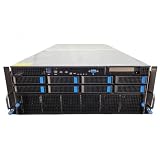
- No Processor Installed; Supports 2x AMD EPYC 9004 Series Processors
- No Memory Installed; Supports 24x DDR5 4400/4800 Regsitered Memory Modules
- 8x 3.5" Trays; (Bring Your Own SATA/NVMe Drives)
- 2x H200 NVL Tensor Core 141GB HBM3e PCI Express 5.0 x16 GPU Accelerator Card
- In Original Packaging; Includes Rails and ASUS GPU Cables
5. Evaluate interconnect, topology, and networking at system scale
Large models often spend substantial time exchanging activations, gradients, parameters, or expert tokens. Inspect the complete topology: GPU-to-GPU links inside the node, CPU attachment, PCIe or equivalent host paths, network adapters, switch layout, and the number of links between nodes.
What to verify
- Whether every GPU has the expected peer-to-peer path or whether traffic crosses a CPU or switch bottleneck.
- Collective-communication performance for all-reduce, all-gather, reduce-scatter, and all-to-all patterns used by your parallelism strategy.
- Network bandwidth, latency, congestion control, and adapter count for multi-node training or inference.
- Placement rules in the scheduler so a job receives a topology-compatible set of GPUs.
- Failure behavior when one GPU, link, switch, or node is unavailable.
Benchmark communication separately from model execution. A GPU with excellent local memory bandwidth can underperform if inter-GPU or inter-node traffic is poorly placed.
6. Check power, cooling, and physical integration
Accelerator board power becomes a data-center design constraint when multiplied across a node and rack. MI300X is listed at 750 W peak typical board power. H200 is listed with maximum configurable TDP up to 700 W for SXM and 600 W for NVL. These numbers affect power supplies, voltage regulators, airflow, heat rejection, and rack density.
Deployment checklist
- Confirm the server’s supported accelerator form factor, auxiliary power connectors, and board limits.
- Verify cold-plate, air, or other cooling capacity at the data center’s inlet temperature and altitude.
- Calculate steady-state and transient power for the full node, not just one accelerator.
- Check rack circuits, breaker coordination, redundancy mode, and power-capping policy.
- Allow service clearance and a plan for replacing a module without unacceptable downtime.
- Measure acoustic, airflow, and thermal limits if the system will be installed near staff or in a constrained room.
A passive OAM design depends on the host platform for cooling and mechanical support. Buying modules without confirming the qualified chassis and fabric is a common integration failure.
7. Confirm framework, driver, and kernel support
Hardware support is not the same as a successful production software stack. Verify the exact accelerator, driver, runtime, compiler, framework release, communication library, container base image, and operating-system version you will deploy. The available product material does not provide a complete, versioned compatibility matrix for every application, so obtain current support statements from the relevant software documentation before purchase.
Run a compatibility proof
- Build the intended container or software image with production drivers and runtime libraries.
- Load the actual model and execute representative training or inference, including your quantization and batching settings.
- Exercise distributed execution on the planned GPU count and topology.
- Check unsupported operators, fallback kernels, compilation time, numerical differences, and memory fragmentation.
- Capture logs and pin the tested versions in the procurement and operations documents.
For a heterogeneous fleet, document which models run on which accelerator and how jobs are scheduled. A nominally cheaper GPU can cost more if it requires separate kernels, custom maintenance, or lower utilization.
Rank #4

- Graphics Card Interface: Pci E
8. Benchmark candidates on an apples-to-apples workload
The cited vendor pages do not settle whether H200, MI300X, MI325X, H100, or B200 is faster or cheaper for your job. A useful comparison controls the variables that materially change results.
What’s actually slowing this PC down?
Pick the symptom - the matching free tool is one click away.
Minimum benchmark protocol
- Use the same model revision, dataset sample, tokenizer, checkpoint, and accuracy target.
- Keep precision, quantization, sequence length, image size, batch size, and concurrency identical.
- Test the same number of GPUs and, for distributed jobs, the same node count and network class.
- Use production-like software versions and warm up compilation and caches before timing.
- Report median and tail latency, throughput, time to solution, scaling efficiency, GPU utilization, memory high-water mark, and node power.
- Repeat enough runs to identify variance and record failures such as out-of-memory errors, hangs, or kernel fallbacks.
For inference, publish separate time-to-first-token and decode-token rates, because a system can have good aggregate throughput but unacceptable interactive latency. For training, include checkpoint time and recovery behavior; a fast step rate does not help if checkpoints become the bottleneck.
9. Procure the complete system, not an isolated accelerator
Enterprise accelerators are normally purchased as qualified servers or platforms. NVIDIA’s HGX reference guidance says: “For exact BOM and part numbers, please work with your OEM/ODM partners and our NVIDIA support team depending on your specific rack and data center conditions.” Use that process to validate the node, fabric, networking, power, cooling, firmware, and support contract.
Ask for a configuration-level quote
- Exact GPU module, quantity, memory configuration, and firmware.
- CPU, system memory, local storage, network adapters, switches, and topology diagram.
- Power supplies, rack units, cooling method, inlet-temperature rating, and power cap.
- Driver, runtime, management software, and update policy.
- Warranty response time, advance replacement, on-site service, and spare strategy.
- Delivery date, regional availability, acceptance test, and return terms.
Current prices and availability are not established by the specifications discussed here. Compare quotes only when the hardware, software support, warranty, and acceptance criteria are equivalent.
Independent reader supportYour contribution helps us test, update, and keep practical guides available for everyone.10. Choose by workload profile
When memory capacity is the limiting factor
Consider the options with more HBM per device, such as MI300X at 192 GB or MI325X at 256 GB, when a model or KV cache cannot fit comfortably on a 141 GB H200. Confirm that your kernels and framework use the available memory efficiently and that the platform’s power and cooling are acceptable.
The Tool Desk
Outbyte PC Repair FREEClear out junk files and repair common Windows errorsFree Scan →Outbyte Driver Updater FREEFix the driver behind crashes, sound loss and screen glitchesFind Drivers →When a mature, qualified scale-out platform matters
A complete HGX or DGX-class configuration can simplify node-level integration, but the exact OEM system, network, and software image still require validation. H200, H100, and B200 reference figures show how capacity and bandwidth differ across generations; they do not predict your application’s scaling efficiency.
Best Value

- 3rd generation Tensor core and 2nd generation RT core provide 1.5 times more graphic CAD performance and 3 times more rendering and generating AI performance than previous model T1000
- It delivers up to twice the real-time lay-tracing performance of previous generations, allowing you to perform complex 3D model processing and more realistic image processing in half the time
- Up to 3.6 times higher generation AI performance than previous generations, creating high-quality images/videos, and generating 3D assets quickly
- Equipped with 4 Mini DisplayPort connectors for increased productivity for multi-application workflow. 8K output can also output 2 screens simultaneously
When interactive latency is the priority
Favor the configuration that meets tail-latency targets at expected concurrency with enough memory headroom. Measure prompt-processing and token-generation phases separately, and test realistic request mixes rather than a single fixed batch.
When training time and utilization dominate
Compare time to a fixed accuracy target, not only examples per second. Include collective communication, checkpointing, data loading, and the cost of keeping the cluster occupied. A lower utilization caused by software or topology can outweigh a favorable specification.
11. Common selection mistakes and recovery actions
Buying on peak FLOPS alone
Symptom: The installed GPU delivers disappointing throughput. Fix: Re-run a controlled benchmark at the production precision, model, batch, sequence length, and system scale; inspect kernel and communication utilization.
Do these 3 things before closing this tab:
1Scan for outdated or missing drivers - takes under a minute2Repair Windows errors before they cause bigger problems3Fix the driver behind crashes, sound loss and screen glitchesTreating aggregate HBM as one pool
Symptom: A model fits on paper across eight GPUs but fails or spends excessive time communicating. Fix: Select an explicit sharding strategy, verify placement, and measure communication. Leave per-device headroom.
Ignoring the exact configuration
Symptom: A module cannot be installed or runs below its advertised limit. Fix: Match the purchase order to the qualified chassis, power limit, cooling design, firmware, and interconnect topology.
Skipping software validation
Symptom: Operators encounter unsupported kernels, numerical changes, or unstable distributed jobs. Fix: Freeze a tested image and run the full model and failure-recovery test before committing to volume.
Comparing unlike commercial offers
Symptom: The lower quote has weaker warranty, delayed delivery, or missing networking. Fix: Normalize the bill of materials, support term, acceptance test, and delivery commitment before calculating cost per workload unit.
Recommended Free Tools
12. A concise decision checklist
- Workload, model, precision, batch, sequence length, concurrency, and service-level targets are documented.
- Per-device memory and runtime headroom are sufficient for weights, activations, KV cache, optimizer states, and buffers.
- Candidate results use identical software, model, precision, and system scale.
- Interconnect and network topology match the chosen parallelism strategy.
- Power, cooling, rack, serviceability, and redundancy are approved by facilities and operations.
- The exact server bill of materials, firmware, drivers, and support terms are in the quote.
- A representative pilot records latency, throughput, utilization, memory, power, failures, and recovery time.
Final decision
Choose the smallest complete, supportable system that meets the measured workload target with memory and operational headroom. H200 offers 141 GB of HBM3e at a listed 4.8 TB/s, MI300X offers 192 GB of HBM3 at a listed 5.3 TB/s peak theoretical bandwidth, and MI325X is listed with 256 GB of HBM3E and 6 TB/s; those specifications help narrow the shortlist but cannot select a winner by themselves. The decisive evidence is a controlled benchmark on the exact model, software stack, topology, and server configuration you will operate.
Quick Recap
Product prices and availability are accurate as of the date/time indicated and are subject to change. Any price and availability information displayed on Amazon at the time of purchase will apply.

