
iTechGuides is reader-supported. When you buy through links on our site, we may earn an affiliate commission. As an Amazon Associate I earn from qualifying purchases. Learn more
Choose the case around what you actually carry. A console-only case is the practical choice for handheld travel with the Switch 2, Joy-Con 2 controllers and a few games. If you regularly take the system to a television, choose Nintendo’s larger all-in-one case because it is designed for the console, dock, Joy-Con 2 controllers, cables and up to six game cards. After deciding the format, verify that the current listing explicitly names Nintendo Switch 2, then compare the interior fit, padding or lining, card capacity, accessory storage and included screen protection.
Start with the case size: handheld travel or the complete TV setup?
The most important decision is not the brand or color; it is the equipment that must fit without forcing the case closed. Nintendo lists both a standard Nintendo Switch 2 carrying case and a larger all-in-one model. They serve different trips.
Choose a console-only case for everyday handheld travel
A standard carrying case is suited to carrying the console and handheld essentials. This format is smaller and easier to place in a backpack, work bag or personal item. It is the sensible option when your destination already has a television setup, or when you normally play in handheld or tabletop mode and do not need the dock.
Do not assume that a slim exterior means inadequate protection, or that a larger shell automatically protects better. The listings supplied for these products describe construction and storage features, but they do not provide shared laboratory drop-test results. Compare the actual interior molding, lining and padding instead of treating size or a product name as a durability rating.
#1 Best Overall

- Travel case
- Protection Library holds 12 game cards and offers full screen and analog stick protection
- microSD Card Case 2pcs, each holds 2 microSD Cards
- Comfortable carrying handle and soft cleaning cloth
Choose the all-in-one case when the dock must travel
Nintendo’s Nintendo Switch 2 All-In-One Carrying Case is designed to store and carry the system, dock, Joy-Con 2 controllers, cables and up to six game cards. Select this format if you move between homes, take the console on extended trips, or need to connect it to a television at your destination.
The trade-off is bulk. A case large enough for the dock and cables will occupy more space than a handheld case, so it is wasteful for short trips where you carry only the console. Before buying, lay out the dock, both controllers and every cable you expect to pack. If the complete set is part of the trip, the all-in-one format avoids trying to squeeze TV-mode gear into a case intended for handheld use.
Compare the Nintendo-listed cases and their stated features
The following options appear in Nintendo’s official store or accessories listings. Capacities and features are specifications from those listings, not independent protection tests.
| Case | Stated construction or protection feature | Stated storage | Included extras | Best fit for |
|---|---|---|---|---|
| Nintendo Switch 2 Carrying Case & Screen Protector | Carrying case; the listing bundles a screen protector | Exact card and accessory capacity is not stated on the supplied product information | Screen protector and cleaning cloth | Owners who want a standard case with screen protection supplied in the bundle |
| Nintendo Switch 2 All-In-One Carrying Case | Large format intended for the complete system setup | Console, dock, Joy-Con 2 controllers, cables and up to six game cards | All-in-one storage layout | Travel that includes TV-mode equipment |
| PowerA Protection Case for Nintendo Switch 2 – Black | Molded, soft-lined interior and a padded screen protector | Up to nine game cards and two microSD Express cards; mesh accessory pocket | Dedicated small-item storage | Handheld travelers carrying several games, memory cards and small accessories |
| Turtle Beach PlayTrek Slim Case for Nintendo Switch 2 – Charcoal Black | Slim licensed case with molded EVA shell and padded interior flap | Card storage is listed, but the supplied information does not state a number | Low-profile design | Travelers prioritizing a slim case and basic game storage |
| PowerA Slim Case for Nintendo Switch 2 – Dark Heather Grey | Molded lined interior; integrated play stand also serves as padded screen protection | Up to ten game cards | Integrated play stand | Handheld users who want maximum stated card capacity in a slim-style case and occasional tabletop play |
These descriptions tell you what each listing claims to hold and how the interior is built. They do not establish that one model survives a drop better than another. No independent market, durability or drop-test statistic is provided for these cases, so a purchase decision should stay within the stated features.
Use this buying process before you order
- Inventory the trip. Write down whether you need only the console, the Joy-Con 2 controllers, a charger, headphones, game cards, microSD Express cards, the dock, HDMI or other cables. The dock is the dividing line between a handheld case and a true all-in-one case.
- Separate essential items from nice-to-have items. A case with a mesh pocket or card slots can keep small accessories together, but a pocket is not evidence that every charger or cable will fit. Identify the largest item that must go inside and check the product listing for a compartment intended for it.
- Confirm the platform name. The listing should explicitly say Nintendo Switch 2. Do not rely on a photograph, an older Switch case description or a similar-looking shell. Nintendo Switch 2 has different hardware dimensions and accessories, so an apparently compatible case can still be undersized.
- Check the stated capacity against your inventory. The official figures differ: Nintendo’s all-in-one case lists up to six game cards, the PowerA Protection Case lists up to nine game cards plus two microSD Express cards, and the PowerA Slim Case lists up to ten game cards. Treat “up to” as a maximum for the listed layout, not a guarantee that your bulky accessories will fit beside it.
- Inspect the interior description. Look for terms such as molded, lined, soft-lined, padded or molded EVA shell. These describe the contact surfaces and structure shown in the listing. They are useful for comparing designs, but they are not equivalent impact ratings.
- Decide whether screen protection is part of the purchase. The Nintendo carrying-case bundle includes a screen protector and cleaning cloth. The PowerA Protection Case lists a padded screen protector, while the PowerA Slim Case says its integrated play stand doubles as padded screen protection. Verify exactly what is included on the current listing rather than assuming every case includes a protector.
- Check the return and fit conditions shown by the seller. Before checkout, confirm the model name, included accessories and any regional or edition wording on the live product page. If a listing does not state a dimension, capacity or included item, treat it as not stated rather than guessing.
- Plan the packing order. The console should sit in its molded or lined compartment, cards should go in their designated slots, and cables should not press directly against the screen. Close the case without resistance; a zipper or clasp that must be forced is a sign that the load is too large.
How to judge protection without an invented durability score
Interior molding and lining
A molded interior helps define where the console sits, while a soft or lined surface limits direct contact between the hardware and the case. The PowerA Protection Case is specifically listed with a molded soft-lined interior. The PowerA Slim Case is listed with a molded lined interior. The Turtle Beach PlayTrek Slim Case is listed with a molded EVA shell and padded interior flap.
Rank #2

- NINTENDO CASE - SWITCH 2 COMPATIBLE: Our premium Nintendo Switch case is custom fit for your Switch 2, shielding your console with anti scratch velvet lining and shock absorbing materials—perfect for daily storage, commutes, or long travel days
- TRAVEL READY DESIGN: This compact portable Nintendo Switch 2 carrying case fits easily in a backpack or carry-on or can simply be carried by itself with a wristlet handle for secure handling without risk of drops—great for on-the-go everyday players
- CONVENIENT GAME & AIRTAG STORAGE: Whether at school, traveling or on the go, you can organize up to 12 game cards in a dedicated slot system and track your Case for Nintendo Switch 2 accessories using a hidden AirTag compartment, so it's never lost
- DURABLE & STYLISH: Crafted with an abrasion- and water-resistant polyester exterior and brushed velvet interior lining, plus hidden, no-snag zippers, this Nintendo Switch 2 travel case protector resists wear and tear for lasting device protection
- SUSTAINABLY MADE + 2-YEAR COVERAGE: This durable Belkin Switch 2 Case comes in 100% plastic-free packaging. Plus, you can purchase the Nintendo Switch carrying case with peace of mind knowing that it comes with 2-year coverage
Use those descriptions to match the case to your handling conditions. A structured, padded interior is useful when the case will be placed in a crowded bag, but the supplied listings do not say how much force any model withstands. Do not convert “molded,” “EVA,” “soft-lined” or “padded” into a drop-height claim.
Screen coverage
Screen contact is a separate concern from the outer shell. The Nintendo bundle supplies a screen protector and cleaning cloth. Nintendo says the protector is intended to help protect against scratches and debris, but its safety information limits that promise. Nintendo’s health and safety sheet states: “These products cannot completely prevent scratches or other damage that may occur to the touch screen.” Read that warning literally: a protector reduces some everyday risks; it cannot make the screen damage-proof.
Do these 3 things before closing this tab:
1Fix the driver behind crashes, sound loss and screen glitches2Clear out junk files and repair common Windows errors3Scan for outdated or missing drivers - takes under a minuteThe PowerA Protection Case listing includes a padded screen protector, and the PowerA Slim Case listing describes an integrated play stand that doubles as padded screen protection. Confirm whether the protector is a removable flap, a fitted film, or another component in the current package description. The supplied information does not establish that these designs perform identically.
Outer shell and compression
A slim case can save bag space, while a larger case can reserve room for the dock and cables. Neither shape is a published impact test. Look for a case that closes around the console without compressing sticks, buttons or the screen. Avoid packing hard objects loose in a pocket that can swing against the console. If the listing does not explain how an accessory is separated from the system, use a separate soft pouch rather than forcing it into the console compartment.
Plan game-card and small-item storage accurately
Capacity is one of the easiest specifications to compare because the official listings provide numbers for several models. It is also easy to misread: a card-slot maximum does not describe the space available for chargers, cases or cables.
Rank #3

- Hard shell case protects & is compatible with Nintendo Switch 2, Nintendo Switch OLED, Nintendo Switch system
- Protection Library holds 12 game cards and offers full screen and analog stick protection
- MicroSD Card Case 2pcs, each holds 2 microSD Cards
- Comfortable carrying handle
| Option | Game-card capacity stated in the listing | Other stated storage | Planning implication |
|---|---|---|---|
| Nintendo Switch 2 All-In-One Carrying Case | Up to six game cards | Space for the console, dock, Joy-Con 2 controllers and cables | Prioritizes the complete TV setup over the highest card count |
| PowerA Protection Case | Up to nine game cards | Two microSD Express cards and a mesh accessory pocket | Useful when memory cards and small accessories travel with the console |
| PowerA Slim Case | Up to ten game cards | No additional capacity is stated in the supplied listing summary | Highest stated game-card count among the listed handheld-style options |
| Turtle Beach PlayTrek Slim Case | Card storage is stated, but no number is supplied here | No additional capacity is stated in the supplied listing summary | Verify the current product page if a specific card count matters |
| Nintendo Switch 2 Carrying Case & Screen Protector | Not stated in the supplied product information | Screen protector and cleaning cloth | Choose it for the bundle, not an assumed card capacity |
Keep microSD Express cards in their dedicated slot or a secure holder. A loose memory card can disappear in a large accessory pocket, while placing it under the console can create pressure. If you need more cards than the case lists, carry a separate card wallet instead of overfilling the built-in slots.
Quick wins for a faster PC:
Repair Windows errors before they cause bigger problemsFix Now →Fix the driver behind crashes, sound loss and screen glitchesFind Drivers →Choose the right format for common travel situations
Daily commute or school bag
Choose a console-only case. Prioritize a precise molded or lined interior, a padded screen barrier and enough room for the number of cards you actually carry. A slim option such as the Turtle Beach PlayTrek Slim Case is designed around a molded EVA shell and padded flap. The PowerA Slim Case adds an integrated play stand and lists capacity for up to ten game cards. Select between them based on the play-stand feature, the stated card capacity and the current listing’s fit details.
Weekend visit where a television is available
If you will play only in handheld mode, a standard case avoids carrying unused bulk. If you might connect to a television, determine whether the dock and cables are genuinely coming with you. Once they are, move to an all-in-one case rather than relying on a slim case’s accessory pocket. Nintendo’s all-in-one listing specifically covers the dock, controllers and cables.
Long trip with games and memory cards
Start with the card count. The PowerA Protection Case lists nine game cards, two microSD Express cards and a mesh pocket, making its published layout the most explicit for mixed small-item storage. The PowerA Slim Case lists up to ten game cards, but the supplied information does not state comparable microSD or pocket capacity. Pick the model whose stated storage matches your inventory, then verify that chargers and headphones have somewhere safe to go.
Tabletop play during travel
The PowerA Slim Case listing identifies an integrated play stand that also serves as padded screen protection. That feature may matter more than an extra card slot if you often set the console on a table. A case with a stand is not automatically better protected; it is simply a better match for that use case when the stand is included and positioned as described by the listing.
Free tools Windows power users keep installed
One-click scans. No signup required.
Rank #4

- Hard and High Quality: Designed to make your new Switch 2 Console even more portable & travel friendly. High quality hard shell case protects Switch from drops and scratches. Not for the switch 1st 2017 and switch oled model.
- Perfect carry case for keeping your Switch 2 securely stored when travelling or when not in use.
- Hard EVA shell keeps your device protected while the soft inner material keeps your device free from scratches.
- Large Storage: A mesh pocket provides secure storage room for some small accessories like charging cable, ear buds, and 2 extra JoyCons.
- Compatibe with Nintendo Switch 2 console with both its Joy-Con controllers attached to it, and the upper section features a separate inner pocket which can fit extra JoyCons, Cables, Games, and other smaller but essential accessories. (Please note this cannot accommodate larger items like the dock or pro-controllers)
Screen-protector safety and installation considerations
The Nintendo carrying-case bundle is released as a case-and-protector package; Nintendo’s product page gives June 5, 2025 as its release date. The bundle also includes a cleaning cloth. Use the cloth to remove dust before applying a protector, and follow the instructions supplied with the protector rather than improvising with household cleaners.
Nintendo’s safety information makes the limitation clear: “These products cannot completely prevent scratches or other damage that may occur to the touch screen.” Keep the console away from keys, coins and other hard objects even after installing a protector. A protector is one layer of defense, not permission to carry unprotected objects against the display.
Pack and store the Switch 2 safely
- Turn the console off before closing the case. Nintendo’s storage guidance says not to leave the console switched on inside the case. Use the system’s power controls and wait for it to shut down before packing.
- Attach the Joy-Con 2 controllers when storing the system. Nintendo’s manual guidance says to attach the Joy-Con 2 controllers when storing the system in the case. This keeps the console in its intended stored configuration instead of leaving controllers loose where they can press against the screen or disappear in a pocket.
- Remove loose debris. Check the case and the console screen for grit before closing. The supplied safety information explains that the protector cannot completely prevent screen damage, so preventing debris from being trapped is still important.
- Place cards and accessories in their assigned areas. Use card slots for game cards and microSD Express slots where provided. Put cables in a separate pocket or the all-in-one cable area so their plugs do not rest on the display.
- Close gently and inspect the fit. If the closure catches, the case bows, or an accessory presses into the console, remove the excess item. A case is not a compression bag; forcing it closed defeats the purpose of the structured interior.
- Store the packed case in a stable position. Keep it away from liquids, extreme heat and heavy objects that could crush the case. The product listings do not provide a crush rating, so avoid treating any carrying case as hard luggage.
Common buying mistakes and how to correct them
Buying an older or ambiguous “Switch” case
Symptom: The product title mentions Nintendo Switch but not Nintendo Switch 2, or the seller relies on a generic compatibility photo.
Correction: Choose a listing that explicitly names Nintendo Switch 2 and check the model description immediately before ordering.
Choosing a slim case for dock travel
Symptom: The dock or cables are left outside the case, or the console compartment must share space with bulky power equipment.
Correction: Use Nintendo’s all-in-one format when the dock, Joy-Con 2 controllers and cables are part of the trip.
Assuming every case includes a screen protector
Symptom: The listing describes a protective interior but does not list a protector as an included item.
Correction: Treat the Nintendo case bundle, the PowerA Protection Case’s padded screen protector and the PowerA Slim Case’s padded stand-protector as separate stated features. Do not infer inclusion for another model.
Best Value
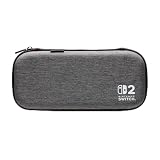
- Structured Protection: Molded interior with soft fabric lining
- Game Storage: Securely holds up to 10 game cards*
- Integrated Play Stand: unfold the convenient play stand and enjoy tabletop mode with ease
- Padded Screen Protector: The play stand doubles as a padded screen protector when the system is inside the case
- Compatibility: Compatible with Nintendo Switch 2
Overfilling card slots or pockets
Symptom: The case bulges, the zipper is difficult to close or cards press against the console.
Correction: Stay within the published maximum, move surplus cards to a separate wallet and keep hard accessories out of the console compartment.
Treating construction words as test results
Symptom: A listing’s “EVA,” “molded” or “padded” wording is read as proof that the case survives a particular drop.
Correction: Use those words to compare the described design only. No shared impact-test results are supplied for these options, so a superior drop-protection ranking cannot be established.
A quick decision framework
- Need the dock and TV cables? Choose Nintendo’s All-In-One Carrying Case and accept the larger format.
- Need a standard handheld case plus a bundled protector? Consider Nintendo Switch 2 Carrying Case & Screen Protector, which includes a screen protector and cleaning cloth.
- Need nine game cards, two microSD Express cards and a pocket? The PowerA Protection Case lists all three storage features.
- Need up to ten game cards in a slim-style case? The PowerA Slim Case lists that capacity and an integrated play stand that doubles as padded screen protection.
- Want a slim licensed case with a molded shell and padded flap? The Turtle Beach PlayTrek Slim Case lists those features; verify its exact card capacity on the current product page because no number is stated in the supplied information.
- Need a capacity or dimension that a listing does not state? Do not guess. Contact the seller or choose a model whose official page gives the specification you need.
What to verify on the live product page
Product pages can change packaging, colors and included accessories. Before paying, recheck the exact model name, platform compatibility, case capacity, screen-protector inclusion and whether the listing is for a console-only or all-in-one format. For Nintendo’s products, begin with the Nintendo Switch 2 Accessories page, then open the specific product page. The official pages for the named cases are Nintendo Switch 2 Carrying Case & Screen Protector, PowerA Protection Case, PowerA Slim Case and Turtle Beach PlayTrek Slim Case. Read the Nintendo health and safety information before installing or using the bundled screen protector.
The Tool Desk
Outbyte Driver Updater FREEFix the driver behind crashes, sound loss and screen glitchesFind Drivers →Outbyte PC Repair FREERepair Windows errors before they cause bigger problemsFix Now →The Bottom Line
Pick a console-only case for handheld essentials and Nintendo’s all-in-one case when the dock, Joy-Con 2 controllers and cables must travel. Then match the stated card capacity, pocket layout, lining and screen-protection features to your inventory. Treat construction descriptions as design information—not drop-test proof—and follow Nintendo’s storage guidance: attach the Joy-Con 2 controllers and switch the console off before closing the case.
Quick Recap
Product prices and availability are accurate as of the date/time indicated and are subject to change. Any price and availability information displayed on Amazon at the time of purchase will apply.

