
Recommended Free Tools
iTechGuides is reader-supported. When you buy through links on our site, we may earn an affiliate commission. As an Amazon Associate I earn from qualifying purchases. Learn more
A 6-watt USB-C host port is a constraint, not a promise that a hub can deliver 6 watts—or more—to every connected device. Choose a hub by its documented power architecture, downstream per-port limits, aggregate budget, host data/video support, and adapter requirements.
First confirm what “6 watts” means in your computer’s documentation: a total source budget, a particular USB-C power profile, or a measured operating limit. Then select a self-powered hub or a USB-C PD-input hub whose manufacturer states exactly what works with external power connected and what remains available when it is not.
What a 6-watt USB-C port actually tells you
The number alone is incomplete. Six watts equals 5 volts at 1.2 amps, but a USB-C port can negotiate different voltage, current, data, charging, and alternate-mode combinations. The host may also reserve part of its source budget for the computer’s own functions. USB-IF explains that USB-C and Power Delivery behavior can vary across available power profiles, so the host computer’s manual is the authority for your particular port.
What’s actually slowing this PC down?
Pick the symptom - the matching free tool is one click away.
Determine these details before buying:
- Whether the port is a downstream port that supplies power, an upstream port intended to connect peripherals, or a dual-role port.
- Whether the 6-watt figure is a maximum source budget, a continuously available budget, or a value measured only in one negotiated mode.
- Whether the port supports USB data, DisplayPort Alternate Mode (DP Alt Mode), USB Power Delivery, or only some of those functions.
- Whether the computer limits power further when running on battery, sleeping, or using a particular cable.
A hub cannot create host capabilities that are absent. External power can improve the hub’s peripheral-power budget, but it cannot add DP Alt Mode, a faster USB data mode, or a missing USB-C role to the computer.
#1 Best Overall

- Hybrid USB Port Expander: Rosonway 7 Ports Powered USB hub with 4 USB-C 3.2 ports and 3 USB-A 3.2 ports, allowing you to easily connect to your laptop, desktop, gaming console, and more—transforming a single port into a complete workstation. Plug-and-play, no drivers required. Simplify your setup and boost productivity
- Fully Upgraded to 10Gbps: Experience blazing speeds up to 10Gbps on every port of this USB 3.2 hub for fast file transfers and seamless connectivity, saving you valuable time during critical projects. The upgraded USB-C ports are compatible with 99% of standard-sized USB-C devices. Note: USB-C ports only support data transfer and standard 1.5A charging. PD charging and video output (DisplayPort Alt Mode) are not supported
- Powerful and Safe: Powered USB C hub equipped with a 36W(12V/3A) DC power adapter to deliver stable, safe power to multiple connected devices while maintaining uninterrupted high-speed data transfer. The Type-C hub has a built-in surge protector with over-voltage and over-current protection for secure, efficient operation
- Detachable Cable & Portable Design: USB-C extender hub with detachable 3.3ft USB-C host cable for easy storage and portability. Perfect for home, office, or compact travel setups. Broadly compatible with most USB-C laptops, PCs, and various host devices
- Individual Switches: The USB splitter is crafted from durable aluminum for excellent heat dissipation. Each port features an independent electronic switch with a blue LED indicator, clearly displaying power status—tap to turn on, hold for 2 seconds to turn off. This enables efficient power management and precise control over all connected devices
Choose the hub’s power architecture first
Bus-powered hub
A bus-powered hub takes its operating power from the computer’s USB-C port. It is simple and portable, but the hub electronics and all downstream devices share the host’s available budget. With a 6-watt source, there may be little left for a hard drive, phone, or other high-draw device after the hub itself is operating.
Use this design only when the connected devices are low-power and the manufacturer specifies realistic bus-powered limits. A large port count does not increase available power; it only provides more connectors competing for the same source.
Hub with an external DC supply
An externally powered hub runs its electronics and downstream ports from a separate DC adapter. This can remove most of the load from the host port, but you still need to check the adapter’s voltage, current, connector, polarity, and the hub’s stated per-port and total output. External power does not automatically mean that every port can deliver the adapter’s full rating.
Check the upstream connector as carefully as the power specification. For example, the Coolgear CG-6PU3DH-C is an externally powered six-port USB 3.2 Gen 1 hub with a 9–30V DC input, a 20W maximum draw, and a 900mA maximum per port, but its upstream connection is Type-B rather than USB-C. It illustrates the architecture, not a direct USB-C-host recommendation.
USB-C PD-input hub with pass-through
A PD-input hub has a USB-C port for an external USB-C Power Delivery adapter. Depending on the model, that power can run the hub, feed downstream accessories, and pass some power onward to the laptop. The word “PD” is not sufficient: identify which port is the power input, which ports are outputs, and whether laptop charging is supported.
Pass-through always involves allocation. The hub may reserve power for its own operation and deduct that amount before the laptop receives anything. Belkin states this explicitly for the AVC021: its PD port accepts up to 100W of USB-C PD input, the company recommends a 60W-or-higher adapter, and the laptop may receive slightly less than the adapter’s maximum because the hub reserves operating power. Those figures apply to that model and should not be generalized.
Rank #2

- Hybrid USB C Hub: This usb hub features 1*USB-C 3.2 10Gbps + 2 USB A 3.2 10Gbps, 4 USB-A 3.0 5Gbps and 2 USB-C PD 45W Fast Charging Ports(Not support data transmission) , use the usb hub for pc to extend your laptop, desktop, gaming host and more. Note: Powered usb hub do not support video output function.⚠️Note: The usb hub powered is not recommended for charging computers or other high-power devices.
- 10Gbps Fast Data Transfer: The USB 3.2 hub provides lightning fast data transfer via USB 3.2 port (10Gbps) or USB 3.0 port (5Gbps), allowing you to easily transfer HD photos, videos, and any files in seconds.Suitable for video editing, social media video editing, photography enthusiasts, educators, researchers, and office workers Note: Do not use multiple SSD drives simultaneously
- PD 45W Fast Charging: This usb hub for laptop provides dedicated 2 PD 45W charging ports, can quickly charge your iPhone17/ 16/15 series, iPad, mobile phones and other type-c devices. Note: when you use the powered usb hub, please insert the provided power adapter to charge your device via hub. ⚠️Note: The PD 45W Charging Ports does not support data transfer .
- Ergonomic Design: The aluminium one-piece USB port hub has a unique ergonomic 28-degree made with 50%+ recycled materials angled triangular shape and feet on the bottom to make plugging and unplugging USB devices easier and more stable on the desktop.Note:It is recommended that you avoid using multiple removable drives simultaneously.
- Universal Compatibility: Intpw powered usb c hub includes a USB C to C cable in the package, compatible with most USB-C laptops and PC, such as M1/M2/M3/M4/M5 MacBook Air/Pro, iMac, XPS, Surface Pro.Friendly Note: This design perfectly fits 99% of standard-sized USB-C devices (including regular-thickness USB-C flash drives, phone/tablet cables, etc.). If you're using a custom USB-C device with a thicker port housing, please contact us for compatibility advice.
Read downstream power, not just the adapter label
Compare two separate numbers for every candidate: the maximum output of each port and the hub’s total downstream budget. A 100W adapter rating describes what can enter the hub under the applicable PD negotiation; it does not mean 100W is available to accessories. Hub electronics, laptop pass-through, thermal limits, and port-sharing rules consume or reserve part of that input.
| Specification to find | Why it matters | What to record |
|---|---|---|
| Per-port output | Determines whether one device can start, charge, or remain stable. | Voltage, current, and wattage for each USB-C and USB-A port. |
| Aggregate output | Several ports may share a smaller pool than their individual labels suggest. | Total accessory-power limit and the conditions under which it applies. |
| Adapter condition | Some high-output ratings exist only when an external adapter is connected. | Output with the adapter attached and bus-only output without it. |
| Reserved power | The hub may keep power for its electronics before allocating the rest. | Any stated reservation or laptop pass-through deduction. |
| Port behavior | USB-C data, charging, and video ports may have different limits. | Function and power rating for every physical port. |
For context, USB-IF compliance guidance lists standard downstream limits of up to 500mA for applicable USB 2.0 ports and up to 900mA for applicable USB 3.0 ports. At 5V, those correspond to 2.5W and 4.5W. These are standard-port contexts, not a universal promise for every USB-C charging mode. A device that requires more than its applicable USB specification permits must be self-powered or connected to a port and power system explicitly designed for its demand.
Use a repeatable buying procedure
- Write down the host requirements. Record the computer model, the exact USB-C port, the documented power profile or 6W limit, and whether the port supports data and DP Alt Mode. Do not rely on the shape of the connector.
- List the devices and their worst-case needs. Include bus-powered SSDs, hard drives during spin-up, phones at their fastest charging mode, webcams, audio interfaces, and any device that has a separate power input. Note which must operate simultaneously.
- Choose a power architecture. Select bus power only for a low-demand set of devices. Prefer an external DC supply when you need a fixed, independent accessory budget. Choose USB-C PD input when you also want controlled laptop charging and the hub documents pass-through behavior.
- Verify the upstream connection. Confirm that the hub’s host connector is USB-C and that its data rate matches the computer. A hub designed for a Type-B upstream connection, such as the Coolgear example, is not a drop-in USB-C-host solution.
- Read the model-specific power table. Capture maximum per-port output, aggregate output, adapter-required conditions, and any shared-port groups. If a specification gives only adapter wattage or port count, treat the power evidence as incomplete.
- Check the adapter requirement. Confirm voltage, current, wattage, connector, polarity for DC models, and whether the adapter is included. A guide may list an adapter as optional and sold separately, so verify the current package for the exact model.
- Check laptop pass-through. For a PD-input hub, identify the maximum input, the recommended adapter size, the amount reserved by the hub, and the maximum power that can reach the computer. Make sure the computer accepts charging through that port.
- Validate data and video separately. Confirm USB generation, supported resolutions, refresh-rate conditions, and DP Alt Mode requirements. External power does not compensate for a host port that lacks video output.
- Plan for simultaneous use. Compare the combined worst-case load with the stated aggregate budget, leaving margin for startup surges and negotiation changes. If the manufacturer does not state the aggregate limit, choose a model with clearer documentation rather than assuming the individual ratings add together.
- Confirm the exact model before purchase. Product families often contain visually similar revisions. Match the model number, guide, adapter specification, and included accessories; do not substitute a marketplace listing’s generic description.
Documented examples and what they demonstrate
The following specifications come from manufacturer documentation. They are not independent measurements or comparative test results.
| Model | Power architecture and host | Documented downstream behavior | Selection lesson |
|---|---|---|---|
| StarTech HB31C3A1CDPPD3 | Four-port USB-C hub; USB-C PD input rated up to 100W. USB-C upstream connection with data, charging, and DP Alt Mode functions. | USB-C data/charge/DP Alt Mode port: 5V/2.4A (12W) when a USB-C power adapter is connected. Without the adapter, bus power is up to 5V/0.9A (4.5W). Three USB-A data ports are specified at 5V/0.9A (4.5W). | A high downstream rating can be conditional on external power. The guide lists the adapter as optional and sold separately; verify current packaging. |
| Belkin AVC021 | USB-C PD input accepts up to 100W and can send power toward the laptop while powering the hub. | Belkin recommends a 60W-or-higher adapter, says the hub reserves operating power, and says the laptop may receive slightly less than the adapter’s maximum. Accessory USB-C ports share output; Belkin advises against charging above 7.5W per port. | Input wattage, accessory output, and laptop charging are separate figures. The model’s shared-port guidance is not a universal USB-C rule. |
| Coolgear CG-6PU3DH-C | Externally powered six-port USB 3.2 Gen 1 hub; 9–30V DC input; Type-B upstream connection. | 20W maximum draw and 900mA maximum per port. | External power still requires checking the upstream connector and compatibility. It is an architecture contrast, not a direct USB-C-host alternative. |
Understand PD input, PD output, and laptop charging
USB Power Delivery allows power direction to be negotiated rather than permanently fixed; USB-IF summarizes this as “Power direction is no longer fixed.” In a hub, however, direction is implemented by the product’s ports and firmware. A USB-C receptacle labeled PD may be input-only, output-only, or a bidirectional pass-through port.
PD input
This is where the external USB-C adapter connects. The input rating states the largest negotiated supply the hub accepts under supported profiles. It does not establish the output of downstream ports.
Quick wins for a faster PC:
Scan for outdated or missing drivers - takes under a minuteDriver Scan →Clear out junk files and repair common Windows errorsFree Scan →PD output to the laptop
Pass-through output is the portion remaining after the hub reserves its operating power and allocates accessory power. Some designs provide a maximum laptop charge rate only with a sufficiently capable adapter; others provide no laptop charging at all.
Rank #3
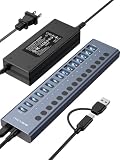
- 【2025 UPGRADED ACASIS Hybrid USB A&C 3.2 Hub】Features 16 ports (8 USB-A 3.2 Ports+8 USB-C 3.2 Ports) with 10Gbps transfer speed, delivering faster connections and less waiting. Handle massive files and multitask with ease, backed by extensive testing in the lab showing speeds of W: 1008.9MB/s, R: 860.7MB/s. Note: Powered usb c hub do not support video output function.
- 【96W Powered USB 3.2 Hub】With a 96W power adapter, the usb hub supports multiple devices at once(up to 5V/1.5A) which is sufficient to charge USB devices. It includes surge protection, hot swapping, and is safe for your Mac, phone, and tablet. Certified with FCC, UL, CE, and UKCA.
- 【Aluminium Alloy Housing】ACASIS usb port hub build with quality aluminium alloy, ensuring quick heat dissipation and durability. It assurances stable connections with multiple devices, preventing overheating and disconnections, and is drop-resistant.
- 【Independent Switch】ACASIS 16-port USB 3.2 hub features independent switches for each 10Gbps port, providing enhanced security and convenience by allowing direct activation without unplugging cables.
- 【Wide Compatibility】The usb hub with power is compatible with most operating systems: Windows XP/Vista/7/8/10/11, MacOS-8/9/X, Linux. It ensures fast PLUG-AND-PLAY installation, allowing you to easily connect and use your devices across different systems.
Charging a downstream device
A downstream USB-C port may support data and limited charging without implementing full USB-C PD. Check whether the specification gives only 5V current or lists negotiated PD profiles. A phone that expects a particular charging protocol may draw less than the port’s theoretical wattage.
Check data and video compatibility independently
Power and signaling are separate decisions. The host must support the USB data mode required by the hub, and the hub must expose the connector type and speed your devices need. If the hub includes HDMI or DisplayPort, the host USB-C port generally must support DP Alt Mode; a powered hub cannot add that alternate mode.
- Confirm the host USB-C port supports DP Alt Mode before buying a video-capable hub.
- Check whether video is available simultaneously with the hub’s fastest data mode; some products share bandwidth.
- Match USB 2.0, USB 3.x, or USB4 requirements to the host and the hub. A faster label on one side does not upgrade a slower side.
- Verify operating-system support for Ethernet, card readers, audio, and other functions if those are important.
Adapter sizing and power budgeting
Choose the adapter from the hub’s documented recommendation, not by multiplying the number of ports. For a PD-input hub, the adapter must cover the laptop’s desired charging rate, the hub’s reserve, and the accessory load. A 60W recommendation means the manufacturer considers that input appropriate for the model’s intended operation; it does not promise 60W to the laptop.
Free tools Windows power users keep installed
One-click scans. No signup required.
For a DC-powered hub, use the exact voltage range and connector specification. Supplying the wrong voltage or polarity can damage the hub. If the manufacturer states a 20W maximum draw, that is the hub’s own maximum input consumption in the cited specification, not automatically a 20W-peripheral allowance.
Common mistakes and fixes
Assuming 6W in means 6W out
Symptom: a drive disconnects or a phone charges slowly when several devices are attached. Fix: use a self-powered or PD-input hub and compare its adapter-connected aggregate output with the devices’ combined demand.
Comparing adapter wattage with port wattage
Symptom: a 100W hub is expected to deliver 100W to accessories. Fix: locate the per-port and total downstream ratings and account for hub reserve and laptop pass-through.
Rank #4

- Upgraded with More USB-C Ports: The RSHTECH Hybrid 10-Port USB Hub with 6 x USB-C ports (2 USB 3.2 + 4 USB 3.0) and 4 USB A ports (1 USB 3.2 + 3 USB 3.0), enabling seamless connectivity for diverse peripherals. Plug-and-play setup requires no drivers
- Ultra-Fast Data Transfer: Powered USB data hub with 3 x USB 3.2 ports (up to 10Gbps) and 7 x USB 3.0 ports (up to 5Gbps), transferring HD photos, videos and any files can be done in seconds. Ideal for multi-device workflows demanding high-speed performance (Note: USB-C port does NOT support video output)
- 2-in-1 USB Cable: The USB port hub comes with a detachable 3.3ft USB-A/USB-C dual connector cable, offering versatile compatibility with desktops, laptops, and other host devices
- Universal 60W Power Supply: The Powered USB C Hub is equipped with a 12V/5A DC power supply, ensures stable power distribution for multiple devices while maintaining secure, uninterrupted data transfers
- Individual Touch Button: The USB C Splitter has individual touch switches, touch to activate, long press for two seconds to deactivate, blue LED light to easily show power status. Each USB port is independently controlled without interfering with each other, making it easy to manage multiple USB devices
Ignoring adapter-required conditions
Symptom: a port advertised at 12W behaves like a 4.5W port. Fix: check whether the higher rating applies only with the external adapter connected, as documented for the StarTech example.
Windows Errors? Fix Them Before They Spread
Repair common Windows errors and clear accumulated junk for a smoother, more stable PC - no reinstall needed.Free scan · no reinstallCrashes, No Sound, or Screen Glitches?
Random freezes, missing sound and display glitches usually trace back to one bad driver. Find and replace yours safely.Free scan · under a minuteTreating “PD” as a complete specification
Symptom: the laptop does not charge through the hub. Fix: identify the PD input, confirm pass-through support, use the recommended adapter, and verify that the host accepts charging on that port.
Expecting video from every USB-C port
Symptom: USB devices work but the monitor remains blank. Fix: confirm DP Alt Mode support on the host and the hub’s video requirements.
Using a generic marketplace specification
Symptom: the delivered hub has different port behavior or accessories. Fix: match the exact model number to the current manufacturer guide and confirm whether the adapter is included.
A practical decision checklist
- Host documentation identifies the port’s role and the meaning of the 6W figure.
- Hub architecture is bus-powered, externally DC-powered, or USB-C PD-input/pass-through, and that choice fits the workload.
- Per-port voltage, current, and wattage are documented.
- Aggregate downstream output and port-sharing rules are documented.
- Adapter voltage, current, wattage, connector, and inclusion status are known.
- Upstream connector and USB data standard match the computer.
- DP Alt Mode and other host requirements are confirmed for video or specialty functions.
- Pass-through charging limits and hub power reservation are understood.
- Combined device demand leaves margin below the stated budget.
- Specifications come from the exact manufacturer model, not a generic listing.
What USB-IF guidance does—and does not—guarantee
USB-IF describes USB Power Delivery 3.1 as capable of systems up to 240W. That is a capability ceiling for the standard, not an assertion that a particular hub, cable, adapter, or 6-watt host port supports 240W. USB-IF also advises testing products across combinations of power profiles to avoid silent failures and user confusion.
Standard USB current figures are useful baselines, but USB-C power negotiation, dedicated charging behavior, and device-specific protocols can produce different results. Treat the exact hub and host documentation as decisive. If a manufacturer does not publish a needed value, mark it as unknown and choose a better-documented model rather than inferring it from the connector, port count, or adapter label.
Quick Recap
Product prices and availability are accurate as of the date/time indicated and are subject to change. Any price and availability information displayed on Amazon at the time of purchase will apply.

