
iTechGuides is reader-supported. When you buy through links on our site, we may earn an affiliate commission. As an Amazon Associate I earn from qualifying purchases. Learn more
Compare your computer with Hood Warfare 2’s current Steam requirements. Check 64-bit Windows, the processor, RAM, graphics card, DirectX 12, free storage, broadband internet and a DirectX-compatible sound card. Matching the minimum specification means your PC meets the publisher’s stated entry threshold; it does not guarantee a particular frame rate, resolution or graphics preset.
The requirements below are from the official Steam listing checked on October 13, 2026. Use the step-by-step checks to identify your hardware, then compare each item with the minimum and recommended columns.
Hood Warfare 2 system requirements at a glance
These are the complete minimum and recommended specifications shown on the official Steam listing when it was checked on October 13, 2026.
PC Slower Than It Used to Be?
A free scan shows the junk files, broken settings and background clutter dragging Windows down - then fixes them in one click.Free scan · Windows 10 & 11Outdated Drivers Are Slowing You Down
One free scan finds every outdated or missing driver and matches the right update for your exact hardware.Free scan · exact hardware match| Component | Minimum | Recommended |
|---|---|---|
| Operating system | Windows 10 64-bit, version 1909 or newer | Windows 11 64-bit |
| Processor | Intel Core i5-9600K or AMD Ryzen 5 3600 (6 cores) | Intel Core i5-12600K or AMD Ryzen 5 7600 |
| Memory | 8 GB RAM | 16 GB RAM |
| Graphics | NVIDIA GeForce GTX 1660 or AMD Radeon RX 5600 XT 6 GB | NVIDIA GeForce RTX 3060 Ti or RTX 4060 8 GB |
| DirectX | Version 12 | Version 12 |
| Network | Broadband internet connection | Broadband internet connection |
| Storage | 25 GB available | 30 GB available |
| Sound | DirectX-compatible sound card | DirectX-compatible sound card |
The table describes listed targets, not a benchmark of every possible combination of parts. The Steam listing does not provide an equivalency chart for graphics cards or processors that are not named.
#1 Best Overall

- High-Quality Graphic Cards for PC Gaming - designed to provide you with an immersive and realistic gaming experience. This powerful graphics card for gaming PC is perfect for gamers who demand the best performance and visual quality.
- NVIDIA Graphics Card with Dual Fan VR Ready OC - Equipped with a 192-bit HDMI/DP 6GB GDRR6 HDCP Support, the MSI GTX 1660 TI Ventus XS 6G OC is a top-of-the-line NVIDIA graphics card that delivers stunning visuals and smooth gameplay for an unforgettable gaming experience.
- Computer Graphics Cards with DirectX 12 Support - compatible with the latest DirectX 12 technology, ensuring that you can enjoy the most advanced and cutting-edge gaming titles without any performance hiccups.
- Video Cards for PC with Advanced Cooling System - This GPU graphics card features a dual fan design that efficiently dissipates heat, keeping your video cards for PC cool and stable even during intense gaming sessions.
- Upgrade Your Gaming Experience with MSI - is a reliable and powerful computer graphics card that will take your gaming experience to new heights. Don't settle for less, upgrade your gaming rig with this high-performance video card today!
How to find your PC’s specifications in Windows
Do these checks on the computer where you plan to install the game. Desktop and laptop model names can be misleading, so record the exact processor and graphics model Windows reports rather than only the computer’s marketing name.
Check the Windows edition, architecture and version
- Open Settings and select System, then About.
- Under Windows specifications, note the edition and version. Under Device specifications, find System type.
- Confirm that the system is 64-bit. The minimum listing is Windows 10 64-bit version 1909 or newer; the recommended operating system is Windows 11 64-bit.
- For a quick version check, press
Windows+R, enterwinver, and pressEnter. Record the version shown in the dialog.
A 32-bit installation does not match the published minimum, even if the computer has a sufficiently powerful processor. If your version is older than Windows 10 version 1909, it also falls below the stated minimum as written.
Identify the processor and installed RAM
- Right-click the taskbar and choose Task Manager, or press
Ctrl+Shift+Esc. - If Task Manager opens in its compact view, select More details.
- Open the Performance tab and select CPU. Record the complete processor name shown near the top right.
- Select Memory and record the total installed RAM. Windows may display a slightly different usable amount because the operating system and hardware reserve some memory.
Compare the processor name with the exact minimum choices—Intel Core i5-9600K or AMD Ryzen 5 3600—or with the recommended Intel Core i5-12600K or AMD Ryzen 5 7600. The minimum listing explicitly describes the i5-9600K and Ryzen 5 3600 class as six-core processors; it does not state a core count for the recommended entries.
Free tools Windows power users keep installed
One-click scans. No signup required.
For memory, 8 GB reaches the listed minimum and 16 GB reaches the listed recommended target. Installed RAM is not the same as free disk space: check both separately.
Identify the graphics card and its memory
- In Task Manager, remain on Performance and select each GPU entry. The model name appears near the top right.
- Record the complete model, including its series and suffix. A name such as “RTX” or a number without the full model is not enough for a reliable comparison.
- Look for the dedicated GPU memory figure in the GPU panel. On some systems, Windows also shows shared GPU memory; do not treat shared system memory as dedicated graphics memory.
The named minimum graphics options are an NVIDIA GeForce GTX 1660 or an AMD Radeon RX 5600 XT with 6 GB. The recommended options are an NVIDIA GeForce RTX 3060 Ti or RTX 4060 with 8 GB as written in the listing. If your card is a different model, the listing supplies no official equivalency table, so a model-number guess cannot establish compliance.
Laptops may show integrated and discrete GPUs separately. If two GPU entries appear, note both and identify which one is used for games in the laptop’s graphics settings. The published requirement is still a comparison with the actual model, not with the laptop’s product family name.
Verify DirectX 12
- Press
Windows+R, typedxdiag, and pressEnter. - On the System tab, read the DirectX Version line.
- Check the Display tabs as well. They show the graphics device and driver information Windows detects.
The listing specifies DirectX 12 for both minimum and recommended configurations. A computer that reports an older DirectX version does not match the requirement as published. Do not confuse the DirectX version with a graphics card’s branding; both the software environment and the hardware must be suitable.
Recommended Free Tools
Rank #2

- Memory Speed:14 Gbps.Digital Max Resolution:7680x4320
- Chipset: NVIDIA GeForce GTX 1660 Super
- Boost clock: 1815 MHz
- Memory Interface: 192-Bit
- Video Memory: 6GB GDDR6
Check available storage
- Open File Explorer and select This PC.
- Find the drive where you intend to install the game and read the Free space value.
- Compare that value with the listing’s 25 GB minimum or 30 GB recommended amount.
The figure is available space on the installation drive, not the drive’s total capacity. Leave room for the installation process and normal Windows operation rather than treating a drive with only a few megabytes beyond the stated number as a comfortable margin. The published requirement itself is 25 GB minimum and 30 GB recommended; it does not state a separate SSD requirement.
Confirm internet and sound requirements
The listing calls for a broadband internet connection in both columns. It does not publish a required speed, latency target or data allowance, so there is no supported number to compare against. Confirm that the computer can connect reliably to your broadband service and that security software or network restrictions will not block the game’s online functions.
For audio, the listing requires a DirectX-compatible sound card in both columns. In Windows, open Settings > System > Sound to see available output devices. You can also inspect the Sound, video and game controllers section in Device Manager. The requirement does not identify a particular sound-card model, so this check confirms that Windows detects an operating audio device rather than proving a specific performance level.
How to decide whether your PC passes
Evaluate every category, not just the graphics card. A PC meets the published minimum only when it satisfies the operating-system, processor, memory, graphics, DirectX, storage, network and sound conditions together.
Use the strict minimum test
Mark a category as meeting the minimum only when your exact specification reaches one of the listed choices or thresholds. For example, Windows 10 64-bit version 1909 or newer passes the operating-system minimum; Windows 10 32-bit does not. At least 8 GB of RAM passes the memory threshold; 6 GB does not. At least 25 GB of free space passes the listed storage amount at the time you check it.
For named processors and graphics cards, use the exact model comparison. A processor with a newer-looking model number is not automatically equivalent, and a graphics card from the same manufacturer is not automatically faster than a listed model. Because the Steam listing gives no equivalency chart, label an unlisted part as unconfirmed rather than claiming that it passes.
Separate a minimum match from a recommended match
The recommended column is a higher target, not a second minimum. It doubles listed memory from 8 GB to 16 GB, raises free storage from 25 GB to 30 GB, and names more powerful processor and graphics options. A computer can meet every minimum item while falling short of one or more recommended items.
Rank #3

- 【Amazing Gaminig Experience】GTX 1660 Super graphics card is a mainstream gaming GPU built on the 12 nm process, equipped with 192-Bit and 6GB GDDR6 memory with 14000 MHz. Providing computer enthusiasts with a smoother, higher quality gaming experience.
- 【High Definition Display Effect 】GTX 1660S 6GB Graphics Card has 3 monitor support ouput included 1X DVI Port+ 1X Display Port + 1X HDMI Port, can support three monitors. GTX 1660 super is connected to the rest of the system using a PCI-Express 3.0 x16 interface, supports up to 8K display, delivers more higher definition pc gaming effect.
- 【Powerful Cooling Performance】ZER LON cooling system uses a combination of traditional grooved and copper powder sintered composite heat pipes that directly contact the GPU core to quickly export core heat. At the same time, the integrated thermal design makes the core, memory, power supply MOS tube and the heatsink fully in contact, effectively reducing the working temperature, avoiding MOS tube overheating caused by full load degradation and other reasons, thus improving the stability and life
- 【VR-Ready Graphics】Equipped with advanced technologies, such as NVIDIA VRWorks, the GTX 1660S 6G graphics card provides an excellent virtual reality (VR) gaming experience. It ensures low latency, high compatibility, and stunning visuals for VR applications.
- 【What You Will Get】1x GTX 1660 Super 6GB graphics card, 2-Year Limited warranty, Before installing the driver, you must uninstall the old driver first, otherwise it may cause the driver installation to fail. You can download the driver for this graphics card directly from the official website. Select the driver corresponding to your computer's operating system for download and installation. Alternatively, you can use software that automatically installs drivers for the installation process.
Use the recommended column when you want to aim for the publisher’s stronger target. Use the minimum column when you only need to know whether the configuration reaches the entry specification. Neither column states a guaranteed frame rate, resolution or graphics preset.
Quick wins for a faster PC:
Repair Windows errors before they cause bigger problemsFix Now →Fix the driver behind crashes, sound loss and screen glitchesFind Drivers →Clear out junk files and repair common Windows errorsFree Scan →Handle a mixed result
Suppose a PC has 16 GB of RAM but a graphics card below the named minimum. It has recommended-level memory but does not meet the complete minimum configuration. Conversely, a listed minimum GPU paired with only 4 GB of RAM still fails the overall minimum because memory is a separate requirement.
Write down a pass or fail for each row before making a decision. This prevents one strong component from hiding a shortfall elsewhere.
A comparison worksheet you can fill in
Copy the exact values from Windows into the middle column. The final column is for your own conclusion; do not infer equivalence for a model the listing does not name.
| Category | Your PC | Minimum to reach | Recommended target |
|---|---|---|---|
| Windows | Record edition, 64-bit status and version | Windows 10 64-bit, version 1909 or newer | Windows 11 64-bit |
| CPU | Record the full model | Intel Core i5-9600K or AMD Ryzen 5 3600 (6 cores) | Intel Core i5-12600K or AMD Ryzen 5 7600 |
| RAM | Record installed gigabytes | 8 GB | 16 GB |
| GPU | Record the full model and dedicated memory | NVIDIA GeForce GTX 1660 or AMD Radeon RX 5600 XT 6 GB | NVIDIA GeForce RTX 3060 Ti or RTX 4060 8 GB |
| DirectX | Read the version in DxDiag | Version 12 | Version 12 |
| Storage | Record free space on the install drive | 25 GB available | 30 GB available |
| Network | Confirm a working broadband connection | Broadband internet | Broadband internet |
| Sound | Confirm Windows detects an audio device | DirectX-compatible sound card | DirectX-compatible sound card |
If a row contains a different processor or GPU model and you cannot establish equivalence from the listing, keep that row unconfirmed. That is more accurate than treating the manufacturer, product family or a similar number as proof.
What to do when your PC is below a requirement
Below the Windows requirement
First verify the version with winver and the architecture in Settings > System > About. If the installation is 32-bit or the Windows 10 version is earlier than 1909, it does not meet the published minimum as written. Check whether your computer can be updated to a qualifying 64-bit Windows installation before considering hardware changes. Back up important files and confirm that your existing applications and hardware support any operating-system change.
Below the RAM requirement
Close unnecessary applications and recheck the installed amount; doing so can improve available memory but cannot turn 4 GB into the listed 8 GB requirement. If the hardware supports a memory upgrade, verify the computer’s memory type, slot capacity and installation limits before buying anything. The requirement is for installed RAM, not merely free RAM shown while the game is closed.
Rank #4
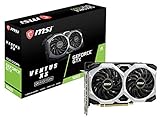
- Chipset: NVIDIA GeForce GTX 1660
- Boost Clock: 1830 MHz
- Memory Interface: 192 bit
- Video Memory: 6GB GDDR5
- Output: DisplayPort x 3 (V1; 4)/ HDMI 2; 0B x 1
Below the graphics requirement
Record the exact GPU and dedicated-memory figure first. If it is not one of the named minimum options, the listing alone cannot confirm how it compares. A graphics-card upgrade is therefore a conditional decision: check the power supply, physical clearance, connectors, motherboard support and the processor’s suitability for the complete system before purchasing. On a laptop, the GPU is often not replaceable, so compare the cost and practicality of another system instead of assuming a desktop-style card swap is possible.
Short on storage
Check the free space on the intended installation drive, remove or move files you no longer need, and empty the recycle bin before checking again. Do not delete personal files or system folders merely to reach 25 GB. If you plan to keep other games and applications on the same drive, the recommended 30 GB figure is the more useful target from the listing.
Missing DirectX, network or sound capability
Run dxdiag again to verify the DirectX version and inspect whether Windows detects the display and audio devices. Confirm that broadband works on the same computer and that an audio output appears in Windows sound settings. If any of these conditions remains absent, the PC does not match the published minimum as written.
Before installing or launching
- Recheck the Windows edition, 64-bit architecture and version after any operating-system update.
- Record the processor and installed RAM from Task Manager’s Performance tab.
- Record the active graphics card and dedicated memory, especially if the PC has multiple GPU entries.
- Confirm DirectX 12 in
dxdiag. - Make sure the installation drive has at least 25 GB free; 30 GB matches the recommended storage target.
- Verify a working broadband connection.
- Verify that Windows detects a DirectX-compatible sound device.
- Compare every row with the official Steam requirements rather than relying on a single “can I run it” score or a similar product name.
Keep the results with the date you checked them. Free storage, Windows versions and installed hardware can change, while the Steam requirements may also be revised; the figures in this article reflect the listing checked on October 13, 2026.
What the requirements do—and do not—tell you
The official listing establishes component thresholds and targets. It does not report hands-on tests for your particular PC, frame-rate measurements, supported resolutions, graphics presets, performance under multiplayer load or an equivalency ranking for every unlisted component.
Consequently, a minimum match means only that your computer reaches the publisher’s stated minimum specification. It is not a promise that the game will run at a particular speed or visual quality. A recommended match is likewise the publisher’s higher target, not a measured guarantee for every system using those parts.
What’s actually slowing this PC down?
Pick the symptom - the matching free tool is one click away.
Quick Recap
Product prices and availability are accurate as of the date/time indicated and are subject to change. Any price and availability information displayed on Amazon at the time of purchase will apply.

