
Outdated Drivers Are Slowing You Down
One free scan finds every outdated or missing driver and matches the right update for your exact hardware.Free scan · exact hardware matchWindows Errors? Fix Them Before They Spread
Repair common Windows errors and clear accumulated junk for a smoother, more stable PC - no reinstall needed.Free scan · no reinstalliTechGuides is reader-supported. When you buy through links on our site, we may earn an affiliate commission. As an Amazon Associate I earn from qualifying purchases. Learn more
A 100 accessibility score is evidence that a particular checker passed the automated audits it included for the page and state it examined. It is not proof that the whole website is accessible or that people with disabilities can complete its tasks. Lighthouse is one useful example, but scoring methods vary by tool.
What does a Lighthouse accessibility score of 100 mean?
In Lighthouse, the accessibility score is a weighted average of the audits that count toward scoring. Each such audit is pass or fail, and its weight is based on axe user-impact assessments. A failed audit does not receive partial credit. Manual audits and low-impact or best-practice audits do not affect the score. Chrome’s Lighthouse scoring documentation explains these mechanics.


So a 100 means the tested page passed the automated, score-affecting audits in that run. It describes that tool, page, and tested state—not every aspect of accessibility. Other products may use different rules and ways of combining results, so don’t assume that every checker’s “100” means the same thing.
What can an automated score miss?
Automated checks can identify some issues, but they cannot establish on their own whether an experience works for people in practice. W3C’s overview of evaluation tools notes that some checks cannot be automated, that tools can be inaccurate, and that teams should not rely too heavily on tool results instead of users’ real-life experience.
#1 Best Overall
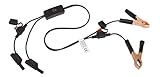
- Replaceable in-line fuses protect both the meter and tester in the event a high current source on the vehicle is left on
- The multimeter is bypassed with the switch during connection in case of a power surge
- The tester and meter can remain connected until other computer systems shut down, isolating the drain
- As a convenience, stacking banana connectors are used on the tester
- This allows voltage to be measured on various locations on the vehicle during the drain test, using standard test leads
Keyboard operation and navigation
A passing score does not, by itself, tell you whether keyboard users can move through the experience in a sensible order or operate its controls as intended. Test the actual interactive flow, not just whether a page has been scanned.
Screen-reader understanding
A score alone cannot tell you whether a screen-reader user can understand names, states, and changes throughout a task. Review the experience as it unfolds, including what happens after actions such as opening a menu or submitting a form.
Rank #2

- Precision Authentication: Uses pure resonance frequency analysis to verify changes ranging from 1/10 troy ounce to 10 troy ounces. Complies with certification standards, ensuring professional and reliable authentication results
- Comprehensive Authentication Tool kit: Includes acoustic resonance testing and magnetic composition detection for multi factor verification of gold and silver changes. Compatible with mainstream verification systems, meeting comprehensive authentication needs
- Cross Platform System Compatibility: Connects with changes analysis apps, supporting advanced spectral analysis and automated report generation. Conveniently stores complete authentication documents for record keeping
- Easy to Operate: Place the changes in the included stand to start resonance analysis, authenticate authenticity intuitively through sound characteristics. Magnetic buckle design enables simple and efficient metal composition testing, no professional expertise needed
- Portable Design for On the Go Use: Easily fits in pockets, enabling professional grade authentication anytime anywhere. Ideal for collectors and merchants needing on site changes verification
Instructions, meaning, and form errors
Markup can be present while the content still fails to communicate clearly in context. Check whether instructions make sense, whether people can identify what went wrong in a form, and whether they can recover from errors.
Real tasks across pages and states
A result is tied to what the tool tested. It does not automatically establish that other pages, interactions, or states work, or that a person can finish a site’s core task under real conditions. The checks above are areas for human or task-based review, not a claim that every one is outside Lighthouse’s current audits.
Rank #3
How should you follow up on a score of 100?
- Identify exactly what was tested. Note the checker and its rule set, the page, and the state or interaction shown during the scan. A score without that context is hard to interpret.
- Review the tool’s findings and manual checks. In Lighthouse, manual audits are not included in the score. Treat them as follow-up work rather than assuming the 100 covers them.
- Manually test important interactions. Work through the site’s core tasks with a keyboard and, where possible, a screen reader. Check navigation, controls, feedback, instructions, and form-error recovery.
- Include users where possible. Observing people with disabilities using relevant tasks can reveal practical barriers that a score does not convey.
- Consider a professional evaluation when the stakes or needs warrant it. This may be appropriate for consequential user journeys or when the team lacks accessibility expertise; the right scope depends on the site and its needs.
Does a 100 prove WCAG conformance or legal compliance?
No such conclusion follows from the score alone. A Lighthouse 100 is not an accessibility certification or a complete WCAG conformance result. Whether a site meets a particular standard or legal requirement depends on factors such as the applicable standard and version, jurisdiction, pages and states evaluated, and evaluation method. The score by itself does not settle those questions.
Quick Recap
Rank #4

- 【Articulated Test Finger】Meets UL60335/UL476/UL1026/UL50762 standards for electrical safety testing. Simulates human finger articulation to verify accessibility to hazardous components during industrial equipment evaluations
- 【Precision Bend Test Probe Design】Total length 234mm with articulated bend sections (30/30/40mm configuration, 97mm effective test length). Features 78mm baffle width for standardized clearance verification
- 【Adjustable Articulated Finger Mechanism】Engineered joints allow 180° articulation to replicate natural finger movement. Locking mechanism maintains preset angles during pressure application (up to 30N force simulations)
- 【Durable Construction】Heat-treated articulated joints maintain structural integrity through repeated bending/straightening cycles. Steel paired with rugged polyethylene handle ensures long-term reliability
- 【Industrial Safety Testing Application】Validates protective barriers on machinery, appliances, and scientific equipment. Prevents accidental contact with live circuits or moving parts under IEC 61032 Clause B requirements
Product prices and availability are accurate as of the date/time indicated and are subject to change. Any price and availability information displayed on Amazon at the time of purchase will apply.

