
iTechGuides is reader-supported. When you buy through links on our site, we may earn an affiliate commission. As an Amazon Associate I earn from qualifying purchases. Learn more
Android does not have one battery-health screen that works on every phone. The correct way to check it depends on the manufacturer, model, and Android version.
First, distinguish battery level from battery health. The level is the charge remaining right now, such as 42%. Health describes how much capacity the battery can still hold compared with when it was new. A phone can show 100% charge while its worn battery provides much less runtime than it used to.
Check battery health by phone brand
| Phone | Where to check | What you may see |
|---|---|---|
| Google Pixel 8a and later | Settings → Battery → Battery health | Normal, Reduced, Unavailable, and sometimes an estimated capacity percentage |
| Samsung Galaxy | Samsung Members → Support → Get Started under Phone diagnostics → Battery status | Normal, Weak, or Bad |
| Motorola | Device Help → Learn about my device → Hardware test → Battery | Battery condition and related readings |
| Xiaomi, Redmi, and POCO | Settings → Battery → Battery protection, if supported | Charging-protection controls; not necessarily a health percentage |
| Other Android phones | Search Settings for battery health, battery condition, or battery protection | Availability varies by model and software |
Google Pixel
On supported Pixel phones, open:
- Open Settings.
- Tap Battery.
- Tap Battery health.
- Read the status shown by the phone.
On Pixel 8a and later, the status can be Normal or Reduced. Google defines Reduced as an estimated capacity below 80%. To view the estimated percentage, open Settings → Battery → Battery health → Battery capacity.
Unavailable means the phone cannot determine its battery status. It does not automatically mean the battery is defective.
#1 Best Overall

- Ultra-Slim & Light weight Design: At just 0.63 inches thick and 8.11oz, this is the slim and light 10000mAh power bank. Perfect for travel, it easily fits in your pocket or bag without adding bulk.
- 22.5W USB-C Fast Charging: Equipped with USB-C input and output, this power bank supports PD3.0 and QC4+ fast charging, delivering up to 22.5W of power. Charge your iPhone to 65% in just 30 minutes or power up multiple devices quickly.
- 3 Output & Dual Input: Features 3 outputs (2 USB-A + 1 USB-C) and 1 inputs (USB-C ), allowing you to charge up to three devices simultaneously. Ideal for smartphones, tablets, earbuds, and more.
- Wide Compatibility: Works seamlessly with a wide range of devices,Compatible with iPhone 17/16/15/14/13/12, Samsung Galaxy, Google Pixel, iPads, AirPods, Android tablets, and other USB-C devices.
- Advanced Safety & LED Display: Built with an 8-Layer Protection System to prevent overcharging, overheating, and short circuits. The LED digital display shows the remaining battery percentage, so you’re never caught off guard by a low battery.
The Battery health status screen is not available on every Pixel. Google specifically lists the Pixel 6a, Pixel 7, Pixel 7 Pro, Pixel 7a, Pixel 8, and Pixel 8 Pro as models that do not indicate battery health status. The feature is also unavailable on Pixel Tablet. If the menu is missing on one of these models, that is expected rather than a sign that you have overlooked a setting.
Samsung Galaxy
Samsung’s official battery check uses the Samsung Members app rather than a universal Settings menu:
- Open Samsung Members. Install or update it from the Galaxy Store or Google Play if necessary.
- Tap the Support tab.
- Under Phone diagnostics, tap Get Started.
- Complete the diagnostic checks.
- Tap the Battery status icon.
The result is normally one of three categories:
- Normal: Samsung detected no battery issue.
- Weak: Battery efficiency may have decreased through use or environmental conditions.
- Bad: Battery life has significantly degraded; Samsung recommends contacting a support center.
The Samsung Members layout can differ by model, country, and app version. On some phones, you may need to tap Phone diagnostics before selecting the battery test. The labels are condition categories, so the test may not provide a precise remaining-capacity percentage.
The Tool Desk
Outbyte PC Repair FREERepair Windows errors before they cause bigger problemsFix Now →Outbyte Driver Updater FREEScan for outdated or missing drivers - takes under a minuteDriver Scan →Motorola
Motorola places its battery test in the preinstalled Device Help app:
- Open Device Help.
- Tap Learn about my device.
- Tap Hardware test.
- Select Battery.
The test can report current power, battery condition, temperature, and charging status. Treat “battery condition” as a diagnostic result, not necessarily as a measured percentage of the battery’s original capacity.
Xiaomi, Redmi, and POCO
On supported models, Xiaomi documents the path Settings → Battery → Battery protection. The page may include options such as Regular charging, Limited charging, and Optimized charging.
These options control how the phone charges to reduce battery aging. They are not the same thing as a battery-health percentage. In particular, a phone stopping at 80% because Limited charging is enabled does not mean that the battery is only 80% healthy.
Free tools Windows power users keep installed
One-click scans. No signup required.
Other Android phones
OnePlus, ASUS, Sony, Nothing, Nokia/HMD, and other manufacturers use different menus. Try this order:
Rank #2
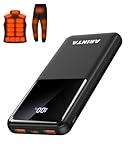
- 📱 Compatible with 5V USB Heated Clothing – This battery is compatible with 5V heated vests, jackets, and other heated clothing. Its professionally customized chip provides continuous, stable output, making it safe and reliable. The 10000mAh capacity gives you up to 7 hours of power, while the slim body makes it easy to carry in your pocket.
- ⚡PD Super-Fast Charging: Rapidly power up compatible devices with USB-C Power Delivery (PD 20W)—recharge an iPhone 15 to 60% in~30 minutes. Dual USB-A ports also deliver 22.5W speeds for Android Smartphones.
- 🔋 2-3 Full Phone Charges: The 10,000mAh high-capacity battery reliably recharges an iPhone 15 twice, a Samsung Galaxy 1.8 times, or an iPad once—perfect for travel or daily use.
- 🔌 Triple-Port Simultaneous Charging: Power 3 devices at once with dual 22.5W USB-A ports + 20W USB-C PD port. Ideal for phones, tablets, earbuds, or smartwatches without slowdowns.
- 📊Precision LED Digital Display: Track exact remaining power down to 1%—no guessing. Includes a visual fast-charge indicator (e.g., green light for PD/QC activation).
- Open Settings.
- Use the Settings search box and search for battery health, battery condition, or battery protection.
- If a result is not found, open Settings → Battery and inspect the available options.
- Look for a manufacturer support or diagnostics app.
- If the feature is still absent, search the phone maker’s support site for the exact model number and “battery health” or “battery test.”
Do not assume that every Android phone supports a capacity estimate. Some phones report only charging behavior, some provide a diagnostic condition, and some expose no user-facing health reading at all.
Use ADB for a technical battery check
If you have a computer and Android Debug Bridge (ADB) configured, you can inspect the battery service:
adb shell dumpsys batteryThe output may include fields such as:
level: current charge levelscale: the maximum charge scale, normally 100status: charging or other charging statehealth: an Android battery-health condition- Voltage, temperature, and battery technology
The ADB health field is not the battery’s remaining capacity. Android uses it for operating or fault states such as Good, Overheat, Dead, Over voltage, Cold, and Unspecified failure. It normally will not tell you that a battery has, for example, 78% of its original capacity left.
Do these 3 things before closing this tab:
1Fix the driver behind crashes, sound loss and screen glitches2Clear out junk files and repair common Windows errors3Scan for outdated or missing drivers - takes under a minuteTo inspect power-use history, you can run:
adb shell dumpsys batterystatsThis is useful for finding apps or system components that consume power. It is not a direct battery-wear or battery-capacity reading.
What to do when the result looks bad
A health result below 80% is a practical replacement warning on supported Pixel phones. Google’s guidance says to consider replacing the battery below 80% capacity or after 800 charge cycles on Pixel 3 through Pixel 8 Pro and Pixel Fold. For Pixel 8a and later, Google says to consider replacement below 80% or after 1,000 cycles.
For Samsung, a Bad result is the point at which Samsung recommends contacting a support center. A Weak result may explain reduced runtime but does not by itself identify a precise capacity percentage.
Before arranging a repair, back up your phone. Use the manufacturer or an authorized repair provider, particularly if the phone has water resistance or a sealed battery.
Warning signs that need immediate attention
Stop treating the issue as an ordinary battery-life problem if the phone’s back cover or screen is lifting, the device is visibly swollen, or the battery becomes unusually hot. Do not press the cover back into place, puncture the phone, pry it open, or attempt a DIY battery removal. Arrange repair or recycling through the manufacturer or an appropriate service provider, and avoid handling a swollen battery unnecessarily.
Rank #3

- Up to 3.5 Phone Charges On the Go: Compact and easy to carry, this 15,000mAh power bank keeps you powered for travel, commuting, and emergencies. Charges iPhone 17 up to 3.5 times, Samsung S26+ up to 2.5 times, and AirPods Pro up to 20 times.
- 40% Smaller, 45% Lighter: Designed for power without the extra bulk, this compact power bank is 40% smaller and 45% lighter than conventional models, making it easy to carry for travel and daily use. Built-in USB-A, Type-C, iOS, and Micro cables keep your devices ready to charge—no extra cables needed.
- Airline-Safe Power, Trusted Worldwide: Safe charging you can trust. Join over 50 million users worldwide who rely on our safety-focused design for worry-free charging and carry-on travel.
- 50% Power in 30 Minutes: Get fast, convenient charging when you need it most. This 22.5W portable charger powers your phone up to 50% in just 30 minutes, ideal for busy days and travel.
- Charge 6 Devices at Once: With 6 outputs and a bi-directional Type-C port, this portable charger powers multiple devices at the same time. Compact enough for your pocket or bag.
If the phone drains quickly but health looks normal
Battery health and battery drain are different diagnostics. A healthy battery can empty quickly because of a bright display, weak cellular signal, navigation, gaming, video recording, background sync, or a misbehaving app.
Open Settings → Battery → Battery usage—the exact wording varies—to identify which apps or system features consumed power recently. If one app is unusually high, update it, restrict its background use, or uninstall it temporarily. If no app explains the drain, check for poor signal, overheating, recent system updates, and charging accessories before concluding that the battery itself is worn.
FAQ
How do I check battery health on Android?
There is no universal Android path. Pixel 8a and later use Settings → Battery → Battery health. Samsung Galaxy phones use Samsung Members → Support → Get Started under Phone diagnostics → Battery status. Motorola uses Device Help → Learn about my device → Hardware test → Battery. Other brands require a model-specific Settings menu or diagnostic tool.
Why can’t I find Battery health in Android Settings?
The feature may not be supported by your model. For example, Google says the Pixel 6a, Pixel 7 series, Pixel 8, Pixel 8 Pro, and Pixel Tablet do not show the Pixel Battery health status screen. Search Settings for battery health or battery condition, then check the manufacturer’s support app or support page.
Does ADB show the remaining battery capacity?
No. The command adb shell dumpsys battery can show the current level, charging state, temperature, voltage, and an Android health condition. Its health field is not the battery’s remaining-capacity percentage. adb shell dumpsys batterystats reports power-use history, not battery wear.
Is stopping charging at 80% proof that my battery is damaged?
No. An 80% limit may be an intentional charging-protection feature, such as Xiaomi’s Limited charging or an optimized-charging mode. These features are designed to reduce battery aging and do not indicate that the battery is only 80% healthy.
The Bottom Line
Use the diagnostic method made for your phone: Pixel 8a and later have Battery health in Settings, Samsung Galaxy uses Samsung Members, and Motorola uses Device Help. Xiaomi’s Battery protection page controls charging rather than necessarily reporting capacity. If your phone has no health screen, that may simply be a model limitation. Use battery-usage statistics to investigate drain, and treat swelling or unusual heat as a repair-safety issue rather than a software setting.
Windows Errors? Fix Them Before They Spread
Repair common Windows errors and clear accumulated junk for a smoother, more stable PC - no reinstall needed.Free scan · no reinstallCrashes, No Sound, or Screen Glitches?
Random freezes, missing sound and display glitches usually trace back to one bad driver. Find and replace yours safely.Free scan · under a minuteQuick Recap
Product prices and availability are accurate as of the date/time indicated and are subject to change. Any price and availability information displayed on Amazon at the time of purchase will apply.

