
The Tool Desk
Outbyte Driver Updater FREEScan for outdated or missing drivers - takes under a minuteDriver Scan →Outbyte PC Repair FREEClear out junk files and repair common Windows errorsFree Scan →iTechGuides is reader-supported. When you buy through links on our site, we may earn an affiliate commission. As an Amazon Associate I earn from qualifying purchases. Learn more
Yes. Use one compliant USB-C Power Delivery (USB-PD) charger rated at least for your exact MacBook’s minimum wattage, then use the correct cable for each device. A single-port charger works one device at a time; charging everything simultaneously requires a multi-port USB-C PD charger with enough per-port and combined output.
The charger you need
The MacBook determines the minimum charger rating. iPhones, iPads and Apple Watch generally draw less power, so a higher-wattage USB-C PD adapter that meets the MacBook requirement can safely charge them as well. USB-PD lets the device and adapter negotiate the power level; the device takes only what it supports.
Apple says iPhone, iPad and Apple Watch can use Apple USB power adapters, a Mac USB-C power adapter or compliant third-party adapters. Apple also identifies an 18W USB-C adapter as fast-charging an iPhone 8 or later. The adapter must comply with the safety regulations and standards that apply in your country or region.
Use the MacBook’s model-specific minimum
Apple’s Mac guidance is to use at least the minimum wattage specified for the particular MacBook. The following figures are examples from Apple’s published compatibility guidance, not a universal recommendation for every configuration.
#1 Best Overall

- The 70W USB-C Power Adapter offers fast, efficient charging at home, in the office or on the go.
- It’s compatible with numerous USB-C devices and charging cables.
- Apple recommends pairing it with a 14-inch MacBook Pro or a 13-inch or 15-inch MacBook Air using a USB-C to MagSafe 3 Cable or USB-C Charge Cable.
- Use it with MacBook Air (2022 and later) to take advantage of fast charging, for up to a 50 percent charge in around 30 minutes.*
- Charging cable sold separately.
| MacBook example | Apple-listed minimum or recommended wattage | What to do |
|---|---|---|
| MacBook Neo | 20W | A 20W-or-higher USB-PD adapter can meet the listed minimum. |
| Selected MacBook Air models | 30W, 35W, 67W or 70W, depending on model | Check the exact model before buying; do not assume every Air uses the same rating. |
| 13-inch and selected 14-inch MacBook Pro models | 61W, 67W or 96W, depending on model | Match the wattage Apple specifies for your configuration. |
| 16-inch MacBook Pro models introduced in 2021 or later | 140W | Use a USB-PD charger capable of the listed 140W requirement when that model calls for it. |
Apple’s current 70W USB-C Power Adapter page recommends 70W for selected 14-inch MacBook Pro and 13-inch or 15-inch MacBook Air setups. “70W” is therefore a useful search term for those combinations, but it is not the optimum for every MacBook. A charger below the requirement may charge slowly, stop increasing the battery percentage while the Mac is busy, or fail to keep up with sustained load.
One charger can mean two different setups
Sequential charging with one port
A single-port 70W (or higher) USB-C PD adapter can serve all four devices by moving the cable between them. Connect the appropriate cable, charge one device, unplug it, and connect the next. This is the simplest arrangement and avoids the output-sharing limits that occur when several ports are occupied.
Simultaneous charging with multiple ports
To charge an iPhone, iPad, MacBook and Apple Watch at the same time, choose a multi-port USB-C PD charger. Check three separate specifications:
- USB-PD support: The charger should explicitly support USB Power Delivery, not merely provide a USB-C-shaped socket.
- Per-port output: Confirm how much power each port can provide when used alone and when other ports are occupied.
- Combined output: Verify that the total available power remains sufficient for the MacBook while the other devices are connected.
A label such as “100W” or “140W” usually describes a maximum under a particular port arrangement. It does not guarantee that every port can deliver that figure at the same time. Read the maker’s output-allocation table. If the MacBook is assigned too little power after you connect the iPad, phone and watch, move the MacBook to the port with the highest allocation or use a higher-capacity charger.
Rank #2
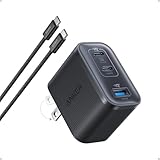
- Power Your MacBook at True 70W Speed: Each USB-C port delivers 70W max of power—enough to charge a 14-inch MacBook Pro (2024) from 0 to 50% in 35 minutes. Compared to a standard 65W charger, it offers faster performance and better compatibility with the latest M4 models.
- Mini Size and Travel-Friendly: At just 2.09 × 1.68 × 1.24 inches, the charger is 41% smaller than a standard 70W USB-C charger—making it effortlessly portable. Slip it into a pocket, handbag, or travel pouch without taking up valuable space, so you can stay powered up wherever you go.
- Fast Charging That Stays Cool: With TÜV Rheinland certification and ActiveShield 4.0 thermal monitoring, surface temperatures measure up to 50°F (10°C) lower than international safety benchmarks for charging devices.
- Elegance in Every Charge: A textured shell, glossy finish, and premium metal frame create a clean, modern look that blends seamlessly with your workspace or travel setup.
- What You Get: Anker Nano Charger (70W, 3 Ports), 4.9 ft USB-C to USB-C Cable, welcome guide, 18-month warranty, and our friendly customer service.
Match the cable to each Apple device
The adapter supplies power; the cable or magnetic connector determines whether the device can receive it. Keep a separate, correctly rated cable for each device.
| Device or charging method | Required connection | Important check |
|---|---|---|
| MacBook with MagSafe 3 | USB-C to MagSafe 3 Cable | Plug the USB-C end into the PD adapter and the MagSafe 3 end into the MacBook. |
| MacBook charging through USB-C | USB-C charge cable | Use a cable suitable for the power level required by the MacBook; a low-power cable can limit charging. |
| USB-C iPhone or iPad | USB-C cable appropriate to that device’s port and charging specification | Both ends may be USB-C, but data and power capabilities still vary by cable. |
| iPhone or iPad with a Lightning port | USB-C to Lightning cable | The USB-C plug goes into the adapter and the Lightning plug into the device. |
| Apple Watch | Apple Watch Magnetic Fast Charger to USB-C Cable | The magnetic puck attaches to the watch; the USB-C plug connects to the charger or a compatible iPad. |
Inspect cables for cuts, bent connectors, exposed conductors, heat damage or loose plugs. Replace damaged cables instead of trying to tape or bend them back into service.
How to charge all four devices, step by step
- Identify the MacBook model. Open Apple menu > About This Mac on the MacBook, note the model and year, and check Apple’s power-adapter guidance for its minimum wattage.
- Select a USB-PD adapter. Choose a compliant adapter rated at least as high as that MacBook minimum. A higher rating is acceptable when the adapter supports USB-PD.
- Check the ports. For sequential charging, one USB-C port is enough. For simultaneous charging, confirm the number of USB-C ports and the per-port and combined-output rules.
- Gather the cables. Use USB-C to MagSafe 3 or USB-C for the MacBook, USB-C or USB-C to Lightning for the iPhone and iPad as applicable, and the Apple Watch Magnetic Fast Charger to USB-C Cable for the watch.
- Connect the MacBook first when using several ports. Put it on the port with the highest guaranteed allocation, then connect the iPad, iPhone and watch to the remaining ports.
- Confirm charging. The MacBook should show the charging symbol or “Power Source: Power Adapter” in its battery menu. The iPhone and iPad should show the charging indicator, and the watch should display its charging animation.
- Recheck under load. If the MacBook battery still falls during demanding work, disconnect another device, move the MacBook to a higher-output port, or use a charger with greater combined capacity.
Choosing a charger for your particular combination
If you only need one device at a time
Buy a single-port USB-C PD adapter whose rating meets the MacBook requirement. This is often the smallest and simplest option. The same adapter can charge an iPhone, iPad or Apple Watch safely because those devices negotiate a lower draw. The adapter’s wattage does not force that amount into the device.
Quick wins for a faster PC:
Scan for outdated or missing drivers - takes under a minuteDriver Scan →Repair Windows errors before they cause bigger problemsFix Now →Fix the driver behind crashes, sound loss and screen glitchesFind Drivers →If you need the MacBook and smaller devices together
Choose at least two USB-C ports and examine the allocation when both are occupied. The MacBook should retain enough power to charge or at least maintain its battery during your normal workload. An adapter that advertises a high total number but drops the MacBook port to a low level when a second device is connected may not meet that need.
Rank #3
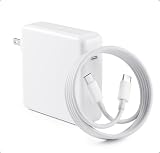
- High-efficiency Fast Charger: The 70W USB C macbook pro charger can automatically identify equipment and provide the fastest and most effective output current,charging efficiency of up to 96%Whether at home, in the office or on the road, this 70w USB C charger allows you to charge quickly and efficiently without compromising its service life and performance.
- Wide Compatibility: Our charger Compatible with USB C port macbook pro & macbook air 16 15 14 13 inch, M1 M2 M3 M4 MacBook, ipad pro & smartphone and all USB C device, laptops and smartphones. Works with USB C 29W, 30W, 61W, 67W, 70W PD model. Automatic identification and conversion of charging power
- Multiple Security Protection: Mac book laptop charger adopts the most advanced technology and is made of the highest quality materials. Smart chip is installed inside, include multiple smart features safeguarding against over-current, over-voltage, overload, temperature protection, short-circuit protection, and auto recovery, fast charging speed and long service life.
- Portable to Various Occasion:PD 3.0 charging technology,the performance is higher than other replacement macbook charger.Compared to others, we have added an additional storage bag for easy organization and to avoid confusion.In addition to daily use at home, chargers are also widely used during travel, school, and business trips.
- After-Sales Guaranty:We offer a 12 month warranty.And we have always been committed to provide products of superior quality at unbeatable prices, if you have any questions about the items, please feel free to contact our customer service team, we will reply you within 24 hours.
If all four devices must charge together
Prioritize the MacBook’s required wattage, then add the power needed for the iPad, iPhone and watch. Do not add headline numbers blindly: the manufacturer’s combined-output table is the controlling specification. A four-port charger may divide power dynamically, and the exact split can change when a device reaches a high state of charge or is unplugged.
What else to compare
When evaluating otherwise suitable chargers, compare the features that affect daily use:
- USB-PD version and supported charging profiles.
- Maximum output on each port and the combined maximum with two, three or four ports occupied.
- Whether the package includes any USB-C, MagSafe-compatible or Lightning cable. A charger normally does not include every cable your devices require.
- Physical size, weight and plug design if you travel.
- Published safety certifications and compliance for your country or region.
- Price and warranty, while remembering that a familiar brand name alone does not establish electrical compliance.
Can a MacBook charger charge an iPhone, iPad and Apple Watch?
Yes, provided it is a compliant USB-C PD adapter. Apple specifically says a higher-wattage USB-C adapter, including the one supplied with a Mac laptop, can be used with an iPad for faster charging. Apple also documents that an Apple Watch Magnetic Fast Charger to USB-C Cable can connect directly to an iPad to charge Apple Watch. The same principle applies when those devices are connected to a MacBook USB-C adapter: use the correct cable and let USB-PD negotiation set the draw.
Free tools Windows power users keep installed
One-click scans. No signup required.
A higher rating is safe; excessive voltage from a non-compliant or defective adapter is not. The relevant distinction is not “MacBook charger versus phone charger,” but whether the adapter follows USB-PD and applicable safety requirements and whether its available output meets the MacBook’s needs.
Rank #4

- Super Fast Charging: fast charge for M2 MacBook Air to 50% in only 30 mins, full charge for MacBook Pro 13 inch in only 1h 48mins, strong power support the high-speed processing capacity of M1, M2, M3 M4 chip
- Original Quality Helps to Keep MacBook Battery Health: built-in original dynamic software and hardware systems to keep Maximum Battery Capacity to 98%, intelligently learning your daily charging routine to reduce battery aging, friendly to computer battery and provide 2 times longer battery lifespan
- Universal Compatibility: optimized charging and intelligently output support 70W, 67W, 65W, 61W, 45W, 30W, 20W and provide higher charging performance at the mean time, widely compatible with MacBook Pro 16 15 14 13 inch 2024, 2023, 2022, 2021 2020 2019 2018 2017 2016, M1 M2 M3 M4 MacBook Air 2025, 2024, 2023, 2022, 2021, Surface(Use USB C charging port), Dell, Lenovo, HP, M4 M2 M1 iPad Pro 13 12.9 11 inch, iPad 10, M4 M2 M1 iPad Air 5 4, iPad Mini 6 A17 Pro, iphone 16, iPhone 15, etc
- USB-IF Certified 6.6 feet / 2m USB C to USB C Cord: USB-IF Certified ID of our cable: 800-1471, protect the charging port of your expensive device from damage, made of top-rated thicker copper wire and coated with premium soft-touch TPE, tested with over 20000+ times bend to provide 4 times longer lifespan; twice length cable than default cable which is only 1m, let you can charge and have fun anywhere, support 480Mbps data syncing between your phone and laptop
- Soft LED Indicator and Foldable Plug: cool-green LED emits a soft, gentle glow so you can see your device has power; with a foldable plug protect screen from scratches, make it more portable for travel
Charging speed and behavior to expect
Why a high-wattage adapter does not make every device charge at the same speed
The adapter’s maximum rating is a ceiling. Each device requests a supported power level, and charging speed also changes with battery percentage, temperature, cable capability and use. An iPhone connected to a 70W adapter does not become a 70W device.
The 18W iPhone reference
Apple’s 2024 support guidance identifies an 18W USB-C adapter as fast-charging an iPhone 8 or later. That statement describes Apple’s fast-charging threshold in that guidance; it does not mean every iPhone model has identical charging behavior or that an 18W adapter can satisfy a MacBook.
When a MacBook appears to charge slowly
If the MacBook is under heavy CPU or graphics load, some of the adapter’s power runs the computer instead of increasing the battery percentage. A charger below the model’s minimum can make this more noticeable. With a multi-port adapter, connecting other devices can reduce the MacBook port’s allocation. Check the port assignment and the MacBook’s model-specific requirement before assuming the computer or cable is defective.
Do these 3 things before closing this tab:
1Scan for outdated or missing drivers - takes under a minute2Clear out junk files and repair common Windows errors3Fix the driver behind crashes, sound loss and screen glitchesSafety and compatibility checks
Apple advises that third-party power adapters comply with applicable country regulations and international and regional safety standards. Adapters that do not meet those standards can create a risk of death or injury. Choose products that publish their electrical specifications and relevant certifications, and stop using any adapter that becomes unusually hot, smells of burning, makes crackling sounds or has a damaged enclosure.
Best Value

- Power Your MacBook at True 70W Speed: Each USB-C port delivers 70W max of power—enough to charge a 14-inch MacBook Pro (2024) from 0 to 50% in 35 minutes. Compared to a standard 65W charger, it offers faster performance and better compatibility with the latest M4 models.
- Mini Size and Travel-Friendly: At just 2.09 × 1.68 × 1.24 inches, the charger is 41% smaller than a standard 70W USB-C charger—making it effortlessly portable. Slip it into a pocket, handbag, or travel pouch without taking up valuable space, so you can stay powered up wherever you go.
- Fast Charging That Stays Cool: With TÜV Rheinland certification and ActiveShield 4.0 thermal monitoring, surface temperatures measure up to 50°F (10°C) lower than international safety benchmarks for charging devices.
- Elegance in Every Charge: A textured shell, glossy finish, and premium metal frame create a clean, modern look that blends seamlessly with your workspace or travel setup.
- What You Get: Anker Nano Charger (70W, 3 Ports), 4.9 ft USB-C to USB-C Cable, welcome guide, 18-month warranty, and our friendly customer service.
- Use the adapter within its stated voltage, current and temperature limits.
- Keep ventilation openings clear and do not cover a high-power adapter with clothing or bedding.
- Use dry connectors and keep liquid away from the charger and devices.
- Do not force a connector or use a frayed cable.
- Replace an adapter or cable after impact, liquid exposure or visible damage.
Troubleshooting common problems
The MacBook says “Not Charging”
Confirm that the adapter supports USB-PD and meets the MacBook’s minimum wattage. If several devices are connected, move the MacBook to the highest-output port or disconnect another device. For a MagSafe setup, check both the USB-C connection and the MagSafe connector for debris.
The phone or iPad charges but the MacBook battery falls
The adapter may be below the MacBook requirement, or its combined-output limit may have reduced the MacBook port after other devices were connected. Test the MacBook alone with the same adapter. If it still loses charge during ordinary use, select a higher-rated USB-PD adapter or the model’s recommended Apple adapter.
The Apple Watch does not charge
Use the Apple Watch Magnetic Fast Charger to USB-C Cable, clean and dry the magnetic puck and watch back, and connect the USB-C plug directly to a powered USB-C port. If you are connecting the watch to an iPad, verify that the iPad supports charging accessories through its USB-C port and that it has sufficient battery.
Charging stops when another device is plugged in
That behavior usually indicates dynamic power sharing or a protection response. Consult the charger’s port-allocation table, reconnect the MacBook to the designated high-power port, and reduce the number of simultaneous loads if the combined limit is exceeded.
The adapter or cable becomes very hot
Some warmth is normal during high-power charging, but excessive heat, odor, noise or visible damage is not. Unplug it, allow it to cool, inspect the cable and adapter, and replace the suspect component with a standards-compliant alternative.
A quick buying checklist
- Have you identified the exact MacBook model and its Apple-listed minimum wattage?
- Does the adapter explicitly support USB-PD?
- Is its single-port rating at least the MacBook minimum?
- If charging simultaneously, is the MacBook’s required wattage available after the other ports are occupied?
- Do you have USB-C to MagSafe 3, USB-C, USB-C to Lightning and Apple Watch magnetic USB-C cables as needed?
- Are the adapter and cables compliant with applicable safety standards and free from damage?
Bottom line
Choose the charger around the MacBook, not the iPhone. A compliant USB-C PD adapter that meets the exact MacBook minimum can safely charge an iPhone, iPad and Apple Watch with their appropriate cables. One port means moving the cable between devices; simultaneous charging requires multiple ports and a verified power-allocation table.
Quick Recap
Product prices and availability are accurate as of the date/time indicated and are subject to change. Any price and availability information displayed on Amazon at the time of purchase will apply.

