
Do these 3 things before closing this tab:
1Repair Windows errors before they cause bigger problems2Fix the driver behind crashes, sound loss and screen glitches3Clear out junk files and repair common Windows errorsiTechGuides is reader-supported. When you buy through links on our site, we may earn an affiliate commission. As an Amazon Associate I earn from qualifying purchases. Learn more
Two birthdays are dates on a calendar; two flight departure times are instants. Subtracting each pair answers a different question. A useful date-difference calculator makes that choice explicit: it can count calendar days, measure elapsed time, or calculate a duration between local times in a named time zone.
How many days are between two dates?
For date-only inputs, count the calendar days between the dates in a declared calendar. This is not the same as counting both endpoints. For example, the elapsed calendar-date difference from Monday to Tuesday is one day; an inclusive count of the dates Monday and Tuesday is two. Choose and label one convention rather than leaving users to guess.
For a Gregorian date-only calculator, parse year, month, and day as calendar fields. Do not turn a date such as 2026-10-11 into an instant in the visitor’s local time zone and then subtract timestamps: that adds a time-zone interpretation the input did not contain. MDN describes Temporal as distinguishing date-only values from instants and zoned date-times. Its PlainDate.until() method expresses a difference between calendar dates.
Windows Errors? Fix Them Before They Spread
Repair common Windows errors and clear accumulated junk for a smoother, more stable PC - no reinstall needed.Free scan · no reinstallCrashes, No Sound, or Screen Glitches?
Random freezes, missing sound and display glitches usually trace back to one bad driver. Find and replace yours safely.Free scan · under a minuteLeap years belong in calendar arithmetic. A date-only calculator should use the selected calendar’s rules when determining the span; it should not assume every year has the same number of days. If the result includes months or years, define how partial units are handled because those units have varying lengths.
#1 Best Overall
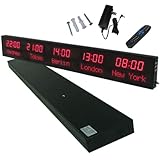
- 【GLOBAL MULTI-TIME ZONE DISPLAY】High-definition LED World Clock simultaneously showcases time across 5 countries/cities with intelligent time zone switching (customizable city+time layouts). Ideal for transnational operations and cross-time-zone collaboration.
- 【DUAL-MODE FLEXIBLE INSTALLATION】Innovative wall-mount + floating design. Aerospace-grade aluminum alloy frame with steel cable suspension system creates modern minimalist wall art or sci-fi inspired levitating time display.
- 【SMART WIFI AUTO-SYNC】Self-calibrating system syncs global clocks via primary city setting. Supports 99-minute custom rotation intervals. Zero manual adjustment ensures punctuality for international conferences.
- 【ULTRA-CLEAR ADAPTIVE DISPLAY】1000cd/m² high-brightness LEDs with 140° wide viewing angle remain legible beyond 15m. Auto-dimming light sensor adapts to environments – perfect for conference halls/airports/schools 24/7.
- 【INDUSTRIAL-GRADE DURABILITY】Aerospace-grade aluminum construction with 20W low-power operation. IP54-rated protection enables stable 24/7 performance. Transforms corporate HQs to boutique hotels into functional art installations.
How do I calculate the difference between two dates?
Start by defining the input and output contract. The following design separates date-only arithmetic from elapsed-time arithmetic and avoids silently treating local wall times as globally unique instants.
- Identify the input type. Decide whether users enter calendar dates, timestamps with an offset, or local date-and-time values tied to a location.
- State the counting convention. Specify whether the output is the difference between endpoints or an inclusive count of both dates. If inputs may be reversed, decide whether to show a signed result or reorder them, and document that behavior.
- Use calendar arithmetic for dates. Parse date fields in the chosen calendar and compute the date difference without applying the browser’s time zone.
- Use instant arithmetic for timestamps. When both inputs identify instants, subtract their timestamp values to obtain elapsed time. Format the result in the units the user requested.
- Resolve local times with a named zone. If an input is a wall-clock time at a place, require or obtain that place’s time zone and apply its rules for the date in question. Do not substitute the host machine’s zone.
- Label distinct results separately. If the interface returns both a calendar span and elapsed duration, name them separately—for example, “1 calendar day” and “23 elapsed hours.”
How many hours are between these dates?
Hours are a measure of elapsed time, so the answer depends on whether the inputs identify instants. If a user supplies only two dates, a calculation such as “days multiplied by 24” assumes a fixed-length day. That assumption may not match elapsed time between local midnights around a daylight-saving transition.
Rank #2

- Large Digital Wall Clock with Big Numbers - Easy to Read: WallarGe digital wall clock has a high-definition LCD screen measures 14x6 inch and the time display is 8.1x4.3 inch, the large display helps you read the time from many angles at a room distance. You can also read the indoor temperature and date on screen for full information
- Digital Wall Clock Battery Operated - Easy to Setup: The clock is supported by 4xAA battery (not included). There is a low battery indicator display on screen when battery is not power enough, no more worries about forgetting to replace new batteries. The function buttons are at the back which are easily to set
- Day and Temp Display Switchable: There are three modes optional for the day/temp display: Day only, Temp only, Day and Temp display in turns every 10s. Just click the button at back to choose the display mode you favored. No matter which mode of day/temp you choose, the time and date will not change
- Wall Mount Large Digital Clock with Fold-out Stand - Digital Clock for Wall or Desk: The clock comes with a mounting template ruler showing 8.7 inches distance between two mounting holes, so you don't need to measure holes on wall. If you intend it to be placed on desk with no holes on wall, you can just unfold the fold-out stand
- Wall Clock Large Display with AUTO DST: The clock will automatically adjust time in Daylight Saving Time with AUTO DST on. It has two time display modes (Military time and Standard time), just click 12/24 button to switch. And the alarm is optional, it can be turned off manually if for no need
In a named time zone, a span from one local time to the same local time on the next calendar day can be 23 or 25 elapsed hours when the offset changes. MDN documents these cases for ZonedDateTime.since(). A calculator should distinguish “one calendar day later” from “24 hours later” rather than treating them as interchangeable.
Does the calculator account for leap years or daylight saving time?
Those are separate capabilities. Leap-year handling matters to calendar-date counts; daylight-saving handling matters when converting local times in a location into elapsed durations. A tool can handle one correctly without handling the other.
Rank #3

- Black wood frame with decorative silver map details
- Six-city world time wall clock
- Includes 32 pre-printed silver city name plaques
- Powered by 6 AA battery (included)
- Overall dimensions: 23.5 X 33.5 X 2.25
For a concrete example, timeanddate.com says its date-duration calculator accounts for leap years but not daylight-saving changes. Its separate time-zone duration calculator accounts for DST switches using location information. These are descriptions of those specific tools, not a general rule about date calculators.
Why JavaScript Date can produce surprising differences
JavaScript’s Date represents a time value measured in milliseconds from the UTC epoch. Its local component methods interpret that value using the host environment’s time zone; the zone itself is not stored in the object. MDN explains this behavior in its Date documentation and notes that getTimezoneOffset() can vary by date in regions with daylight-saving changes.
Rank #4
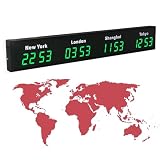
- 【Clear & Accurate Multiple Time Zones Clock】: This Multiple Time Zones Clock delivers precise time display for 3-5 global time zones, with each zone’s time shown independently and synchronized in seconds. The dot-matrix city name display lets you easily identify each time zone
- 【Wall Mounted LED Digital Multiple Time Zones Clock】: Our Wall Mounted LED Digital Multiple Time Zones Clock features high brightness, allowing you to set the perfect visibility for day or night use
- 【Easy Setup & Remote Control Operation】: Unlike complicated world clocks, this World Time Zones Clock comes with a remote control, making it easy to adjust time, and switch display modes
- 【Stylish Cities World Time Wall Clock】: This Cities World Time Wall Clock boasts an all-aluminum shell with an exquisite, sleek design that adds a touch of sophistication to any space. The digital static display ensures reliable performance, long service life
- 【Versatile Installation】: Choose between wall mounting or suspension for flexible placement—wall mounting creates a stylish wall feature, while suspension gives a floating illusion. It’s perfect for large family rooms, offices, multinational corporations
That makes Date appropriate for representing instants, but a risky default for date-only arithmetic. Constructing a date from calendar fields and relying on local interpretation can shift the apparent date or make a subtraction reflect the machine’s zone. Keep date-only inputs as calendar values, and use an explicit zone when a location is part of the question.
What’s actually slowing this PC down?
Pick the symptom - the matching free tool is one click away.
How to choose a date calculator
Before trusting a result, check what the tool accepts and what its result means. The same pair of visible dates can support different calculations.
- Input type: Does it accept dates only, timestamps, or a location and local time?
- Output unit: Is the answer calendar days, elapsed hours/minutes/seconds, or a calendar-based duration?
- Time-zone behavior: Can you specify a location, and does the tool account for daylight-saving transitions?
- Leap years: Does the tool state how leap years affect the calendar count?
- Months and years: If displayed, does it explain how partial months or years are calculated?
- Endpoint convention: Does it count the difference between dates, or include both start and end dates?
Months and years are calendar-relative units, not fixed quantities of seconds. MDN’s Temporal.Duration documentation describes this distinction. A result such as “one month” therefore needs a reference date and a policy for partial units; it cannot be converted to one context-free number of days.
Choosing an implementation for production
Temporal provides types for plain dates, instants, zoned date-times, and durations, which map more closely to these distinct questions than a single timestamp type. However, MDN marks the API as not Baseline across major browsers in its ZonedDateTime.since() documentation. Check target-browser support before relying on it directly, or provide a compatible fallback. Whichever implementation you choose, preserve the distinction between a calendar result and an elapsed-time result in both the calculation and the interface.
Quick Recap
Product prices and availability are accurate as of the date/time indicated and are subject to change. Any price and availability information displayed on Amazon at the time of purchase will apply.
Free tools Windows power users keep installed
One-click scans. No signup required.

