
iTechGuides is reader-supported. When you buy through links on our site, we may earn an affiliate commission. As an Amazon Associate I earn from qualifying purchases. Learn more
In Microsoft Teams, adding someone to a standard channel usually means adding them to the team that owns the channel. Team members automatically get access to the team’s standard channels. Private and shared channels work differently: you add people to those channels separately.
Use the instructions below to choose the right workflow, whether the person is inside your organization, a guest, or someone who is not yet a team member.
Add an internal person to a standard Teams channel
You need to add the person to the team containing the channel. A team owner can add people directly.
PC Slower Than It Used to Be?
A free scan shows the junk files, broken settings and background clutter dragging Windows down - then fixes them in one click.Free scan · Windows 10 & 11Crashes, No Sound, or Screen Glitches?
Random freezes, missing sound and display glitches usually trace back to one bad driver. Find and replace yours safely.Free scan · under a minute- Open Microsoft Teams on the desktop or at teams.microsoft.com.
- In the team list, point to the team name.
- Select More options (…) → Add member.
- In the Add members box, type the person’s name, email address, distribution list, security group, or Microsoft 365 group.
- Select the correct result. Repeat the process if you are adding several people.
- Select Add.
After the person is added to the team, they can access its standard channels, including the channel where you want to work with them. If necessary, send them the channel name or a link to a specific post.
#1 Best Overall
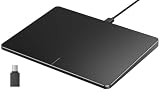
- Windows Only: The Large Wired Trackpad for Windows10/11 is compatible with Windows 11, Windows 10, PC, laptops and desktop computers. Note: Not compatible with Mac/Chrome OS/Linux. Not recommended for use on other systems. Some touchpad gestures or functions may be missing
- Convenient left and right physical clicks: The wired trackpad supports physical clicks of the left and right buttons at the bottom to realize the left and right mouse button functions. It also supports full-area single-click to realize the left mouse button function and two-finger single-tap for right mouse clicks, which is convenient for you to select text/documents and drag large areas easily
- How to drag files and select text: Double-click with one finger + hold/slide to drag files or select text
- Multiple gestures support: The touchpad supports multiple gestures and supports up to four-finger operation, which is smoother than the laptop touchpad operation. Fast and sensitive response, at your fingertips. Multiple functions, including smooth screen clicks, scrolling up and down pages, pinching to enlarge photos, etc.
- How to adjust the touchpad cursor speed: Open "Windows Settings" → "Bluetooth and other devices" → "Touchpad". Adjust the "Cursor Speed" slider to suit your preference (slower ← → faster)
Make the new person a team owner
While adding the person, select the down arrow beside Member and choose Owner. Teams allows multiple owners, so this is useful when another person needs to manage membership or approve requests.
Add someone to a private channel
Private channels have their own membership. Adding someone to the wider team does not automatically give them access to a private channel.
- Find the private channel in Teams.
- Select the channel’s More options menu.
- Choose the option for managing or adding channel members, such as Manage channel or Add members.
- Search for the person and select their account.
- Confirm the addition.
The person must normally already be a member of the parent team. Private-channel membership is controlled separately, and only the appropriate team or channel owners can add people.
The Tool Desk
Outbyte PC Repair FREERepair Windows errors before they cause bigger problemsFix Now →Outbyte Driver Updater FREEScan for outdated or missing drivers - takes under a minuteDriver Scan →Add someone to a shared channel
Shared channels also have membership separate from ordinary team membership. Open the shared channel’s More options menu and use its member-management or Add people option. Search for the person, choose the correct account, and confirm the invitation.
Whether you can add someone from another team or organization depends on your Microsoft 365 and Teams policies. If the person does not appear in search, an administrator may have restricted shared-channel access or external collaboration.
Rank #2

- Media-Friendly: The K400 Plus wireless touch TV keyboard gives you integrated, comfortable control of your PC-to-TV entertainment, eliminating the clutter of a separate keyboard and mouse
- Plug-and-Play: Simply plug the Unifying receiver into a USB port and the wireless touchpad keyboard is ready to go; adjust controls using the Logitech Options Software to save preferred settings
- Power-Packed: Built with laid-back control in mind, this wireless TV keyboard has a reliable and long battery life of up to 18 months (2), including an on/off button to help it go even longer
- Wireless Freedom: Designed for seamless comfort and control, this HTPC keyboard boasts a range of up to 33 ft (1) wireless connectivity, with quiet keys and a large touchpad for easy navigation
- Broad Compatibility: Designed for use with Windows 7, Windows 8, Windows 10 and later, Android 7 or later, and Chrome OS
If you are not a team owner
Being a regular team member does not always mean you can add people directly. In that case, Teams can submit a request to the team owners.
- Open the team’s More options menu.
- Select Add member.
- Enter the person’s name or email address.
- Select Send request.
Team owners receive an alert about the pending request. In Teams Free, pending membership requests appear under Your teams → Pending invites, where a team or channel owner can accept or deny them.
Quick wins for a faster PC:
Repair Windows errors before they cause bigger problemsFix Now →Fix the driver behind crashes, sound loss and screen glitchesFind Drivers →Clear out junk files and repair common Windows errorsFree Scan →Add an external person as a guest
To give someone outside your organization access to a team and its standard channels, add them as a guest rather than trying to add them as an ordinary member.
- Point to the team name and select More options → Add member.
- Enter the person’s external email address. Outlook, Gmail, and other business or consumer addresses may work if your organization permits guest access.
- Select the email address again to confirm it.
- When Teams asks Add (name) as a guest?, enter the guest’s display name.
- Select Add.
The guest receives a welcome email and must accept the invitation before using the team. Microsoft notes that access can take a few hours to become available. In Teams, the person appears with Guest after their name.
To check the person’s role, open the team’s More options menu, choose Manage team, and open Members.
Rank #3

- Windows Only: The Large Wired Trackpad for Windows10/11 is compatible with Windows 11, Windows 10, PC, laptops and desktop computers. Note: Not compatible with Mac/Chrome OS/Linux. Not recommended for use on other systems. Some touchpad gestures or functions may be missing
- Convenient left and right physical clicks: The wired trackpad supports physical clicks of the left and right buttons at the bottom to realize the left and right mouse button functions. It also supports full-area single-click to realize the left mouse button function and two-finger single-tap for right mouse clicks, which is convenient for you to select text/documents and drag large areas easily
- How to drag files and select text: Double-click with one finger + hold/slide to drag files or select text
- Multiple gestures support: The touchpad supports multiple gestures and supports up to four-finger operation, which is smoother than the laptop touchpad operation. Fast and sensitive response, at your fingertips. Multiple functions, including smooth screen clicks, scrolling up and down pages, pinching to enlarge photos, etc.
- How to adjust the touchpad cursor speed: Open "Windows Settings" → "Bluetooth and other devices" → "Touchpad". Adjust the "Cursor Speed" slider to suit your preference (slower ← → faster)
When guest addition fails
Guest access must be enabled by a Teams administrator. If Teams shows We didn’t find any matches when you enter an external address, guest access may be disabled or the address or domain may be blocked by organizational policy.
A guest may also need to switch organizations in Teams to the account associated with the inviting organization. Guest access is represented through Microsoft Entra ID B2B collaboration, so the guest’s account and sign-in context matter.
Guests have fewer capabilities than regular members. Their file access is controlled partly by the organization’s SharePoint settings, which a team owner cannot override. Channel-level guest settings are available on desktop or web under Team name → More options → Manage team → Settings → Guest permissions.
Use the mobile Teams app
On mobile, add an internal person to a team with this path:
- Open Teams and locate the team.
- Select More options.
- Choose Manage members → Add members.
- Type the person’s name and select the matching result.
- Select Add.
For a guest, enter the external email address, choose Invite as a guest, and select the checkmark. Microsoft recommends the desktop or web app when adding multiple people.
Free tools Windows power users keep installed
One-click scans. No signup required.
Rank #4

- Wired only (via USB-C cable) – provides stable connection, but is NOT compatible with Mac, Chrome, or Linux
- Windows Only: The Large Wired Trackpad for Windows10/11 is compatible with Windows 11, Windows 10, PC, laptops and desktop computers. Note: Not compatible with Mac/Chrome OS/Linux. Not recommended for use on other systems. Some touchpad gestures or functions may be missing
- Convenient Physical Buttons: The touchpad features physical left and right buttons at the bottom, functioning like mouse buttons. It also supports single-finger clicks for left-clicking and two-finger taps for right-clicking, allowing for easy text and document selection and drag-and-drop operations
- File Drag and Drop & Text Selection: Double-tap and hold with one finger, then slide to drag files or select text
- Multi-Gesture Support: The touchpad supports various gestures, recognizing up to four fingers. It offers rapid and sensitive response, providing a smoother user experience than typical laptop touchpads. It supports common functions including clicking, scrolling up and down, and pinch-to-zoom for images
Do not confuse a channel member with a chat participant
Adding someone to a chat does not add them to a team or channel. For a one-to-one chat, select Chat → New chat, enter the person’s email address, select the result, write a message, and select Send.
To add someone to an existing group chat, open the chat and select View and add participants → Add people. Choose how much chat history to share, then select Add. This creates or modifies a conversation; it does not grant access to the team’s files, channels, or other team resources.
Limits and practical checks
| Situation | Correct action | What to expect |
|---|---|---|
| Standard channel | Add the person to the parent team | They receive access to the team’s standard channels |
| Private channel | Add the person through the channel’s membership controls | Team membership alone is not enough |
| Shared channel | Use the shared channel’s member controls | External access may be restricted |
| External person | Add them through the team as a guest | They must accept the invitation; access may take a few hours |
| No owner permission | Send an add-member request | Owners must approve it |
A team can contain up to 5,000 people. If the person still cannot see the channel after being added, check that they accepted the invitation, are signed in to the correct organization, and are not being blocked by guest, external-access, private-channel, or sharing policies.
Independent reader supportYour contribution helps us test, update, and keep practical guides available for everyone.FAQ
Does adding someone to a Teams channel add them to the whole team?
For a standard channel, you add the person to the parent team, and they then receive access to the team’s standard channels. Private and shared channels have separate membership controls.
Do these 3 things before closing this tab:
1Fix the driver behind crashes, sound loss and screen glitches2Repair Windows errors before they cause bigger problems3Scan for outdated or missing drivers - takes under a minuteCan a regular Teams member add someone?
A team owner can add someone directly. A non-owner can usually submit an Add member request for team-owner approval instead.
Best Value

- Multi-Touch Navigation: Touch gestures for Windows: Select an item, Scroll, Zoom in or out, Show more commands (like right-clicking)
- Large Tracking Surface: Dimensions of the touchpad: 5.31'' x 4.57'' x 0.55'' (135x116x14mm) with a large touchpad area of 5'' x 4''.
- Supports High Precision Settings: Precise and smooth surface to control cursor movements; To adjust the sensitivity of the touchpad you can adjust the Mouse Sensitivity on your computer setting. Non-slip Rubber Feet: Special enhanced rubber feet with a good grip on the desktop or flat surface.
- Detachable USB-C to USB-A cable with a stable wired connection that offer uninterrupted connection and durable design that is portable to take with you.
- System requirements: Windows 7, 8, 10, 11, and later versions; Package includes: 1 x PERIPAD-506; 12-month limited warranty
How do I add someone from outside my organization?
Use the team’s More options → Add member path, enter the external email address, confirm the address, choose Add as a guest, enter the display name, and select Add. Guest access must be enabled by your organization.
Why can’t my guest see the Teams channel?
The guest may not have accepted the invitation, may be signed in to the wrong organization, or may need to wait several hours for access. Your administrator’s guest-access or domain policies may also block the account.
Does adding someone to a Teams chat give them channel access?
No. Chat participants and team or channel members are separate. Add the person through the team or channel membership controls to grant channel access.
Recommended Free Tools
How many people can a Teams team contain?
Microsoft documents a limit of up to 5,000 people in a team.
The Bottom Line
For a standard Teams channel, add the person to the parent team: Team … → Add member. Use the channel’s own membership controls for private or shared channels, and add external people as guests. If you are not an owner, send an approval request instead of expecting immediate access.
Quick Recap
Product prices and availability are accurate as of the date/time indicated and are subject to change. Any price and availability information displayed on Amazon at the time of purchase will apply.

