
iTechGuides is reader-supported. When you buy through links on our site, we may earn an affiliate commission. As an Amazon Associate I earn from qualifying purchases. Learn more
A single dashboard can bring host selection and routine server controls into one browser experience, so you may not need to keep three separate SSH windows open. It does not merge your servers or eliminate SSH: a multi-host dashboard can still rely on SSH to reach secondary machines. The title’s dashboard is not identified in the available information, so Cockpit below is an official, documented example—not a claim about the author’s setup.
How does one dashboard manage multiple homelab servers?
A server dashboard gives you a browser-based place to view and manage systems. Cockpit, for example, describes browser terminal access and server-administration features on its project page. Its documented multi-host workflow uses one primary host or session to connect to additional machines over SSH. You can switch among hosts in one interface, but each server remains a separate system with its own access and authentication requirements.
That distinction explains the practical change: the interface can reduce the friction of moving between machines, while SSH continues to handle connections behind the scenes. Host reachability, SSH authentication, and verification of host identities still matter.
What changes when the dashboard replaces separate SSH windows?
- Host switching: One browser interface can make it easier to navigate between configured machines instead of juggling multiple terminal windows.
- Administration: A server-focused dashboard may offer system overview and controls alongside terminal access. The precise features depend on the software and configuration.
- Underlying access: A dashboard does not automatically consolidate accounts, make machines identical, or remove the need to decide which hosts and users are trusted.
The result is primarily a change in how access is presented—not a replacement for the systems and security decisions underneath it.
#1 Best Overall

- 【DeskPi RackMate T2】It's made of aluminum alloy and acrylic frame mini chassis which you can setup your own cluster or home assistant server. For 10 inch 4U Server Cabinet (DeskPi RackMate T0), please refer to ASIN B0DPGZPTPP . For 10 inch 8U Server Cabinet (DeskPi RackMate T1), please refer to ASIN B0CSCWVTQ7 . NOTE: the rack is designed for 10-inch form factors and is not compatible with standard 19-inch enterprise equipment.
- 【10-inch width】The cabinet has a width of 10 inches, which is a relatively small size that saves space while accommodating sufficient equipment. With dimensions of 11.02x10.23x23.22 inches, it is suitable for small offices, home environments, and large enterprises looking to save space.
- 【Open Design】The cabinet adopts an open design, allowing easy access to all devices inside. This design facilitates equipment installation and maintenance, aids in device cooling, and maintains optimal working conditions.
- 【12U Standard】The cabinet has a height of 12U, which is a standard unit size. With 1U equaling 1.75 inches, 12U implies a height of 21 inches.
- 【Translucent Design】Both sides are made of translucent acrylic, providing dust resistance and reduced weight. This design allows direct observation of the cabinet's interior, and users can add ambient lights for decoration.
Is Cockpit’s multi-host feature a current choice?
Check the version caveat before choosing Cockpit specifically for multi-host management. The Cockpit documentation marks that feature deprecated as of version 322. Separately, the project page reports Cockpit version 366, released on 13 August 2026. That release information does not mean every Cockpit feature is deprecated; the warning applies to its documented multi-host capability. Consult the multi-host documentation and the project page for the version relevant to your installation.
What security trade-offs should you consider?
Cockpit’s project guidance warns that code from connected local and remote hosts runs in the same browser context, without isolation. A connected host could therefore affect the primary host or other connected systems. The project advises connecting only to trusted machines and documents disabling multi-host access with AllowMultiHost=false. See its multi-host guidance.
Rank #2

- 【Powerful Load-bearing】12U Network Rack Open Frame is constructed from durable cold rolled steel; Rack shelf supports enhance stability, wall-mounted capacity of 130lbs, the ground-mounted up to 260lbs
- 【Considerate Designs】Open-frame layout, including a top panel adding space, anti-slip shelf stops fixing devices and compatible racks for stack and expansion to meet requirements of home server rack
- 【Complete Accessories】A 12U open frame server rack, two ventilated shelves, four shelf stops, four velcro straps and a set of equipment mounting screws
- 【Versatile Application】Ideal for space-efficient multi-device setups in warehouses, retail, classrooms, offices and more; Excellent choices as AV Rack/IT Rack
- 【Effortless Setup】 Network Rack includes hardware, a comprehensive manual, mounting hole drilling template and an online assembly video to simplify setup
- Connect only to machines you trust, and consider the implications of granting a browser session access to several hosts.
- Preserve sound SSH practices, including authentication and host-key verification; the dashboard does not remove these dependencies.
- Assess network exposure according to your own setup. The available product documentation does not establish how your homelab is configured, so it cannot justify a blanket recommendation to expose a management interface beyond a trusted network.
Would an SSH client be a better fit?
If you mainly want saved hosts and terminal sessions, an SSH client may fit better than a system-administration dashboard. Termius describes saved host access and terminal workflows on its website. That makes it an adjacent option, not an equivalent to a dashboard with system overview and management controls. Compare tools by whether you need browser-based administration or terminal-first access, how they handle credentials and keys, and whether their multi-host features are maintained and appropriate for your trust boundary.
Do these 3 things before closing this tab:
1Clear out junk files and repair common Windows errors2Fix the driver behind crashes, sound loss and screen glitches3Repair Windows errors before they cause bigger problemsHow should you choose?
- Choose a dashboard approach if you want system views and administration controls alongside access to multiple hosts. Confirm that its cross-host feature is supported in the version you plan to run.
- Choose an SSH-client approach if saved host entries and terminal sessions are the main problem you are solving.
- Keep SSH access directly available when you need a straightforward path to a host or when the dashboard’s multi-host support does not meet your requirements.
No single approach is established as best for every homelab. The right choice depends on the work you do, the software’s current support status, and which machines you are willing to connect through the same interface.
Quick Recap
Best Value

- 【DeskPi RackMate T2】It's made of aluminum alloy and acrylic frame mini chassis which you can setup your own cluster or home assistant server. For 10 inch 4U Server Cabinet (DeskPi RackMate T0), please refer to ASIN B0DPGZPTPP . For 10 inch 8U Server Cabinet (DeskPi RackMate T1), please refer to ASIN B0CSCWVTQ7 .
- 【10-inch width】The cabinet has a width of 10 inches, which is a relatively small size that saves space while accommodating sufficient equipment. With dimensions of 11.02x10.23x23.22 inches, it is suitable for small offices, home environments, and large enterprises looking to save space.
- 【Open Design】The cabinet adopts an open design, allowing easy access to all devices inside. This design facilitates equipment installation and maintenance, aids in device cooling, and maintains optimal working conditions.
- 【12U Standard】The cabinet has a height of 12U, which is a standard unit size. With 1U equaling 1.75 inches, 12U implies a height of 21 inches.
- 【Translucent Design】Both sides are made of translucent acrylic, providing dust resistance and reduced weight. This design allows direct observation of the cabinet's interior, and users can add ambient lights for decoration.
Rank #4
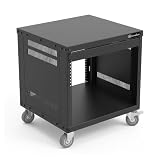
- 8U Universal 19-inch Equipment Rack Cabinet Case with Locking Wheels for AV, Networking, Computer Server, Home Theater Rackmount Gear
- Compatible with American 5mm and European 6mm rackmount standards. 5mm and 6mm Screws Packs are included.
- Open Front and Back,8U Rack Spacing Design with Protective-Vented Side Panels. Front and Real Rail Rack. No Door. Textured-Matte Black Finish. Holds AV/Networking Equipment up to 18-inches Deep.
- Front locking 3" Caster Wheels move easily on carpet. 1U Blank Panel is included. Dimensions Assembled: 20” x 18” x 20.5” with wheels. Weight Capacity is 330lbs with wheels and 440lbs without wheels.
- This Standard 19"8U Rack is Ideal for businesses, DJs, Sound Studios,home theaters with needs to organize Server/Network Equipment, Power Amplifiers, Microphones, DVD Players, Electronics etc. Compatible with ALL AxcessAbles rack drawers, shelves, rack accessories as well as all standard 19" rack accessories in the marketplace.
Rank #3

- WALL-MOUNT SERVER CABINET FOR IT & AV SETUPS – Designed for home labs, office IT networks, AV systems and security installations while helping maximize usable floor space in compact environments.
- 24-INCH DEEP NETWORK RACK – 24-Inch overall depth and 20-Inch usable mounting depth help buyers confirm fit for switches, routers, patch panels, NAS systems, PoE devices and AV components in structured cabling and office IT setups.
- HEAVY-DUTY WALL-MOUNT LOAD CAPACITY – Supports up to 133 lbs (60 kg) of installed equipment when securely mounted to a solid wall structure, helping protect network, AV, security and IT hardware in compact installations.
- LOCKING GLASS DOOR & VENTILATED ACCESS – Tempered glass front door with perforation pattern and removable side panels provide controlled access, equipment visibility and airflow support for enclosed 18U rack setups.
- ACTIVE COOLING & COMPLETE INSTALLATION KIT – Integrated top fan supports active ventilation and heat removal. Includes 2 fixed shelves, PDU, brush cable entry panels and complete mounting hardware for faster setup.
Product prices and availability are accurate as of the date/time indicated and are subject to change. Any price and availability information displayed on Amazon at the time of purchase will apply.

