
iTechGuides is reader-supported. When you buy through links on our site, we may earn an affiliate commission. As an Amazon Associate I earn from qualifying purchases. Learn more
Samsung Galaxy phones do not all expose battery health in the same way. The most reliable check is Samsung’s own diagnostic in the Samsung Members app, which reports the battery as Normal, Weak, or Bad. Some newer models also include a battery-information page in Settings, but its availability depends on the Galaxy model, One UI version, Android version, and region.
Check battery health with Samsung Members
Samsung Members is Samsung’s supported method for checking the condition of a Galaxy battery. The current menu path in many regions is:

- Open Samsung Members.
- Tap the Discover tab.
- Tap Diagnostics.
- Choose Phone diagnostics.
- Tap Battery status.
You can also select Test all from the phone diagnostics screen. This runs several hardware checks and includes the battery test in the results.
Recommended Free Tools
Samsung Members may use a slightly different layout depending on your country or app version. If you do not see Discover → Diagnostics, try this route instead:
#1 Best Overall

- Rechargeable Samsung Jet battery for the Jet 75* Series cordless stick vacuum with 60 minute run time**
- Compatible Models: VS20T7511T5/AA, VS20T7512N7/AA, VS20T7551P5/AA, VS20T7551R5/AA
- Stated run time applies to the minimum power level with a non-motorized tool attached
Samsung Members → Support → Get started under Phone diagnostics → Battery status
The available tests can also vary by Galaxy model. If Samsung Members is not installed, download it from the Galaxy Store or Google Play Store.
What the battery result means
| Result | Meaning | What to do |
|---|---|---|
| Normal | The diagnostic did not detect a battery problem. | Continue using the phone. Investigate unusual drain separately if battery life is still poor. |
| Weak | Battery efficiency may have declined because of age, usage, or environmental conditions. | Watch for short runtime, unexpected shutdowns, or worsening performance. Consider service if the symptoms continue. |
| Bad | Battery life has significantly degraded. | Contact Samsung Support or a Samsung Service Centre about battery replacement or repair. |
This diagnostic is a condition assessment. It does not necessarily provide an iPhone-style number such as “87% maximum capacity.” Samsung’s official instructions do not promise a remaining-capacity percentage on every Galaxy device.
What’s actually slowing this PC down?
Pick the symptom - the matching free tool is one click away.
Look for a battery-health page in Settings
Some newer Galaxy phones and software versions provide additional battery details directly in Settings. Check:
Rank #2

- High-capacity, long-lasting, high-rate lithium battery cells, capable of covering an entire large apartment on a single full charge.
- Charges quickly without damaging the battery or the main circuit.
- Low self-discharge batteries lose charge slowly when left unused, so they are not easily depleted even after long periods of inactivity, and can be used anytime without frequent recharging.
- Lightweight design with high-density battery cells, lighter weight, reduces robot load, and improves walking agility and climbing ability.
- Smooth and continuous power supply with stable discharge voltage ensures consistent suction and stable movement.
Settings → Battery → Battery information
Depending on the device, this page may show details such as:
- Battery capacity
- Battery health
- Charge-cycle information
- Manufacture date
- First-use date
If Battery information is missing, or the page shows capacity without a health percentage, that does not necessarily indicate a fault. Samsung makes these fields dependent on the model, One UI or Android version, and regional software configuration. There is no supported setting that forces unavailable fields to appear.
Do not confuse battery usage with battery health
To find out which apps are consuming power, open:
Settings → Battery → Battery usage
On older Galaxy software, use:
Settings → Device care → Battery → Battery usage
Free tools Windows power users keep installed
One-click scans. No signup required.
This screen reports recent power consumption, app activity, and estimated runtime. It can help identify an app, display setting, or network condition that is draining the phone, but it does not measure the battery’s remaining physical capacity.
For example, a game that uses 30% of the battery in a short session may explain rapid drain without proving that the battery is worn out. Conversely, a battery can be degraded even when no individual app appears unusually high in the usage list.
Signs that the battery may need service
Consider contacting Samsung if you notice one or more of these symptoms:
- Battery life has dropped sharply compared with its previous runtime.
- The phone shuts down unexpectedly while the indicator still shows charge.
- Games, the camera, or other demanding apps trigger slowdowns or shutdowns.
- The phone behaves unusually in cold weather, including sudden power loss.
- Charging problems continue after testing another compatible charger, cable, and outlet.
- Samsung Members reports Bad.
Cold temperatures can cause a temporary voltage drop, and an older battery is more likely to shut down under those conditions. A single poor battery day, however, is not enough to establish battery failure. Check the diagnostic result and look for a repeated pattern.
Should you use a secret code or battery app?
Codes such as *#0228# are often described online as a way to display battery health. Do not treat that menu as a definitive health measurement. It is a legacy service menu that may be blocked on newer Galaxy software, vary by model or carrier, and show raw readings that Samsung does not document as a remaining-capacity percentage.
Rank #4
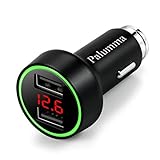
- Smart IC Technology - High-speed charging with 5V 2.4A of dedicated adaptive power output in each USB port, providing the maximum charging speed your device supports. Charging stops when battery is full.
- Safety On The Go - Soft LED lights help you locate the ports in darkness, also alarms flashing green lights for low voltage without being distracted on driving.
- Real-time Monitoring - Concise LCD screen displays vehical's operating voltage once the charger is pluged into cigarette lighter socket, and works as an ammeter by displaying the total current during the charging process.
- Rest Assured of Quality - Design with all-metal housing for long time usage, professional protection against short circuiting, over-heating, over-current and over-charging, Certified by CE, FCC, RoHS.
- Durable Reliability - Crafted of special fire proof material with anti-oxidative Zinc Alloy, compact design and all-metal housing facilliate a super solid structure, anti-static and fastens cooling frame. If by any chance our charger doesn't fit, a refund will be provided. You won't lose anything.
Third-party battery apps have a similar limitation. They may estimate capacity from charging behavior, but Android access and Samsung’s battery data vary by device. Their percentages are not guaranteed to match the battery’s actual physical capacity.
For a supported check, use Samsung Members first. If the result is Weak or Bad, or the phone has severe symptoms, back up your data and contact Samsung rather than relying on an unofficial reading.
Quick troubleshooting before replacing the battery
- Run the Battery status test in Samsung Members.
- Review Settings → Battery → Battery usage for an app with unusually high consumption.
- Install pending system and app updates.
- Test the phone without recently installed or suspicious apps.
- Try a known-good, compatible charger and cable if charging is unreliable.
- Arrange Samsung service if the diagnostic says Bad, the phone repeatedly shuts down, or the battery is swollen.
If the phone’s back cover or screen is lifting, stop charging and using the device and seek professional service. Do not press a swollen battery back into place or attempt to remove it yourself.
The Tool Desk
Outbyte Driver Updater FREEFix the driver behind crashes, sound loss and screen glitchesFind Drivers →Outbyte PC Repair FREEClear out junk files and repair common Windows errorsFree Scan →FAQ
How do I check battery health on a Samsung Galaxy phone?
Open Samsung Members, tap Discover, choose Diagnostics, tap Phone diagnostics, and select Battery status. In some versions, the path is Samsung Members → Support → Get started under Phone diagnostics → Battery status.
Best Value

- IMPORTANT: Device is Unlocked! Device may boot up to one Carrier 1st Time But Adapts Its Software to SIM Card Carrier, & Downloads that Carriers Apps. Insert SIM, Turn On, & Accept Prompt. Unlocked for freedom to choose your carrier. Compatible with both GSM & CDMA networks. The phone is unlocked to work with all GSM Carriers & CDMA Carriers Including AT&T, T-Mobile, Verizon, Sprint., Etc.
- 64GB ROM, 4GB RAM, Single SIM - Nano SIM, OS: Android 8.0 (Oreo), 10nm 64-bit Octa-Core Processor 2.8GHz + 1.7GHz
- Front Camera: 8MP, Rear camera: 12 MP, Digital zoom up to 8x, Selective Focus (background blur effect)
- 2G bands: GSM 850 / 900 / 1800 / 1900, 3G bands: HSDPA 850 / 900 / 1700(AWS) / 1900 / 2100, 4G bands: LTE band 1(2100), 2(1900), 3(1800), 4(1700/2100), 5(850), 7(2600), 8(900), 12(700), 13(700), 14(700), 17(700), 18(800), 19(800), 20(800), 25(1900), 26(850), 28(700), 29(700), 30(2300), 38(2600), 39(1900), 40(2300), 41(2500), 46, 66(1700/2100), 71(600)
- 5.8" Quad HD+ Super AMOLED (2960x1440), 570 ppi, Stereo speakers tuned by AKG
Does every Samsung Galaxy show a battery-health percentage?
No. Galaxy models and software versions differ. Samsung Members usually provides a condition label such as Normal, Weak, or Bad, while only some devices show additional battery information or a health percentage in Settings → Battery → Battery information.
What does Weak mean in Samsung Members?
Weak means battery efficiency may have declined because of age, usage, or environmental conditions. Check whether the phone also has short runtime or unexpected shutdowns, and contact Samsung if those problems continue.
Is Settings → Battery → Battery usage a battery-health test?
No. Battery usage shows which apps and features consumed power recently. It can help explain battery drain, but it does not measure the battery’s remaining physical capacity.
Do these 3 things before closing this tab:
1Scan for outdated or missing drivers - takes under a minute2Clear out junk files and repair common Windows errors3Fix the driver behind crashes, sound loss and screen glitchesThe Bottom Line
Use Samsung Members → Discover → Diagnostics → Phone diagnostics → Battery status for the most dependable Galaxy battery check. Treat Normal, Weak, and Bad as condition results rather than guaranteed percentage readings, and use Samsung service when the result is Bad or the phone is shutting down, swelling, or losing runtime dramatically.
Quick Recap
Product prices and availability are accurate as of the date/time indicated and are subject to change. Any price and availability information displayed on Amazon at the time of purchase will apply.

