
iTechGuides is reader-supported. When you buy through links on our site, we may earn an affiliate commission. As an Amazon Associate I earn from qualifying purchases. Learn more
The best GoPro LIT HERO setup depends on what you are filming and where the footage will be viewed. Start with 4K when detail and cropping matter, switch to 60/50 frames per second for smoother action or 2x slow motion, and use Battery Saver when recording time matters more than maximum resolution. Turn the built-in light off unless you need it, use QuikCapture between clips, keep the camera firmware current, and remember that stabilization is applied in the Quik app rather than shown on the camera during playback.
Quick settings for common LIT HERO situations
There is no single best preset for every scene. Choose the mode that matches your destination, motion, available light and expected recording time.
| Situation | Starting setting | Why it fits | Main trade-off |
|---|---|---|---|
| Travel, scenery and clips that may be cropped | 4K, 4:3, 30/25 fps | The taller frame uses the full 165-degree lens and leaves room to crop later. | Larger files and more processing than Battery Saver modes. |
| Phone or television playback in a standard widescreen frame | 4K, 16:9, 30/25 fps | 16:9 fills common screens without reframing. | You give up some of the vertical image area available in 4:3. |
| Fast movement or action | 4K, 60/50 fps | Twice the frame rate produces smoother motion and permits 2x slow-motion playback. | Higher frame rates use more storage and can make the camera heat faster. |
| Long recording where some detail can be sacrificed | 1080p30/25 Battery Saver, or a firmware-added Battery Saver mode | Lower resolution extends recording and reduces file size. | Less detail and less flexibility for cropping. |
| Slow-motion clips with smaller files | 1080p60/50 Battery Saver | Provides the 60/50-fps motion benefit while reducing resolution. | Fine detail is lower than 4K. |
| Night or close subjects needing extra illumination | Use the light at the lowest effective level | Low, medium and high settings let you balance visibility and battery use. | The light shares the camera battery and shortens runtime. |
The 30/25 and 60/50 pairs correspond to NTSC (60 Hz) and PAL (50 Hz) regions. Select the rate that matches the electrical-video standard commonly used where you shoot to reduce the risk of flicker under artificial lighting.
The Tool Desk
Outbyte PC Repair FREEClear out junk files and repair common Windows errorsFree Scan →Outbyte Driver Updater FREEFix the driver behind crashes, sound loss and screen glitchesFind Drivers →Choose 4:3 or 16:9 before you record
4:3 for point-of-view footage and flexible reframing
LIT HERO records 4:3 video in 4K or 1440p. The manual describes this as a taller image that is useful for point-of-view shots. The product information states that 4:3 uses the full 165-degree lens, giving you extra image above and below the conventional widescreen area.
#1 Best Overall

- High Dynamic Range Video + Photo: HERO12 Black takes its best-in-class image quality to the next level with HDR for both videos (5.3K and 4K) and photos. Great in environments with both shadows and bright light, HDR captures the subtle details of the scene that might typically blend into the darkness of shadows or disappear in the bright spots of your shot. The result is dynamic footage with true-to-life color and precision.
- Unbelieveable Image Quality: With 5.3K video that gives you 91% more resolution than 4K and an incredible 665% more than 1080p, HERO12 Black captures the action with crisp detail and cinematic image quality with High Dynamic Range (HDR) while also taking 27MP photos. You can also grab stunning photos up to 24.7MP of your favorite shots from your videos using the GoPro Quik app.
- Emmy Award- Winning HyperSmooth 6.0 Stabilization: HyperSmooth continues to set the bar for insanely smooth footage and has the hardware to back it up—a 2021 Emmy for In-Camera Sensor and Software Stabilization. HERO12 Black makes it even better by maximizing HyperSmooth AutoBoost performance with more stabilization while still delivering less image cropping. Bike, skate, ski, chase your kids through the park or get awesome pet POV shots—even the shakiest footage comes out silky smooth.
- Rugged + Waterproof to 33ft (10m): Completely waterproof and as tough as ever, HERO12 Black is ready to capture the fun on any adventure. Its legendary durability can take a beating and keep going, whether you’re ripping through mud, snow or water (down to 33ft/10m). A water-repelling lens cover even helps eliminate lens flare and other artifacts to make your photos and videos even more stunning.
- What's Included: HERO12 Black, Enduro Rechargeable Battery, Curved Adhesive Mount, Mounting Buckle + Thumb Screw, USB-C Cable
That extra height is valuable when the camera position may change or when you expect to create several versions of a clip. You can crop the frame vertically for a particular platform, or use SuperView in Quik to present the 4:3 capture in a 16:9 layout. The price is a larger frame to manage and, depending on the selected resolution, more storage than a lower-resolution mode.
16:9 for immediate full-screen playback
The 16:9 Video mode records 4K or 1080p. It is the straightforward choice when the final clip is intended for a phone or television that already uses widescreen. You avoid a later crop, but you cannot recover the additional top and bottom image area that a 4:3 capture retained.
Decide based on the destination rather than treating one ratio as universally superior. If you are uncertain, 4:3 is the safer capture format when reframing is likely; use 16:9 when a ready-to-watch widescreen file is the priority.
Set frame rate deliberately
30/25 fps: efficient normal-speed recording
The LIT HERO manual lists 4K30/25 and 1080p30/25 Battery Saver in Video mode. These lower frame rates are appropriate for ordinary walking, talking, scenery and other clips that will play at normal speed. They generally require less storage and produce less heat than a higher frame rate at the same resolution.
60/50 fps: smoother motion and 2x slow motion
Slo-Mo mode lists 4K60/50 and 1080p60/50 Battery Saver. GoPro says 60/50 fps captures smoother motion than 30/25 fps and can be played at regular speed or slowed to 2x. Choose it for cycling, running, sports, pets, vehicles and camera moves where motion blur or uneven movement would be distracting.
Higher frame rates increase the data and processing load. In a hot environment they also make the camera heat faster, so use them when the motion benefit is visible rather than leaving 60/50 enabled for every clip.
Rank #2
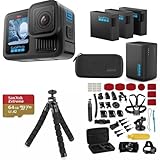
- INCLUDES – GoPro HERO13 Black Camera | 3 High-Capacity 1900mAh Enduro Batteries | Dual-Battery Charger with USB Input | 64GB SanDisk microSD Card | Adhesive Helmet Mount Kit | Camera Case | GoPro 1-Year Limited Warranty | Bundle Includes 47-Piece Adventure Accessory Kit | Extra Enduro batteries and dual charger help extend recording time for travel, sports, vacations, and all-day adventures with less downtime and uninterrupted shooting
- PRO-GRADE VIDEO & ADVANCED STABILIZATION – Capture stunning 27MP photos and ultra-detailed 5.3K60 video with 91% more resolution than 4K, plus 4K120 and 2.7K240 slow motion for smooth cinematic playback | HDR/HLG recording, 10-Bit Color & GP-Log support deliver rich color and enhanced dynamic range | HyperSmooth 6.0 stabilization with Horizon Lock keeps footage steady and level during action scenes | Compatible with HB-Series auto-detect lenses | Front & rear LCD screens with Bluetooth audio support
- EXTENDED POWER & FAST CHARGING – Includes 3 high-capacity 1900mAh Enduro Batteries and Dual-Battery Charger for longer shooting sessions and reliable all-day power | With each battery Capture over 1.5 hours of continuous 5.3K30 or 4K30 recording, plus over 2.5 hours at 1080p30 | Dual charger powers 2 batteries simultaneously for fast, efficient charging | Dual LED indicators and battery quick-check display charging status even when unplugged | Enduro batteries deliver enhanced cold-weather performance down to 14°F (-10°C)
- RUGGED, WATERPROOF & ADVENTURE READY – Built tough for travel, sports, mud, snow, and underwater adventures with a durable waterproof body up to 33ft (10m) | Lightweight portable design mounts easily to helmets, bikes, chest harnesses, vehicles, and gear for immersive first-person action recording almost anywhere | HyperSmooth stabilization helps capture smooth footage during high-action activities
- CREATOR-READY & EXPANDABLE SYSTEM – Front and rear LCD screens simplify vlogging, selfies, live streaming, and social media content creation | Compatible with GoPro mounts, HB-Series lenses, wireless audio accessories, and creative tools for POV recording, cinematic video, vertical capture, and multi-angle shooting flexibility
Additional 120/100-fps option after the 2026 firmware update
Firmware v2.10.00, released April 14, 2026, adds 1080p120/100 in 16:9 Slo-Mo. This provides a higher-speed capture option for more pronounced slow motion, but it also increases storage and heat demands. The exact choices shown on a camera depend on its installed firmware, so update before deciding that a mode is missing.
Recommended Free Tools
Use Battery Saver when runtime and file size matter
GoPro’s manual describes Battery Saver as reducing video resolution to maximize battery life. The lower resolution also creates smaller files, which can be useful when storage, transfer time or editing capacity is limited. The trade-off is visible detail and less freedom to crop compared with 4K.
In the manual’s original mode table, Video includes 1080p30/25 Battery Saver, while Slo-Mo includes 1080p60/50 Battery Saver. Firmware v2.10.00 adds two further choices: 1440p30/25 4:3 Video Battery Saver and 1080p60/50 SuperView Battery Saver. It also introduces lower-power preview in selected modes.
Because the mode table in a manual can predate a later firmware release, check the camera after updating rather than relying only on printed documentation. GoPro’s update process uses the Quik app over Wi-Fi; the update information lists LIT HERO v2.10.00 as the latest release on April 14, 2026. Firmware availability can change, so check the current update screen when you set up the camera.
When to accept the resolution trade
- Choose Battery Saver for long continuous recordings, time away from chargers or clips that will be viewed mainly on a phone.
- Stay with 4K when you expect to crop, stabilize and reframe, or when fine texture and distant detail are important.
- Use 1440p30/25 4:3 Battery Saver when you want the taller composition but need smaller files, provided your updated camera exposes that mode.
- Use 1080p60/50 SuperView Battery Saver when you need a wide, smooth action view and runtime is more important than 4K detail.
Control the built-in light instead of leaving it on
The integrated light has Low, Medium, High and Off settings. It uses the same battery as the camera, so enabling it reduces recording time. Use the lowest level that makes the subject visible; leave it Off outdoors or whenever ambient light is sufficient.
Crashes, No Sound, or Screen Glitches?
Random freezes, missing sound and display glitches usually trace back to one bad driver. Find and replace yours safely.Free scan · under a minutePC Slower Than It Used to Be?
A free scan shows the junk files, broken settings and background clutter dragging Windows down - then fixes them in one click.Free scan · Windows 10 & 11GoPro’s current LIT HERO product FAQ reports typically over 100 minutes at 4K60 with the light Off and over 75 minutes with the light on High. Those are manufacturer figures from controlled-environment testing, not a guarantee for every temperature, card, battery condition, clip length or camera position. The difference illustrates why High should be reserved for situations that genuinely need it.
Rank #3

- The Perfect Entry-Level GoPro: Simplified controls let you easily tap and swipe between video, photo and slo-mo modes
- Rugged + Waterproof to 16ft (5m): Completely waterproof and built with legendary GoPro durability, LIT HERO is ready to capture the fun whether you’re ripping through mud, snow or water (down to 16ft/5m) or just exploring nature or a new city.
- Built-in Light: LIT HERO’s built-in light can help you illuminate scenes that need a little more light or capture shots in total darkness. It features 3 brightness settings and even works when your camera is off or when it’s plugged in and charging.
- Stunning Image Quality: LIT HERO captures the action in ultra HD 4K video while bumping the frame rate up to 60 frames per second for more fluid motion and the ability to play back video in 2x slow motion. You can also take 12MP photos and grab photos up to 11MP from your videos using the GoPro Quik app.
- What’s Included: LIT HERO Camera, Light Diffuser, Curved Adhesive Mount, Mounting Buckle + Thumb Screw, USB-C Cable
If the subject looks harshly lit, lowering the light can improve the image as well as preserve power. A diffuser is mentioned in the product FAQ as a way to make the light more even, but the available documentation does not establish its included contents, separate availability or price.
Use QuikCapture between clips
QuikCapture prevents the camera from idling while you move between shots. With LIT HERO powered off, press the shutter button to start recording. Press the shutter again to stop; the camera then turns off. The manual describes this behavior as a way to maximize battery life because the camera is on only while it is recording.
- Turn the camera completely off rather than leaving it in an active preview state.
- Press the shutter button once when you are ready to capture.
- Press the shutter button again as soon as the clip is complete.
- Confirm that recording has stopped before putting the camera away or moving to the next location.
QuikCapture is most useful for intermittent shooting, such as short trail, travel or event clips. For a single long take, it does not replace choosing an efficient resolution, managing heat and carrying adequate storage.
Do these 3 things before closing this tab:
1Fix the driver behind crashes, sound loss and screen glitches2Clear out junk files and repair common Windows errors3Scan for outdated or missing drivers - takes under a minuteUnderstand how LIT HERO stabilization works
According to the manual, LIT HERO footage is automatically stabilized in the Quik app. The camera does not show the stabilized result in its own playback, and the same stabilized view is not displayed by third-party apps or the GoPro media library. Do not judge stabilization by watching the unprocessed clip on the camera.
A reliable stabilization workflow
- Record with the composition and frame rate appropriate for the shot; stabilization is not a reason to select a maximum setting indiscriminately.
- Import the clip into Quik and allow the app to process the footage.
- Review the stabilized version in Quik before exporting or sharing.
- If another editor is required, export the processed result from Quik first, then continue editing that exported file.
If a clip appears unstabilized in camera playback, that is expected behavior rather than evidence that the recording failed.
Independent reader supportYour contribution helps us test, update, and keep practical guides available for everyone.Manage heat, temperature and battery drain
The manual gives an operating ambient range of -10°C to 35°C. Higher temperatures increase power use and drain the battery faster. High resolution and high frame rate also heat the camera more quickly, especially when the surrounding air is hot.
Rank #4

- What's Included: Hero12 Black Camera, enduro battery, usb-c charging cable, curved adhesive mount, mounting buckle, and thumb screw
- Rugged & Waterproof to 33ft (10m): HERO12 Black is built to withstand extreme conditions and is fully waterproof, making it the ultimate adventure companion in any environment.
- 2x Longer Runtime: Achieve up to 70 minutes of continuous recording at 5.3K60 with dramatically improved battery efficiency and the powerful 1720mAh Enduro battery.
- Unbelievable 5.3K Video & 27MP Photos: Capture your adventures in stunning detail with 91% more resolution than 4K and 665% more than 1080p, plus grab 24.7MP photos from your videos using the GoPro Quik app.
- High Dynamic Range (HDR) Video & Photo: HDR captures more detail in both bright and shadowy scenes, ensuring true-to-life colors and precision in every shot.
Hot-weather adjustments
- Move to 30/25 fps when smooth 60/50-fps motion is not necessary.
- Use a Battery Saver resolution for long takes.
- Turn the built-in light off or lower it when ambient light allows.
- Break a long recording into shorter clips when the shot permits it, using QuikCapture to power down between clips.
- Keep the camera within the -10°C to 35°C operating range and avoid enclosing it where heat cannot escape.
These changes address both runtime and reliability. A camera that is already hot has less remaining thermal headroom, so lowering resolution or frame rate before recording is more effective than waiting for a warning or shutdown.
A step-by-step setup for a new shooting day
- Update first. Connect the camera to Quik over Wi-Fi and install the current LIT HERO firmware. After the April 14, 2026 v2.10.00 release, verify whether the new Battery Saver, SuperView and 120/100-fps options appear.
- Choose the frame shape. Select 4:3 if you want the full 165-degree view and future cropping; select 16:9 for immediate widescreen playback.
- Choose resolution. Select 4K for detail and reframing. Select a Battery Saver option when recording duration, storage or transfer size has priority.
- Choose frame rate. Use 30/25 fps for normal motion, 60/50 fps for smoother action or 2x playback, and 120/100 fps when the updated 16:9 Slo-Mo mode is appropriate for stronger slow motion.
- Set the light. Start at Off outdoors. If illumination is necessary, begin at Low and raise it only when the subject still needs more light.
- Check conditions. In warm weather, favor a lower-power combination and avoid leaving the camera powered between clips.
- Capture with QuikCapture. Start and stop each clip with the shutter so the camera is not consuming power while you wait.
- Process stabilization in Quik. Review and export the stabilized version there rather than judging the camera’s playback screen.
Fix common LIT HERO setting problems
A mode or resolution is missing
Check the firmware version and update through Quik. The April 2026 release adds modes that may not appear on a camera using older software. Restart the camera after updating and review both Video and Slo-Mo mode lists.
The battery ends sooner than expected
Check whether the light is on High, whether you are recording at 4K60 or another high-load combination, and whether the camera is operating in heat. Turn the light off, select Battery Saver, lower the frame rate when practical and use QuikCapture to eliminate idle time. GoPro’s 100-plus-minute and 75-plus-minute figures are controlled tests, so real-world results will vary.
Footage looks too wide, too tall or poorly framed
Confirm the aspect ratio before recording. Use 4:3 for the full tall capture and later cropping; use 16:9 when the final destination is standard widescreen. If a 4:3 clip must become widescreen, reframe it in Quik with SuperView.
The camera playback looks shaky
Open the clip in Quik. The manual says stabilization is applied there, not during playback on the camera, in third-party apps or in the GoPro media library.
Quick wins for a faster PC:
Fix the driver behind crashes, sound loss and screen glitchesFind Drivers →Repair Windows errors before they cause bigger problemsFix Now →Which setting should you leave enabled?
For a mixed day, a practical baseline is 4K30/25 in the aspect ratio that matches your destination, with the light Off and QuikCapture used for separate clips. Change only the variable that solves the immediate problem: move to 60/50 fps for action, Battery Saver for runtime, 4:3 for reframing, 16:9 for direct widescreen delivery, or a low light level when the subject cannot be seen clearly. This approach preserves quality where it matters without spending battery and storage on settings that the shot does not need.
Quick Recap
Product prices and availability are accurate as of the date/time indicated and are subject to change. Any price and availability information displayed on Amazon at the time of purchase will apply.

