
Outdated Drivers Are Slowing You Down
One free scan finds every outdated or missing driver and matches the right update for your exact hardware.Free scan · exact hardware matchWindows Errors? Fix Them Before They Spread
Repair common Windows errors and clear accumulated junk for a smoother, more stable PC - no reinstall needed.Free scan · no reinstalliTechGuides is reader-supported. When you buy through links on our site, we may earn an affiliate commission. As an Amazon Associate I earn from qualifying purchases. Learn more
If GarageBand for Mac shows a feedback warning with no audible feedback, select the audio track’s Monitor control and choose On instead of On with Feedback Protection. Apple recommends this workaround for some USB microphones with internal limiting or gain control; it is not a general recommendation for every microphone or every warning. Apple’s guidance identifies the two Monitor options but does not specify a universal click-by-click path for every GarageBand version.
How to turn off Feedback Protection in GarageBand for Mac
- Select the audio track whose input you are monitoring.
- Locate that track’s Monitor control or Monitor pop-up in your installed version of GarageBand.
- If you are getting a warning despite no actual feedback, set Monitor to On, not On with Feedback Protection. Apple suggests this for some USB microphones with internal limiting or gain control. Apple Support does not provide a menu path guaranteed to match every version, so use the Monitor control shown for your selected track.
- Listen cautiously. If feedback occurs, stop monitoring or recording and correct the setup before continuing.
What changes when you choose On
Feedback Protection is a monitoring safeguard, not a noise-removal effect. GarageBand’s legacy recording manual describes On with Feedback Protection as a mode that automatically turns off monitoring if feedback from the input occurs. Choosing On enables monitoring without that protection mode, so do not rely on the automatic safeguard. The manual is older material hosted by HelpNox, so treat its description as context rather than current, version-specific interface documentation. HelpNox recording manual
| Choice or setup | Monitoring behavior | Feedback considerations |
|---|---|---|
| On with Feedback Protection | Input monitoring is enabled with the protection mode; the legacy manual says monitoring turns off if feedback occurs. | Provides the automatic response described in the manual. |
| On | Input monitoring is enabled without Feedback Protection. | Apple suggests it for the specific false-warning case involving some USB microphones. |
| Monitoring off | You do not hear the live input through GarageBand. | Useful if live monitoring is not needed; it avoids the live monitoring path. |
| Speakers while monitoring | Speakers play output while the microphone is active. | The microphone may pick up speaker output and create a feedback loop. |
| Headphones while monitoring | You hear output without playing it through room speakers. | Reduces the speaker-to-microphone feedback route. |
Reduce the chance of real feedback
Feedback can happen when a microphone picks up audio coming from speakers. To reduce that risk while monitoring, use headphones, lower speaker or master volume, and point the microphone away from speakers where practical. These steps reduce risk; they cannot guarantee that feedback will not occur. GarageBand recording guidance hosted by HelpNox
Do these 3 things before closing this tab:
1Repair Windows errors before they cause bigger problems2Fix the driver behind crashes, sound loss and screen glitches3Clear out junk files and repair common Windows errors- If feedback starts, stop monitoring or recording and address the acoustic setup before resuming.
- Do not treat the On setting as protection against a genuine feedback loop.
- Apple’s article describes some USB microphones with internal limiting or gain control; it does not identify specific models or say that all USB microphones trigger false warnings. Apple Support
Do not confuse Feedback Protection with other GarageBand controls
Noise Gate on Mac
The Noise Gate is a separate control for reducing low-level input noise in quiet passages, including noise made more noticeable by effects such as distortion, overdrive, or amp simulators. It is not the Feedback Protection toggle. Apple: Preventing noise from effects in GarageBand
#1 Best Overall

- Music Production and Beat Maker Essential -USB powered MIDI controller with 25 mini MIDI keyboard velocity-sensitive keys for studio production, virtual synthesizer control and beat production
- Total Control of your Production - Innovative 4-way thumbstick for dynamic pitch and modulation control, plus a built-in arpeggiator with adjustable resolution, range and modes
- Native Kontrol Standard (NKS) Integration - Akai Professional and Native Instruments have partnered to bring NKS support to the MPK Controller series, get ready to Kontrol straight from your MPK
- Choose Your Exclusive Complimentary NKS Bundle - Browse and control Native Instruments presets and sound libraries; select one of three curated Komplete 15 Select bundles: Beats, Band, or Electronic
- The MPC Experience - 8 backlit velocity-sensitive MPC-style MIDI beat pads with Note Repeat and Full Level for programming drums, triggering samples and controlling virtual synthesizer / DAW controls
Monitor on iPhone
GarageBand for iPhone has an Audio Recorder Monitor button for an external microphone or audio device, along with a separate Noise Gate control. Those mobile controls are not the Mac procedure for changing Feedback Protection. Apple: Use the Audio Recorder in GarageBand for iPhone
Crosstalk Protection on iPad
GarageBand for iPad documents Crosstalk Protection for a guitar or bass connected through the headphone port. Apple notes that it can affect the monitored sound and advises lowering iPad volume before switching it off. This is distinct from the Mac USB-microphone Feedback Protection warning. GarageBand User Guide for iPad
Rank #2

- Mini Keys, Major Performance - 25-key MIDI controller keyboard with responsive keys to play with feel and dynamics; Enjoy expressive songwriting, composing, jamming, playing melodies, bass lines, and more
- Full Range Experience - Play every note with ease; Use the dedicated octave up and down buttons to transpose the range of your software instruments plus a sustain button for expressive performances
- Feature Packed - Use the built-in arpeggiator and clock for creative control of any of your sound sources like software instruments, synthesizers, or USB-enabled modular gear, all by one USB cable
- Customized Production - With 8 programmable preset slots you can instantly recall your mappings for DAWs, virtual instruments, and more; Create, edit, and manage all your presets from the computer
- Versatile Performance - The USB Studio MIDI controller is perfect for your songwriting, beat-making, and DJ remixes whenever you're inspired; The sleek design fits alongside your studio equipment
Mic Mode on Mac
If recorded audio sounds different than expected, check that Mac Mic Mode is set to Standard. Apple says other Mic Mode settings are intended for calls and change audio input; this is an adjacent audio check, not a Feedback Protection setting. Apple: Check Mic Mode on Mac when recording audio in Logic Pro or GarageBand
Quick Recap
Best Value

- Full Creative Control - A dynamic 37-Key MPK Mini keybed for 3 full octaves of melodic and harmonic performance; Easily connect to your DAW or studio equipment with the USB-powered MIDI Controller
- Advanced Connectivity - Connect to different sound sources with CV/Gate and MIDI I/O; Control modular gear, sound modules, synthesizers, and more to bring new sound sources into your music production
- Native Kontrol Standard (NKS) Integration - Akai Professional and Native Instruments have partnered to bring NKS support to the MPK Controller series, get ready to Kontrol straight from your MPK
- Choose Your Exclusive Complimentary NKS Bundle - Browse and control Native Instruments presets and sound libraries; select one of three curated Komplete 15 Select bundles: Beats, Band, or Electronic
- Record and Compose Without a Computer - Connect to your production station and use the built-in 64-step sequencer featuring one track for drums and one for melodies or chords, with up to 8 notes each
Rank #4

- 【Powerful keyboard】 Songwriters and Beat Maker Essential - USB powered MIDI controller with 25 mini MIDI keyboard velocity-sensitive keys for studio production, virtual synthesizer control and beat production.
- 【Wireless keyboard】It's very compact and portable, and you can connect it wirelessly to your device with Bluetooth, built-in 2,000 mAh battery can work for about 16 hours, you can easily slip this ultra-portable MIDI keyboard into almost any bag and take it with you to the studio, cafe or hotel to compose music.
- 【Music Production】 25 velocity-sensitive keys, 8 RGB backlit velocity-sensitive pads, 8 assignable rotary enconders, 2 Capactive touch stripes pitch bend to all your music studio plugins for mixing, tweaking synth controls and more.
- 【Smart keyboard】Compatible with Windows, Mac OS, Android and iOS,The K5 compatible with all digital audio worksstation, Ableton live,Fl Studio,Cubase,Logic Pro X,Bitwig,Reason,Studio One,GarageBand(iOS) etc.,
- 【Scale feature】Integrate the smart chord and smart sound function, users can choose quickly through the keys. very suitable for setting this function during performance and practice.
Rank #3
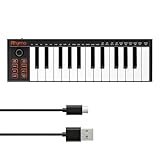
- 【Ultra-Portable USB-C MIDI Controller】Rhymo 25-key portable MIDI keyboard is slim, compact, and powered directly via USB-C from your computer or tablet. No batteries or adapters required for a truly hassle-free, on-the-go music production setup.
- 【Complete Performance & Creative Controls】Features X-Y joystick for pitch bend & modulation, arpeggiator with latch & multiple modes, loop function, tap tempo, and transpose control. Octave buttons expand up to 10-octave range for full melodic flexibility.
- 【Professional Playability Features】Equipped with Full Level mode, 16 user-selectable MIDI channels, and a 6.35mm sustain pedal interface. The velocity-sensitive keyboard delivers dynamic, expressive playing for both beginners and experienced producers.
- 【Universal DAW & System Compatibility】Class-compliant USB-MIDI and Bluetooth MIDI work with Mac, PC, iOS, and all major DAWs including GarageBand, FL Studio, Ableton Live, Logic Pro, Cubase, and more. Plug & play with no extra drivers required.
- 【Versatile I/O & Easy Operation】Includes USB-C port, 3.5mm TRS MIDI output for external synths, and clear LED indicator lights. User-friendly button layout for ARP, loop, tempo, octave, and transpose for fast, intuitive music creation.
Product prices and availability are accurate as of the date/time indicated and are subject to change. Any price and availability information displayed on Amazon at the time of purchase will apply.
Independent reader supportYour contribution helps us test, update, and keep practical guides available for everyone.
