
Free tools Windows power users keep installed
One-click scans. No signup required.
iTechGuides is reader-supported. When you buy through links on our site, we may earn an affiliate commission. As an Amazon Associate I earn from qualifying purchases. Learn more
Short answer: an official Arcade Archives release of Exzisus is not confirmed by the available HAMSTER catalog search, so no edition-specific button map, remapping path, supported console list, or measured input-lag figure can be stated as fact. The documented 1987 Taito arcade version used an 8-way joystick and two action buttons per player. If you own a listing that you can verify, use that edition’s manual and settings screen, then reduce perceived delay with a display’s Game Mode, minimal video processing, and—where supported—a direct wired controller connection.
What is actually known about Exzisus controls
Exzisus is documented as a Taito arcade game from 1987. The strongest available control evidence comes from MAME’s input definitions and a specialist historical listing: each player uses an 8-way joystick and two buttons. Those are controls for the original arcade hardware, not a verified mapping for a modern console edition.
A search of HAMSTER’s official Arcade Archives catalog did not identify an Exzisus entry. That result is not proof that no release exists; catalog coverage, regional stores, delistings, and search indexing can change. Treat the Arcade Archives title, platform, and current availability as unresolved until you can match an official listing to your copy.
The Tool Desk
Outbyte PC Repair FREERepair Windows errors before they cause bigger problemsFix Now →Outbyte Driver Updater FREEFix the driver behind crashes, sound loss and screen glitchesFind Drivers →- Verified historical input: 8-way joystick plus two buttons per player.
- Historical release: Taito arcade game, 1987.
- Not verified: a specific Arcade Archives product, console, modern button labels, remapping menu, controller requirements, or input-lag measurement.
Confirm that your copy is the game you think it is
Before changing controls or troubleshooting delay, establish the exact product. This prevents you from applying settings from another Arcade Archives title to a game with different options.
#1 Best Overall

- Compatible with Switch/Switch 2, PS4, PS3, Xbox Series S/X, Xbox One, Xbox 360, PC Windows, macOS, Steam Deck, Android.
- Compatible with Sanwa Denshi buttons and joystick that is perfect for customization
- Supports the XINPUT and DINPUT when being used on PC
- Supports the Turbo functions with different speed settings.
- F300 is compatible with PS5 by MAYFLASH Magic-S Ultimate adapter or MagicBoots-S5 Converter.
- Open the official HAMSTER Arcade Archives catalog or the first-party store for your console.
- Search for Exzisus and record the exact title spelling, publisher, platform, region, and product identifier shown by the store.
- Compare that information with the title on your console’s home screen and in the game’s information panel.
- Look for a release-specific manual, support page, or in-game help screen. Do not rely on a menu path copied from another Arcade Archives game.
- If no matching official listing appears, describe your software as an emulator, compilation, re-release, or other version rather than assuming it is an Arcade Archives edition.
Keep a screenshot of the store page or product information. If you later ask the platform maker or publisher for support, the exact edition and region are the details they need.
Use the original arcade layout as your starting point
Joystick
The original machine is described as using an 8-way joystick. That means the game recognizes the four cardinal directions and the four diagonals. A modern analog stick may work as a directional input, but its dead-zone, gate shape, and diagonal behavior depend on the hardware and software. Do not assume that a contemporary stick will feel identical to an arcade joystick.
Two action buttons
Each player is documented with two buttons. The historical sources establish the number of buttons, not the labels used by a modern controller or the in-game function assigned to each one. A current port might display labels such as A/B, Cross/Circle, or other platform-specific names; those labels are not evidence of the original assignment.
Two-player considerations
The MAME definitions identify player inputs, while the historical description identifies two buttons per player. Whether a modern release supports simultaneous two-player play, local multiplayer, or a particular controller arrangement is not established here. Verify those features in the actual edition rather than inferring them from the arcade specification.
Rank #2

- 【8BitDo Ultimate Software】Customize button mapping and create macros with any button combination. It even has 2 dedicated macro buttons(P1/P2). Create controller profiles and switch between them at any time.
- 【Dynamic Button Layout】When you switch between Switch and PC (X-Input) mode, Arcade Stick's dynamic button layout instantly changes its visual layout.
- 【3 Ways to Connect】Bluetooth, 2.4g and wired USB-C. The included 2.4g receiver has a special hidden compartment to store it safely.
- 【Compatibility】Compatible with Switch, Windows.
- 【Ultra-moddable】You can swap out 30mm/24mm arcade buttons. Arcade Stick is even designed with a universal joystick mounting plate. It supports virtually every arcade stick ever made such as Sanwa JLF.
Set up controls on a verified release
Because the Exzisus edition itself is unverified, the safe procedure is to inspect the release you own and use only options it exposes. The following sequence avoids making unsupported assumptions about menu names.
- Start with the platform controller connected before launching. If the platform supports both wireless and wired operation, begin with the connection you intend to test and note which controller the system identifies as Player 1.
- Open the game’s own settings or options screen. Look for entries named Controls, Button Configuration, Controller, Game Settings, or similar. The exact wording and location vary by title and platform.
- Check whether remapping exists. If a button-assignment screen is present, map the two action functions to the buttons that are easiest for you to reach without moving your thumb from the directional control. Save the configuration and return to the game.
- Test every direction. Move up, down, left, right, and each diagonal. An 8-way game can feel wrong if the controller’s diagonal threshold is too strict or if an analog stick’s dead-zone is excessive.
- Test both action buttons separately. Press each once, then in quick succession. Confirm that the game recognizes both inputs and that no button is being held continuously by a faulty switch or aggressive turbo setting.
- Check pause and system controls separately. Platform-level buttons can be handled by the console rather than the game. Do not remap a system button expecting it to alter the arcade controls unless the platform documentation says it does.
- Save, quit, and relaunch. Some games apply a remap immediately; others require an explicit confirmation or retain settings only after returning to the main menu. A relaunch confirms whether the change persists.
If the release has no remapping screen, use the default mapping shown by its manual or on-screen instructions. Do not treat a third-party mapping for another title as an Exzisus control reference.
How to reduce input lag without claiming a game-specific result
No release-specific latency test or millisecond figure is available for Exzisus. The adjustments below are general display and connection practices, not measured Exzisus fixes. Change one item at a time so you can identify what improves your setup.
1. Turn on the display’s Game Mode
On a television or monitor, enable the mode intended for interactive play. Game Mode normally reduces the amount of image processing applied before the picture appears. The label and menu location differ by display, so use the display’s own manual if the option is not obvious.
Rank #3

- New Style DIY Arcade Kit, LED arace game DIY MAME parts DIY Accessories.
- 100% Zero Delay Encoder and USB work perfectly all Windows systems.
- 2 Player Arcade MAME DIY Accessories, DIY Your Own Arcade Game Console.
- Use the highest quality materials! Made of high temperature resistant plastic.
- Perfect LED Kit Arcade PC Games DIY Choice! Easy to install!
2. Disable unnecessary video processing
Turn off, or set to the least processed option, features that add analysis between the console signal and the panel. Examples include motion interpolation and other enhancement layers. This is a general setup recommendation; the effect depends on the display, input, resolution, and refresh behavior.
3. Prefer a direct controller connection when available
If the platform supports a wired controller connection, test it directly against the console rather than through an unverified hub, adapter, or intermediary. Wired operation is a troubleshooting baseline, not proof that wireless play is unsuitable. If the wired test changes nothing, the delay may be elsewhere in the chain.
4. Establish a baseline before changing settings
Use the same game scene, controller, display input, and television picture preset for each comparison. Write down whether the symptom is late button response, missed directions, inconsistent diagonals, or a delayed picture. These are different problems and can have different causes.
Do these 3 things before closing this tab:
1Repair Windows errors before they cause bigger problems2Scan for outdated or missing drivers - takes under a minute3Clear out junk files and repair common Windows errors5. Test the simplest signal path
Connect the console to the display using the normal direct input path for your setup, bypassing extra processing devices while testing. If the delay disappears, add devices back one at a time. This identifies where processing is being introduced without claiming that any particular accessory is incompatible.
Rank #4

- Quality Components: Excellent Control USB Encoder with high quality 8 way joystick and LED buttons featuring good lighting effects for enhanced gaming experience
- Advanced Functionality: DC 5V Arcade Illuminated Pushbutton with 8 ways joystick using microswitch with gilded contact leg, excellent electronic performance, long life, reliability tested to 1,000,000 cycles
- Mounting Specifications: Joystick requires 24mm mounting hole while large buttons require 30mm mounting holes for proper installation
- Package Details: Compact package dimensions of 175 x 95 x 115mm with each button and joystick individually packaged and includes 1 year warranty for quality assurance
- Wide Compatibility: LED Kit supports Windows Arcade Games, PC Games, DIY Projects, Arcade Raspberry Pi for RetroPie system and MAME applications
Distinguish input lag from control or display problems
| What you notice | Likely category to investigate | First check |
|---|---|---|
| Every button feels late by a similar amount | Display processing, connection path, or platform timing | Enable Game Mode, remove extra processing, and repeat with a direct wired controller if supported. |
| Only diagonals fail or feel hesitant | Directional mapping, analog dead-zone, or 8-way interpretation | Test all eight directions and inspect any controller calibration or remapping option the release actually provides. |
| One action never registers | Wrong mapping, a defective button, or a blocked input | Verify the two-button assignment and test the controller in another system menu or game. |
| Inputs repeat without another press | Turbo, a stuck switch, or a held platform input | Disable turbo features and reconnect the controller; then test each action button independently. |
| The picture appears late but the character responds promptly | Display refresh or image-processing perception | Compare with Game Mode enabled and processing reduced. |
| Delay changes between sessions | Different display preset, wireless state, or software path | Record the controller connection and display preset each time you test. |
This table is a diagnostic framework, not a claim that Exzisus has any particular defect. The same symptom can have more than one cause.
Use a controlled troubleshooting sequence
- Confirm the edition. Write down the official product name, platform, and region if shown.
- Restore a known mapping. Use the game’s default controls or its documented remap, and remove undocumented turbo or accessibility layers for the test.
- Test the controller outside the game. Check that each direction and both action buttons register in a platform screen or another known application.
- Switch to a direct wired connection. Only if the platform supports it, repeat the same scene and input sequence.
- Enable Game Mode. Keep the display input and resolution unchanged while testing.
- Remove extra processing. Disable additional picture enhancements one at a time, then repeat the test.
- Reconnect the original arrangement. If the symptom returns, the last changed component is a useful lead. If it does not, the issue may have been intermittent.
- Document the result. Record the controller type and connection, display mode, game version, and exact symptom. This is more useful to support staff than a claim that the game has a particular number of milliseconds of lag.
What you should not infer from other Arcade Archives titles
HAMSTER describes the Arcade Archives series as having game settings, but settings differ by title. A store description or manual for a different game can show that configurable options exist somewhere in the series; it cannot prove that Exzisus has a control-remapping page, a particular menu path, language option, display filter, save behavior, or latency setting.
For the same reason, do not copy a button map from another arcade shooter, assume every title supports the same controller types, or treat a different platform’s manual as evidence for your console. Confirm the actual release first.
Recommended Free Tools
Comparing two setups fairly
If you are deciding whether a console, controller, or display arrangement feels faster, compare the complete chain rather than changing several variables at once.
Best Value
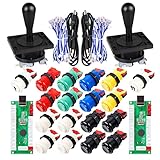
- Additional Color Options: Multiple color variations available for this arcade kit to match your cabinet design preferences
- Easy Installation: Designed for wood or metal control panels and mounts securely in standard 1-1/8 inch holes
- Durable Microswitches: High-quality microswitches included and tested to withstand 10,000,000 cycles for long-lasting performance
- Versatile Compatibility: Replace or build video arcade, emulator, and MAME cabinet controls with this comprehensive kit
- Zero Delay USB Interface: 100% Zero Delay USB Interface PCB with Auto-Fire Mode support for responsive 2-player arcade PC gaming
| Variable | Values to record | Why it matters |
|---|---|---|
| Software | Exact title, edition, platform, region, and version shown by the system | Different releases can expose different settings and input paths. |
| Controller | Model or type, Player 1 assignment, and wired or wireless connection | Connection and hardware affect how an input reaches the platform. |
| Display | Television or monitor input and active picture mode | Processing presets can change perceived response. |
| Processing | Game Mode on or off and any extra enhancement layers | Keeping this explicit prevents an invisible setting from confusing the comparison. |
| Control options | Default mapping, remapping availability, and any calibration exposed by the game | The edition may not provide the same controls as another title. |
| Observed symptom | Late response, missed direction, repeated input, or delayed picture | A precise symptom points to a more useful next test than a general lag label. |
Do not publish or rely on a millisecond comparison unless a repeatable test identifies the edition, equipment, method, and conditions. No such Exzisus-specific measurement is established here.
When the controls still feel wrong
The store listing cannot be found
Recheck the official catalog and the relevant first-party store using the exact spelling. Search by publisher or historical title only if the store supports those filters. If no matching result appears, keep the release status unresolved and ask the platform or publisher for confirmation rather than assuming a delisting or a hidden regional release.
The game has no remapping option
Use the default layout shown in the edition’s own instructions. Platform-level accessibility remapping may exist, but it is a console feature and should not be described as an Exzisus setting unless the platform documentation explicitly connects it to the game.
What’s actually slowing this PC down?
Pick the symptom - the matching free tool is one click away.
Only diagonal movement is unreliable
Return to the original 8-way expectation. Test with a digital directional pad if available, then test the analog stick with any platform calibration option. If the release exposes no calibration or dead-zone control, record that limitation instead of inventing a menu path.
Wired testing does not help
Keep the wired result as evidence that the controller’s wireless link is not the only suspect. Recheck display Game Mode, extra processing, signal routing, and whether the symptom is actually a missed input rather than a delayed picture.
Support asks for details
Provide the official product name, platform, region, software version, controller connection, display model or mode, the exact controls affected, and the steps that reproduce the problem. Include whether the issue occurs in the platform menu or only inside the game.
Evidence-based limits of this setup guide
- The 1987 date and original joystick-plus-two-button layout describe the arcade game documented by MAME and historical references.
- The current existence, platform, and availability of an Arcade Archives Exzisus release remain unconfirmed by the catalog result checked.
- Modern button labels, remapping steps, compatibility, and latency are edition-specific and cannot be supplied without a verified listing or manual.
- Game Mode, reduced display processing, and a direct wired controller are general troubleshooting measures, not tested Exzisus performance claims.
That distinction matters: it gives you a reliable starting point without turning the original arcade specification or another game’s settings into unsupported promises about a modern release.
Quick wins for a faster PC:
Repair Windows errors before they cause bigger problemsFix Now →Fix the driver behind crashes, sound loss and screen glitchesFind Drivers →Clear out junk files and repair common Windows errorsFree Scan →Quick Recap
Product prices and availability are accurate as of the date/time indicated and are subject to change. Any price and availability information displayed on Amazon at the time of purchase will apply.

