
iTechGuides is reader-supported. When you buy through links on our site, we may earn an affiliate commission. As an Amazon Associate I earn from qualifying purchases. Learn more
An eSATA hybrid port is usually a powered eSATA connection—also called eSATAp, Power eSATA, or an eSATA/USB combo. It can provide eSATA data and USB power for compatible devices. Ordinary eSATA carries data but does not power a drive, so check the computer, cable, and peripheral manuals before connecting them.
What “eSATA hybrid” means
“eSATA hybrid port” is a practical label rather than a guarantee of one universal port design. The common technical names are powered eSATA, eSATAp, Power eSATA, and eSATA/USB combo. The connector may support an eSATA connection or a USB connection, and some implementations add power for compatible peripherals. That does not make USB and SATA the same data protocol: the connected device uses the mode and wiring it was designed to support. Seagate describes its GoFlex combo implementation, while TechTerms defines eSATA as an external SATA interface.
How it differs from ordinary eSATA and USB
| Connection | Data mode | Power | What to verify |
|---|---|---|---|
| Ordinary eSATA | eSATA | Does not provide device power | Whether the peripheral has its own power source or another supported power connection. Seagate’s warning applies specifically to its GoFlex device. |
| Powered eSATA/eSATAp combo | eSATA or USB, depending on the connection and device | May provide power for compatible devices | The host port and peripheral must both support the intended mode and power arrangement. |
| USB connection through a combo port | USB | USB bus power may be available, subject to the device and port | Use the USB connection and check whether the device’s power needs are met. |
Seagate says its GoFlex drive needs a combo port and that “Basic eSATA ports do not provide power and will not work.” That is a GoFlex-specific compatibility warning, not a claim about every external drive. The SATA-IO eSATA information states that shielded external eSATA cables can be up to 2 meters long and that eSATA is hot-pluggable; those eSATA specifications do not establish the power behavior of every eSATAp port.
Free tools Windows power users keep installed
One-click scans. No signup required.
How to check whether your devices will work together
- Identify the computer port. Consult the computer’s manual or manufacturer documentation. Confirm that it supports powered eSATA/eSATAp if the peripheral depends on power from the port. A label alone may not establish the power wiring. Seagate notes that ports for its GoFlex implementation are generally marked “eSATA” alongside a USB symbol, but this is not a universal labeling rule.
- Check the peripheral’s connection and power requirements. Find out whether it expects USB, eSATA, or Power eSATA, and whether it needs power beyond what the host supplies.
- Match the cable and enclosure. Check connector compatibility and the supported drive type and size. For example, StarTech’s S2510PESAT product page describes a 2.5-inch SATA HDD/SSD enclosure using eSATA data and USB 5V power. This example does not establish compatibility with every computer or enclosure.
- Use another supported power option if needed. If the host has ordinary eSATA or its power capability is unclear, use the peripheral’s specified external power supply or a compatible USB connection rather than assuming the port will power it.
What the term does not tell you
The phrase “eSATA hybrid” alone does not establish a universal pinout, voltage arrangement, power capacity, or compatibility with a particular drive. Seagate’s guidance concerns its GoFlex implementation; the StarTech page describes one enclosure; and TechTerms is a glossary last updated March 10, 2015. Use the documentation for your exact computer and peripheral for device-specific compatibility and electrical details.
Quick Recap
Best Value

- ★ Transfer rate of Super-Speed USB 3.0 interface can be up to 3Gbps;
- ★ Supports Hot-Swapping and Plugs and Play function;
- ★ Compliance with Serials ATA Specification Revision2.6;
- ★ Backward compatible previous versions of USB ports (USB1.0, USB1.1&USB2.0) & SATA hard disks (1.5Gbps)
- ★ Backward compatible previous versions of USB ports (USB1.0, USB1.1&USB2.0) & SATA hard disks (1.5Gbps)
Rank #4
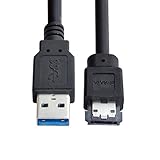
- Provide DC 5V power for power eSATA port. (not power for eSATA port)
- Can connect any external eSATA hard drive (HDD), solid state drive (SSD), or optical disc drive (ODD) through the USB 3.0 port on your laptop or desktop.
- USB 3.0 to Power Over eSATA DC5V Adapter USB2.0 to HDD/SSD/ODD eSATAp Converter
- Easily connect your USB-enabled computer or laptop, to a SATA drive using this eSATA HDD cable.
- For fast access to external storage, this USB to eSATA converter cable supports transfer rates up to 5Gbps using USB 3.0.
Rank #3

- ADD AN EXTERNAL HARD DRIVE: This 3ft / 1m USB 3.0 to eSATA adapter lets you connect any external eSATA hard drive (HDD), solid state drive (SSD), or optical disc drive (ODD) through the USB 3.0 port on your laptop or desktop
- MAXIMUM COMPATIBILITY: Easily connect your USB-enabled computer or laptop, such as your Dell OptiPlex or MacBook to an eSATA drive using this eSATA HDD cable.
- COMPACT DESIGN: This hard drive adapter cable features a compact, portable form factor design that fits perfect in your laptop bag, making it ideal for professionals on the go
- HIGH TRANSFER SPEEDS: For fast access to external storage, this USB to eSATA converter cable supports transfer rates up to 5Gbps using USB 3.0
- NOTE: Connects to an eSATA or eSATAp port only; Please ensure eSATA drive/device has its own power as this is an eSATA (data-only) cable, not eSATAp (eSATA + power); OS Independent; Plug-and-play and hot-swap compatible
Rank #2
- USB 3.0 to Power Over eSATA DC5V Adapter USB2.0 to HDD/SSD/ODD eSATAp Converter
- This 1m USB 3.0 to eSATA / Power eSATA adapter lets you connect any external eSATA hard drive (HDD), solid state drive (SSD), or optical disc drive (ODD) through the USB 3.0 port on your laptop or desktop.
- Provide DC 5V power for power eSATA port. (not power for eSATA port)
- Easily connect your USB-enabled computer or laptop, such as your Dell OptiPlex or MacBook to a SATA drive using this eSATA HDD cable.
- For fast access to external storage, this USB to eSATA converter cable supports transfer rates up to 5Gbps using USB 3.0.
#1 Best Overall

- The USB 3.0 to power eSATA cable ,One end of it is connected to the USB3.0 port on a laptop or desktop computer, and the other end is connected to any external eSATA hard disk drive (HDD) solid state drive (SSD) or optical disk drive (ODD) for high-speed data transmission.
- This USB to eSATA cable has a built-in conversion chip, and the eSATA end has a 5V power supply output. If your hard disk is a power eSATA port, you do not need to supply power again. If your hard disk is a SATA port, you need to supply additional power.
- For fast access to external storage, this USB to eSATA converter cable supports USB3.0 transfer rates up to 5Gbps.
- Plug and play, no need to install driver, compact and simple design, easy to carry.
- The USB end is connected to the computer, and the power eSATA end is connected to the hard disk. Reverse connection is not allowed. The USB terminal must be connected to the computer and compatible with any system as long as the computer has a USB interface.
Product prices and availability are accurate as of the date/time indicated and are subject to change. Any price and availability information displayed on Amazon at the time of purchase will apply.
Independent reader supportYour contribution helps us test, update, and keep practical guides available for everyone.
