
Recommended Free Tools
iTechGuides is reader-supported. When you buy through links on our site, we may earn an affiliate commission. As an Amazon Associate I earn from qualifying purchases. Learn more
For regular PC cleaning, a reusable electric air duster is usually the more practical choice; for an occasional cleanup, an aerosol electronics duster can be more convenient because it is ready to use without charging or storing another powered tool. Neither type is a proven category-wide winner for cleaning performance, noise, or static behavior, so follow the instructions for your specific equipment and duster.
The choice is mainly about how often you clean, how you want to store and ready the tool, and what the product’s own instructions say. Both kinds of duster dislodge dust rather than collect it, so plan for cleanup too.
What “canned air” and electric air dusters actually are
“Canned air” is a common name for an aerosol electronics duster, not a can of ordinary compressed air. These products contain pressurized gas propellants that produce a directed stream to dislodge dust and debris from sensitive or hard-to-reach areas. The exact formulation varies by product, so check the label rather than assuming every can contains the same gas. The CPSC Aerosol Dusters Market Report says consumer products typically use HFC-152a, while commercial and industrial products may use other propellants or blends.
What’s actually slowing this PC down?
Pick the symptom - the matching free tool is one click away.
An electric air duster is a powered blower that moves surrounding air through a nozzle. It is reusable, although a cordless model needs to be charged. The CPSC staff report identified handheld electric duster blowers as potential alternatives to aerosol dusters, while noting that they are not exact substitutes. It says they can perform many similar functions, including removing dust and debris from sensitive or hard-to-reach surfaces. The report states that it was not reviewed or accepted by the Commission, so this is staff-report context, not an adopted Commission finding.
#1 Best Overall

- Powerful Turbo Fan:WOLFBOX MegaFlow 50 electric air duster reaches speeds of up to 110,000 RPM, effectively removing dust and debris. It features three adjustable speed settings to suit different cleaning tasks.
- Economical and Reusable: Built from durable materials with a long-lasting battery, the WOLFBOX MegaFlow 50 is a sustainable alternative to disposable air cans, enhancing your cleaning experience.
- Portable and Lightweight: Weighing only 0.45 lb, this compact air duster is easy to carry. The included lanyard ensures convenient use both indoors and outdoors.
- Wide Application: WOLFBOX MegaFlow 50 electric air duster comes with 4 nozzles, making it suitable for a variety of scenes, such as pc, keyboards, or other electronic devices. It also serves well for home clean and car duster.
- 3.5 Hours Fast Charging: WOLFBOX MegaFlow 50 electric air duster recharges in just 3.5 hours with a type-C cable. Enjoy up to 240 minutes of use on the lowest setting, with four charging options to suit your needs.To ensure optimal performance of your MF50, please fully charge the battery before use.
Both tools move dust away from the surface; neither captures it. That distinction matters: blowing dust out of a PC can leave it on your desk, floor, or in the room unless you collect or wipe it up afterward. The airflow may make a dusty surface look clean while simply relocating the particles, so treat cleanup as part of the job rather than assuming the dust has disappeared.
Which one should you choose?
Choose an electric duster for repeated cleaning
If you clean your PC regularly, maintain several computers, or expect to use a duster on other devices, reuse is the main advantage of an electric model. You do not have to replace a depleted can each time. A cordless model also has a readiness trade-off: it needs to be stored and charged so it is available when needed. A corded model avoids battery charging but still requires storage and access to power.
This is an ownership recommendation, not evidence that every electric duster is stronger or cleans better than every aerosol. Product design and instructions vary, and the available comparisons do not establish one overall performance winner. Think of “reusable” as a difference in how you keep the tool available, not as a guarantee of a particular cleaning result.
Before buying, check whether the model is cordless or corded, how it is powered, what its instructions say about use on electronics, and what attachments or controls are actually included. Those are model-specific details, not category-wide assurances. A cordless unit that is not charged when you need it may be less convenient than its reusable design suggests; a corded unit may suit a workspace where access to power and storage are straightforward.
Choose an aerosol duster for an infrequent, ready-to-use job
For a one-off cleanup or occasional use, an aerosol can may suit someone who wants a compact consumable that is ready without charging. It is eventually depleted and must be replaced. Because the contents vary, read and follow the exact product’s label and handling directions rather than treating all aerosol dusters as interchangeable.
Convenience does not mean the can has unlimited output: it is a product you use up, then replace. If you keep one for occasional maintenance, check that you still have it when the job comes up and that its label matches your intended use. If you clean multiple devices repeatedly, the need to replenish cans becomes part of the ownership decision. The evidence here does not establish a universal number of cans, uses, or price at which an electric duster becomes cheaper.
Use another method when blowing is not the whole job
If you need to remove dust rather than merely displace it, plan a collection step. The EPA lists microfiber cloths and USB vacuums among electronics-cleaning alternatives in its duster fact sheet. Check the computer or component maker’s instructions before using a vacuum around internal parts; a cleaning tool’s suitability depends on the device and the way it is used.
Free tools Windows power users keep installed
One-click scans. No signup required.
A cloth can help with suitable external surfaces, while a vacuum may be an option where the device maker permits it. Do not assume a vacuum is appropriate for every internal component simply because the EPA lists USB vacuums as an electronics-cleaning alternative. The applicable guidance is the one for the specific computer or component. Whichever cleanup method you use, keep the distinction clear: blowing loosens and relocates dust; a separate step is needed to collect it.
Rank #2

- Reusable Cordless Air Duster: Replace disposable compressed air cans with a rechargeable electric blower for keyboards, PC towers, car interiors and home devices
- 100000RPM Motor, 3 Adjustable Speeds: Choose lower airflow for gentle dusting or stronger airflow for keyboard gaps, PC fans, car vents and tight corners
- Smart LED Display: Check speed mode and battery level at a glance, helping you adjust cleaning power and avoid unexpected power loss
- 5 Nozzles & 3 Brushes: Detail attachments help clean laptop ports, keyboard gaps, vents, camera gear and other hard-to-reach spaces
- LED Light & Portable Safety Design: Built-in light reveals dust in dark areas; lightweight handheld body with safety protections supports daily use
Electric duster vs. aerosol duster at a glance
| Decision point | Electric air duster | Aerosol electronics duster |
|---|---|---|
| Repeat use | Reusable; cordless models need charging | Consumable; the can is depleted and replaced |
| Readiness | Requires a powered device, storage, and possibly a charged battery | Ready-to-use without charging |
| Performance | Varies by model | Varies by product and propellant formulation |
| Noise and static behavior | No category-wide advantage is established by the cited comparison material | No category-wide advantage is established by the cited comparison material |
| Dust handling | Dislodges and relocates dust; cleanup is still needed | Dislodges and relocates dust; cleanup is still needed |
| Environmental data available here | No quantified lifecycle comparison is established | EPA’s 2012 fact sheet reports GWP values for two propellants and recommends lower-GWP alternatives |
The comparison’s limits are important. A recent manufacturer-published comparison discusses consumer choice and general precautions, but it is not an independent, controlled head-to-head test of named products. The cited material does not establish category-wide rankings for airflow, noise, static behavior, or cost break-even. Compare the specific models and their instructions instead of treating one advertised number as a reliable proxy for cleaning results.
How to compare specific products
Start with the use case, then read the actual product details. For an electric duster, distinguish a corded model from a cordless one and account for charging or power access, storage, and readiness. For an aerosol duster, check the exact label and formulation, and remember that the container is consumable. In either case, verify that the maker describes the product for the task you have in mind and read any operating limits before using it near a computer.
Do not compare unlike specifications as if they settled the decision. An advertised wind-speed figure by itself does not show how well a product will remove dust from a particular PC, what it will sound like in use, or whether it is appropriate for a specific component. The comparison material does not provide a standardized test across named models. Likewise, no supplied price list or current retailer information establishes a general break-even point. If cost matters, compare the price of the particular tool with the amount and replacement cost of the aerosol cans you expect to use, while recognizing that purchase prices and usage vary.
The Tool Desk
Outbyte Driver Updater FREEFix the driver behind crashes, sound loss and screen glitchesFind Drivers →Outbyte PC Repair FREERepair Windows errors before they cause bigger problemsFix Now →Reviews and product listings may help you find specifications and instructions for an individual model, but a claim about one model should not be generalized to every electric duster or every aerosol can. Look for the details that affect your own routine: whether charging is a hassle, whether you have a place to store a powered tool, whether a can’s label fits your intended use, and whether you have a sensible plan for the dust once it is dislodged.
How to clean a PC with either type of duster
Use the duster as one part of a cleaning routine, not as a substitute for the PC maker’s instructions. The general precautions below are not model-specific: consult the computer, component, and duster directions if they differ.
- Shut down and disconnect the PC. Turn the computer off and unplug it before cleaning. Disconnect peripherals where appropriate, and let the system cool if it has been running.
- Prepare a place for the dust to go. Work where displaced dust can exit the case rather than settle deeper inside or spread through your workspace. Have a microfiber cloth available for suitable surfaces and a cleanup plan for the dust outside the PC.
- Check the product instructions. Follow the duster’s directions and limits, including any instructions for how to hold or operate it. For aerosol products, the label is especially important because contents and handling directions differ.
- Direct airflow toward an exit. Use short, controlled passes aimed so dust leaves the case or component instead of being driven farther into it. Avoid treating airflow as a way to remove dust from the room; it only moves particles.
- Clean up dislodged dust. Wipe appropriate external surfaces and collect dust from the work area. If considering a vacuum for internal components, first check the computer or component maker’s guidance.
- Reconnect only after the cleanup is complete. Once the equipment and work area are ready, reconnect the system according to its usual setup.
A general consumer comparison offers similar precautions—shut equipment down and unplug it, direct debris outward, and follow product-specific instructions—but it is not a substitute for the manuals for your PC and duster.
Common cleaning mistakes to avoid
One mistake is aiming airflow without thinking about where the dust will go. If the stream drives debris farther into the case or into another hard-to-reach area, it has not completed the cleaning job. Direct it so particles can leave, and then clean up what settles in the workspace.
Do these 3 things before closing this tab:
1Clear out junk files and repair common Windows errors2Fix the driver behind crashes, sound loss and screen glitches3Repair Windows errors before they cause bigger problemsAnother is assuming a generic tip applies to every product. Aerosol formulations differ, and powered models have their own instructions and limits. The safe, bounded approach is to read the label or manual for the exact duster and follow the computer maker’s directions as well. If the two sets of instructions differ, do not treat general advice as a reason to ignore either one.
Rank #3

- 110,000 RPM Power Air Duster: Engineered with a brushless motor reaching up to 110,000 RPM in third gear. This electric air duster blasts away microscopic dust and crumbs from keyboards, computer cases, and radiator fans. "1-min maintenance, 10-min deep clean" for PC gamers and tech enthusiasts.
- 3 Speeds & Long Runtime: Features 3-speed settings: Gear 1 (25K RPM) for delicate electronics, Gear 2 (60K RPM) for daily dusting, Gear 3 (110K RPM) for tough debris. With 2*2500mAh batteries, it runs up to 240 mins on Gear 1 and fully charges in 3.5 hours.
- Lightweight & Portable Design: Weighing only 0.5 lbs.Our mini air blower is exceptionally easy to handle and carry. Its compact size fits perfectly in a camera backpack or car glove box, making it ideal for on-the-go photographers and campers who need to clean lenses or clear campsite debris quickly .
- Reusable & Cost-Effective Investment: Replaces disposable canned air that run out quickly and freeze up. This cordless air blower is rechargeable and designed for repeated use, saving money in the long run by eliminating the need to constantly buy canned air . It serves as a sustainable cleaning partner for electronics, home surfaces, keyboards, and delicate gadgets.
- Versatile Cleaning Tool: The WOLFBOX MF60 Electric Air Duster comes with 5 nozzles: a flat nozzle for blowing dust off PC cases and desks, a long nozzle for deep cleaning computer keyboards and car vents, a round all-purpose nozzle, and a swim ring/air mattress nozzle for outdoor inflation and camping. From electronics to car care and outdoor life, it's an all-in-one solution.
Finally, do not interpret a marketing specification as an operating instruction. A high advertised airflow number does not tell you to use a tool in a particular way or prove suitability for every component. Product directions and equipment guidance should determine how you proceed.
Does an electric duster make a PC unsafe because of static?
The available comparison material does not establish that electric dusters are inherently static-safe, nor does it show that every electric duster will damage a PC. It also does not support a blanket claim that one category is safer than the other on static grounds. Do not infer safety from the category name or from an advertised airflow specification. Follow the computer and component manufacturers’ handling guidance, along with the exact duster instructions.
In practical terms, treat static as a question for the particular product and equipment guidance rather than trying to resolve it from the words “electric” or “canned.” The evidence here does not provide a controlled static comparison or authorize a universal assurance. If you are uncertain whether a product is suitable for the component you want to clean, consult its maker’s instructions instead of relying on an unverified category claim.
PC Slower Than It Used to Be?
A free scan shows the junk files, broken settings and background clutter dragging Windows down - then fixes them in one click.Free scan · Windows 10 & 11Crashes, No Sound, or Screen Glitches?
Random freezes, missing sound and display glitches usually trace back to one bad driver. Find and replace yours safely.Free scan · under a minuteAre electric air dusters quieter than canned air?
There is no category-wide answer established by the cited comparison material. Noise depends on the particular electric model or aerosol product and the conditions of use; the sources do not provide a controlled, named-model comparison that establishes one type as quieter. If noise is important, look for information about the specific product and do not assume that every electric duster is quieter—or louder—than a can.
Is a higher advertised wind speed better for dusting?
Not by itself. The cited material does not establish a category-wide relationship between an advertised speed figure and better PC cleaning. Specifications may describe different products or conditions, and airflow is only one consideration. Look at the specific product’s instructions and intended use, and do not use a single advertised number as proof of cleaning performance, noise level, or suitability for a particular component.
What the environmental comparison can—and cannot—tell you
The EPA’s duster fact sheet, updated June 26, 2012, reports global-warming potentials (GWP) of 1,300 for HFC-134a and 140 for HFC-152a. It also reports atmospheric lifetimes of about 14 years for HFC-134a and approximately 1.5 years for HFC-152a. These are figures from that dated fact sheet, not a current inventory of every duster or a lifecycle comparison between aerosol and electric products.
The EPA advises: “If you do choose to use a compressed air duster, request low-GWP alternatives – such as cans that use HFC-152a over cans that use HFC-134a.” Check the exact product label; do not assume every can uses either of those propellants. The cited sources do not provide quantified lifecycle data that would establish the overall environmental impact of an electric duster versus an aerosol can.
That distinction matters if you are weighing environmental impact. The EPA figures allow a comparison between two propellants named in its 2012 fact sheet, not a full comparison of the manufacturing, use, replacement, or disposal of every electric tool and every aerosol can. An electric product being reusable does not, on the basis of these sources alone, prove its total environmental impact is lower. Nor does the fact sheet describe every formulation currently on sale. Check the actual aerosol label and treat the EPA numbers as dated, propellant-specific context.
Rank #4

- Powerful Turbo Fan:CAGIWIRU Electric Air Duster have reached speed up to 130000RPM,Can efficient remove dust and debris.With LED light and Three Adjustable Speed to meet with different cleaning tasks.
- With Attached USB C Fasting Charging cable.Charing 3 hours,Enjoy up to 240 minutes of use on the lowest setting, For third speed can use for 25mins.with four charging options to meet with your needs.
- Wide Application:Upgraded attached 5 different nozzles,making it suitable for a variety of scenes, such as car,pet, pc, keyboards, and other electronic devices. It also serves for office and home clean duster.
- Handy Design & Portable:Cordless air duster electric nozzle is Light weight and small size, design and comfortable to hold and space saving, convenient to carry around. You can put it in your room or inside the car without taking up space.
- Warranty & Support: Our Electric air duster comes with 5 years warranty and 24/7 customer service. During this period, if you have any questions,pls kindly feel free to contact us.
What the market figures do—and do not—say
The CPSC staff market report estimates that the U.S. aerosol duster market in 2022 comprised 29.9 million units and $304.2 million in retail value. The report itself says it had not been reviewed or accepted by the Commission. Those figures describe the report’s estimate for the U.S. market in 2022; they do not show which cleaning method performs better or establish today’s market size.
The figures offer context about the scale of aerosol duster sales at that time, not a reason to choose one product over another. They do not quantify electric-duster sales, tell you how long an individual can lasts, or provide current prices. For a personal purchase decision, the relevant comparison remains your expected frequency of use, readiness preferences, product instructions, and the specific costs of the products available to you.
Frequently asked questions
Is canned air actually compressed air?
“Canned air” is a familiar shorthand, but an aerosol electronics duster is a pressurized container with a gas propellant, not ordinary air stored in a can. Formulations vary. The CPSC report says consumer products typically use HFC-152a, while commercial and industrial products may use other propellants or blends. Read the specific product label rather than assuming all cans contain the same gas.
Which is cheaper for cleaning a PC?
The sources do not establish current prices or a universal cost break-even point. An electric duster is reusable but requires buying and storing a powered tool; an aerosol duster is a consumable that is eventually replaced. To compare costs, use the actual price of the specific model and cans you are considering and estimate how often you expect to clean. That calculation will depend on your products and usage, so there is no supported one-size-fits-all answer.
Does either kind of duster remove dust from the room?
No. Both dislodge and move dust; neither captures it. Plan to collect or wipe away the debris afterward. The EPA lists microfiber cloths and USB vacuums among electronics-cleaning alternatives, but consult the PC or component maker before using a vacuum around internal parts.
Can I use the same cleaning steps for any PC or duster?
Use the general approach—shut down and unplug equipment where applicable, direct debris outward, and clean up what is displaced—but follow the exact PC, component, and duster instructions. Models and product directions vary, so general consumer guidance is not a replacement for the manuals or labels.
Is one type proven to clean better?
The cited comparison does not establish a universal performance winner or a controlled head-to-head result for named products. Airflow and output vary by model and product. Compare the particular products and their instructions rather than assuming an entire category is more effective.
Bottom line
For repeated PC cleaning, an electric duster is a practical reusable default if you are willing to store and maintain a powered tool. For occasional use, an aerosol electronics duster can be more convenient when you want a ready-to-use consumable. Whichever you choose, check its exact instructions, do not assume category-wide performance or static-safety advantages, and plan to collect the dust airflow dislodges.
Best Value
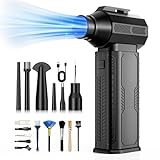
- [130K RPM Cleaning Storm] Our air duster features a 2X ultra-powerful brushless motor, delivering 52 m/s airflow, to blast even 3-year dust from keyboards in 10 seconds.
- [Cost-Effective & Reusable] The rechargeable electric air duster replaces 1,000+ disposable canned air. Only dry, stable airflow, shielding your devices from damage, blending eco-friendliness with high-tech precision.
- [4-Gear Adjustable Wind Speeds] Conquer every cleaning challenge. Level 1 for gentle dusting; Level 2 for precision clean; Gear 3 for daily clean; Gear 4 for heavy-duty clean (PS: long-press to activate storm mode.)
- [6 Versatile Nozzles & 10 Detail Brushes] Offer tailored solutions for every cleaning task, from delicate computer keyboards and sensitive electronics to car detailing, home deep cleans, and even outdoor inflation tasks. One tool, infinite mastery.
- [Safe & 2.5-Hour Fast Charge] Fully recharge via Type-C in 2.5 hours. The 8000mAh battery delivers 120 minutes of runtime on Speed 1, 2X longer than others. The upgraded AI Chip with overcharge & overheat protection.
Frequently Asked Questions
Is canned air actually compressed air?
“Canned air” is a familiar shorthand, but an aerosol electronics duster is a pressurized container with a gas propellant, not ordinary air stored in a can. Formulations vary, so check the exact product label.
Which is cheaper for cleaning a PC?
No universal break-even point is established. Compare the specific electric duster’s purchase price with the cans you expect to use and replace; the answer depends on product prices and cleaning frequency.
Are electric air dusters quieter than canned air?
The cited comparison material does not establish a category-wide winner for noise. Noise depends on the specific product and conditions of use.
Quick wins for a faster PC:
Fix the driver behind crashes, sound loss and screen glitchesFind Drivers →Clear out junk files and repair common Windows errorsFree Scan →Does a higher advertised wind speed mean better dusting?
Not by itself. The available comparison does not establish that an advertised speed figure predicts better PC cleaning. Check the particular product’s instructions and intended use.
Will an electric duster fry my PC with static?
The cited material does not establish that electric dusters are inherently static-safe or that every electric duster will damage a PC. Follow the computer, component, and duster instructions rather than making a category-wide assumption.
Does either kind of duster collect the dust it blows loose?
No. Both dislodge and relocate dust, so plan to wipe or collect it. Check the equipment maker’s guidance before using a vacuum around internal components.
The Bottom Line
For repeated PC cleaning, an electric duster is a practical reusable default if you are willing to store and maintain a powered tool. For occasional use, an aerosol electronics duster can be more convenient when you want a ready-to-use consumable. Whichever you choose, check its exact instructions, do not assume category-wide performance or static-safety advantages, and plan to collect the dust airflow dislodges.
Quick Recap
Product prices and availability are accurate as of the date/time indicated and are subject to change. Any price and availability information displayed on Amazon at the time of purchase will apply.

