
iTechGuides is reader-supported. When you buy through links on our site, we may earn an affiliate commission. As an Amazon Associate I earn from qualifying purchases. Learn more
Data centers should treat drone security as part of site protection and continuity planning—not as a single sensor or an assumed right to stop aircraft. Start with a facility risk assessment, combine deterrence, detection, asset protection and practiced response, and keep any active countermeasure outside ordinary private security operations unless qualified counsel and relevant authorities confirm it is lawful.
How drone risk fits into data-center security
A drone, or unmanned aircraft system (UAS), can raise concerns about observation, access to exposed areas, a suspected dropped item or disruption to operations. The appropriate response depends on the site and circumstances; there is no data-center-specific threat score or universal buffer distance established in the cited guidance.
The Interagency Security Committee’s November 2020 guide, Protecting Against the Threat of Unmanned Aircraft Systems, frames measures as options to choose through a facility risk and vulnerability assessment. CISA’s general layered-security guidance likewise supports combining measures rather than relying on one control. For a data center, that can mean site rules, staff reporting, sensors, physical protection, response procedures and exercises working together.
Keep two decisions separate: whether a drone is present, and whether its activity poses a threat requiring action. The Federal Aviation Administration (FAA) states, “Detection systems do not have the ability to determine intent or the level of threat posed by UAS.” An alert is an observation to verify and assess—not proof of hostile intent.
#1 Best Overall
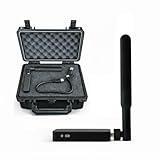
- REAL-TIME PRESENCE AWARENESS Track drones as soon as they enter your airspace with instant detection alerts. Know when and where an unmanned aircraft shows up — not hours later.
- DIARY LOG & HISTORICAL RECORDS The Bridge Kit logs every detection. Keep a searchable timeline of drone activity — perfect for reporting incidents to law enforcement, HOA boards, security teams, or legal documentation.
- PRECISE REMOTE ID STREAMING Supports Remote ID reception to capture both drone location and operator coordinates (when available). Connects directly to mobile apps for easy situational context.
- EASY SETUP + DAILY USE Portable and simple to deploy — just power and place. Ideal for both fixed site monitoring or traveling missions. Works with recommended companion apps for visual tracking.
- Backed by a Veteran-Owned U.S. Company: Trusted by teams across the country looking for affordable, effective counter-drone solutions without the complexity.
Assess the facility before choosing controls
Map the site’s exposure and the consequences of an incident before selecting technology or barriers. CISA’s facility assessment and exercise resources can help structure this work, but the assessment should reflect the actual property and operating model.
- Airspace and surroundings: Review nearby activity, adjacent properties, public access and lines of sight to sensitive operations. Include the implications of neighboring buildings, roads and site boundaries in planning.
- Exposed areas: Identify roof access, courtyards, outdoor equipment, loading and delivery areas, and information or assets visible from outside.
- Operational consequence: Consider how observation, a suspected dropped item, damage or a response action could affect staff safety, equipment, service continuity and recovery.
- Existing security: Document current cameras, access controls, staffing, communications, alert queues, power and network dependencies, and who has authority to make operational decisions.
Use the assessment to prioritize plausible consequences and gaps; do not convert it into an unsupported universal distance or promise of detection.
Build layers that deter, detect and protect
CISA’s Deter, Detect, Protect and Respond framing is a useful way to organize facility options. The right mix varies by site; the examples below are candidates to assess, not a one-size-fits-all blueprint.
Do these 3 things before closing this tab:
1Scan for outdated or missing drivers - takes under a minute2Clear out junk files and repair common Windows errors3Fix the driver behind crashes, sound loss and screen glitchesDeter observation and improve reporting
Use clear site rules, practical reporting channels and workforce awareness so staff know whom to contact when they observe a drone or a concerning item. CISA also lists public communications and signs, privacy measures, concealment and relocating important assets away from exposed areas as possible protective measures. Evaluate each for operational, safety, privacy and local constraints.
Detect with complementary observations
The FAA’s airport-focused guidance identifies radar, radio-frequency (RF), electro-optic and acoustic sensors as detection technologies that may be used individually or in combination. It does not establish comparative performance, detection ranges or a best sensor for data centers. Treat modality choice as a site-fit question, not a guarantee.
Rank #2

- REAL-TIME PRESENCE AWARENESS Track drones as soon as they enter your airspace with instant detection alerts. Know when and where an unmanned aircraft shows up — not hours later.
- DIARY LOG & HISTORICAL RECORDS The Bridge Kit logs every detection. Keep a searchable timeline of drone activity — perfect for reporting incidents to law enforcement, HOA boards, security teams, or legal documentation.
- PRECISE REMOTE ID STREAMING Supports Remote ID reception to capture both drone location and operator coordinates (when available). Connects directly to mobile apps for easy situational context.
- EASY SETUP + DAILY USE Portable and simple to deploy — just power and place. Ideal for both fixed site monitoring or traveling missions. Works with recommended companion apps for visual tracking.
- Backed by a Veteran-Owned U.S. Company: Trusted by teams across the country looking for affordable, effective counter-drone solutions without the complexity.
When evaluating a detection system, ask how it handles:
- Coverage across the property and relevant approaches, including obstructions and adjacent buildings or roads.
- Environmental conditions, interference, uptime and the circumstances that can produce false alarms.
- Alert triage, human verification and escalation into the security operations center (SOC).
- Integration with existing cameras, communications and incident-management procedures.
- Privacy, data access and retention, as well as power, network, maintenance and interoperability needs.
- Vendor support and lifecycle costs. The official sources cited here do not provide comparable performance figures or cost data for data-center deployments.
An outdoor security camera system can support visual observation and operator verification as one facility-security layer. It is not equivalent to a dedicated UAS detection system. Camera planning should account for lighting, weather, obstructions, privacy, data retention and the need for an operator to review what the camera shows.
Protect exposed assets and preserve operations
CISA identifies concealment, relocation, and physical barriers such as netting or grillage as measures a facility may assess. Consider whether a roof, courtyard, outdoor equipment or visible information needs protection, and whether the measure addresses the risk identified in the assessment.
Before installing a barrier or changing asset placement, involve the relevant engineering and operations teams. Check fire safety, maintenance access, airflow, structural loading and possible interference with other facility or security systems. These are necessary site-engineering considerations; the cited CISA material does not prescribe a data-center-specific design.
Detection is not mitigation
Detection systems observe or alert; they do not by themselves establish intent or authorize a response. The FAA distinguishes detection from mitigation, which may involve disrupting, disabling, destroying, taking control of or redirecting a UAS. That distinction matters for both safety and legal authority.
Rank #3

- 【𝐔𝐩𝐠𝐫𝐚𝐝𝐞𝐝 𝐁𝐞𝐞𝐩𝐞𝐫 𝐅𝐞𝐚𝐭𝐮𝐫𝐞】The R111S drone remote id module includes a built-in beeper, making it easier to locate lost aircraft. This enhancement provides added convenience when retrieving your drone from challenging locations, adding another layer of safety and control to the flying experience.
- 【𝐅𝐢𝐧𝐝 𝐓𝐡𝐞 𝐋𝐨𝐬𝐭 𝐀𝐢𝐫𝐜𝐫𝐚𝐟𝐭】This remote id module for drone can be used as a GPS tracker for FPV drones, RC gliders, RC helicopters, RC jet fighters, fixed-wing aircraft, fixed-wing helicopters, multirotors, flapping-wing drones, paragliding drones, etc. By integrating the aircraft's original positioning function with the module's app, it enables precise real-time tracking within a range of 500-1000 meters for dual positioning, enhancing the safety and reliability of your flight adventures.
- 【𝐅𝐀𝐀 𝐂𝐨𝐦𝐩𝐥𝐢𝐚𝐧𝐭】Ruko R111S remote id module can ensure all drones over 250g comply with FAA regulations. It is applicable to all Ruko drones and various other brands/models such as DJI Mini 2 SE, Mini 4K, Mini 3, Mini 3 Pro, Mini 4 Pro, Air 2S, Air 3, Mavic 3, Mavic 3 Pro, Avata 2, FPV, Spark, Phantom 2, Phantom 3, Phantom 3 SE, Phantom 4, Inspire 1, Inspire 2, Inspire 3, Matrice 210, Matrice 350, Matrice 600, Matrice 600 Pro; F7/F7GB2; ATOM, ATOM SE, etc.
- 【𝐂𝐨𝐦𝐩𝐚𝐜𝐭 𝐃𝐞𝐬𝐢𝐠𝐧】It only weighs 13.5g (0.48oz) with a size of 1.3*1.1*0.5 inch, more compact than other modules, and has almost no impact on drone flight.
- 【𝐋𝐨𝐧𝐠 𝐁𝐚𝐭𝐭𝐞𝐫𝐲】A full charge of R111S only takes 40 minutes and can last up to 3 hours of constant use when the buzzer is off and up to 2.5 hours when the buzzer is on, so can assist a drone for 5-6 flights. The built-in battery does not need to be replaced and can be charged directly by plugging it into the Type-C charging cable included in the package.
| Function | What it means for the facility | Planning implication |
|---|---|---|
| Detection | Sensor technologies such as radar, RF, electro-optic or acoustic sensing provide observations or alerts; systems may be combined. | Build in human verification and an operational threat-assessment process. Do not treat an alert as proof of intent. |
| Mitigation | Active measures may disrupt, disable, destroy, take control of or redirect a drone. | Do not procure or use these as routine private-facility security controls without specific legal review and confirmation of authority. |
Plan a safe response and recovery
Write down how an alert becomes a verified incident, who can make decisions, and how the facility protects people, operations and evidence. CISA recommends planning for response, recovery and forensics; the FAA’s airport guidance emphasizes coordination and managing second-order effects in airport environments. Those airport procedures should not automatically be transferred to a data center, but coordination and consequence management are relevant planning considerations.
What’s actually slowing this PC down?
Pick the symptom - the matching free tool is one click away.
- Receive and log: Identify who receives sensor and staff reports, how time and observations are recorded, and how duplicate or unverified alerts are handled.
- Verify and assess: Assign trained personnel to check available visual information and assess the circumstances. Record what is known and what remains uncertain; do not infer intent from detection alone.
- Escalate: Define who contacts law enforcement and relevant public agencies, who informs facility leadership, and who coordinates with operations, safety and communications teams. Establish call paths in advance rather than improvising them during an incident.
- Protect the site: Set procedures for a drone near a roof, a suspected dropped item, unauthorized observation or possible operational disruption. Include staff safety and safe access to affected areas in the decision process.
- Recover and preserve evidence: Specify who authorizes a return to normal operations, how relevant records are preserved, and how recovery and forensics responsibilities are assigned.
- Exercise and update: Practice plausible scenarios, review handoffs and alert handling, and revise plans when exercises expose gaps or site conditions change.
Keep active countermeasures under legal review
Do not treat jammers, takeover systems, projectiles, nets fired at aircraft or other active countermeasures as ordinary products a private data center may independently deploy. The FAA’s page, UAS Detection, Mitigation, and Response on Airports (last updated June 23, 2025), says the agency does not support counter-UAS use by entities other than federal departments with explicit statutory authority and warns of aviation and navigation risks. A private operator should not presume it has authority to interfere with an aircraft or communications.
Authority is date- and jurisdiction-sensitive. The Department of Justice Office of Legal Policy’s UAS index, updated August 10, 2026, lists a July 2026 Federal Register item concerning state and local law-enforcement authority. The index alone does not establish that item’s precise scope or implications for private operators. Have qualified counsel review the applicable primary legal materials and coordinate with relevant authorities before considering any active response.
Separately, the FAA announced on May 6, 2026, a proposed process for operators of certain critical-infrastructure sites to petition for restrictions. A proposal is not an approved site restriction, and it does not establish that a particular data center qualifies. Before relying on this route, confirm the rulemaking’s current status, the site’s eligibility and any applicable requirements directly with the FAA and counsel.
Quick Recap
Product prices and availability are accurate as of the date/time indicated and are subject to change. Any price and availability information displayed on Amazon at the time of purchase will apply.
The Tool Desk
Outbyte PC Repair FREEClear out junk files and repair common Windows errorsFree Scan →Outbyte Driver Updater FREEFix the driver behind crashes, sound loss and screen glitchesFind Drivers →
