
Free tools Windows power users keep installed
One-click scans. No signup required.
iTechGuides is reader-supported. When you buy through links on our site, we may earn an affiliate commission. As an Amazon Associate I earn from qualifying purchases. Learn more
No. A robot vacuum can clean an entire floor without creating or saving a detailed map. Mapping is primarily a control and navigation feature: it can enable room-by-room commands, saved clean and keep-out zones, and more repeatable routes. Whether mapping is worthwhile depends on your floor plan, how much control you want, and the exact model’s sensors and software—not on a universal requirement for effective cleaning.
What a map changes—and what it does not
A saved map gives the robot a reusable representation of your home. On later jobs, a compatible robot can use that representation to identify rooms, plan routes, and apply rules you set in its app. Without a saved map, a robot may still move through the available floor, detect obstacles, follow a cleaning pattern, and return to its dock.
The key distinction is between cleaning capability and cleaning control. The manufacturer documentation available for iRobot and eufy describes navigation methods and app features, but it does not establish that a detailed map always removes more dirt, cleans faster, or covers every home more completely. Results depend on the individual robot, floor plan, obstacles, settings, battery behavior, and maintenance.
Three kinds of “mapping” you may encounter
Persistent maps
A persistent map is stored for future sessions. Supported robots can use it to recognize the home and accept targeted instructions such as cleaning a named room or a selected zone. iRobot calls its persistent system Imprint Smart Maps. Its support material describes the map as a way for the robot to remember the home so the owner can send it to specific areas.
#1 Best Overall
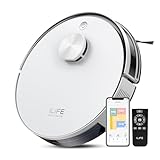
- Up to 10,000Pa Strong Suction: Experience deep cleaning with up to 10,000Pa ultra-strong suction in Spot Mode. The A30s robot vacuum effortlessly lifts dirt, debris, and pet hair from carpets and hard floors. Customize the suction power directly from the ILIFE Clean app for a personalized clean
- Smart Mapping & LiDAR Navigation: With advanced LDS LiDAR technology and the SLAM algorithm, the A30s robotic vacuum cleaner quickly maps your home and plans the most efficient cleaning path, ensuring comprehensive floor coverage and reducing missed spots
- Suitable for Pet Households: Design with dual anti-tangle brush, the A30s robotic vacuum effectively collects pet hair while minimizing tangles, suitable for dogs, cats, and busy pet households. Please note: This model supports vacuum only and does not have mopping function
- 2.4G WiFi & ILIFE Clean App Control: Take command of your cleaning via the ILIFE Clean App. Set no-go zones, virtual walls, and cleaning schedules, select specific rooms or areas to clean, activate auto carpet boost feature, and adjust suction power —all from your phone. Note: Compatible with 2.4GHz WiFi only
- Smart Voice & Remote Control: Achieve hands-free control via voice commands with Amazon Alexa or Google Assistant. You can also easily start the vacuum robot with the included remote, which is easy to use for all family members
eufy’s iPath navigation is another example of a map-storing approach. The company describes iPath models as using LiDAR and retaining maps for later jobs. Exact controls still depend on the model, app, software version, and region.
Temporary cleaning reports
Some apps draw a map-like image after a run to show where the robot traveled. That report can be useful for checking coverage, but it is not necessarily a map the robot stores and uses for its next navigation cycle. iRobot explicitly distinguishes Clean Map reports from Smart Maps. A detailed-looking screen therefore does not prove that the robot has persistent room memory.
Navigation without a stored map
Non-mapping robots can navigate with obstacle and movement sensors while discarding a reusable home map. eufy describes two such families:
Windows Errors? Fix Them Before They Spread
Repair common Windows errors and clear accumulated junk for a smoother, more stable PC - no reinstall needed.Free scan · no reinstallCrashes, No Sound, or Screen Glitches?
Random freezes, missing sound and display glitches usually trace back to one bad driver. Find and replace yours safely.Free scan · under a minute- Bounce navigation: the robot changes direction when it encounters an obstacle.
- Dynamic navigation: sensors guide a zig-zag cleaning pattern without storing a map of the area.
These robots may still clean methodically and return to their base. They simply do not offer the same map-based room controls or saved boundaries.
What persistent maps are useful for
Room-by-room cleaning
If you want to say “clean the kitchen” or select several named rooms in an app, persistent mapping is usually the enabling feature. The robot needs a stored representation that connects the room label to a location. Availability is model-specific; a brand’s app support does not mean every generation supports directed room cleaning.
Room commands do not always mean the robot travels only inside the selected room. iRobot’s support guidance notes that a robot may pass through an unselected room when that is the route to the target. A keep-out boundary can prevent entry where the model supports that function, but normal route planning may cross other areas.
Clean zones and keep-out zones
Compatible models may let you draw a temporary clean zone around a spill or save a restricted area that the robot should avoid. Some systems support both clean zones and keep-out zones; others support neither or only one. Check the exact model’s feature list rather than assuming that a map automatically supplies these controls.
Rank #2

- 90-Day Hands-Free Cleaning: The 3L self-emptying dustbag holds weeks of debris, eliminating the need for frequent emptying. Enjoy effortless maintenance with this robot vacuum self-emptying
- 6000Pa Ultra-Strong Suction: The L8000 Plus Robot Vacuum effortlessly lifts debris, pet hair, and deep-seated dirt from floors & carpets. It will automatically increase suction to 6000 Pa(Max) on the carpet
- 360° LiDAR Navigation & Smart Mapping: Equipped with advanced LiDAR technology, the robot vacuum and mop scans your home in 360° and creates maps. It intelligently avoids obstacles like walls, stairs, ensuring no missed spots or repeated passes. Multi-floor maps(5 Max) can also be saved for seamless cleaning
- 2-In-1 Sweeping & Mopping: Sweepping, Mopping and Self-emptying in one device. Customize cleaning with 3 suction levels & 3 water flow settings for all floor types(In mop mode, please remove the mop holder or establish a no-go zone to prevent the vacuum from dirtying your carpet)
- Convenient App & Voice Control: You can customize no-go zones and no-mop zones, set up virtual walls, schedule cleaning, select specific rooms or areas to clean, and adjust the water level and suction power according to your individual cleaning requirements. This makes smart home cleaning a breeze. It can also work with Alexa, supports 2.4Ghz & 5Ghz WI-FI
Repeatable scheduling
A persistent map can make scheduled cleaning more predictable because the robot can associate a schedule with a room or zone. This is valuable in homes where the kitchen needs daily attention but bedrooms do not. A non-mapping robot generally offers whole-area starts, not the same level of location-specific scheduling.
Recovery and orientation
Stored geometry can help a robot plan a route and relocate its dock. However, a map is not permanent truth. Moving furniture, changing the dock position, closing a previously open passage, or making a substantial layout change can make the stored representation inaccurate.
How accurate is a robot-vacuum map?
A map is an inferred model, not an architectural drawing. iRobot explains that its software observes geometry and infers room divisions; owners can edit labels and boundaries afterward. Narrow openings, reflective surfaces, clutter, temporary furniture, and doors that are open during one run but closed during another can all affect the result.
On its iRobot Home app page, iRobot claims that automatic room labeling reaches “up to 90% accuracy” for kitchens. The same page says recognition of other room types varies and may be lower. This is a manufacturer claim about labeling, not an independent measurement of map geometry and not a statistic for cleaning effectiveness.
Do these 3 things before closing this tab:
1Scan for outdated or missing drivers - takes under a minute2Clear out junk files and repair common Windows errors3Fix the driver behind crashes, sound loss and screen glitchesCamera-based systems can have environmental requirements. iRobot’s troubleshooting guidance for vSLAM mapping discusses adequate lighting and an unobstructed camera view. LiDAR-based systems have different sensing characteristics, but their map quality is still affected by blocked paths, moved objects, and dock placement.
What mapping setup usually requires
The exact process differs by model, but a first map normally needs a clear, uninterrupted exploration run and an app connection. For iRobot Smart Maps, the support guide recommends clearing floors before mapping. Cables, piles of clothing, closed doors, and objects that block the robot can create incomplete room boundaries.
- Install and connect the manufacturer’s app. Confirm that your model, account, app release, firmware, and region support Smart Maps or the equivalent feature.
- Place the dock where it will remain. The robot uses the dock as a reference point. A significant dock move can invalidate an existing map.
- Open the areas you want mapped. Leave interior doors open and remove temporary obstacles from the main routes.
- Run the model’s mapping or exploration cycle. Avoid picking up the robot or interrupting the run unless the instructions specifically allow it.
- Review room divisions and labels. Correct boundaries or names in the app when editing is supported.
- Test a targeted command. Send the robot to one room or zone and confirm that the route and boundaries match your expectations.
After a layout or dock change, remapping may be necessary. iRobot’s guidance for the i3, i4, and i5 series specifically says significant layout or dock changes require a new map.
Rank #3

- 【2-in-1 Mopping and Vacuuming】 The ROPVACNIC Robot S1 integrates advanced electronically controlled mopping technology, significantly enhancing both cleaning efficiency and effectiveness, which makes your floors remain free from footprints, dirt, and dust throughout the day. It features an upgraded high-capacity water tank with a four-stage personalized water adjustment system, enabling it to address various stains across different settings according to user requirements.
- 【Comprehensive Intelligent Control】 Multiple Cleaning Modes, combined with personalized settings, allow you to easily accomplish various household cleaning tasks with zero effort from your smartphone. Moreover, by voice commands, you can start your cleaning while kicking back and relaxing (compatible with Alexa or Google Assistant). Enjoy an utterly hands-free cleaning experience.
- 【5200Pa Powerful Suction】A 3-point cleaning system coupled with strong suction ensures your floors are free from all dirt, dust, and crumbs for a thorough, superior clean. The highly passable compact design combined with 3-level suction facilitates cleaning in hard-to-reach areas where you can't, making it suitable for a wide range of surfaces from wood, and hard floors to low pile carpets.
- 【Smarter High Automation & Self-Recharge】 The robot aspiradora is equipped with an advanced high-coverage sensing system and multiple algorithmic data points, enabling autonomous completion of cleaning tasks—from scheduled starting, detecting obstacles, adjusting direction, and switching modes, to automatically returning to recharge. This hassle-free operation ensures a clean home when you return.
- 【Engineered for Pet Owner】 The exclusive no-entanglement design negates the need for your dirty hands to clean up tangled dog or cat hair, unlike traditional roller brushes. Its dual rotating electric side brushes sweep and collect hidden pet hair more efficiently throughout the house, saving you the hassle.
Choosing between mapped and non-mapped navigation
| Requirement | Persistent map | Non-mapping navigation |
|---|---|---|
| Whole-floor routine cleaning | Supported on compatible models | Supported by documented Bounce and Dynamic models |
| Named-room commands | Available on models with directed room cleaning | Not provided by the documented non-mapping categories |
| Saved keep-out zones | Available on some models | Not provided by the documented non-mapping categories |
| Reusable route reference | Yes, when the map remains valid | No stored home map |
| Setup effort | Mapping run, clear paths, and compatible app or account may be required | Usually less map configuration |
| Effect of moving the dock or changing the layout | May require remapping | No saved map to update |
Choose mapping when control matters
- You want room-by-room starts from the app.
- You regularly clean a spill or high-traffic area with a defined zone.
- You need saved keep-out boundaries around pet bowls, delicate objects, or work areas.
- Your home has multiple rooms and you prefer repeatable schedules instead of whole-floor runs.
Choose non-mapping navigation when simplicity is enough
- You mainly press start for a whole-floor cleaning cycle.
- You do not need named rooms or permanent virtual boundaries.
- You prefer to avoid mapping setup and occasional remapping after furniture changes.
- Your cleaning area is open and uncomplicated enough that sensor-based navigation meets your needs.
Questions to check before buying a mapped model
“Supports mapping” is too broad to be a buying criterion by itself. Verify these details for the exact model and your region:
- Persistent or temporary: Does the robot save a map for future navigation, or only show a post-run report?
- Room controls: Can you label rooms and direct cleaning to one or several rooms?
- Zones: Are clean zones, keep-out zones, or both supported?
- Map count: If your home has multiple floors, check whether the model stores more than one map.
- Sensor conditions: Does the system use LiDAR, a camera, or another method, and are lighting or clear-camera requirements specified?
- Software dependency: Does the feature require a current app, firmware update, account, or cloud connection?
- Editing and recovery: Can you rename rooms, divide or merge areas, restore a map, or start over after a failed run?
Common mapping problems and practical fixes
The map has merged rooms
Leave the connecting doorway open during a complete mapping run, remove temporary obstructions, and use the app’s room-editing tools if available. A room division inferred from a single cluttered pass may need correction.
The robot misses a room
Check whether the door was closed, a threshold blocked access, or the robot could not return to the dock. Run another mapping cycle with clear paths. If the robot can reach the room only through a narrow or obstructed route, no map can compensate for physical access.
The robot enters a supposedly excluded area
Confirm that the model supports saved keep-out zones and that the boundary was saved to the correct map. A room-selection command is not automatically a no-entry command; the robot may cross another room while traveling to the selected destination.
The map shifts after furniture or dock changes
Restore the dock and major furniture to their previous positions when possible. If the layout changed substantially, follow the manufacturer’s remapping procedure rather than repeatedly editing a map that no longer matches the home.
The map looks detailed but does not persist
Look for the product’s terminology. “Clean Map” or “cleaning report” may describe a record of the completed run, while “Smart Map,” “saved map,” or an equivalent term indicates reusable navigation. Confirm in the model’s support documentation.
Independent reader supportYour contribution helps us test, update, and keep practical guides available for everyone.Does a more detailed map mean better cleaning?
Not by itself. A map can make cleaning more controllable and repeatable, but the available manufacturer descriptions do not provide a controlled comparison showing that every mapped robot cleans more thoroughly than every non-mapping robot. Brush design, suction, edge behavior, obstacle handling, battery management, navigation software, and maintenance also influence results.
Rank #4

- 【dToF Navigation & Multi-Floor Mapping】With advanced dToF navigation, the Lefant M330 Pro lidar robot vacuum efficiently scans up to 15 meters, enabling smart route planning that seamlessly maps and cleans large areas. This technology reduces unnecessary repetition and prevents missed spots, ensuring thorough coverage.
- 【Precision Detection & Avoidance & Slim 95mm Design】This advanced robot vacuum cleaner features with advanced PSD(Position Sensitive Device)technology, which accurately detects and avoids furniture, cords, and small objects with millimeter precision, ensuring better collision prevention and maintaining cleanliness, even in the dark. Ultra-slim 95mm body reaches tight spaces that most vacuums miss for better coverage.
- 【Carpet Detection & Auto Boost】The M330 Pro robotic vacuum features advanced carpet detection, allowing it to expertly avoid carpets in mopping mode, keeping them dry and spotless. In vacuuming mode, it automatically boosts suction to maximum for a deep, efficient clean. This effortless transition ensures comprehensive cleaning across all surfaces, making the M330 Pro the perfect choice for homes with diverse flooring.
- 【Vacuuming and Mopping】Lefant robot vacuum and mop equipped with 200ml refillable water tank and washable mop pad helps you save time and space, providing a thorough cleaning experience without the need for multiple devices, ensuring a deep, hassle-free clean. Perfect for those looking to simplify their cleaning routine while achieving spotless floors effortlessly.(⚠Empty the water tank after mopping to prevent leaks and floor stains)
- 【Perfect for pet households】Lefant M330 Pro robot vacuum upgraded the anti-tangle suction port to eliminate hair wrap issues—ideal for pet owners. It features with 450ml visible dustbin, which lets you know exactly when to empty and reduces frequent emptying.
For a simple open floor, a non-mapping robot may be entirely adequate. In a multi-room home where you need selective cleaning and boundaries, a persistent map can be worth the extra setup even if the underlying cleaning hardware is otherwise similar. Treat mapping as a feature for managing the robot, not as a guarantee of spotless floors.
Bottom line
Robot vacuums do not need a detailed saved map to clean effectively. Non-mapping models can navigate and clean using obstacle sensors and programmed patterns. Persistent mapping becomes important when you want room-level commands, saved clean or keep-out zones, and repeatable, location-specific schedules. Compare those functions on the exact model you are considering, and remember that a map is an editable, sometimes fallible navigation aid—not proof of superior cleaning performance.
Frequently Asked Questions
Can a robot vacuum clean if I never create a map?
Yes. Documented non-mapping navigation systems can follow sensor-guided patterns, avoid obstacles, and return to the dock without storing a reusable home map.
Is an after-cleaning map the same as a saved navigation map?
No. A cleaning report may show where the robot traveled once, while a persistent map is retained and used for later navigation and controls.
Will a robot clean only the room I select?
Not necessarily. A compatible robot may travel through an unselected room when that is the route to the selected room. A saved keep-out zone is a separate feature.
Do all models from one brand support the same mapping features?
No. Room labels, directed cleaning, zone controls, map storage, sensors, app requirements, and regional availability vary by exact model and software version.
Recommended Free Tools
Quick Recap
Product prices and availability are accurate as of the date/time indicated and are subject to change. Any price and availability information displayed on Amazon at the time of purchase will apply.

