
PC Slower Than It Used to Be?
A free scan shows the junk files, broken settings and background clutter dragging Windows down - then fixes them in one click.Free scan · Windows 10 & 11Outdated Drivers Are Slowing You Down
One free scan finds every outdated or missing driver and matches the right update for your exact hardware.Free scan · exact hardware matchiTechGuides is reader-supported. When you buy through links on our site, we may earn an affiliate commission. As an Amazon Associate I earn from qualifying purchases. Learn more
A DIY vision sensor is more than a camera: it combines a sensor module, compatible host or onboard processing, optics, a stable mount, suitable lighting, and software that turns images into the information you need. For a first 2D prototype, start with one camera and a host board; add global shutter for fast motion, interchangeable optics for a specific view or working distance, or a calibrated stereo pair only when you need depth.
Decide what the sensor must measure
First define the output: an object label, a position in the image, motion over time, or a distance or 3D measurement. Then note the scene’s operating distance, object speed, lighting, and whether the camera must see visible light or infrared. Those requirements determine the camera, lens, lighting, and processing more reliably than choosing a module by megapixel count alone.
- 2D detection or inspection: A single camera is usually the simplest prototype architecture.
- Fast-moving subjects: Consider a global-shutter camera to reduce rolling-shutter distortion; short exposures may require more light.
- Specific field of view or working distance: Choose optics and a compatible lens mount accordingly.
- Depth or 3D geometry: Use a depth-capable approach or a fixed, calibrated stereo pair—not merely two uncalibrated cameras.
Choose a camera architecture
| Build path | Best suited to | Key trade-offs |
|---|---|---|
| One standard camera plus host processing | 2D capture, inspection prototypes, basic classification or detection | Simple architecture, but field of view, infrared response, board connection, and host processing capacity still matter. |
| Global-shutter camera | Moving subjects or synchronized multi-camera capture | Reduces rolling-shutter distortion; lower resolution than Camera Module 3 and may need more light for short exposure. |
| Interchangeable-lens camera | Projects with a particular working distance or field of view | Requires mount-compatible optics, focus adjustment, and careful mechanical alignment. |
| Fixed stereo pair | Depth estimation or 3D reconstruction | Needs two views, rigid geometry, pair calibration, a capture/synchronization plan, and more processing. |
| AI camera | Inference workloads supported by the camera and host software | Some processing can occur on the camera, but the Raspberry Pi AI Camera pipeline still uses host-side post-processing for final detection output. |
Raspberry Pi documents Camera Module 3 as a 12-megapixel camera offered in standard or wide field of view and standard or NoIR variants. Its Global Shutter Camera is specified at 1.6 megapixels and is designed for moving subjects and externally triggered synchronized capture. These are manufacturer specifications, not performance results for a completed DIY assembly. See Raspberry Pi camera documentation.
Free tools Windows power users keep installed
One-click scans. No signup required.
More pixels do not automatically improve a real-time sensor: processing a larger image can be harder, and the useful detail depends on the lens, field of view, exposure, and target size. Match resolution to the detail you need and the compute capacity and frame rate your system can sustain.
#1 Best Overall

- Ultra High Definition 8000x6000 Lightburn Camera for Laser Engraver, USB2.0 Machine Vision Industrial Camera for Computer,Raspberry Pi
- Super Image reality, real color reproduction, ultra crystal shooting image. The camera works like human eye, get sharp image and accurate color reproduction in every detail
- 5-50mm Zoom Lens, Pro industrial grade 12mp ultra hd optical zoom lens, manual focus, iris and zoom. Pefect for close-ups and quality inspection
- USB Plug & Play, UVC compliant usb camera, just connect the camera to PC, laptop, Android device or Raspberry Pi with the included USB cable without extra drivers to be installed.
- Wide Applications: Well used for industrial camera, Medical device, Quality Inspection, Scientific research and development, image processing, computer and machine vision.
Match the optics and connection to the host
The lens, mount, cable, and host-board connector are part of the design. Raspberry Pi documents CS- and M12-mount variants of its High Quality Camera and different cable requirements across board generations. Verify the exact camera mount and the connector and cable supported by your particular board before ordering; do not assume that a camera cable fits every Raspberry Pi generation.
For an interchangeable-lens build, select focal length and focus around the working distance and field of view. A tighter aperture can increase depth of field, but it also reduces the light reaching the sensor. Plan illumination and exposure together rather than treating lens choice as an isolated decision. A compatible lens and camera mount must match the camera variant.
Rank #2

- 2MP Global Shutter & 90fps High Frame Rate: This camera features a 2MP global shutter sensor and up to 90fps high-speed frame rate, effectively eliminating motion blur and distortion. It delivers stable and clear images for fast-moving objects, ideal for high-speed capture, motion detection and industrial applications.
- 2.8-12mm 4X Manual Varifocal Zoom Lens: Equipped with a 2.8‑12mm varifocal CS mount lens supporting 4X manual zoom. You can freely adjust focal length, focus and field of view to meet various needs from wide viewing to close‑up detail capture.
- Strong System & Device Compatibility: UVC compliant plug‑and‑play design with no driver required. Fully compatible with Windows, Linux, Jetson Nano and embedded systems, supporting stable long‑time working for industrial and daily use.
- Wide Software Support: Perfectly works with Lightburn, OpenCV, machine vision software, live streaming tools and video monitoring programs. Great for laser engraving monitoring, machine vision, production detection and live broadcast.
- Versatile Wide Applications: Widely used in industrial inspection, machine vision, Lightburn monitoring, USB video microscope, live streaming, high-speed recording, security monitoring and embedded projects.
Build and validate a single-camera prototype
- Define the scene and output. Record what must be recognized or measured, the working range, object motion, and expected lighting.
- Select the camera family. Use a standard module for a general 2D prototype; consider global shutter for motion, interchangeable optics for a specific view, and stereo only for geometric depth.
- Check compatibility before connecting. Follow the official connection guidance for the exact board and camera. Camera PCBs are static-sensitive, so ground yourself before handling them. Raspberry Pi’s camera documentation covers its camera options and connections.
- Secure the camera and set focus. Fix the mount and camera pose, then establish focus, lighting, and exposure under the actual scene conditions.
- Capture representative images. Test the complete pipeline with real target positions, movement, and lighting rather than assuming a specification predicts system performance.
- Calibrate if geometry matters. If the output depends on position, dimensions, or camera geometry, use a known-geometry calibration target and the appropriate camera model.
- Implement the processing step. Use image processing or inference appropriate to the requested output. OpenCV supports tasks such as recognition, classification, tracking, and 3D reconstruction; its tutorials describe library capabilities.
Calibrate when measurements depend on geometry
Calibration estimates camera parameters rather than making every image inherently accurate. OpenCV’s documented workflow finds correspondences between known 3D points and their image projections; a chessboard is one supported calibration pattern. The resulting intrinsic parameters describe the camera model, while per-view extrinsic parameters relate the camera to the calibration target for each view. Consult OpenCV camera calibration documentation for the APIs and concepts.
The Tool Desk
Outbyte PC Repair FREEClear out junk files and repair common Windows errorsFree Scan →Outbyte Driver Updater FREEScan for outdated or missing drivers - takes under a minuteDriver Scan →For stereo, calibration must account for the fixed relationship between the two cameras. Keep the cameras rigidly mounted after calibration; changing their relative pose invalidates that relationship and can undermine depth estimates. A Teledyne FLIR stereo application note, published September 28, 2020, illustrates a two-camera OpenCV workflow and checkerboard calibration. Treat it as a technical example, not current software setup instructions.
Rank #3

- Day/Night Vision: IR-CUT Filter switched in and out automatically based on light condition (only visible light during the daylight and infrared sensitivity during the night with 850 IR LEDs on)
- HD Resolution: This camera adopts 2MP OV2710 sensor for sharp image, Max. resolution: 1920*1080
- High Frame Rates: 30fps@320*240, 352*288, 640*480, 800*600, 1024*768, 1280*720, 1280*960, 1280*1024, 1920*1080; YUY2 30fps@320*240 15fps@640*480 20fps@800*600 10fps@1024*768, 1280*720; 5fps@1280*960,1280*1024,1920*1080; High speed USB 2.0 interface.
- Plug&Play: UVC-compliant, just connect the camera to PC, laptop, Android device or Raspberry Pi with the USB cable without extra drivers to be installed.
- Applications: this mini 38mmx38mm camera board can be installed in most hidden and narrow position for a home surveillance system, wildlife photography, dashcam, baby camera, etc.
Where processing happens in an AI camera
An AI camera does not necessarily produce a finished detection without help from a host. In Raspberry Pi’s documented AI Camera pipeline, the IMX500 forms an input tensor, and host-side post-processing produces the final detection output. Check the Raspberry Pi AI Camera documentation to understand the camera/host boundary and supported workflow.
Independent reader supportYour contribution helps us test, update, and keep practical guides available for everyone.Set expectations for a DIY sensor
A prototype can demonstrate image capture, detection, or calibrated measurement, but the documentation and examples cited here do not establish accuracy, latency, reliability, regulatory compliance, or suitability for safety-critical control for a particular build. Measure those characteristics on the assembled system under its intended conditions before relying on its output.
Quick Recap
Best Value
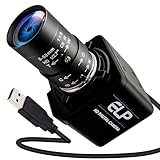
- Global Shutter 90fps High Speed Camera: Equipped with global shutter technology and up to 90fps high frame rate, effectively eliminates motion blur and distortion, perfect for capturing fast-moving objects in golf swing analysis, 3D printing monitoring and high-speed motion recording.
- 5-50mm Varifocal Lens with 10X Zoom: Features a 5-50mm adjustable varifocal lens, providing 10X manual zoom for flexible viewing distance and frame adjustment, allowing you to get clear and detailed images without changing lenses.
- UVC Compliant & Plug and Play : Adopts standard UVC video protocol, no extra driver required. Simply plug into the USB port to use instantly, saving time and effort for quick setup on various devices and applications.
- Wide Compatibility for Multi Devices: Works seamlessly with laptops, Android devices, Raspberry Pi and more industrial or DIY platforms, ideal for machine vision, industrial monitoring, computer vision projects and home experimental applications.
- Stable Performance for Professional Scenarios: Built for long time continuous operation, delivering stable video output and clear imaging for golf swing analysis, 3D printer monitoring, industrial inspection and other high speed capture tasks.
Rank #4

- 1) Camera transfer speed is fast.
- 2) Provide SDK, easy to use and convenient.
- 3) Support external trigger and flash.
- 4) SDK supports Windows and Linux systems.
- 5) SDK supports VC/C++, VB6, VB.NET, Delphi, C#, JAVA, Python, OpenCV.
Product prices and availability are accurate as of the date/time indicated and are subject to change. Any price and availability information displayed on Amazon at the time of purchase will apply.
Quick wins for a faster PC:
Clear out junk files and repair common Windows errorsFree Scan →Scan for outdated or missing drivers - takes under a minuteDriver Scan →
