
The Tool Desk
Outbyte Driver Updater FREEFix the driver behind crashes, sound loss and screen glitchesFind Drivers →Outbyte PC Repair FREEClear out junk files and repair common Windows errorsFree Scan →iTechGuides is reader-supported. When you buy through links on our site, we may earn an affiliate commission. As an Amazon Associate I earn from qualifying purchases. Learn more
Short answer: choose a CRT when you want the characteristic scanlines, phosphor motion and signal behavior of older games; choose a modern flat-panel TV when you want a lighter, sharper, higher-resolution display and are willing to verify signal support and processing. Neither choice wins for every console or television. A console that works perfectly on one flat panel can produce no picture, incorrect deinterlacing or excessive delay on another.
The deciding variables are the console’s exact video output (commonly 240p or 480i on older systems), its connector, the television’s supported input formats, and the processing applied to that signal. Check the complete console–cable–scaler–TV chain rather than relying on a generic label such as retro, CRT or 4K.
The practical verdict
A CRT is the safer choice for plug-and-play compatibility with many original standard-definition consoles, provided the set has the required input. Its image has the soft edges, scanline structure and motion character associated with period hardware. A modern flat panel can look remarkably clean and can be easier to live with, but it may need a console-specific cable or an external scaler to convert 240p or 480i into a format the TV accepts and processes correctly.
What’s actually slowing this PC down?
Pick the symptom - the matching free tool is one click away.
For a flat panel, confirm the exact model’s input resolutions, select its low-latency game mode, and test the real console connection. For a CRT, confirm the exact signal and connector as well; standard-definition CRTs, HD CRTs and computer monitors do not all accept the same formats. If your priority is authentic presentation and uncomplicated legacy signals, start with a known-compatible CRT. If your priority is size, weight, availability, sharp pixels or one display for modern and old systems, start with a flat panel and budget time for compatibility checks.
#1 Best Overall

- Large Accommodation - 23.6'' wide shelf boards that this media stand has offer you enough space to place your stereo equipment. The open construction and 4-tier adjustable shelves will make your setup easier and more convenient. The open construction also means that your electronics aren't going to overheat, because air is circulating freely all the time. Plenty of clearance for gaming consoles, DVD players, a cable box, a sound system woofer, and a CD changer.
- Strong & Stylish Constructure - Very solid and shelves are very strong to hold everything. This audio rack is made of premium 15mm MDF board which has superior load-bearing to guarantee long-term use. Metal frame adds sturdiness, so it can hold all of your audio-visual equipment well. This media tower is relatively low profile and looks stylish.
- Built-in Power Strips & LED Lights - Built in a power station including 4 receptacles plus 2 USBs, this AV media stand will make the charging of your electronics more convenient. It will save you space for adding power strips. The lighting is good for the mood setting. Static mode and 20 dynamic modes are flexible options for your music, gaming, and movie vibes.
- Suitable for Multiple Uses - The DVD stand fits in tight or small spaces. Except place this in a theater room to store your stereo component you can also use it as a printer stand for my office. What's more, you can use it as a TV stand in a small bedroom. Takes up little space but is tall enough to see the TV.
- Straightforward Assembly - The whole item is very easy to put together and takes less than a half hour. The directions are clear and easy to follow. All the parts and hardware are provided and labeled.
What signal does your console actually produce?
Begin with the console, not the television. Identify the system model and revision, because regional and hardware revisions can change the video output. Then determine the electrical signal and connector delivered by the cable.
240p
Many 8-bit and 16-bit systems use a 240-line progressive signal even though it is carried through connectors commonly associated with standard-definition television. A display must recognize that timing as 240p. If it treats it as 480i, the picture can shimmer, bob, appear vertically unstable or be processed with an unnecessary deinterlacing step.
480i
Later 2D consoles and many 3D-era systems output 480i. Interlaced video contains alternating fields, so the television’s deinterlacing quality affects motion, sharpness and latency. A set that handles 240p correctly may still produce an unattractive or delayed 480i image.
Free tools Windows power users keep installed
One-click scans. No signup required.
Other outputs
Some consoles and revisions can provide 480p or another progressive format through component, RGB or a digital connection. Do not assume that a cable with the right plug carries the same signal as every other cable for that console. Record the console revision, cable type, color-space or sync requirements, and the output format before checking a TV manual.
Picture quality: authentic character versus clean pixels
Why people prefer CRTs
A CRT draws the image on phosphors rather than holding a complete digital frame on a fixed pixel grid. The resulting scanlines, gentle edge blending and phosphor glow can make low-resolution artwork look as it did on period hardware. Curves, shadow masks and different tube designs change the appearance, so there is no single CRT look. A small consumer set, a professional video monitor and an HD CRT can all present the same console differently.
Motion is another part of the appeal. CRT presentation is not the same sample-and-hold behavior used by most flat panels, so scrolling backgrounds and fast sprites can appear more continuously defined. This is a visual preference, not proof that every CRT is technically superior. Focus, geometry, convergence, tube wear and the quality of the incoming signal still matter.
Rank #2

- Large Accommodation - 23.6'' wide shelf boards that this media stand has offer you enough space to place your stereo equipment. The open construction and 4-tier adjustable shelves will make your setup easier and more convenient. The open construction also means that your electronics aren't going to overheat, because air is circulating freely all the time. Plenty of clearance for gaming consoles, DVD players, a cable box, a sound system woofer, and a CD changer.
- Strong & Stylish Constructure - Very solid and shelves are very strong to hold everything. This audio rack is made of premium 15mm MDF board which has superior load-bearing to guarantee long-term use. Metal frame adds sturdiness, so it can hold all of your audio-visual equipment well. This media tower is relatively low profile and looks stylish.
- Built-in Power Strips & LED Lights - Built in a power station including 4 receptacles plus 2 USBs, this AV media stand will make the charging of your electronics more convenient. It will save you space for adding power strips. The lighting is good for the mood setting. Static mode and 20 dynamic modes are flexible options for your music, gaming, and movie vibes.
- Suitable for Multiple Uses - The DVD stand fits in tight or small spaces. Except place this in a theater room to store your stereo component you can also use it as a printer stand for my office. What's more, you can use it as a TV stand in a small bedroom. Takes up little space but is tall enough to see the TV.
- Straightforward Assembly - The whole item is very easy to put together and takes less than a half hour. The directions are clear and easy to follow. All the parts and hardware are provided and labeled.
Why flat panels look sharper
A flat panel has a fixed native resolution, often 1080p or 4K, and can display a crisp, stable desktop-like image. Scaling a 240p game to that grid can make individual pixels and borders look very sharp, especially with an integer or carefully chosen scaling factor. The same process can also expose jagged edges, uneven pixel sizes or processing artifacts that a CRT’s blending would hide.
Recommended Free Tools
Flat-panel sharpness is not automatically more faithful. Some players want visible scanlines and blended colors; others prefer a clean pixel grid. Use the display mode that matches your preference and the console’s artwork rather than treating softness or sharpness as an objective score.
Motion blur and black-frame insertion
Most modern flat panels use sample-and-hold presentation: each frame remains visible until the next one arrives. During eye tracking, that persistence can be perceived as motion blur even when the panel’s pixel response is fast. RTINGS explains the mechanism and the trade-offs in its black-frame-insertion (BFI) motion tests.
BFI or backlight strobing inserts dark intervals between frames to reduce perceived persistence blur. The implementation is model-specific. It can lower brightness, create visible flicker, and produce a double image when the timing does not match the source. It may also be unavailable at some refresh rates or in a television’s game mode. Treat BFI as an optional motion setting to test with your console, not as a universal CRT replacement.
Input lag is a property of the whole setup
Input lag is the time between a controller action and the corresponding displayed result. It is different from pixel response time, which describes how quickly a pixel changes state, and from motion blur, which describes how movement is perceived. A display can have fast pixels but still delay the image through buffering, scaling, noise reduction or deinterlacing.
Many modern TVs provide a game or low-latency mode that bypasses some processing. The exact benefit depends on the input, resolution and features enabled. HDR, motion interpolation, BFI and certain picture enhancements can alter the processing path. HD CRTs can also perform digital scaling or conversion, so the CRT label alone does not establish a lag value.
Rank #3

- UNIQUE RETRO TV DESIGN – Captivating CRT-style screen with an angry expression and bunny-ear antennas that evoke nostalgia.
- EXPRESSION OF MOOD – Perfectly embodies that 'don't talk to me' vibe for your office or gaming space, adding personality to any setup.
- IDEAL FOR COLLECTORS – A must-have for vintage tech enthusiasts and collectors of quirky decor, bringing a nostalgic touch to your shelf.
- DETAIL-RICH SCULPTING – Features a cracked screen design that enhances its character, making it a conversation starter.
- THOUGHTFUL COLLECTIBLE GIFT – An excellent choice for adults who appreciate unique figurines, tech culture, or a good laugh.
There is no defensible universal number such as CRT equals zero milliseconds, and the available evidence here does not provide a directly comparable measurement set for representative CRTs and current flat panels. Look for an independent measurement of the exact modern TV in the exact game mode and signal path. Then test your own console, because a scaler, cable or unusual 240p/480i path can change the result.
Compatibility: acceptance is not the same as correct processing
A television can lock onto a signal and still handle it incorrectly. It may display a 240p source as an interlaced signal, add a frame of buffering, crop the image, or refuse a particular timing on one input while accepting it on another. Some models behave differently with different consoles even when the connector and nominal resolution are the same.
HD Retrovision’s TV Compatibility List, dated December 11, 2017, records model- and console-specific 240p compatibility and processing outcomes. It includes combinations that pass a signal but fail processing, as well as televisions that differ by console. The document is historical and incomplete, so use it as evidence that results vary, not as a current or exhaustive buyer list.
Do these 3 things before closing this tab:
1Repair Windows errors before they cause bigger problems2Fix the driver behind crashes, sound loss and screen glitches3Clear out junk files and repair common Windows errorsCRT categories are not interchangeable
- Standard-definition consumer CRT: commonly designed for legacy 240p and 480i signals, but input availability differs by model.
- HD CRT: may accept higher resolutions and use digital processing; its behavior with 240p and 480i must be checked separately.
- Computer monitor: often expects RGB timings and connectors unlike a television, and may reject composite or component signals without conversion.
These categories describe typical design goals, not guarantees. Read the manual for the exact unit and identify whether the input is composite, S-Video, component, RGB, VGA or another format. A physical connector alone does not prove electrical or timing compatibility.
Native resolution, supported formats and upscaling
A TV’s native resolution is the physical pixel grid of its panel. Its supported input formats are the resolutions and timings it can recognize at each input. Those are separate from upscaling: a TV may accept a lower-resolution signal and enlarge it internally, or it may reject that signal and require an external converter.
RTINGS documents this distinction, its test method and model-specific results in Supported Resolutions of TVs (updated October 3, 2025). A television advertising 4K resolution therefore does not promise direct 240p support. Conversely, a television that lists 480i support may still process a particular console’s timing poorly.
Rank #4
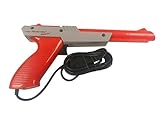
- Official Nintendo Hardware: Experience retro gaming as it was meant to be played with an official NES Zapper light gun.
- Amazon Renewed Guarantee: Backed by the Amazon Renewed Guarantee, this product has been professionally inspected, tested, and cleaned to work and look like new. Your purchase is protected, and you are eligible for a replacement or refund if you are not satisfied.
- Iconic Gaming Experience: Take aim and relive the glory days of 8-bit gaming! This is the essential accessory for classic light gun shooters like Duck Hunt, Hogan's Alley, and Wild Gunman.
- Professionally Refurbished: Each Zapper is thoroughly cleaned and tested to be fully functional. While it may show minor signs of cosmetic wear from its past adventures, it is guaranteed to bring you right back to the 1980s with flawless performance.
- IMPORTANT TV COMPATIBILITY: The NES Zapper is only compatible with older CRT (Cathode Ray Tube) televisions. It WILL NOT WORK with modern HDTVs (LCD, LED, Plasma, or Projector). Please ensure you have a compatible TV before purchasing.
An external scaler can convert a legacy output to 480p, 720p, 1080p or another format accepted by the TV. That conversion adds another device and another possible source of latency, aspect-ratio errors or compatibility problems. Verify the scaler’s input requirements, output modes and treatment of 240p and 480i together with the TV’s manual. The chain must be tested as a unit.
Manufacturer tables are also model-specific. Sony USA’s support guidance says supported resolutions depend on the television model and directs owners to the manual; see The TV Doesn’t Display the Image in the Correct Display Resolution. Do not apply one model’s listed inputs to every television in a product line.
A step-by-step compatibility check
- Write down the console and revision. Include the region, motherboard revision if known, and whether the system is original, modified or emulated.
- Identify the output format. Determine whether the connection is 240p, 480i, 480p or another timing. Record whether sync is carried through composite video, luma, RGB or a dedicated digital link.
- Identify the cable and connector. A cable can change the available signal. Note the required input type and whether an adapter performs active conversion or merely changes the plug shape.
- Download the exact TV manual. Find the input-specification table for the precise model and screen size. Check every input you intend to use, not just the headline resolution.
- Check 240p and 480i behavior separately. Look for model-specific compatibility reports, and distinguish a picture that appears from correct processing without unwanted deinterlacing, cropping or buffering.
- Decide whether a scaler is required. If the TV does not accept the console’s native timing, select a scaler or console-specific conversion method whose documented input and output formats match both ends.
- Connect directly first. Test the console with the shortest practical chain before adding switches, receivers or capture devices. Confirm stable sync, correct colors and the expected aspect ratio.
- Enable low-latency mode. Turn on the TV’s game mode, then disable motion interpolation and unnecessary enhancement features. Recheck the picture because some modes change available resolutions or BFI.
- Test real gameplay. Check a title with rapid scrolling, one with interlaced menus or video, and a timing-sensitive action. If possible, compare the direct and scaled paths with the same display settings.
Setting up a CRT
- Confirm that the CRT has the connector your console uses; an adapter may not convert the signal.
- Verify that the set is a standard-definition model, HD CRT or computer monitor, then check its accepted timings in the manual.
- Use the television’s aspect and geometry controls to correct overscan or an obviously compressed image without stretching a 4:3 game to widescreen.
- If the image rolls, loses color or shows unstable sync, stop and verify the console’s output standard and the cable’s wiring rather than repeatedly reconnecting it.
- For an HD CRT, test 240p and 480i independently. Digital processing in that set can add delay or alter the image even when a standard-definition CRT would display it correctly.
Setting up a flat-panel TV
- Connect the console to a compatible input or to a scaler whose output format is listed by the TV.
- Select the input’s game or low-latency mode. Confirm that the mode remains active at the chosen resolution and refresh rate.
- Set the aspect ratio to 4:3 for a conventional console image. Turn off overscan or use a pixel-accurate setting when the TV provides one.
- Choose scaling deliberately. Integer scaling can preserve equal pixel sizes; a high-quality non-integer scaler may fill more of the screen but can soften or unevenly enlarge pixels.
- Test BFI or backlight strobing only after the basic picture works. Keep it off if flicker, dimming or duplicate images are distracting.
- Save a dedicated picture preset for the console so later movie or HDR settings do not re-enable processing that increases delay.
CRT and flat-panel comparison
| Decision axis | CRT | Modern flat panel |
|---|---|---|
| Image character | Scanlines, phosphor glow and natural blending; appearance varies by tube and condition. | Sharp fixed-pixel image with configurable scaling; may reveal jagged edges or uneven pixel sizes. |
| Motion | Often chosen for clear motion and period-appropriate presentation. | Sample-and-hold persistence can blur movement; BFI may help but can flicker, dim the image or create double images. |
| 240p/480i handling | Standard-definition sets often suit legacy timings, but HD CRTs and monitors can differ substantially. | Model- and input-specific; may accept, reject or process the same timing differently. |
| Input lag | Not automatically zero; HD CRT processing can vary. | Depends on processing, input, mode and any scaler; use exact-model measurements where available. |
| Physical setup | Usually heavier and deeper, with fewer modern inputs and variable availability. | Thin and widely available, with more inputs, but may require a scaler or active adapter for legacy signals. |
| Best fit | Authentic presentation and direct connection to a compatible standard-definition source. | One compact display for multiple devices, high-resolution menus and configurable image processing. |
Troubleshooting common failures
No signal or an input that says unsupported
Confirm that the selected input matches the cable and that the console is outputting the expected format. Try another input on the same TV only if its manual lists the required timing. If the TV does not list 240p, use a converter that outputs a supported format; do not assume the TV will upscale an unlisted signal.
A picture appears but wobbles, flickers or has combing
The display may be interpreting 240p as 480i or deinterlacing a 480i source poorly. Test the two source formats separately, disable motion processing, and check model-specific compatibility information. A different input can have different processing even on the same television.
The image is stretched, cropped or has uneven borders
Set 4:3 aspect mode, disable overscan where possible, and inspect the scaler’s output aspect setting. Non-integer scaling can produce alternating pixel widths; integer scaling may add black borders but preserves consistent geometry.
PC Slower Than It Used to Be?
A free scan shows the junk files, broken settings and background clutter dragging Windows down - then fixes them in one click.Free scan · Windows 10 & 11Outdated Drivers Are Slowing You Down
One free scan finds every outdated or missing driver and matches the right update for your exact hardware.Free scan · exact hardware matchControls feel delayed
Enable game mode, turn off frame interpolation and test without an AV receiver, capture device or unnecessary switch. Compare direct and scaled connections. If the delay remains, find an independent measurement for the exact TV and mode; do not infer it from the display technology.
Best Value

- Are you a retro gaming collector who hunts cartridges at every thrift store and treats your CRT setup like a museum piece? Old School Rules.
- Makes a great surprise for any retro gaming collector, cartridge hunter, vintage console fan, NES collector and proud CRT lover.
- Lightweight, Classic fit, Double-needle sleeve and bottom hem
BFI makes the screen dark or uncomfortable
That is a normal trade-off of the feature, not proof that the panel is defective. Increase brightness only if the manufacturer permits it without clipping, reduce the strobe setting, or disable BFI when flicker and duplicate images outweigh the motion benefit.
An HD CRT behaves differently from a standard-definition CRT
Check whether the HD model is converting or buffering the signal. Verify its accepted 240p and 480i timings and compare its processing with the console’s requirements. A successful lock-on does not establish authentic timing or low latency.
Practical factors beyond image quality
Measure the furniture and access route before choosing a CRT: depth and weight can be substantial, and moving an older tube safely may require two people. Availability is local and condition varies; inspect for geometry, convergence, burn-in, focus and reliable inputs. Flat panels are easier to mount and replace, but the number and type of legacy inputs can be limited, and an external scaler adds cost, cabling and another device to troubleshoot.
Input count matters when several consoles are connected. A switch can simplify wiring, but it becomes part of the signal path and should be checked for 240p/480i compatibility and any added delay. Keep the original direct connection available while diagnosing problems so you can identify whether the display or an intermediate device is responsible.
How to make the final choice
- Choose a CRT when authentic scanlines, phosphor motion and direct legacy-signal support matter more than thinness, weight and high native resolution.
- Choose a flat panel when you need a practical modern screen, sharp pixels or one display for current and older hardware, and you are prepared to verify formats and configure game mode.
- Choose a flat panel plus a scaler when the TV lacks reliable 240p/480i handling but you want its size and convenience. Confirm the scaler’s compatibility and latency in the complete chain.
- Choose neither on reputation alone. The exact console revision, cable, input, TV model and processing mode determine the result.
The most reliable buying process is therefore a specification check followed by an actual gameplay test. Treat compatibility lists as model-specific evidence, treat manufacturer resolution tables as model-specific guidance, and treat image character as a preference. That approach avoids both common mistakes: assuming every CRT is lag-free and assuming every modern flat panel mishandles retro consoles.
Quick Recap
Product prices and availability are accurate as of the date/time indicated and are subject to change. Any price and availability information displayed on Amazon at the time of purchase will apply.

