
Do these 3 things before closing this tab:
1Repair Windows errors before they cause bigger problems2Scan for outdated or missing drivers - takes under a minute3Clear out junk files and repair common Windows errorsiTechGuides is reader-supported. When you buy through links on our site, we may earn an affiliate commission. As an Amazon Associate I earn from qualifying purchases. Learn more
To connect SiteLock to your website, first create or obtain an FTP user through your hosting provider. Then, in SiteLock, choose the website, open Sites → Manage Website → Settings → Server Access or use its Setup Wizard, and enter the server details and website root directory. SiteLock supports FTP, FTPS, and SFTP; its configuration guide identifies SFTP with SSH as the most secure option.
Before you start: get your hosting connection details
SiteLock uses the FTP account to connect to the server for SMART File Scan. Create the user in your hosting control panel, or ask your hosting provider to create it and confirm the correct values. You will need the server host, port, username, and password. For SFTP, you can use an SSH key instead of a password.
- Confirm which protocol your hosting account supports: FTP, FTPS, or SFTP.
- Ask for the website’s document root or the correct FTP home directory. SiteLock needs access to the files for the website you selected.
- If using SFTP with an SSH key, SiteLock can generate and download the key. Install its public key on the server; SiteLock’s guide says a common location is
/home/user/.ssh/authorized_keys, but confirm the correct path with your host.
SiteLock’s FAQ says an FTP user does not need special permissions simply to be compatible with SiteLock. The account still needs to be able to see the files you want the scan to access.
The Tool Desk
Outbyte PC Repair FREERepair Windows errors before they cause bigger problemsFix Now →Outbyte Driver Updater FREEFix the driver behind crashes, sound loss and screen glitchesFind Drivers →Connect the FTP account in SiteLock
- Select the right website. Sign in to SiteLock and select the domain you intend to configure, particularly if the account contains multiple websites.
- Open Server Access. Go to Sites → Manage Website → Settings → Server Access, or open that site’s Setup Wizard. SiteLock documents both routes for viewing or updating the server-access settings. See SiteLock’s dashboard navigation guide.
- Choose credential scope. Select Same Credentials to use one FTP login across products, or Separate Credentials to configure distinct details for SMART File Scan, Database Scan, and Backup. SiteLock recommends using one FTP user unless you have a reason to use multiple accounts.
- Select the protocol and enter credentials. Choose FTP, FTPS, or SFTP, then enter the host, port, username, and password. For an SFTP account using SSH authentication, choose the SSH-key option and generate or download the key for installation on your hosting server. SiteLock describes SFTP with SSH as its most secure option.
- Set the transfer options. Choose the transfer-speed or connection setting and the maximum download time. More simultaneous connections may speed a scan, but can also run into limits imposed by your host or cause errors when multiple protected sites share a hosting account.
- Select the website files. Choose Select Folder and select the website root directory—the directory containing the site’s files that SiteLock should scan.
- Save and continue. Save the settings and continue through the wizard.
For the exact field descriptions and key setup, refer to SiteLock’s SMART Server Access and Database Settings guide.
#1 Best Overall

- Multi Angle CAT6 Extender Connector:Multi angle design (UP/Down/Left/Right/Straight) avoids excessive bending of cables in narrow spaces such as walls, furniture, or network cabinets, effectively protecting Ethernet ports from wear and tear.
- High Speed Transfer : Cat 6 male to female adapter supports data transmission speed of up to 1Gpbs, Bandwidth of up to 250MHz. Perfect downward compatibility with Cat5e/cat5. Suitable for uploading and downloading files, music, and videos.
- Wide Compatibility: This RJ45 ethernet extension cable universally connects with LAN network port devices. Such as computer, router, modem, switch box, network media player, smart TV, network printer, PS5, PS4 and more.
- Built to Last : This shielded network cable has passed over 10,000+ bending tests and is very suitable for long-term use. Adopting black PVC outer jacket and pure copper conductor, it has excellent flexibility and durability.
- Reliable Service: We hope this product can create a perfect experience for you and offer a one-year warranty for this Cat 6 Ethernet Extension Cable. If you have any questions about our products, you can contact us at any time, and our professional customer service will reply within 24 hours.
Choose access and connection settings that fit your setup
Protocol: FTP, FTPS, or SFTP
Use a protocol supported by your hosting account. SiteLock supports all three; its documentation calls SFTP with SSH the most secure option. Do not assume the port or authentication method: confirm the settings with your provider.
One login or separate credentials
Same Credentials is the simpler choice when SiteLock products connect to the same server using one account. Choose Separate Credentials when SMART File Scan, Database Scan, or Backup need different logins or server details.
Rank #2

- 【Enhanced Multi-Angle Design】The Cat6 Ethernet Extension Cable incorporates an innovative multi-angle design, including Up, Down, Left, Right, and Straight orientations. This feature minimizes excessive bending in confined spaces, effectively protecting Ethernet ports from wear and tear, ensuring prolonged device connectivity.(Note: Only the straight connector is Cat 6; other Ethernet cables are Cat 5E.)
- 【High-Speed Data Transfer】Engineered to support data transmission speeds of up to 1Gbps and bandwidth capabilities reaching 250MHz, this cable guarantees efficient and uninterrupted file uploads, downloads, and streaming activities, catering to both personal and professional networking needs
- 【Broad Universal Compatibility】Designed for seamless integration with a wide range of devices equipped with LAN network ports, such as computers, routers, modems, switches, smart TVs, printers, gaming consoles, and more, this cable ensures versatile and reliable connectivity
- 【Robust and Durability Construction】Crafted with a PVC outer jacket and pure copper conductors, this right angle ethernet cable has undergone rigorous testing, to ensure exceptional durability and long-term performance under various usage conditions
- 【Packed Packaging】This set includes 5 pcs Cat6 Ethernet Extension Cables, providing ample connectivity solutions for multiple devices or setups, making it an ideal choice for both home and office environments
Website-root-only access or broader access
Select the website root in the SMART File Scan setup. Restricting an account to the known document root can limit the files it can reach while still allowing the scan to clean those files. SiteLock’s FAQ advises full access unless there is a specific reason to limit the user; broader access can help analysts investigate possible reinfection sources outside the site directory. Treat the scope as an access-control decision for your hosting setup, not a universal requirement. You can also ask your host or SiteLock for guidance.
Connection count: speed versus host limits
SiteLock’s guide uses three simultaneous connections as an example of a setting that may speed scans, but warns that it can produce errors if the host limits connections or several SiteLock-protected sites share the same hosting account. If scans fail with connection errors, lower the setting or ask your provider about the applicable limit. Three is an example, not a general performance benchmark.
Rank #3

- 90Degree Cat 6 Ethernet Cable: 90 Degree (Right Angle UP + Right Angle Down). Effectively avoiding excessive bending of cables in narrow spaces such as walls, furniture, or network cabinets, effectively protecting Ethernet ports from wear and tear, and greatly extend the using life of the LAN cable.
- 1Gbps high-speed Transfer: The cat6 Ethernet cable provides high performance up to 250MHz and maximum speed on 1Gbps. It is very suitable for you to play games, surf the internet, watch videos, listen to music, download or upload files online, while obtaining a better uninterrupted and uninterrupted deceleration experience.
- Premium Materials: This 90Degree angle CAT6 Male to female network cable adapter uses oxygen free copper inner conductor, which has stronger conductivity and improves signal transmission performance. Durable Heavy PVC jacket with a bending life exceeding 15,000+, it has excellent flexibility and durability.
- Wide Compatibility: This CAT6 to RJ45 ethernet extension cable universally connects with LAN network port devices. Such as computer, router, modem, switch box, network media player, smart TV, network printer, PS5, PS4 and more.
- 12-Month Warranty: We provide this 90 Degree Cat 6 Ethernet Extension Cable with worry-free 12-month warranty and friendly customer service, If you have any questions, we will resolve them within 24 hours.
Fix an empty folder picker or connection error
SiteLock connects, but no files or folders appear
A frequent cause is that the FTP user’s home directory does not point to the website files. When a user is created, the hosting panel may generate a directory path and make that directory the account’s home. If it is a new, empty directory, SiteLock can connect but cannot see the site.
- Check the FTP user’s home or directory path in your hosting control panel.
- Confirm that the path leads to the website’s actual document root and that the account can access its files.
- If the account was created with the wrong path, remove and recreate it with the correct directory, then update the credentials or path in SiteLock and try Select Folder again.
SiteLock explains this issue in its FAQ.
The scan fails with connection errors
Reduce the simultaneous-connection setting first. If the error persists, ask your hosting provider whether the server imposes a connection limit and confirm the host, port, protocol, and credentials. If the account protects several sites on the same hosting account, account for their shared server limits.
Rank #4
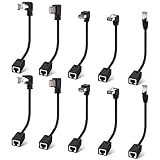
- Cat 6 Ethernet Extension Cable 10 Pack,Multiple Angles(UP/Down/Left/Right/Straight), Cat6 RJ45 Network LAN Patch Cord Adapter, FTP Shielded Male to Female Connector, Supports CAT5E/CAT5-0.6 Feet
You cannot create the account or verify the correct path
Use your host’s documentation or contact hosting support; a website administrator or developer may also know the correct account path. SiteLock says its support team can assist with setup, including configuring access with temporary cPanel or WHM access. Only provide that access through a support process you trust and understand.
Quick Recap
Best Value
- 90Degree Cat 6 Ethernet Cable: 90 Degree (Right Angle UP + Right Angle Down). Effectively avoiding excessive bending of cables in narrow spaces such as walls, furniture, or network cabinets, effectively protecting Ethernet ports from wear and tear, and greatly extend the using life of the LAN cable.
- 1Gbps high-speed Transfer: The cat6 Ethernet cable provides high performance up to 250MHz and maximum speed on 1Gbps. It is very suitable for you to play games, surf the internet, watch videos, listen to music, download or upload files online, while obtaining a better uninterrupted and uninterrupted deceleration experience.
- Premium Materials: This 90Degree angle CAT6 Male to female network cable adapter uses oxygen free copper inner conductor, which has stronger conductivity and improves signal transmission performance. Durable Heavy PVC jacket with a bending life exceeding 15,000+, it has excellent flexibility and durability.
- Wide Compatibility: This CAT6 to RJ45 ethernet extension cable universally connects with LAN network port devices. Such as computer, router, modem, switch box, network media player, smart TV, network printer, PS5, PS4 and more.
- 12-Month Warranty: We provide this 90 Degree Cat 6 Ethernet Extension Cable with worry-free 12-month warranty and friendly customer service, If you have any questions, we will resolve them within 24 hours.
Sources
- SiteLock: Configure SMART Server Access & Database Settings
- SiteLock: Frequently Asked Questions
- SiteLock: How To Navigate Your SiteLock Dashboard
Product prices and availability are accurate as of the date/time indicated and are subject to change. Any price and availability information displayed on Amazon at the time of purchase will apply.

