
Free tools Windows power users keep installed
One-click scans. No signup required.
iTechGuides is reader-supported. When you buy through links on our site, we may earn an affiliate commission. As an Amazon Associate I earn from qualifying purchases. Learn more
A concurrent-use license lets an eligible pool of users share a limited number of software seats. The key limit is simultaneous use: the number of people using the software at one time cannot exceed the license cap. Depending on the vendor’s terms, the software may be installed on more computers than there are seats, but installation rights and simultaneous-use rights are separate.
What is a concurrent-use license?
It is a software entitlement that caps how many users may use the software at the same time. For example, Esri defines a Concurrent Use License as permission to install and use software on networked computers so long as simultaneous users do not exceed the licenses acquired. Rockwell Automation’s agreement similarly ties concurrent use to the number of valid activations identified in the order form.
In plain terms, more eligible people or computers may be able to use the software than there are seats, but no more than the licensed number can use it at once. The agreement may impose additional limits on installations, users, locations, or activations.
How does concurrent licensing work?
In a common floating or network-license setup, a license server manages a shared pool of seats. When someone opens the application, it requests a seat. If one is available, the user can proceed; when the seat is released, another eligible user can use it. Matrix42 describes this checkout-and-return model, and Golden Software documents license activation and usage management through its License Administrator.
#1 Best Overall
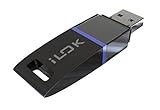
- USB Key for Storing Authorizations
- Portable
- Can Hold Over 500 Authorizations
- Immune from Updates and Crashes
- USB Key for Storing Authorizations
- The organization acquires a defined pool. The order form or agreement specifies the applicable seat, license, or activation limit.
- A user requests access. In a network arrangement, the client application contacts the license server to check availability.
- An available seat is assigned. The user can use the software while the entitlement is allocated.
- The seat becomes available again. Typically, the application releases it when use ends, though product-specific rules determine the exact release behavior.
If all seats are occupied, another user may be unable to start or access the software until a seat is freed or the organization obtains additional entitlement. There is no universal rule for whether a product queues requests, displays a particular error, times out idle sessions, or allows a seat to be borrowed for offline use.
Does a concurrent license limit installations or simultaneous users?
Those are different questions. Some vendor arrangements allow software to be installed on multiple client computers while restricting the number of simultaneous users. Esri’s definition refers to networked computers and a simultaneous-user cap; Golden Software also describes client computers checking with a server for an available seat.
Rank #2

- Bluetooth 5.4 + Broad Compatibility - Provides Bluetooth 5.4 plus EDR technology and is backward compatible with Bluetooth V5.3/5.0/4.2/4.0/3.0/2.1/2.0/1.1.
- Faster Speed, Extended Range - Get up to 2x faster data transfer and 4x broader coverage compared to Bluetooth 4.0 — perfect for smooth audio streaming and stable connections.
- EDR and BLE Technology - This Bluetooth dongle is quipped with enhanced data rate and Bluetooth low energy, UB500 has greatly improved data transfer speed and operates at the optimal rate of power consumption
- Nano-Sized - A sleek, ultra-small design means you can insert the Nano Bluetooth receiver into any USB port and simply keep it there regardless of whether you are traveling or at home
- Plug & Play with Free Driver Support - Plug and play for Windows 8.1/10/11 (internet required). Supports Win7 (driver required and can be downloaded from website for free). Download the latest driver from TP-Link website to utilize Bluetooth 5.4
Do not infer broad installation rights from the phrase “concurrent use.” Check the applicable terms for device limits, eligible users, organization or site restrictions, and deployment conditions.
Recommended Free Tools
How does it differ from named-user or single-user licensing?
A concurrent-use model makes a limited pool available to eligible users, with access governed by how many use the software at once. In the cited Rockwell Automation agreement, named use is tied to an identified person, while concurrent use is tied to a simultaneous-user limit. Golden Software contrasts a single-user license with a network-based concurrent model. These labels and rules are not standardized across vendors, so the license agreement—not the label alone—determines the rights.
Rank #3

- This LEVN USB Dongle supports pairing with all LVEN brand headphones with USB Dongle. Currently supported models are LE-HS010 Superior, LE-HS013 Superior, LE-HS016 Superior, LE-HS011 Superior, CT001, CT002, CT005. For questions about USB adapter and headphone re-pairing, please feel free to contact us!
What should you check before choosing or using one?
- Counting method: Is the cap measured by users, devices, sessions, activations, or another unit?
- Eligible users: Who can draw from the pool, and are they restricted to a particular organization or location?
- Installation and deployment: How many computers may have the software installed, and are there other deployment limits?
- Server and connectivity: Is a license server required? Verify supported platforms, network access, remote-use conditions, redundancy, and support obligations.
- Interrupted or offline use: Find out what happens when a user disconnects, leaves a session idle, or needs to work without network access. Confirm whether borrowing is allowed and how seats are released.
- Recovery rights: Check whether passive failover or disaster-recovery use is permitted. Esri’s agreement expressly addresses passive failover instances of its Concurrent Use License management software; that provision is specific to Esri, not a standard feature of every concurrent license.
Administration tools can help organizations activate licenses and review status or usage. Golden Software documents those functions in its License Administrator and Sentinel RMS License Manager guidance, but compatibility with other vendors’ software should not be assumed.
Quick Recap
Best Value
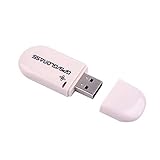
- Works with Windows,Andorid,Linux,Raspberry pi.Support Google Earth.It can not work with IOS system
- Windows and Andorid need driver, Raspberry pi and linux no need driver
- The default output is the product GPs protocol data. You can test the software or serial commands to modify switch PS / GLONASS protocol data
- Note: This dongle only can work outdoor. If you want to let it work indoor, you need have GPS amplifier. Otherwise the GPS can not lock
- If you need some driver links and using videos for VK-172,Please contact us
Rank #4

- 1. Free update. No subscription, no annual fee.
- 4. Work offline, NEED online. Read/Write (have account for users).With integrated scanmatik2
- 3. Master-version, save data in bin format, data not encrypted.
- 2. Has a USB dongle, all licenses for the modules are on the dongle.
- 5. Helpdesk supply free Damaos for tuner (Free damaos as WinOLS damaso file ,WinOLS damaos and MAP package)
Product prices and availability are accurate as of the date/time indicated and are subject to change. Any price and availability information displayed on Amazon at the time of purchase will apply.

