
Do these 3 things before closing this tab:
1Repair Windows errors before they cause bigger problems2Scan for outdated or missing drivers - takes under a minute3Clear out junk files and repair common Windows errorsiTechGuides is reader-supported. When you buy through links on our site, we may earn an affiliate commission. As an Amazon Associate I earn from qualifying purchases. Learn more
ClickUp can work well for agile teams that want Scrum or Kanban tracking alongside broader project coordination, but whether it is a good fit depends on the sprint features and reporting your team needs. Core Sprints are listed on every plan; Sprint Cards, Sprint Automations, and Sprint Reporting dashboards have paid-plan restrictions. Check those limits against your workflow before committing.
What ClickUp offers agile teams
ClickUp describes support for Scrum and Kanban workflows, including backlogs, roadmaps, sprint planning, dashboards, and reporting. It also offers templates and integrations. Those features can bring sprint work and other project coordination into one work-management platform.
The feature list establishes what ClickUp says teams can configure; it does not establish how easy the product is to use, how reliably it performs for a particular team, or whether it outperforms specialist agile tools. Teams should evaluate it against their own workflow rather than treating product descriptions as proof of results.
How its sprint features fit different workflows
Scrum and timeboxed sprints
Teams using Scrum can track sprint work and use Sprint Points, estimates, and sprint reporting features. ClickUp recommends List, Board, and Team views for managing sprint work. The key distinction is that having the core Sprints feature does not mean every sprint-related card or automation is available on every plan.
#1 Best Overall

- ✔️ Ideal for Agile, Scrum & Kanban Workflows – Capture user stories, feature requirements, and task details with clear magnetic cards that improve team visibility and sprint organization.
- ✔️ Reusable & Long-Lasting – Made from durable PVC with a UV-printed surface. Easily wiped clean and reused thousands of times without staining, peeling, or fading.
- ✔️ Smooth Writing Experience – Designed with optimal surface texture and color contrast to ensure every note, detail, and task is clear and easy to read.
- ✔️ Strong Magnetic Hold – Cards adhere firmly to metal whiteboards and stay in place during active sprint sessions, planning meetings, or daily stand-ups.
- ✔️ Visual Task Management – Enhance your board layout with color-coded story cards that help organize priorities, define work stages, and highlight dependencies.
Kanban and ongoing flow
For teams that manage work continuously rather than in fixed sprint cycles, ClickUp markets Kanban workflows and Board views. The practical question is whether the team can represent its backlog and work stages clearly in the views it can access on its chosen plan.
Capacity and workload visibility
Team view can show work assigned to people, workload charts, time estimates, and Sprint Points. This can help a team inspect assignments and capacity in context, though view availability and usage limits vary by plan.
Rank #2

- ✔ FULL AGILE MANAGEMENT BOARD SET. A special flexible Magnetic Agile Board comes with 100 pieces of Magnetic Agile Card Set and 9 piece of accessories to make your set whole. Suitable for building your Kanban Board, Scrum Board and Lean Management Board for Office, Home or School. Use it as a Scrum Board, Kan ban Board, Kanban Planner, Project Management Board, Project Planning Board, Task Board, Scrum whiteboard, Scrum Kit, Agile Kit, SIPOC Board
- ✔ FLEXIBLE, THIN, BUT STILL MORE FUNCTIONAL THAN TYPICAL MAGNETIC BOARD. Do not underestimate its magnetic power and its quality when you see its thin and flexible structure. You will be amazed not only with its magnetic power, but how smoothly you can locate other magnetic cards on it, and the quality of the surface. The high quality and functional magnetic board does not have to be cumbersome!
- ✔ CUSTOMIZABLE AGILE SCRUM KANBAN LEAN BOARD You can easily customize your board headlines with the empty headline cards that come with your set. Just snap the empty headline magnet cards on your board right on dedicated column headlines space, and make your custom headlines. All six columns can be customized on this Kanban Board.Full Kanban Board Magnetic Set will give you the ultimate freedom for building your Agile Board
- ✔ ULTRA LIGHT FULL MAGNETIC KANBAN BOARD AND WHITE BOARD! It is just over 6lb! We used a special materials to make your unique dry erase magnetic board. Its strong magnetic power will keep all of your cards on it safely, use them on your projects easily. This magnetic dry erase board is as light as a magnetic scrum board or a kanban magnetic board can be! Complete Kanban Board Kit and Scrum Board Set with Agile Scrum Cards
- ✔ SNAP ON IT, WRITE ON IT! Not only you can snap the scrum card magnetic, kanban card magnetic and agile magnets that come with the set, you can also write on the board! It is a dry erase board. The set comes with non permanent special card markers, dry erase board markers as well as board & magnet card cleaners. Kan ban cards, Kanban Magnets and Scrum Board Magnets will stay anywhere on this board!
Which plan limits matter for agile work?
ClickUp’s published feature availability distinguishes core Sprints from several advanced sprint features. The following limits are the ones to check when comparing plans:
| Feature | Published availability |
|---|---|
| Sprints | Listed for all plans |
| Sprint Cards | Business, Business Plus, and Enterprise |
| Sprint Automations | Business, Business Plus, and Enterprise |
| Sprint Points | 100 uses on Free Forever and Unlimited; unlimited uses on Business and higher |
| Sprint Reporting dashboards | Business and above |
Dashboard usage and available cards also vary by plan, and views have plan-based availability and limits. These distinctions matter most when your team relies on recurring sprint reporting, automations, or frequent point entry. Confirm the current plan terms before choosing: availability can change.
Quick Recap
Best Value
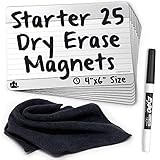
- 25 AgilePacks 4" x 6" magnetic, dry-erase planning cards
- Includes 1 Expo fine-point dry-erase marker
- Includes 1 Magnetic cleaning cloth - never lose your eraser again!
- Large 4" x 6" size offers more space for details
- Use on magnetic whiteboards, cube walls, divider walls, metal surfaces
Rank #4

- ✔ DOUBLE-SIDED DESK BOARD (KANBAN + WHITEBOARD) Switch between a pre-designed Kanban workflow side and a blank whiteboard side for notes, brainstorming, and quick planning—right next to your laptop.
- ✔ SNAP-ON, REUSABLE TASK CARDS (NO STICKY NOTES) Includes 24 reusable task cards that let you move work visually across columns—wipe clean and reuse again and again.
- ✔ FLIP & ROTATE ON THE INCLUDED STAND Easily flip the board between Kanban mode and whiteboard mode on the stand—ideal for sprint planning, daily priorities, or meeting prep.
- ✔ PORTABLE “VISUAL COMMAND CENTER” FOR ANY WORKSPACE Compact desktop footprint for home office, classroom, and small teams—move it between rooms or take it to meetings without hassle.
- ✔ COMPLETE DESKTOP KIT (BOARD + MARKERS + ACCESSORIES) A ready-to-use productivity set built for Agile, Scrum, and project planning—keeps tasks visible, reduces mental load, and helps you execute consistently.
Rank #3

- VISUAL WORKFLOW: 4-column magnetic board featuring To Do, Doing, Verify, and Done sections for clear task progression and project management
- VERSATILE DESIGN: Magnetic surface allows easy rearrangement of tasks using included cards and markers, perfect for agile project planning
- PROFESSIONAL ORGANIZATION: Streamlined task management system helps teams track project status and workflow efficiency in office settings
- COLLABORATIVE TOOL: Ideal for team meetings, sprint planning, and daily standups with visible project status updates for all team members
- PRACTICAL SETUP: Wall-mountable board with magnetic holders and card system enables quick updates and maintains organized workspace appearance
How to decide whether ClickUp fits your team
- Map your working method. Identify whether the team needs backlog prioritization, Scrum-style timeboxed sprints and estimates, Kanban flow, or a combination.
- List the features you actually depend on. Include Sprint Cards, Sprint Automations, Sprint Points usage, reporting dashboards, and the specific views your team uses.
- Compare those needs with plan availability. Core Sprints are listed across plans, but several advanced sprint features are restricted to Business or higher. Check view and dashboard limits as well.
- Assess the coordination trade-off. ClickUp may suit teams that want agile tracking alongside broader project work in one configurable platform. If your decision depends on comparative usability, reliability, or performance against specialist tools, the official feature documentation does not settle that question.
Who is ClickUp a good fit for?
- Potentially a fit: Teams that want configurable Scrum or Kanban tracking and project coordination together, and are willing to configure their workflows.
- Check the plan carefully: Teams that need Sprint Cards, Sprint Automations, Sprint Reporting dashboards, high Sprint Points usage, or particular views.
- Evaluate before standardizing: Teams whose choice hinges on ease of use, reliability, or proven comparative performance; the published feature materials do not establish those outcomes.
Product prices and availability are accurate as of the date/time indicated and are subject to change. Any price and availability information displayed on Amazon at the time of purchase will apply.

