
Do these 3 things before closing this tab:
1Scan for outdated or missing drivers - takes under a minute2Clear out junk files and repair common Windows errors3Fix the driver behind crashes, sound loss and screen glitchesiTechGuides is reader-supported. When you buy through links on our site, we may earn an affiliate commission. As an Amazon Associate I earn from qualifying purchases. Learn more
In Mobile Legends: Bang Bang, open your player profile, tap Account, then Switch Account. Choose the sign-in provider already linked to the profile you want and complete its login or verification. After the game loads, check the player name and ID before playing or making a purchase.
Switch accounts from the in-game menu
-
Confirm which sign-in provider is linked to the Mobile Legends profile you want to open. MOONTON describes M Account and third-party accounts as ways to sign in; a different email or provider does not, by itself, transfer game progress. See MOONTON’s Terms of Service.
-
In Mobile Legends, open your player profile, tap Account, and choose Switch Account. This route is reported by a current walkthrough, but menu labels and available providers can vary by app build or region: Tech How’s account-switch walkthrough.
Special offer. See more information about Outbyte and uninstall instructions. Please review EULA and Privacy policy. -
Select the provider bound to the destination profile, then finish its sign-in and any verification requested by that provider.
#1 Best Overall
 GameSir X5 Lite Mobile Gaming Controller for Android,Hall Effect Joystick
- WIDE SCREEN COMPATIBILITY — PHONE TO TABLET: X5 Lite is a versatile phone controller that stretches up to 213mm to fit iPhone 15/16, most Android phones, iPad mini 6/7, and compatible Android tablets. Secure Type-C connection keeps gameplay stable and responsive.
- MOBILE, CLOUD & REMOTE GAMING: Play supported mobile games like Zenless Zone Zero, or stream console and PC games through Xbox Game Pass, Steam Link, Moonlight, and remote play. Enjoy physical controls wherever you play.
- HALL EFFECT STICKS — PRECISE CONTROL: GameSir Hall Effect sensing sticks deliver smooth 360° control for accurate aiming, movement, and camera adjustments. Built for fast-paced mobile games and streamed console or PC titles.
- LIGHTWEIGHT & ERGONOMIC — 135.4G: At just 135.4g, X5 Lite stays lightweight during extended gaming. Ergonomic, laser-engraved textured grips provide a secure, comfortable hold at home or on the go.
- CUSHIONED MEMBRANE CONTROLS — COMFORTABLE & QUIETER: Cushioned membrane buttons and triggers provide comfortable feedback for repeated inputs while keeping operation quieter. Ideal for extended sessions or gaming in shared spaces.
-
Once the game loads, check the player name and ID, and the server if it is shown. If the identity is not the one you intended, stop and try again with the correct linked provider.
If you use Google Play Games on Android
Google Play Games can use a different Google profile for a particular game. To change the profile associated with a game, open Android Settings and go to Google → All services → Settings for Google apps → Play Games → Sign in account → Change the account by game. Google says a quick chooser may also be available by long-pressing the game icon when that option is enabled. Changing profiles can load different game progress and settings; see Google’s instructions for switching Play Games profiles.
Rank #2
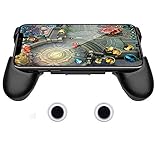
- it is not a electronic product ,Compatible with all touch-screen smartphones ,all iPhone and Android phone. It have no matter with OS , The telescopic boom design allows it to adapt to Large size of the smartphone (13CM to 16 CM / 5.1 inch ~ 6.3 inch length)
- Also it’s an adjustable smartphone case and a smartphone stand holder . You can use it to watch videos with hands-free. There are 3 piece 3mm soft mat to left air place between the handle and phone ,this will help the working smartphone cool off .
- The handle grip has an ergonomic design and comfortable feeling to relax your hand fatigue for the long-time gaming.
- Unlike Bluetooth / WIFI controller , you no need to contact the smartphone to controller . It avoid battery consumption ,but have the same game experience like Bluetooth controller. It left the space for USB port and earphone port ,you can ware the earphone and charge your smartphone when you play games .
- The conductive material stick-on joystick gives players the great physical manipulation, providing precise controlling on the in-game characters, and can deal easier with more complex positioning. Perfect for any game that has an on-screen control pad such as Mobile Legends, Arena of Valor, FIFA, Dragon Nest SEA, GTA and etc.
If switching does not open the intended profile
-
Return to Account → Switch Account and select the provider you previously linked to the target profile. Do not assume that choosing a new provider has moved or merged progress.
Outdated Drivers Are Slowing You Down
One free scan finds every outdated or missing driver and matches the right update for your exact hardware.Free scan · exact hardware matchWindows Errors? Fix Them Before They Spread
Repair common Windows errors and clear accumulated junk for a smoother, more stable PC - no reinstall needed.Free scan · no reinstallSpecial offer. See more information about Outbyte and uninstall instructions. Please review EULA and Privacy policy. -
If you cannot sign in or the destination profile does not load, contact support through the in-game Contact Us option. The Google Play listing also provides the address mobilelegendsgame@moonton.com: Mobile Legends: Bang Bang on Google Play. Support options can vary by region.
Rank #3
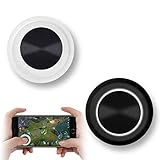 Vakili Mobile Phone Game Joystick Game Control Touch Screen Joypad Game Controller for iPad iPhone Android Mobile Tablet Smart Phone Joystick Touch Screen Joypad Tablet Funny Game Controller 2PACK
- NEW GENERATION OF MOBILE JOYSTICK - uses a special elastic material to improve the adsorption surface, the joystick can be fixed on any mobile phone and tablet PC surface, has excellent paste ability, can rotate the phone is still stuck on the screen 360 °, will not scratch the touch screen. It can be easily removed without leaving any scratches or residue and is extremely durable.
- HIGH SENSITIVITY PLASTIC ROCKER - ANTI-HAND SWEAT! Mini Mobile Joystick will give you the best precision and comfort for the touch screen games. Most player increase their performances by up to 50%!
- Easy to use and never overwrite the game - Joystick diameter is 0.99 inches, no additional spiral pattern covering game. No wires, Bluetooth or battery needed, just paste it on the screen to start playing! It helps to relieve finger pressure by simply pressing the pressure on the screen of the phone, allowing the player to completely abandon the analog joystick and enjoy a variety of complex games.
- Perfect compatibility - any game with a certain kind of screen control panel is suitable for mobile joysticks. It is compatible with all touch screen devices. Like King of Fighters 97, Dragon Nest, Contra, King's Glory, etc. And using screensavers will bring an excellent game control experience.
- Note: this joystick is made for direction coltrol only, not supposed to making sprinting in games such as PUBG or COD etc.
-
If you suspect someone else has access to your account, use MOONTON’s account freeze/unfreeze self-service page. Check its current controls before acting; MOONTON says protective actions, including changing a password and disconnecting, remain available while an account is frozen.
What to know about linked accounts
MOONTON describes M Account as a service intended to improve game-account security and support cross-app login. Switching accounts means signing in with the provider already associated with the profile you want; it is not a method for transferring progress between unrelated accounts. Provider choices and menu wording are not established as identical across every platform, regional build, or app version.
Quick Recap
Best Value

- Bluetooth Controller for iPhone & Android: Mocagen mobile gaming controller Compatible with all iPhone models (including 18/17 series) and Android devices. Pairing steps: 1. Turn on Bluetooth on your phone and go to the pairing screen. 2. Press and hold the Home button for 3 sec until LED4 flashes. 3. Find "XBOX Wireless Controller" on your phone and tap to pair. Quick reconnect: After first pairing, simply press the Home button once (with Bluetooth on) to reconnect
- Play Most Controller-Compatible Games: This iPhone game controller supports cloud gaming (e.g., Xb*x Game Pass, GeForce NOW), Xbox Remote Play, emulator games, and native mobile games (e.g., Apple Arcade). Enjoy effortless control and play Fortnite, Call of Duty, Roblox, Genshin Impact, and many more anytime, anywhere. Note: Controller only works with games that support controller input, and does not support PS Remote Play
- 5M-Cycle Lifespan & Zero Drift: MC1 mobile gaming controller features a Hall-effect joystick with a 5M cycle lifespan, 2.5x longer than standard carbon-film sticks. Its innovative electromagnetic induction technology ensures drift-free operation, enabling precise character control in intense games and significantly extending this phone game controller durability
- Ergonomic Grip Design: The handle is ergonomically shaped with a l*ser-engraved texture for anti-slip and enhanced grip, effectively reducing fatigue during long gaming sessions. The scientifically designed joystick and button layout ensures smooth operation. Whether for personal use or as a gift, it delivers a more comfortable and healthier gaming experience
- 7-Color RGB Light Ring & 600mAh Battery: The mobile game controller features a 7-color adjustable light ring on the joystick(ABXY button lights can be turned off, but their colors are not adjustable). The lighting is vibrant yet eye-friendly. The built-in 600mAh battery provides up to 6 hours of battery life in brightness mode — enough for a full day of gaming
Rank #4

- Officially licensed by Xbox. Bluetooth connection. Supports Xbox Cloud Gaming.
- Officially supported by Apple. Compatible with Apple and Android devices. Stretchable design fits most phones (100–170mm in length).
- Hall Effect Joysticks and Triggers - Upgraded. Robust and long-lasting. Offering higher precision and sensitivity.
- Tactile bumpers and D-pad, 2 Pro back paddle buttons, Xbox button, and wear-resistant metal joystick rings for more ways to play.
- Support 8BitDo Ultimate Software V2 on mobile.
Product prices and availability are accurate as of the date/time indicated and are subject to change. Any price and availability information displayed on Amazon at the time of purchase will apply.
The Tool Desk
Outbyte PC Repair FREERepair Windows errors before they cause bigger problemsFix Now →Outbyte Driver Updater FREEFix the driver behind crashes, sound loss and screen glitchesFind Drivers →
