
Free tools Windows power users keep installed
One-click scans. No signup required.
iTechGuides is reader-supported. When you buy through links on our site, we may earn an affiliate commission. As an Amazon Associate I earn from qualifying purchases. Learn more
If your next ESP32 project needs a compact color touchscreen, the 2.8-inch ESP32-2432S028R Cheap Yellow Display (CYD) is a practical next board to consider. It combines an ESP32-WROOM-32, display, resistive touch, and USB programming and power, reducing the separate parts and wiring needed for a small control panel or status screen. Its main trade-off is limited, shared I/O; check the exact board revision before choosing it or copying a tutorial.
What is a Cheap Yellow Display?
“Cheap Yellow Display” is a nickname used for a family of integrated ESP32 boards. The commonly referenced 2.8-inch resistive-touch model is marked ESP32-2432S028R. Guition’s vendor specification describes an ESP32-WROOM-32 with a dual-core controller, Wi-Fi and Bluetooth, 520 KB SRAM, 448 KB ROM, and 4 MB flash. The same board brings together a color TFT, touch panel, backlight control, speaker drive, light-sensitive circuit, RGB LED, TF card interface, serial interface, and reserved I/O.
The vendor lists the display resolution as 320 × 240 pixels, or 240 × 320 in portrait orientation, and an operating voltage of 5 V. It also lists approximate power consumption of 115 mA, a module weight of about 50 g, and dimensions of 50.0 × 86.0 mm. The specification PDF does not show a publication date, and the power figure is a vendor-listed approximate parameter, not a measurement of a particular project.
Why choose a CYD for an ESP32 project?
Start with fewer separate parts
The board integrates the controller, screen, resistive touch, and USB programming and power. That makes it a convenient starting point for an interactive project without first assembling a display and touch controller. The community project repository maintainer describes it as beginner-friendly because the parts are already connected; this is a description of the integrated board, not a promise that every project needs no additional components.
#1 Best Overall

- 【Powerful ESP32-S3 Core】 Equipped with an Xtensa LX7 dual-core processor (up to 240MHz), featuring 16MB Flash and built-in Wi-Fi & Bluetooth for reliable wireless communication.
- 【2.8-Inch IPS Touchscreen Display】 Features a 240x320 resolution full color screen, supports up to 262K colors (RGB666) for rich color display and wide viewing angles. Capacitive touch screen for a smooth interactive experience.
- 【Rich Audio & Interface Support】 Includes a built-in microphone and external speaker support, with multiple I/O options like I2C, UART, and SPI for expanded functionality.
- 【Battery & Storage Friendly Design】 Supports external lithium battery, micro TF card slot for storage, and an integrated battery management circuit for safe charging and discharging.
- 【Easy Development & AI Voice Chat】 Comes with a USB Type-C port for programming, and supports AI voice chat for smart applications. Provides abundant sample programs for easy learning.
Build a visible, hands-on interface
A built-in color screen and touch panel suit compact menus, device controls, and status displays. The TF card interface can support projects that need removable storage. These features make the CYD useful when you want an ESP32 project to show information or accept touch input rather than relying only on a serial monitor, buttons, or LEDs.
Move from examples to custom firmware
Guition lists Arduino IDE, ESP IDE, MicroPython, and Mixly support. The community repository includes setup and configuration guidance, basic feature examples, alternative display-library examples, ESPHome examples, pin information, troubleshooting, and links to other projects. Treat these as starting points: libraries, pin maps, and display settings must match the specific board and software versions you use.
Rank #2

- ESP32 Development Board WT32-SC01 Plus with 3.5in Multi-Touch IPS Screen with GUI Firmware 8MB PSRAM, WiFi, BT, BLE MCU Module
- WT32-SC01 is an ESP32 Development board with a 3.5-inch color touch screen. The touch screen enables a new way of interacting with the ESP32. The board is equipped with a graphical user interface (GUI) firmware, which supports graphical drag-and-drop programming and helps users develop a customized control platform
- WT32-SC01 development board adopts the ESP32-WROVER-B module, which is a general-purpose MCU module with Wi-Fi, Bluetooth, 4MB SPI Flash and 8MB PSRAM.
- CPU: Dual-core Xtensa 32-bit LX6 MCU; 2-point touch, Capacitive touch screen; Size3.5 inches; resolution-320*480; power supply:DC 5V /2A; operating temperature:–20 ~ 85 °C
- Application: home automation, smart home control panel, 86 box, wearable electronics, gateway with screen
What are the trade-offs?
Many pins are already committed
The screen, touch controller, SD interface, LED, light sensor, and speaker circuitry use or share board resources. A board-specific reference identifies only a few easily accessible GPIOs, notes that GPIO21 controls the backlight, and warns that GPIO22 is shared between two connectors. If you plan to attach sensors or other peripherals, check the pin assignments for the exact board rather than assuming that every ESP32 pin is free.
The display and touch are a particular experience
The common 2.8-inch model has a resistive touchscreen and a modest 320 × 240 resolution. If your project depends on a larger screen, a different touch experience, more memory, a particular display controller, or more free GPIO, compare candidate boards against those requirements instead of choosing by nickname alone.
Rank #3
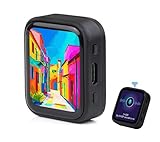
- ESP32-S3R8 Processor--- Equipped with ESP32-S3R8 Xtensa 32-bit LX7 dual-core processor, up to 240MHz main frequency. Supports 2.4GHz W-i-F-i (802.11 b/g/n) and Blue--tooth 5 (LE), with onboard antenna. Built in 512KB of SRAM and 384KB ROM, with onboard 8MB PSRAM and an external 16MB Flash memory.
- AMOLED Touch Screen--- Onboard 1.8inch AMOLED display for clear color picture display, 368 x 448 resolution, 16.7M color, 178° wide viewing angle. Compared to those traditional LCD displays, the AMOLED screen features precise light-control capability, representing more delicate colors, more picture details, and more vivid video image.
- Onboard Audio Codec---Supports high-quality audio processing, providing clear and high-quality audio input and output. Supports Offline Speech recognition and AI Speech Interaction---Allows access to online large model platforms to support more AI application scenarios.
- For Various Smart Devices---Suitable For Various Smart Devices Development, Can Realize Human-Computer Interaction Function. Supports installing ba|tte|ry inside the case for independent operation. (Note: this version doesn't include ba|tte|ry ) Dedicated Black Case---with removable back cover for easy embedded into the projects and DIY design.
- Sensor and Chip---Onboard QMI8658 6-axis IMU (3-axis accelerometer and 3-axis gyroscope) for detecting motion gesture, counting steps, etc. Built-in SH8601 display driver and FT3168 capacitive touch chip, using QSPI and I2C communication respectively, effectively saving the IO resources.
Hardware revisions can differ
“CYD” is not a guarantee of identical hardware. Guition’s specification identifies the ESP32-2432S028R with an ILI9341 display driver. The board reference documents ILI9341 display configuration and XPT2046 touch control for its referenced hardware, while the ESP Boards catalog notes that some later units use an ST7789 display controller. CYD-style S3, C3, 2.4-inch, and other versions should not be assumed to share the common model’s settings or pin map.
How to choose the right ESP32-2432S028R listing
- Confirm the model. Look for the ESP32-2432S028R marking and the 2.8-inch screen if that is the board your project expects. A listing that says only “CYD” may not identify the variant precisely.
- Check the display and touch details. Verify the screen controller and touch type against the listing and, once delivered, the actual board. Do not apply an ILI9341 or XPT2046 configuration automatically to a different revision.
- Check the physical revision and connectors. Confirm the USB connector and board details, especially if a tutorial or enclosure depends on them.
- Compare project requirements before ordering. Count the GPIOs you genuinely need, account for shared pins, and consider screen size, resolution, storage, and the examples available for your chosen firmware.
Seller prices and availability change, and the available references do not establish a universal price advantage or a verified current listing. Search by the full model name, ESP32-2432S028R Cheap Yellow Display, and verify the precise hardware details before buying.
Rank #4

- The display screen is controllable and can be used for APP remote control, remote environmental data collection and remote. Data , remote parameter setting and other batch development applications.
- ESP32-2432S028 development board is based on the ESP32-DOWDQ6 controller, low-power, dual-core CPU, clock frequency up to 240MHZ, integrates a wealth of resource peripherals, high-speed SDIO,SPI, UART and other functions
- Application: Home smart device image transmission, Wireless monitoring, Smart agriculture QR wireless recognition, Wireless positioning system signal, And other IoT applications
- ESP32 WIFI&Bluetooth Development Board 2.8 " 240*320 Smart Display Screen 2.8inch LCD TFT Module With Touch WROOM; Support: 1: UART/SPI/I2C/PWM/ADC/DAC and other interfaces 2:OV2640 and OV7670 cameras, built-in flash 3:picture WiFI upload 4:TF card 5:multiple sleep modes 6:Embedded Lwip and FreeRTOS 7:STA/AP/STA+AP working mode 8:Smart Config 9:AirKiss one-click network configuration 10:secondary development
- The ESP32-24325028 development board is based on the company's ESP32-D0WDQ6 controller, with dual core CPU and clock frequency up to 240MHz. It integrates peripherals, high-speed SDO, SP, UART and other functions, and supports automatic download.
How to get started with a CYD
- Identify the delivered board. Read its model marking and confirm its display controller and touch hardware before following a pin map or selecting a display configuration.
- Choose a setup guide that matches it. Use the community repository’s setup and configuration material for the relevant board, then select an example for your intended framework or display library.
- Test the built-in features first. Start with a basic screen and touch example before adding peripherals. This helps isolate display, touch, and configuration problems from wiring or application code.
- Map pins before expanding the project. Check which connections the display, touch, SD interface, and other onboard circuits use, including shared pins, then plan add-ons around the remaining I/O.
How does it compare with an ESP32 board and separate display?
The CYD’s central advantage is integration, not a proven universal price or performance win. Compare the options on the needs of your project:
What’s actually slowing this PC down?
Pick the symptom - the matching free tool is one click away.
- Total parts cost: compare the complete bill of materials, not just the controller or display price.
- Assembly effort: consider the wiring and setup required for a separate display and touch controller versus an integrated board.
- Interface needs: compare display size and resolution, touch technology, and the number of genuinely free GPIO pins.
- Project constraints: account for memory, storage, firmware examples, and confidence that the board revision matches your intended configuration.
The available board specifications and project references do not provide a controlled head-to-head comparison, so the better choice depends on these requirements rather than a blanket claim that one setup is cheaper or better.
Quick Recap
Best Value

- The ESP32 display screen is controllable and can be used for APP remote control, remote environmental data collection and remote. Data , remote parameter setting and other batch development applications.
- ESP32-2432S028 development board is based on the ESP32-DOWDQ6 controller, low-power, dual-core CPU, clock frequency up to 240MHZ, integrates a wealth of resource peripherals, high-speed SDIO,SPI, UART and other functions
- Application: Home smart device image transmission, Wireless monitoring, Smart agriculture QR wireless recognition, Wireless positioning system signal, And other IoT applications((User manual available if do as follow: click "AITRIP"(you can find "Sold by AITRIP" under Buy Now button), in the new page, click "Ask a question".)we will send you the manual asap))
- ESP32 WIFI&Bluetooth Development Board 2.8 " 240*320 Smart Display Screen 2.8inch LCD TFT Module With Touch WROOM; Support: 1: UART/SPI/I2C/PWM/ADC/DAC and other interfaces 2:OV2640 and OV7670 cameras, built-in flash 3:picture WiFI upload 4:TF card 5:multiple sleep modes 6:Embedded Lwip and FreeRTOS 7:STA/AP/STA+AP working mode 8:Smart Config 9:AirKiss one-click network configuration 10:secondary development
- The ESP32-24325028 development board is based on the company's ESP32-D0WDQ6 controller, with dual core CPU and clock frequency up to 240MHz. It integrates peripherals, high-speed SDO, SP, UART and other functions, and supports automatic download.
Product prices and availability are accurate as of the date/time indicated and are subject to change. Any price and availability information displayed on Amazon at the time of purchase will apply.

