
iTechGuides is reader-supported. When you buy through links on our site, we may earn an affiliate commission. As an Amazon Associate I earn from qualifying purchases. Learn more
Usually, no: an Xbox console game does not run directly on a PlayStation 5, and buying it for Xbox does not create a PS5 entitlement. You have three practical alternatives: play it natively on Xbox Series X|S, buy a separately published PS5 version when one exists, or stream it through Xbox Cloud Gaming on a supported device. PS5’s own cloud service streams selected PlayStation games, not Xbox purchases.
Why an Xbox purchase does not work on PS5
Xbox and PlayStation use separate console operating systems, storefronts, licensing systems and game packages. An Xbox Series X|S digital license is therefore not a universal console license. It authorizes the Xbox version, and sometimes the Windows PC or supported-handheld version under Microsoft’s Xbox Play Anywhere program. It does not authorize a PlayStation 5 build.
The same rule applies to physical discs. An Xbox disc contains or authenticates the Xbox release; a PS5 cannot install and execute that console version. A PS5 can play the game only when its publisher has produced and sold a PS5 edition, or when a supported streaming service delivers a compatible version to that device.
Microsoft says Xbox Play Anywhere can provide Xbox console, PC and supported handheld access from one purchase, with shared progression and achievements. The program has more than 1,000 enabled titles on Microsoft’s current program page, accessed October 15, 2026. PS5 is not part of that entitlement.
#1 Best Overall

- What's in the box: Xbox Series X console, 1 Xbox Wireless Controller - Carbon Black, Ultra High Speed HDMI cable, Power cord.
- Equipped with AMD's Zen 2 and RDNA 2 architectures, DirectX ray tracing delivers true-to-life lighting, shadows and accurate reflections to create dynamic, living worlds.
- Memory: 16GB GDDR6 w/320 bit-wide bus; Memory Bandwidth: 10 GB @ 560 GB/s, 6 GB @ 336 GB/s; Internal Storage: 1TB Custom NVME SSD
- Gaming Resolution: True 4K; Performance Target: Up to 120 FPS; High Dynamic Range: Up to 8K HDR; Optical Drive: 4K UHD Blu-Ray; HDMI Features: Auto Low Latency Mode, HDMI Variable Refresh Rate, AMD FreeSync.
- Bundled with HDMI_Cable
The four ways an Xbox-associated game can reach you
1. Native play on Xbox Series X|S
Xbox Series X or Series S is the direct route for an Xbox console release. The game runs locally, so rendering, input processing and save storage are handled by the console rather than an internet video stream. This is the option to choose when you want the complete Xbox catalogue, Xbox achievements and the least dependence on network quality.
Xbox Play Anywhere can extend an eligible purchase to Windows PC and supported Xbox handhelds at no additional game-purchase cost. Microsoft describes synchronized progress and achievements across those Xbox ecosystem devices. That benefit stops at the ecosystem boundary: it does not turn the purchase into a PS5 copy.
2. A separate PS5 port
Some games associated with Xbox are also released as independent PS5 products. Microsoft’s 2025 Xbox Games Showcase, for example, listed Gears of War: Reloaded for Xbox Series X|S, Xbox PC, Xbox Cloud Gaming, Steam and PlayStation 5, with cross-play and cross-progression. The same showcase listed PS5 versions of Ninja Gaiden 4, The Outer Worlds 2, Fallout 76, The Elder Scrolls Online and Sea of Thieves.
Crashes, No Sound, or Screen Glitches?
Random freezes, missing sound and display glitches usually trace back to one bad driver. Find and replace yours safely.Free scan · under a minutePC Slower Than It Used to Be?
A free scan shows the junk files, broken settings and background clutter dragging Windows down - then fixes them in one click.Free scan · Windows 10 & 11Those are separate platform releases. Owning any of them on Xbox does not automatically unlock the PS5 version. You must verify that the publisher offers a PS5 edition in your region and then obtain that edition through the PlayStation Store or another authorized PS5-compatible channel.
Availability changes by title, release date and region. A game announced for PS5 may not yet be released, and a listing can differ between countries. Treat the individual game’s current PlayStation Store page and the publisher’s announcement as the authority rather than relying on a general list of “Xbox games on PlayStation.”
Rank #2
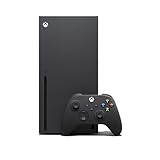
- Experience brighter worlds, vivid imagery, and sharper details with 4K gaming and up to 120 FPS that makes everything feel so real it’s unreal.
- Quick Resume: Seamlessly switch between your favorite games and pick up right where you left off.
- Backward compatibility: Play four generations of games, including games that are optimized for Xbox Series X|S to look and play better than ever.
- Lightning-fast load times: Jump into your favorite games like Fortnite and Grand Theft Auto instantly.
- Play new games on day one like The Outer Worlds 2, Call of Duty: Black Ops 7, and Grounded 2. Choose from hundreds of high-quality games on console, PC, and cloud with Xbox Game Pass Ultimate.
3. Xbox Cloud Gaming on a supported device
Cloud gaming sends a game’s video output to your screen while your controller inputs travel back to Microsoft’s servers. You do not install the Xbox console build locally. Microsoft’s GDC 2025 documentation says Xbox Cloud Gaming can run through a web browser on virtually any device with a browser, including iPhone and iPad, Android devices, Chromebooks and non-gaming PCs. It also lists Samsung TVs, Fire TV devices and Meta Quest headsets.
Microsoft says game progress, purchases and add-ons synchronize across Xbox console, PC and cloud. It reported more than 140 million hours streamed through Xbox Cloud Gaming between October and December 2024. The service also supports Xbox controllers, PlayStation DualSense and DualShock controllers, and Nintendo Switch Pro Bluetooth controllers.
What’s actually slowing this PC down?
Pick the symptom - the matching free tool is one click away.
The cited Microsoft documentation does not name PS5 as an Xbox Cloud Gaming client. Do not assume that the PS5 web browser, Remote Play application or a connected controller creates an Xbox Cloud Gaming pathway. Unless Microsoft publishes an explicit PS5 client or browser-supported method, treat Xbox Cloud Gaming on PS5 as unsupported.
4. PlayStation’s own cloud and remote features
PS5 offers PlayStation Plus Premium cloud streaming for selected games from the PlayStation library. It also offers Remote Play for PlayStation devices. These are Sony services: they stream or access PlayStation software associated with your PlayStation account. They do not convert an Xbox purchase into a PS5 game and cannot be used as a general Xbox backwards-compatibility layer.
Xbox Play Anywhere: exactly what it covers
Play Anywhere is an entitlement and cross-save program, not a universal cross-console standard. When a title is enabled, Microsoft describes a single purchase that can be played with Xbox, including progress and achievements, across Xbox console, PC and Xbox Ally at no additional game-purchase cost. The exact supported devices and features are shown on the individual title listing.
Rank #3

- FASTEST, MOST POWERFUL XBOX — Experience next-generation performance with 12 teraflops of processing power, delivering smoother gameplay, richer worlds, and faster responsiveness than any previous XBOX.
- TRUE 4K GAMING UP TO 120 FPS — Enjoy breathtaking visuals with true 4K resolution, HDR, and frame rates up to 120 FPS, plus hardware-accelerated ray tracing for a heightened level of realism.
- 1TB CUSTOM SSD AND XBOX VELOCITY ARCHITECTURE — Reduce load times dramatically with the custom 1TB NVMe SSD and XBOX Velocity Architecture, enabling lightning-fast performance and seamless world streaming.
- QUICK RESUME — Seamlessly switch between multiple games and resume exactly where you left off. No more waiting through title screens and loading bars.
- FOUR GENERATIONS OF GAMES — Play thousands of games from XBOX Series X|S, XBOX One, XBOX 360, and Original XBOX, with many titles enhanced for better visuals and performance on XBOX Series X.
- Included when listed: the Xbox console version and the supported Windows PC version, with participating handheld access where Microsoft identifies it.
- Shared data: Microsoft documents synchronized progress and achievements for participating Xbox ecosystem devices.
- Not included: a PS5 entitlement, a PlayStation Store license or automatic transfer of an Xbox disc.
- Title requirement: the game must carry the Play Anywhere designation; not every Xbox release does.
More than 50 percent of players game on multiple devices, according to Microsoft’s Play Anywhere program page. That statistic explains the program’s purpose: moving between Xbox-family devices, not making one purchase portable to every competing console.
How to check whether a specific game is playable on PS5
- Identify the exact release. Record the game’s title, edition and release date. Remasters, sequels and expansions can have different platform support.
- Open the current PlayStation Store listing. Search on the PS5 itself or on Sony’s web store for a page that explicitly labels the product as a PS5 game. A page that lists only Xbox, PC or cloud platforms is not a PS5 release.
- Check the publisher’s platform announcement. Confirm that PS5 is named, and note whether the announcement says “available now,” gives a future date or limits availability by region.
- Separate cross-play from ownership. Cross-play means players on different platforms can play together; it does not mean an Xbox purchase grants the PS5 copy. Cross-progression may synchronize a profile, but only after you own or access the game on each supported platform.
- Check edition and add-ons. A PS5 port may sell standard and deluxe editions separately. Xbox-owned expansions, virtual currency or preorder bonuses may not transfer unless the publisher explicitly documents cross-platform entitlement.
- Confirm the account requirement. Some games require a publisher account for cross-progression. Read the current listing and support page before assuming that an Xbox save will appear on PS5.
Native ownership versus streaming access
| Factor | Xbox Series X|S | Separate PS5 release | Xbox Cloud Gaming on a supported device | PS5 PlayStation cloud |
|---|---|---|---|---|
| What you access | Native Xbox console version | Native PS5 version | Cloud-delivered Xbox version | Selected PlayStation titles |
| Does an Xbox purchase normally unlock it? | Yes, for the purchased Xbox entitlement | No; the PS5 edition is a separate entitlement | Only with the required Xbox Cloud Gaming access and an eligible title | No; it uses PlayStation entitlements |
| Where saves and progression work | Xbox ecosystem; Play Anywhere titles can share with PC and supported handhelds | PS5 account and the publisher’s documented cross-progression system | Microsoft documents synchronization among Xbox console, PC and cloud | PlayStation ecosystem rules apply |
| Internet dependence | Online connection may be needed for downloads, updates or multiplayer, but gameplay is local | Local gameplay after installation; online features still need a connection | High; image quality and input response depend on the network | High; streaming availability depends on Sony’s service and title list |
| Controller support documented | Xbox controllers and compatible accessories | PS5-compatible controllers and accessories | Xbox, DualSense, DualShock and Nintendo Switch Pro Bluetooth controllers are listed by Microsoft | PS5-compatible controllers |
The table compares service models, not a promise that every game is present in every catalogue. Cloud libraries, PS5 ports, regional listings and supported features change over time.
Independent reader supportYour contribution helps us test, update, and keep practical guides available for everyone.What happens to saves, achievements and add-ons?
Within Microsoft’s ecosystem
For Play Anywhere titles, Microsoft’s model is designed to carry progress and achievements between Xbox console, Windows PC and supported handhelds. Xbox Cloud Gaming documentation also states that progress, purchases and add-ons synchronize across console, PC and cloud. The game must be an eligible title, and you must sign in with the account that owns or accesses it.
When moving to PS5
A PS5 port has its own PlayStation entitlement and may use a different save format, trophy set and add-on store. The publisher can provide cross-progression, as Microsoft’s showcase notes for Gears of War: Reloaded, but that is a title-specific feature rather than an automatic consequence of owning the Xbox version. Check the game’s account-linking instructions before deleting an Xbox save or buying add-ons.
Cross-play is not cross-buy
Cross-play lets Xbox, PC and PlayStation players share multiplayer sessions when the developer enables it. Cross-progression can carry selected unlocks or story progress between linked platforms. Neither feature, by itself, supplies a free PS5 copy of an Xbox game.
Rank #4

- BEST VALUE IN GAMING — Experience next-gen speed and performance in the smallest XBOX ever. The XBOX Series S delivers powerful all-digital gameplay in a sleek, compact design.
- UP TO 120 FPS GAMEPLAY — Enjoy smooth, responsive gaming with frame rates up to 120 FPS, powered by XBOX Velocity Architecture, a custom NVMe SSD, and DirectX Raytracing for a heightened level of realism.
- 512GB CUSTOM SSD AND XBOX VELOCITY ARCHITECTURE — Reduce load times dramatically with the custom 512GB NVMe SSD and XBOX Velocity Architecture, enabling lightning-fast performance and seamless world streaming.
- QUICK RESUME — Seamlessly switch between multiple games and resume exactly where you left off. No more waiting through title screens and loading bars.
- FOUR GENERATIONS OF DIGITAL GAMES — Play thousands of digital games from XBOX Series X|S, XBOX One, XBOX 360, and Original XBOX with backward compatibility. Many titles are enhanced for better visuals and performance. Smart Delivery ensures you always get the best version for your console.
Latency, image quality and controller considerations for cloud play
Streaming avoids a console purchase and installation, but it adds a network-dependent step between pressing a button and seeing the result. A fast, stable connection with low latency is more important than headline download speed alone. Busy Wi-Fi, long distance to a data center, packet loss and household congestion can cause input delay, resolution changes or disconnects.
Use a wired connection where practical, place Wi-Fi equipment close to the streaming device, pause large downloads and test the service at the time you normally play. Competitive games and rhythm titles are less forgiving of delay than turn-based or slower-paced games. A native Xbox or PS5 installation remains the predictable choice when response time matters.
Microsoft’s documented controller list is unusually broad: Xbox controllers, Sony DualSense and DualShock controllers, and Nintendo Switch Pro Bluetooth controllers are supported for Xbox Cloud Gaming. Compatibility can still depend on the browser, operating system and connection method, so pair the controller and test a short session before committing to a long playthrough.
What Microsoft’s 2024–2025 announcements do—and do not—mean
In February 2024, The Associated Press reported Microsoft’s confirmation that four formerly exclusive Xbox games would come to rival consoles. Microsoft Gaming CEO Phil Spencer said, “The teams that are building those games have announced plans that are not too far away.” AP also reported that Starfield and Indiana Jones were not among those four at that time.
The Tool Desk
Outbyte Driver Updater FREEScan for outdated or missing drivers - takes under a minuteDriver Scan →Outbyte PC Repair FREERepair Windows errors before they cause bigger problemsFix Now →That announcement demonstrates that platform availability can change; it does not establish a blanket policy that every Xbox game will come to PS5. Each release still needs an explicit PS5 announcement, a store listing and a release date. Microsoft’s 2025 showcase provides current examples of selected games receiving PS5 versions, while other titles remain Xbox-only or Xbox-and-PC releases.
Which option should you choose?
- You want the broadest Xbox catalogue and local performance: choose Xbox Series X|S.
- You want one particular game on PS5: verify an official PS5 edition and buy that edition; do not rely on Xbox Play Anywhere.
- You already own an eligible Xbox title and have a supported browser, TV or mobile device: check Xbox Cloud Gaming availability and service requirements for that title.
- You own only a PS5 and want cloud access: PlayStation Plus Premium covers selected PlayStation games, but the cited Microsoft documentation does not list PS5 as an Xbox Cloud Gaming client.
- You care about an existing save: confirm title-specific cross-progression before switching platforms. Shared multiplayer alone is not enough.
Bottom line
There is no general method to install or play an Xbox console purchase directly on PS5. Xbox Play Anywhere covers Xbox, Windows PC and supported handhelds, not PlayStation. A PS5 can run only a separately released PS5 version, and Xbox Cloud Gaming should be used only on devices Microsoft explicitly supports. For native Xbox play, use Xbox Series X|S; for a specific cross-platform title, verify its PS5 listing; for streaming, choose a documented Xbox Cloud Gaming device and expect network-dependent performance.
Quick Recap
Product prices and availability are accurate as of the date/time indicated and are subject to change. Any price and availability information displayed on Amazon at the time of purchase will apply.

