
iTechGuides is reader-supported. When you buy through links on our site, we may earn an affiliate commission. As an Amazon Associate I earn from qualifying purchases. Learn more
Calculate, compare and copy is a beginner-friendly way to describe three things a computer can do with information: perform arithmetic, check data against other data or a condition, and reproduce or move data to create an output. These actions often work together—for example, a program can find matching records, total their values and place the result in a report.
What does “calculate, compare and copy” mean?
The phrase describes a simple model of data processing. It answers the introductory question, “What can the computer do with the information?” The three verbs are useful for understanding familiar tasks, but they are not a complete technical description of how computers or processors work.
Netaji Subhas Open University’s learning material uses the three actions to explain examples such as sorting records, finding a customer by account number, adding values for matching records and editing text. Read the university learning material.
Free tools Windows power users keep installed
One-click scans. No signup required.
Calculate: perform arithmetic on data
To calculate is to apply mathematical operations to data. A computer might add a set of amounts, subtract one value from another, or calculate a total from selected records.
#1 Best Overall

- 1.Number Pad for Laptop: Foloda number pad supports NumLock, ESC, Tab, Delete etc. With shortcut key which can open the computer calculator directly. The Multi - Function 10 keys USB keypad is a must - have laptop accessories. It's more unique than most keyboards, perfectly catering to the needs of laptop users who require efficient numeric input during work, study or financial accounting tasks.
- 2.10 Key USB Keypad: Number Keypad is a great addition to your laptop accessories collection, is only 87g. As a key laptop accessory, Foloda numpad works by 2.4GHz wireless technology, with Plug and Play functionality. You can just plug the receiver into a USB port of your laptop. No device drivers needed, no delays and dropouts, ensuring fast data transmission. The maximum working range up to 32.8 ft. The Receiver is inserted in the battery compartment of the numeric keypad, making it convenient to carry around with your laptop.
- 3.Wireless Number Pad: Number Pad is made of high quality ABS Material which offer great comfortable touch and precise control, good resilience fast response and reduce the press sound. It also has auto sleep function, lower power consumption, reflecting energy saving. Press any key to awake up the keypad. Power Supply by 2 x AAA Battery ( not included ). This makes it an excellent laptop accessories for use in quiet environments like libraries or offices, where noise - free operation is crucial.
- 4.10 Key for Laptop: wireless usb number pad, an essential laptop accessory, works with PC, laptop and desktop computers that have Windows 2000 / XP / Vista / 7 / 8 / 10 systems. Whether you're using a Windows laptop for work or entertainment, Foloda usb numeric keypad is a reliable and compatible accessory.
- 5.USB Number Pad for Laptop: Specialized in Home and try our best to offer the better product and customer service. If you have any question, feel free to contact with us. We are committed to ensuring that your experience with our laptop accessory - the wireless number pad - is nothing short of excellent.
For example, a payroll program can add salary values to produce a total. In a more selective task, it can first identify which records belong in the total, then add only those values.
Compare: check data against a value or condition
To compare is to match or evaluate information against known data or a requested value. A comparison can test whether two entries are equal, determine which value is higher, or check whether a record meets a condition.
Rank #2

- Versatile Application Scenarios: Ideal for a wide range of uses, from accounting and financial work to data entry and education, this keypad is perfect for professionals and students alike. It's also a great tool for gamers who need additional keys for macros, or digital artists and designers for shortcuts, making it a versatile addition to any workspace
- Easy Plug-and-Play Operation: No need for complicated installations or software. This wireless number pad offers a simple plug-and-play functionality with its USB interface, ensuring a hassle-free setup. Simply connect it to your computer, and you're ready to enhance your productivity. (Note: Compatible only with devices equipped with USB ports)
- Compact and Portable Design: With its sleek, lightweight construction, this numeric keypad is designed for portability. Easily carry it in your laptop bag or backpack to have access to efficient data entry wherever you go, making it perfect for mobile professionals, remote workers, and those who value a clutter-free desk
- Enhanced Typing Experience: Equipped with responsive keys and a comfortable layout, this numpad provides a tactile, satisfying typing experience. Its design minimizes fatigue during long periods of use, making it an ideal choice for those who frequently work with numbers or require additional input options for their computing needs
- Wide Compatibility: Compatible with various devices including laptops, desktops, and tablets, fully supporting systems like Windows 2000, XP, Vista or Windows 7/8/98/10/11 later, Chrome Os, Android, Linux, Paritally work with macOS with USB port (Numbers work fine but hotkeys not workable), making it an ideal wireless numeric keypad solution
- Searching: A program can compare account numbers in customer records with the number being sought.
- Sorting: It can compare values in records to determine their order.
- Filtering: It can check whether a record’s job title matches a requested title, such as “NURSE.”
Copy: reproduce or move data to make an output
To copy is to reproduce or move data from one place to another so it can be used in a report, listing or other output. When a program sorts records, for example, it can copy each record into its new position in the ordered result. Text editing also involves copying characters as text is rearranged or placed elsewhere.
Recommended Free Tools
How the three actions work together
Consider a request to find the combined salary of all employees whose job title is “NURSE.” The program compares each title with the requested title, calculates a total from the salaries of matching records, and copies the result into a report or display.
Rank #3

- Widely Compatibility: This Bluetooth number pad is compatible with PC, laptop, desktop and computers running Windows systems. Note: This number pad does NOT support Mac OS systems
- Multi-function 26-key Keypad: With NumLock, ESC, Delete and a shortcut key which can open the computer calculator directly etc.The number keyboard is more unique in that it can be combined into 3 currency symbols through Fn+composite keys
- Bluetooth Number Pad Rechargeable: The wireless numeric keyboard with rechargeable lithium battery, avoid continuous battery consumption and battery replacement. This numeric keypad uses the latest stable buletooth 3.0 connection,plug and play, no delay and caton, fast data transmission, and working range is up to 33FT
- Comfortable Numeric Pad: With quiet SCISSOR-SWITCH KEYS provides a comfortable and smooth typing experience, quick response and good tactile rebound, keep the office quiet and improve work efficiency.15° tilt design fits the human body habits, great for spreadsheets worker, accounting staff and financial officer
- Long Using Time Keypad: The wireless numpad with a large capacity lithium battery, usually can use 1-2 months after fully charged (charged with the provided USB-A to USB-C cable). It will enter the sleep function after being idle for 1 hour, press any key to wake up
- Compare: Check each employee record to see whether its title matches “NURSE.”
- Calculate: Add the salary values from records that match.
- Copy: Put the total into the requested output, such as a report.
The order and combination vary with the task. Sorting uses comparisons to choose an order and copying to form the reordered result; arithmetic may not be needed. A search may compare values and return a matching record without calculating a total.
Independent reader supportYour contribution helps us test, update, and keep practical guides available for everyone.Is this a complete account of computer processing?
No. “Calculate, compare and copy” is a teaching model for describing common data-processing operations, not a claim that every computer operation can be reduced to those three verbs. The university material and ComputerLanguage.com’s encyclopedia entry explain the phrase and its examples; neither is a current processor-architecture specification. ComputerLanguage.com attributes the phrase to Alan Freedman, but that attribution is what the encyclopedia reports and does not independently establish the original coinage. See the ComputerLanguage.com entry.
Quick Recap
Best Value

- 🔗 Dual Bluetooth Connection & Easy Switching: Supports connection to two Bluetooth-enabled devices simultaneously. Easily switch between devices with a tap—great for multitasking across your laptop, tablet, or smartphone. No dongle needed, reducing risk of loss and improving portability.
- 💻 Universal Compatibility: Works seamlessly with Windows, macOS, Android, iOS, and Chrome OS. Ideal for data entry professionals, spreadsheet users, financial officers, and students. (Note: Some shortcut keys may have limited functionality on macOS.)
- 🧮 34-Key Full Numeric Layout with Shortcuts: Includes NumLock, ESC, Delete, page navigation keys, and calculator shortcut—designed for fast and efficient data entry. The responsive layout mimics a full keyboard numpad, saving time on spreadsheets and accounting software.
- 🔇 Quiet Typing with Scissor-Switch Keys: Premium low-profile scissor-switch keys provide tactile feedback with quiet keystrokes—perfect for shared or quiet workspaces. Ergonomic 15° tilt design improves typing posture and comfort during long sessions.
- 📱 Compact, Portable & Durable Build: Sleek, slim design fits easily into bags or backpacks. The sturdy ABS construction and anti-slip base keep the keypad stable during intense typing tasks—ideal for travel, office, or home setup.
Rank #4
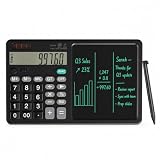
- 【All-in-One Desk Tool: Calculate & Write Without Paper】: Solve math and take notes on the same device! The built-in erasable LCD writing pad supports over 100,000 rewrites—eliminating sticky notes, scratch paper, and clutter. Ideal for accountants, engineers, teachers, and students.
- 【One-Click Clear + Lock to Protect Critical Calculations】: Erase your notes instantly with the dedicated clear button. Press “Lock” to freeze important numbers during audits, exams, or client meetings—no more accidental wipes when you need accuracy most.
- 【Integrated Pull-Out Stylus – Never Lose Your Pen Again】: The smooth-sliding stylus stores inside the calculator body for instant access. No magnets—just reliable, secure storage that keeps your workspace tidy and your tool always ready.
- 【12-Digit Wide Screen & Dual Power for All-Day Reliability】: Large, high-contrast digits reduce errors in complex calculations. Solar-powered with a CR2032 backup battery, it works flawlessly in bright offices, dim classrooms, or during power outages.
- 【Professional Design for Office Desks, Classrooms & Home Use】: Sleek black finish with anti-slip base stays stable during use. Compact enough for backpacks or briefcases—perfect for business professionals, remote workers, and families managing budgets or homework.
Product prices and availability are accurate as of the date/time indicated and are subject to change. Any price and availability information displayed on Amazon at the time of purchase will apply.

