
Crashes, No Sound, or Screen Glitches?
Random freezes, missing sound and display glitches usually trace back to one bad driver. Find and replace yours safely.Free scan · under a minuteWindows Errors? Fix Them Before They Spread
Repair common Windows errors and clear accumulated junk for a smoother, more stable PC - no reinstall needed.Free scan · no reinstalliTechGuides is reader-supported. When you buy through links on our site, we may earn an affiliate commission. As an Amazon Associate I earn from qualifying purchases. Learn more
You can build a desktop posture-coaching prototype by sending live camera frames to MediaPipe Pose Landmarker, checking whether relevant landmarks are visible and stable, and showing a gentle, optional reminder when a simple geometric cue stays outside a chosen range. This is an implementation pattern—not a medically validated posture detector. Its output cannot diagnose a condition or establish that a person is sitting safely.
How the posture-coach pipeline works
Keep the app’s responsibilities separate: camera input supplies frames; Pose Landmarker estimates body landmarks; your code checks tracking quality and applies a clearly labeled heuristic; the Electron interface displays a restrained cue. A neutral or uncertain state is essential: if the relevant landmarks are missing, obscured, or unstable, the app should report that it cannot assess the view rather than infer poor posture.
- Capture: request camera access only after explaining why it is needed, and show when tracking is active.
- Estimate: pass live video frames to MediaPipe Pose Landmarker. Its output includes 33 estimated 3D pose landmarks; that is a description of model output, not an accuracy guarantee. See Google AI Edge’s Pose Landmarker guide.
- Validate and smooth: check that the landmarks used by your cue are present and sufficiently visible, then smooth noisy changes over time.
- Apply a heuristic: evaluate a transparent geometric cue only when tracking quality is adequate. Treat thresholds as configurable design choices, not official or clinical standards.
- Show a cue: use calm, nonjudgmental language, offer a way to pause or disable reminders, and avoid alarms for isolated frames.
Choose camera framing before choosing a posture cue
Pose estimates are constrained by what the camera can see. Ask users to position the camera so the upper-body landmarks relevant to the chosen cue remain in frame and are not blocked. A front view and a side view reveal different geometry; neither gives a complete account of a workstation or a person’s comfort. Clothing, occlusion, lighting, camera angle, and movement can all make tracking less useful.
MediaPipe provides image and estimated world-coordinate outputs. Image coordinates describe positions in the image; world coordinates are model estimates, not direct measurements of every relevant body or workstation factor. Do not present either coordinate set as a direct measurement of spinal health or as proof of a correct sitting position. If the view is poor, say tracking is uncertain and withhold the reminder.
#1 Best Overall

- Say Hello to a Pain-Free Life- The Comfy Brace posture corrector aims to relieve chronic back pain and make long working or standing hours a breeze to get through. By aligning properly your posture, it takes pressure off of key areas, thus alleviating back, neck, shoulder and clavicle pain.
- Innovative Design - Our proprietary design is orthopedically created to correct your posture in the most comfortable way possible for chest sizes of 30" to 43". Fully adjustable and breathable, you can easily wear it even under your clothes, and conquer your day in a pain-free fashion.
- Develop Correct Posture on your Own & Regain Confidence - Start wearing our back straightener for 5-10 minutes per day and then raise the time to an hour or two at a time. After a while, you will notice you stand taller, look healthier and feel absolutely better- all on your own!
- Created to Last- We cut no corners when it comes to quality. Our back brace features high-end durable stitching and it remains silky soft to the touch, breathable, without ever getting uncomfortable or irritating your skin like most other cheaper posture correctors do.
- A Legacy in Customer Satisfaction - Comfy Brace is built on a long history of customer satisfaction, and we would not have made it without you. That’s why we want you to be 100% confident in your purchase and with each posture corrector you get a LIFETIME Warranty, no questions asked!
A webcam is an optional input for this camera-based workflow, not a requirement for the posture guidance itself. Explain the camera placement that supports the landmarks your app uses before users grant access.
Turn landmarks into a restrained heuristic
Do not try to score a person’s entire posture from a single frame. Choose one observable relationship that the selected camera view can plausibly track, define which landmarks it needs, and make the output interpretable. For example, an implementation might monitor whether a head-to-torso relationship appears to deviate for a sustained interval. That is an illustrative software heuristic, not a validated threshold or an assessment of health.
Rank #2

- UPPER BACK AND SHOULDER SUPPORT: This Y-shaped posture brace connects the shoulder straps to a central back panel, offering a gentle reminder to notice rounded shoulders while sitting or standing.
- ADJUSTABLE STRETCH STRAPS: Flexible straps and hook-and-loop closures let you fine-tune the fit around your shoulders and upper body. Adjust the tension to feel comfortably snug without overtightening.
- BREATHABLE PERFORATED FABRIC: Ventilation holes allow air to pass through the fabric, while flexible shoulder sections follow the contours of your upper body for everyday layering.
- DISCREET UNDER MANY OUTFITS: The slim black back support layers beneath many shirts and jackets. Wear it over a light base layer to add posture support to workwear or casual clothing.
- FOR WORK, READING AND HOME ROUTINES: Bring a posture reminder to computer work, reading and quiet time at home. The adjustable design lets you reset the fit for your clothing and each wear session.
- Require usable input: evaluate only when all landmarks needed for the cue are visible enough for the app’s chosen quality rule.
- Use time, not a snapshot: smooth estimates and require a sustained deviation before prompting. This reduces frame-by-frame nagging; the appropriate duration and smoothing are design choices that must be tuned for the application, not thresholds established by the cited sources.
- Keep uncertainty distinct from a cue: distinguish “tracking unavailable” from “consider changing position.” Missing landmarks must not be interpreted as slouching.
- Make prompts optional: let users adjust frequency or pause the feature, and phrase reminders as suggestions rather than warnings.
- Avoid a rigid ideal: encourage users to notice comfort and change position, rather than implying one fixed pose is correct for everyone.
OSHA’s computer-workstation guidance describes a neutral setup that includes the head level and generally in line with the torso, relaxed shoulders, supported feet, and back support. It also describes elbows bent at 90–120 degrees and reclined sitting with an angle of 105–120 degrees between torso and thighs. These are workstation guidance ranges and examples, not universal posture-scoring thresholds for a webcam app. OSHA also notes: “Regardless of how good your working posture is, working in the same posture or sitting still for prolonged periods is not healthy.” See OSHA’s Computer Workstations: Good Working Positions.
Quick wins for a faster PC:
Clear out junk files and repair common Windows errorsFree Scan →Scan for outdated or missing drivers - takes under a minuteDriver Scan →Design the Electron camera flow with security in mind
Camera access is sensitive. Explain the feature before asking for permission, make active tracking visible, and avoid retaining or transmitting frames unless there is a clearly explained need and suitable safeguards. MediaPipe’s pose-estimation capability does not, by itself, establish how your application handles camera images; that is determined by your app’s implementation.
Rank #3
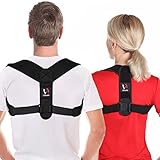
- Enjoy a much healthier life with a posture corrector: Our posture corrector is suitable for men and women, which provides alignment of the back, neck, and shoulder during your activities.
- Straighter posture lets you feel more confident: With the benefit of our back brace, you will have a straight posture and be more confident, healthy, and younger. Enjoy a wonderful life with a better posture.
- Invisible under clothes: This back brace can be worn under the clothes. It is undetectable and very comfortable so that you will forget it after a while. Notes: If you feel discomfort, loosen the straps and readjust. The buckle pad on the back can be adjusted as needed. If you experience numbness, swelling, or discoloration, discontinue use immediately.
- Adjustable & easy to use: Our shoulder brace fits chest sizes from 30" to 42" (please verify before ordering). Start wearing it for 20-30 minutes to 1 hour per day for two weeks and gradually increase & feel the difference. We recommend that you do not wear it for more than 2 hours continuously to avoid physical discomfort and soreness.
- High-quality: In order to provide a comfortable shoulder and neck brace, our back posture corrector is made of high-quality fabric, which is lightweight but strong, soft, breathable, and washable material.
Electron’s security guidance recommends keeping renderer privileges constrained. In particular, use context isolation and sandboxing, apply a restrictive Content Security Policy (CSP), limit navigation, keep Electron current, and do not disable web security. Do not expose Node integration to remote content. Review the guidance for the runtime version you ship: Electron security.
Handle camera permission deliberately through Electron’s session permission APIs, and verify the behavior for the operating systems and packaging configuration you support. Consult the current Electron session API. Do not treat a browser permission prompt or a successful local development run as proof that packaged builds behave identically across platforms.
Rank #4

- 【Pain Relief】 Follow the scientific concepts of ergonomics, BraceTop posture corrector provides 3 in 1 support to straighten your back, chest and shoulder to keep your body in the correct position. By correcting your posture, our posture effectively relieve back pain, neck pain, lumbar pain and back problems such as humpback, kyphosis, scoliosis
- 【Newer and Better】In the new version, our back brace equips with High-elastic support strip that provides stable support. Withdrawable support strip makes you conveniently regulate the pressure or clean the posture corrector. Newly added storage bag can store keys, mobile phones, credit cards and other items
- 【SUPERIOR QUALITY】Perforated elastic band provides strong tension and good resilience. The widened belt provides a wider range of support, which avoid your waist injury while lifting heavy objects. Premium and non-pilling Velcro makes back straightener conveniently adjust the appropriate tension
- 【ANYTIME AND ANYWHERE】Full back of our back brace is made of dense mesh cloth that provides breathable and skin friendly wearing experience. The mesh-cloth design keeps you comfortable and cool while helping support your spine. By advanced materials, our back brace allow you to wear it in anytime and anywhere without stuffiness
- 【CHOOSE YOUR SIZE】Posture corrector is equipped with shoulder straps that are fully adjustable. Our back brace is unisex and suitable for youth and elderly group. We recommend that you measure your waist size ( measured at navel) and choose the appropriate size by follow size chart.If your waist is between two size, we recommend the larger size
Keep ergonomic guidance broader than the app’s score
A camera-based cue can address only a narrow visual signal. It cannot account for all workstation factors, measure comfort, or establish an individual’s risk. NIOSH defines ergonomics as “the design of work tasks and job demands to fit the capabilities of the working population.” Its About Ergonomics and Work-Related Musculoskeletal Disorders page was published February 21, 2024. That broader framing is a better fit than claiming a single camera score can prescribe a perfect pose.
Recommended Free Tools
For workplace posture assessment, NIOSH’s 2014-131 publication discusses observation-based assessment methods and prevention or control of occupational musculoskeletal disorders. It provides context for why a lightweight consumer camera heuristic should not be represented as a validated risk assessment.
Best Value

- Stronger Support, Precise Pain Relief: Designed with 5 flexible ABS support rods, this upgraded posture corrector provides stable, full-back support to help encourage proper posture and reduce strain caused by prolonged sitting or daily activities. The ergonomic design helps ease muscle fatigue and everyday back discomfort while keeping you supported and comfortable. Ideal for work, daily wear, recovery support, and postpartum stabilization
- Posture That Builds Confidence: Designed for comfortable daily wear, this posture corrector gently guides your shoulders and back into a more natural position without uncomfortable underarm pressure. Wearing it for 1–2 hours a day helps build better posture habits and encourages a straighter, more confident stance. With consistent use, it supports improved posture awareness, a more polished appearance, and greater comfort throughout your daily routine
- Loved by thousands of users: the back brace provides strong, reliable support for better posture. Available in a variety of stylish colors to suit your individual needs. It features adjustable shoulder straps and comes in three sizes to fit most body types, helping you naturally improve your posture while working and exercising. For enhanced comfort, wear it over a short-sleeve shirt and choose the larger size if your waist measurement falls between sizes on the chart
- Comfortable Design & Armpit Friendly: Lightweight, adjustable, and discreet under clothing, this back brace posture corrector fits effortlessly into daily life—providing consistent upper back support to improve posture during work, exercise, or rest. Ideal for daily wear at work, home, or during recovery, offering gentle support to help encourage better posture and lasting comfort
- Breathable Comfort for Daily Life: This back support posture corrector is made with lightweight, breathable mesh fabric, which keeps your back cool and dry all day long. The soft, durable material is easy to clean and quick to dry for convenient daily use. Whether at work, exercising, or relaxing, it provides reliable back support, helps relieve discomfort, and promotes healthier posture naturally in everyday life
Workstation setup remains separate from app hardware. OSHA says a footrest may be used if desk height is not adjustable; it is an optional workstation aid, not a required part of this software project. Encourage movement and position changes rather than prolonged effort to hold a single “perfect” pose.
What this prototype can and cannot establish
This design can demonstrate a local workflow for camera input, pose-landmark estimation, basic tracking checks, and optional reminders. It does not establish that the cue is accurate across camera setups or users, nor that using the app improves posture, prevents pain, or reduces musculoskeletal disorders. The cited sources supply no outcome statistic for this specific kind of AI posture coach. Treat any thresholds, timing, and reminder behavior as product decisions that need appropriate testing and clear communication—not as medical facts.
Quick Recap
Product prices and availability are accurate as of the date/time indicated and are subject to change. Any price and availability information displayed on Amazon at the time of purchase will apply.
The Tool Desk
Outbyte Driver Updater FREEScan for outdated or missing drivers - takes under a minuteDriver Scan →Outbyte PC Repair FREEClear out junk files and repair common Windows errorsFree Scan →
