
Recommended Free Tools
iTechGuides is reader-supported. When you buy through links on our site, we may earn an affiliate commission. As an Amazon Associate I earn from qualifying purchases. Learn more
Raycast extensions are built with React, Node.js, and TypeScript, and Raycast’s CLI supports the development-to-build workflow. A number formatter is a useful first project—but the available project details do not establish what this particular formatter accepts, how it rounds, or what it displays. This walkthrough covers the verified Raycast workflow and identifies the implementation decisions you need to make before describing a formatter’s behavior.
What you need before creating a Raycast extension
Raycast describes its extension platform as an API built around React, Node.js, and TypeScript, with the Store as the channel for sharing extensions. Its current getting-started guide lists Raycast 1.26.0 or later, Node.js 22.14 or later, npm 7 or later, and familiarity with React and TypeScript as prerequisites. These version floors can change, so check the Raycast getting-started guide before starting.
If you are new to React or TypeScript, treat the project as two tasks: first learn enough of Raycast’s command structure to make a working extension, then decide and implement the formatter’s input and output behavior. The platform documentation does not define those formatter choices for you.
The Tool Desk
Outbyte Driver Updater FREEFix the driver behind crashes, sound loss and screen glitchesFind Drivers →Outbyte PC Repair FREEClear out junk files and repair common Windows errorsFree Scan →Create and develop the extension
Raycast’s CLI documentation says, “The Raycast CLI allows you to build, develop, and lint your extension.” The CLI also supports migration and publishing tasks. For local development, the documented command is npx ray develop; development mode provides hot reload and detailed error feedback. When you are ready to produce an optimized distribution artifact, use npx ray build. See the Raycast API CLI documentation for the current workflow and command details.
#1 Best Overall

- 🎮【GravaStar Mercury K1 Lite Built for Competitive Speed】 The GravaStar Mercury K1 Lite Gaming Keyboard is engineered for fast, controlled gameplay. Equipped with custom GravaStar x BSUN linear switches featuring 40gf actuation, 2mm pre-travel, and 3.6mm total travel, this Mechanical Keyboard delivers smooth keystrokes and rapid response. Whether you're grinding ranked matches or reacting in high-pressure FPS moments, this performance-focused keyboard helps keep every input consistent and precise.
- 🧊【Transparent 75% Keyboard with Futuristic Edge】 This 75% Keyboard features a fully transparent PC chassis and clear keycaps that showcase a bold exoskeleton design. Built with durable PC construction, the GravaStar Mercury K1 Lite maintains structural stability while adding a striking tech-forward presence to any battle station. It’s a Mechanical Gaming Keyboard that combines aggressive styling with reliable durability for everyday competitive play.
- 🌈【RGB Gaming Keyboard with 13 Custom Modes】 As a dedicated RGB Gaming Keyboard, the GravaStar Mercury K1 Lite offers 13 customizable lighting modes to match your setup. The transparent keycaps amplify illumination, creating a vivid glow across your desk during night sessions. Ideal for streaming, tournament-style environments, or immersive solo gameplay, this RGB Mechanical Keyboard enhances your battle station without overwhelming it.
- 🧸【Gasket-Mounted Mechanical Keyboard for Controlled Feel】 This Wireless Mechanical Keyboard uses a gasket-mounted structure with 5-layer foam dampening to refine keystroke impact and improve acoustic balance. The internal cushioning softens bottom-out while preserving responsive feedback, making long gaming sessions more comfortable. It’s a Gaming Keyboard designed for stability, sound control, and consistent performance under pressure.
- 🔌【Tri-Mode Wireless Keyboard for Multi-Device Setups】 The GravaStar Mercury K1 Lite Wireless Keyboard supports tri-mode connectivity: wired, Bluetooth, and 2.4GHz wireless. Easily switch between a gaming desktop, laptop, or secondary device without constant re-pairing. Compatible with Windows and macOS, this Gaming Mechanical Keyboard adapts to competitive rigs, dorm setups, and home office environments.
- Start a development session: run
npx ray developfrom the extension project directory. Make changes and use Raycast’s development feedback to catch errors. - Decide the formatter contract: specify what a user enters, which input forms are accepted, and what the command returns or copies. Do not assume decimal precision, rounding, grouping separators, or locale behavior without confirming the implementation.
- Build the distribution artifact: run
npx ray buildand inspect the resulting build in Raycast before preparing a public submission. - Lint and address migration needs: use the CLI’s lint and migration capabilities where relevant, consulting its current documentation for exact commands and behavior.
Define and verify number-formatting behavior
A formatter’s name does not tell users what it will do. Before documenting or publishing a number formatter, make its behavior explicit in the command description, README where needed, and implementation. The following are verification questions, not claims about this project:
- Input: Does the command accept only numeric text, or also signs, decimal separators, pasted values, or other forms?
- Invalid values: What happens with empty input, malformed text, or values outside the supported range?
- Precision and rounding: How many decimal places are shown, and which rounding rule is applied?
- Grouping and locale: Are thousands separators used? Is formatting fixed or dependent on a locale?
- Result action: Does the result appear on screen, get copied to the clipboard, or support another action?
Test representative inputs for each behavior you choose, including boundary and invalid cases. The available details about this project do not include its source code or author notes, so they cannot substantiate particular input examples, output strings, tests, or a firsthand account of building it.
Rank #2
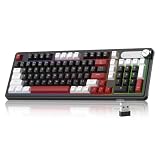
- Triple Connection Modes & Multi-Device Compatibility: This 98-key wireless keyboard supports wired USB-C, 2.4G wireless and Bluetooth three connection modes for free switching. The gaming keyboard supports dual-system compatibility (Windows & Mac) and allows you to pair with up to 5 devices simultaneously, meeting your daily office, gaming and cross-device operation needs easily.
- Vivid RGB Colorful Backlight: Enhanced by rich RGB lighting with diverse dynamic light effects, this creamy keyboard provides clear typing vision even in dim environments. You can freely adjust backlight brightness and flowing speed, and effortlessly switch various light modes via shortcut keys or the built-in knob to build your exclusive cool atmosphere.
- 4000mAh Long-Lasting Battery Life: Say goodbye to frequent charging anxiety. Featuring a built-in 4000mAh rechargeable battery, this light up keyboard delivers extended usage time for both work and gaming marathons. You can keep working wirelessly for days on a single charge, or plug in the included USB-C cable for uninterrupted wired gameplay while charging.
- Dual-Function Control Knob for Easy Operation: Equipped with a practical integrated rotary knob, MageGee GK960 membrane keyboard realizes dual control of volume and lighting. Easily adjust system volume (twist to adjust, press to mute) or customize RGB lighting (rotate for brightness, press to switch effects) without digging into settings. Long press the FN+Knob to switch volume and light modes quickly.
- Durable Double-Shot Keycaps: This ergonomic keyboard adopts premium double-shot injection molding craft to make keycaps, which features clear legends, anti-wear and non-fading performance after long-term frequent use. 3-color mixed keycap layout creates a trendy modern look, delivering layered visual appeal and upgrading your desktop style.
Prepare the extension for the Store
The extension manifest describes key metadata, including the name, title, description, icon, author, supported platforms, categories, and commands. Store preparation also involves a distribution build and checks of metadata and assets. Raycast’s guidance addresses npm lockfiles and recommends a README when setup is non-trivial. Use the current Store preparation documentation to check the requirements before submission.
- Confirm the manifest fields and command details match the extension.
- Check that the icon, categories, and other assets meet Raycast’s current requirements.
- Include a README if users need setup instructions beyond the manifest.
- Review the npm lockfile guidance and include the appropriate lockfile.
- Run the distribution build and inspect it in Raycast.
How public publication works
Public distribution is not automatic: the documented path is to open a pull request to Raycast’s extensions repository, undergo review, and receive acceptance before publication. Once accepted, users can find the extension through Raycast’s in-app Store or the web Store. The submission guide explains the contribution path.
Rank #3

- Media-Friendly: The K400 Plus wireless touch TV keyboard gives you integrated, comfortable control of your PC-to-TV entertainment, eliminating the clutter of a separate keyboard and mouse
- Plug-and-Play: Simply plug the Unifying receiver into a USB port and the wireless touchpad keyboard is ready to go; adjust controls using the Logitech Options Software to save preferred settings
- Power-Packed: Built with laid-back control in mind, this wireless TV keyboard has a reliable and long battery life of up to 18 months (2), including an on/off button to help it go even longer
- Wireless Freedom: Designed for seamless comfort and control, this HTPC keyboard boasts a range of up to 33 ft (1) wireless connectivity, with quiet keys and a large touchpad for easy navigation
- Broad Compatibility: Designed for use with Windows 7, Windows 8, Windows 10 and later, Android 7 or later, and Chrome OS
Raycast’s security documentation describes collaborative review and CI validation, including checks for manifest conformance, assets, author information, and build or type errors. These are platform checks, not a guarantee that any particular extension will be accepted or that its code is safe in every respect. See Raycast’s security documentation.
Quick Recap
Best Value
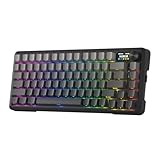
- Info Screen Personalization Plus One-Knob Control - The built-in TFT display shows battery, connection mode and typing status while supporting custom GIFs or memes, and a single knob handles backlight brightness and media playback with no extra key combos.
- Switch Devices Without Re-Pairing, Zero Lag - Tri-mode connectivity jumps between USB-C, Bluetooth, and 2.4GHz wireless, so you can move from PC to laptop to tablet without sacrificing speed.
- Creamy Cushioned Typing Feel, Swap-Ready Anytime - Gasket-mounted construction with thick-lubed custom linear switches and 5-layer noise dampening gives a soft, silky, quiet bounce, and the upgraded socket accepts almost any switch.
- Fade-Resistant PBT Keycaps Meet Brighter South-Facing RGB - Gradient PBT keeps its texture and color for years, while the south-facing socket delivers more even per-key lighting.
- Pro Software for Even Deeper Customization - Design your own lighting effects and program advanced macros with custom keybindings, so the board adapts to how you work or play.
Rank #4

- 【Dreamy Rainbow Gaming Keyboard】K521 Gaming Keyboard Adopts a Different LED Backlight Design, Upgraded on the Traditional LED Backlight Effect, Making the Light More Penetrating, Giving You a More Dazzling Visual Effect, Making Your Gaming Process More Enjoyable
- 【One Touch Opens & Visual Feast】The K521 Red Dragon Keyboard has a One-Touch on/off Lighting Button for Added Convenience. It also has a Three-Position Adjustable Breathing Mode and a Four-Position Adjustable Brightness Lighting Mode
- 【Mechanical Feeling & Fast Tapping】The PC Keyboard Keys are Designed for Mechanical Feeling, Giving You a Better Feel During Use and the Ability to Trigger Keys Quickly, Allowing You to Win All Your Games
- 【19 Keys Anti-Ghosting Keyboard】Anti-Ghosting Ensures Every Button Can Be Triggered. This Allows You to Trigger Key Combinations In The Game Accurately, And Each Skill Can Be Accurately Released to Increase Your Winning Rate. Redragon K521 Will Be Your Perfect Partner
- 【12 Multimedia Combination Keys】The K521 Wired Gaming Keyboard is Equipped with 12 Multimedia Keys That Can Greatly Enhance Your Gaming/Office Efficiency and Make It More Convenient to Use
Product prices and availability are accurate as of the date/time indicated and are subject to change. Any price and availability information displayed on Amazon at the time of purchase will apply.

