
iTechGuides is reader-supported. When you buy through links on our site, we may earn an affiliate commission. As an Amazon Associate I earn from qualifying purchases. Learn more
Yes, you can build games in a browser, but browser editors vary widely in features and production readiness. And a game editor using GPU-accelerated graphics does not, by itself, prove that it uses little CPU. Whether a browser IDE feels light depends on its workload, browser, and hardware; a credible CPU comparison needs measurements under controlled conditions.
Can you build a game in a browser?
Yes. Browser-based game editors range from collaborative tools designed to work in a tab to web versions of desktop editors that still have important limitations. “Full game IDE” is therefore not a dependable description unless it specifies which capabilities are included, such as scripting, debugging, asset import, profiling, and exporting.
Godot’s web editor is preliminary
Godot’s web editor documentation says it can be used with new or existing projects, but labels the editor preliminary and does not recommend it for production work. It supports only the Compatibility renderer and lacks C#/Mono, GDExtension, debugging and profiling, project exporting, and lightmap baking. Godot recommends using the native editor to export a project.
Recommended Free Tools
Projects are stored in the browser’s IndexedDB storage. You can download project source as a ZIP, but Godot warns that files outside the editor’s designated browser filesystem path may be lost when the editor closes. The editor also requires browser support for WebAssembly SharedArrayBuffer to support threading. Godot identifies performance and input limitations on mobile browsers and notes that Firefox may perform worse than Chromium-based browsers in WebGL applications. The linked page is the “latest” documentation, which Godot warns may be unstable; check the stable documentation for the release you intend to use.
#1 Best Overall

- Trusted By Families Worldwide - With Over 50 Million Sold, Thinkfun Is The World's Leader In Brain And Logic Games
- Develops Critical Skills - Playing Through The Challenges Builds Reasoning And Planning Skills As Well As Core Programming Principles, And Provides A Great Stealth Learning Experience For Young Players
- What You Get - Hacker Is A Cybersecurity Coding Game And Stem Toy For Boys And Girls Age 10 And Up Where You Learn Programming Principles Through Fun Gameplay. It Includes A Game Grid, Control Panel, Challenge Booklet, 2 Agent Tokens, 9 Movement Tiles, 13 Revolving Platform Tiles, 5 Double-Sided Transaction Tiles, A Transaction Link Token, 3 Data File Tokens, 2 Exit Point Tokens, A Virus Token, Alarm Token, 2 Lock Tokens, And A Solution Booklet
- Clear Instructions – Easy To Learn With A Clear, High Quality Instruction Manual. You Can Start Playing Immediately
PlayCanvas is built around a browser editor
PlayCanvas describes its platform as an open-source 3D engine with a collaborative editor that runs in a browser. The company says it supports WebGPU while retaining WebGL2 compatibility, and offers visual-editor, engine, React, and Web Components workflows. Its product page lists free public projects, 1 GB of storage, and free app hosting; these are PlayCanvas’s own product statements, so check the current terms before relying on them.
Does a browser game editor use a lot of CPU?
There is no single answer: “browser editor” describes where software runs, not how much work it performs. An editor may be idle, importing assets, compiling scripts, updating a complex scene, or running a game preview. Those states can have very different CPU demands.
Rank #2

- HIGH QUALITY - The future is here and it's ready to play! Coder Mindz is the only board game and STEM toy, that teaches Coding and Artificial Intelligence concepts using a fun gameplay.
- EASY PLAY - Use it at home, in school, coding clubs, Montessori, STEM clubs, boys girls scout, summer clubs, tutoring, after school, day care, maker space, hackathons and for Girls who code!
- YOUNG INVENTOR - Created by Samaira, a 9 year old girl and covered by over 100 Media and News, including TIME, NBC TODAY Show, Business Insider, Yahoo Finance, NBC Bay Area, Sony, Mercury News and many more. Her first game is now used in over 600 schools worldwide.
- FIRST EVER AI GAME and FREE CURRICULUM - The only game that introduces kids to many AI concepts. Teaches Image Recognition, Training, Inference, Data, Adaptive Learning, Autonomous and more. Also teaches Coding concepts like Loops, Functions, Conditionals and Algorithm writing and more. FREE CURRICULUM available to download on website (limited time only)
- THINK AI - Artificial Intelligence is a big and emerging branch. The “Intelligence” in machines is programmed by “Training”. Once trained the machines “Infer” and start behaving “Autonomously”. Training involves Back-propagation which is Retraining or Fine Tuning. Using bots and code card this game sneakily introduces all those concepts which form foundation of today’s AI world. Learning Coding and AI concept helps you connect with real coding and AI.
GPU-accelerated rendering does not mean the CPU is uninvolved. Unity’s Unity 6.6 Web performance documentation says WebGL uses the GPU for hardware-accelerated rendering, but graphics calls and shaders incur overhead as they are translated to the operating system’s graphics API. On the CPU, Unity says, “Emscripten translates your code into WebAssembly, the performance of which depends on the web browser you’re using.” That is general guidance about Unity web builds, not a benchmark of a particular browser IDE.
What can change CPU use?
- Work being done: asset imports, compilation, scene updates, and an active game preview are not equivalent to leaving an editor open with no activity.
- Rendering workload: Unity warns that CPU-side WebGL dispatch can be slower than native OpenGL. It recommends reducing draw calls with batching and instancing.
- Frame rate: Unity says lowering a web build’s target frame rate can reduce CPU use. That may also make motion less smooth, so it is a trade-off rather than a free optimization.
- Browser and tab state: WebAssembly performance depends on the browser, and browsers may throttle content in background tabs. A background-tab reading is not comparable to a foreground editor with an active preview.
- Browser capabilities: Unity says WebAssembly 2023 includes SIMD support and recommends enabling it for better performance in newer browsers. That is a Unity web-build recommendation, not a guarantee that every editor benefits in the same way.
How do you measure CPU usage while a game editor is open?
For a useful result, define what “low” means and compare like with like. A CPU percentage without the machine, browser, workload, and measurement method is difficult to interpret; a comparison against a desktop editor is meaningful only if both run the same project and task.
Rank #3

- HIGH QUALITY - STEM Education Toy and Gift for Girls and Boys ages 4 - 104! Program the Bunnyz with the Code Cards to traverse through the maze, eat the carrot and reach a playful destination.
- EASY PLAY - Use it at home, in school, coding clubs, montessori, STEM clubs, boys girls scout, summer clubs, tutoring, after school, day care, maker space, hackathons and for Girls who code! Within less than an year of launch, CoderBunnyz is already being used as a STEM coding tool at over 600 schools and over 380 libraries in US and all around the world!
- YOUNG INVENTOR - Created by a Samaira, a 9 year old girl and covered by over 100 Media and News, including TIME, NBC-TODAY, Business Insider, Yahoo finance, NBC Bay Area, Sony, Mercury News and many more in more than 100 countries( scroll down for her Hulu Video)
- PLAYED AT GOOGLE - Played by over 4800 kids at 155 workshops, including 50 at Google Headquarters. Teaches simple concepts like loops, branches, functions, conditionals and advance concepts like Inheritance, Parallelism, List, Stack, Queue and Algorithm writing.
- AWARD WINNER - FREE CURRICULUM Recognized by Board of Education, Maker Faires, Science Fairs, several libraries, schools and tech events. Winner of Infy Maker Award 2016. The only board game that you would need to learn concepts of all programming language. No Prior Coding Experience Required. Learn and Play with Computer Programming Today. The ultimate coding board game. FREE CURRICULUM available to download on website (limited time only)
- Record the setup. Note the CPU and GPU, memory, operating system, power mode, plugged-in status, browser and version, and whether the browser supports the relevant graphics and threading features.
- Define the workload. Record the project and scene complexity, whether assets are importing or code is compiling, whether the game preview is running, and whether the tab stays in the foreground. Measure editor idle and active work as separate cases.
- Choose a consistent measurement. Use the same system monitoring tool and sampling interval throughout. Record the metric you intend to report—such as average CPU use over a fixed interval—and include peak use if spikes matter to the task.
- Measure a baseline. Record CPU use before opening the editor, then measure the editor under the specified workload. Repeat the same sequence for any comparison editor on the same machine.
- Report the conditions with the result. State the browser, hardware, workload, foreground or background state, test duration, metric, baseline, and comparison. Do not turn one machine’s result into a general claim about browser development.
How to choose a browser editor
Compare the capabilities you need rather than assuming that an editor running in a tab is equivalent to a desktop IDE. Godot’s documented production limitations and PlayCanvas’s stated WebGL/WebGPU support illustrate how different browser workflows can be.
Quick Recap
Best Value
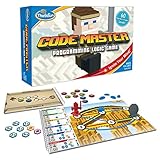
- EDUCATIONAL AND FUN: ThinkFun Code Master is the perfect blend of brain-boosting challenges and entertaining gameplay - ideal for keeping your kids engaged and learning
- SKILL BUILDING: Enhance your child's programming logic, sequential reasoning, and problem-solving skills through a variety of progressively difficult levels
- INCLUDES: A comprehensive set with 10 maps, 60 levels, 12 guide scrolls, 12 action tokens, 8 conditional tokens, and an easy-to-follow instruction booklet
- FOR ALL AGES: A great gift for kids and teens, ages 8 and up - makes learning fun and is suitable for both beginners and expert players
- AWARD-WINNING: Recognized for its educational value and engaging gameplay, Code Master is a top choice for smart games enthusiasts
Rank #4

- HIGH QUALITY - CODE - EXPLORE - SETTLE at Planet Mars. The future is here and it's ready to play! CoderMarz is the only board game and STEM toy, that teaches about Mars facts, Coding and Artificial Intelligence concepts using a fun gameplay.
- EASY PLAY - Use it at home, in school, coding clubs, Montessori, STEM clubs, boys girls scout, summer clubs, tutoring, after school, day care, maker space, hackathons and for Girls who code!
- YOUNG INVENTOR - Created by Samaira, a 11 year old girl and covered by over 100 Media and News, including TIME, NBC TODAY Show, Business Insider, Yahoo Finance, NBC Bay Area, Sony, Mercury News and many more. Her first two games are now used in over 750 schools worldwide.
- FIRST EVER AI+MARS GAME - The only game that introduces kids to Mars Plains, Mountains, Rovers and Facts and AI Concepts. Teaches Coding, Facts about Mars, Training, Prediction, Adaptive Learning and Back Propagation. Also teaches Coding concepts like Loops, Functions, Conditionals and Algorithm writing and more. (PC: beautyinordinarythings)
- THINK MARS THINK AI - Artificial Intelligence is a big and emerging branch. The “Intelligence” in machines is programmed by “Training”. Training involves Back-propagation which is Retraining or Fine Tuning. Using astro and code card this game sneakily introduces AI concepts which form foundation of today’s AI world. Learn more now and amaze everyone with how much you know before everyone gets on the Mars bandwagon with all the new science exploration and talk that will be occurring shortly!
- Production readiness: Check whether the editor’s vendor recommends it for production and whether the required debugging, profiling, extensions, and export workflows are available.
- Compatibility: Verify browser, device, renderer, threading, and input support for your actual target environment.
- Saving and exporting: Understand where project files persist, what can be lost when a session closes, and whether the browser workflow can produce the deliverables you need.
- Rendering support: Confirm which graphics APIs are supported and what fallback path is available on your users’ browsers and devices.
- Performance evidence: Compare CPU behavior only with a matched workload and a stated measurement method; vendor feature claims do not establish CPU performance.
Product prices and availability are accurate as of the date/time indicated and are subject to change. Any price and availability information displayed on Amazon at the time of purchase will apply.

