
iTechGuides is reader-supported. When you buy through links on our site, we may earn an affiliate commission. As an Amazon Associate I earn from qualifying purchases. Learn more
Yes—but only compatible Blink systems can save clips without a subscription. You need local storage: a USB drive connected to a Sync Module 2 or a microSD card used with a Sync Module XR. Without a plan or compatible local storage, you can still use Live View and receive motion notifications, but Blink does not save new clips to the cloud.
What Blink does without a subscription
Blink’s no-cost features include Live View, motion-activated notifications, and two-way audio. These let you check a camera or respond to activity, but they are not the same as keeping a recording you can replay later. Without a subscription or a supported local-storage setup, future clips are not saved to cloud storage. Blink’s storage options and guidance for expired trials explain the distinction.
Ways to save Blink clips
| Setup | What it saves | Key condition |
|---|---|---|
| No plan and no local storage | Live View and motion notifications remain available; new clips are not saved to cloud storage. | An alert or live stream is not a replayable recording. Blink trial-expired guidance |
| No plan with compatible local storage | Clips can be saved locally. | Use a USB drive with Sync Module 2 or a microSD card with Sync Module XR. The storage media are sold separately. Blink storage options |
| Paid plan | Cloud clips and plan features, subject to camera eligibility. | Cloud retention varies by region, and not every feature works with every camera. Blink plan features |
| Qualifying legacy camera or account | Separate legacy cloud-storage provisions may apply. | Legacy rules are not the standard offer for new accounts; current local-storage compatibility also excludes some older cameras. Blink storage options |
How to save clips locally without a plan
- Check the hardware. Confirm that your system uses Sync Module 2 for USB storage or Sync Module XR for microSD storage. Sync Module Core does not support local storage.
- Get compatible storage media. The USB drive or microSD card is a separate purchase; the Sync Module itself is not storage media.
- Set up local storage through the Blink app. Follow Blink’s Sync Module 2 local-storage instructions for the applicable setup. Compatibility varies by module and camera.
- Check saved clips and available space. Blink says local clips remain until you delete them or the storage fills. When it is full, new recordings stop until you free space.
Which cameras and modules support local storage?
Local recording is not available on every Blink device. Blink says Sync Module Core does not support local storage, and its local-storage instructions exclude XT, XT2, and Indoor (1st Gen) cameras from local storage and clip backup. Check your camera model and module before buying storage media or relying on local recording. Blink’s compatibility guidance lists the supported storage paths.
What a subscription adds
A paid plan adds cloud storage and other features. Blink lists live-view recording, person and vehicle detection where supported, Blink Moments, and Photo Capture for eligible cameras among its plan features. Check the plan feature list for camera-specific exclusions.
#1 Best Overall
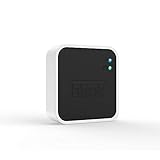
- Conveniently control all of your Blink devices right from the Blink Home Monitor app with the Blink Sync Module 2. The Sync Module 2 connects up to 10 of any Blink Indoor, Blink Outdoor, XT2, XT, Video Doorbell and Blink Mini devices (not required for Mini).
- Supports local video storage for up to 10 Outdoor, Indoor, Video Doorbell and Mini devices. Record and store motion clips when you insert a USB flash drive (up to 256 GB – sold separately) into the Blink Sync Module 2. Does not support live view recording.
- View, share, and download locally stored motion alerts from Outdoor, Indoor, Video Doorbell and Mini devices through the Blink app anytime or watch the footage on your computer by plugging in the USB flash drive (sold separately).
- No monthly fees are required to use local video storage functionality. Local video storage functionality is not compatible with Blink XT2, XT, and 1st generation Indoor cameras.
Blink’s current support guidance states cloud clips are retained for up to 60 days in the United States, Canada, Mexico, Australia, and New Zealand, and 30 days in the EU and UK. These are maximum windows, not a promise that every clip stays for the full period: the applicable custom auto-delete setting can remove clips sooner. Blink storage options
Independent reader supportYour contribution helps us test, update, and keep practical guides available for everyone.Legacy storage rules are different
Blink describes a legacy cloud-storage allocation of 7,200 seconds per Sync Module for qualifying devices and accounts created on or before April 15, 2020, subject to an account cap and other legacy-specific rules. This is a legacy exception, not the standard cloud-storage provision for new accounts. Blink storage options
Quick Recap
Rank #4

- HD Video
- Motion Detection
- Instant Alerts
- Live View
Rank #3

- Blink Sync Module XR is the first system hub to extend the range of your Blink Outdoor 4 wireless smart security cameras, so you can easily see what’s happening around your entire property.
- Unlock even broader coverage — Up to ten Outdoor 4 cameras can now go even farther with Sync Module XR's extended range: up to 250 feet away from your home in XR mode and up to 400 feet in XR+ mode (video resolution may vary).
- Two-year battery life — Set up Outdoor 4 in minutes and get up to two years of power with the included AA lithium batteries (with regular use).
- Enhanced motion detection — Be alerted to motion faster from your smartphone with Outdoor 4’s dual-zone, enhanced motion detection.
- See and speak from the Blink app — Experience 1080p HD live view, infrared night vision, and crisp two-way audio.
Rank #2

- Enjoy 10x the coverage — Install Outdoor 4 cameras (sold separately) up to 2,700 feet (open air)/1,700 feet (typical use) from your Sync Module XR+, which is 10x farther than Blink cameras operating on wifi alone. Video resolution may vary.
- Indoor or outdoor use — Take advantage of open-air range when you place Sync Module XR+ outside your home with the Blink Weather-Resistant Power Adapter (sold separately).
- Faster live view where wifi is spotty — XR technology runs on the 900MHz band, avoiding typical wifi congestion, and unlocking up to 20% quicker access to live view in areas where your wifi signal is poor.
- Experience a more reliable connection — Cameras using XR technology have up to 70% fewer disconnects in areas with poor wifi signal strength.
- Get two-year battery life, even at long range — Blink's patented chip technology unlocks up to two years of battery life for Outdoor 4 (sold separately) when used with a Sync Module XR+ and Energizer Lithium AA batteries.
Product prices and availability are accurate as of the date/time indicated and are subject to change. Any price and availability information displayed on Amazon at the time of purchase will apply.

