
Quick wins for a faster PC:
Fix the driver behind crashes, sound loss and screen glitchesFind Drivers →Clear out junk files and repair common Windows errorsFree Scan →Scan for outdated or missing drivers - takes under a minuteDriver Scan →iTechGuides is reader-supported. When you buy through links on our site, we may earn an affiliate commission. As an Amazon Associate I earn from qualifying purchases. Learn more
Choose by layout and key feel first. For a full-size productivity board with adaptive illumination and two connection methods, the Logitech MX Keys S is the clearest fit. For a full-size, low-profile mechanical board with configurable lighting, the Keychron K5 Pro is the better direction. Neither is an objective winner for every desk: the first uses scissor-style keys and automatic light behavior, while the second is a mechanical platform whose backlight, switch and hot-swap features depend on the exact version you buy.
Use the guide below to check the configuration, connection method and lighting behavior before ordering. Prices, stock, regional layouts and package contents were not established here, so verify the live listing for your country.
Quick answer: which wireless backlit keyboard fits you?
These are the two evidence-supported examples for this guide. They represent different typing experiences rather than two versions of the same design.
| Keyboard | Best suited to | Layout and key type | Lighting behavior | Wireless details | Battery information |
|---|---|---|---|---|---|
| Logitech MX Keys S | Office work, coding and general productivity when you want a familiar, quiet, low-travel feel | Full-size productivity layout with scissor-style keys; confirm the regional layout and number-pad arrangement on the listing | Keys illuminate as your hands approach, and illumination adjusts to the surrounding light, according to Logitech | Bluetooth Low Energy or a Logi Bolt USB receiver; verify whether the receiver is included in your regional package | Logitech claims up to 10 days per full charge with its predefined settings, or up to five months with backlighting off. Actual life varies with use and computing conditions. |
| Keychron K5 Pro | People who want a slim full-size mechanical board and more control over the lighting | Ultra-slim, full-size wireless mechanical design; switch and layout choices vary by listing | RGB configurations list 22 backlight options. White-backlight versions are also sold, so the effect is not identical across every K5 Pro | Wireless operation is supported; confirm the exact operating-system support, pairing method and included accessories for the selected regional version | Official specifications list a 2,000 mAh rechargeable lithium-polymer battery. Runtime with the backlight enabled is not stated in the supplied product information. |
The table is a fit guide, not a laboratory ranking. The available product information is manufacturer-authored, and no independent head-to-head testing established a universal “best” model.
#1 Best Overall

- Wireless keyboard has 7 colors & 4 modes RGB backlit options and adjustable brightness to provide you with more visual aesthetics typing atmosphere.
- Computer keyboard designed with 8.7" convenient device holder to hold your phone or tablet, keep your desk clean and tidy.
- The wireless keyboard features lighted and responsive tactile keystrokes for a smooth and quiet typing experience, ability to increase your work efficiency.
- Keyboard wireless layout with convenient access to all the right shortcut and multimedia keys, achieve more with less effort.
- Backlit wireless keyboard with built-in 1500mAh rechargeable battery that reduce the hassle of traditional battery replacement and wiring.
What “wireless backlit” actually covers
Wireless means the keyboard sends keystrokes without a permanent data cable. A model may use Bluetooth, a dedicated USB receiver, or both. Those choices affect which computers, tablets and docks you can connect to and whether you have a spare USB port available.
Backlit means light is emitted around or through the key legends so they remain easier to identify in a dark room. The term does not specify brightness, color, animation, automatic controls or battery impact. One board can turn lights on when your hands approach; another can offer a menu of colors and effects; a third may have only a fixed white glow.
Illumination is also a power decision. With the MX Keys S, Logitech publishes separate figures for normal predefined settings and for backlighting switched off. The K5 Pro’s 2,000 mAh cell describes capacity, not a guaranteed number of days. Treat any runtime as conditional on brightness, lighting mode, connection, typing time and the computer environment.
The Tool Desk
Outbyte PC Repair FREEClear out junk files and repair common Windows errorsFree Scan →Outbyte Driver Updater FREEScan for outdated or missing drivers - takes under a minuteDriver Scan →Start with the layout you can live with
Full-size: the choice when a number pad matters
A full-size keyboard keeps the navigation cluster and a dedicated number pad beside the main alphanumeric block. That arrangement suits spreadsheets, accounting, data entry and workflows that use navigation keys frequently. It also occupies more desk width and leaves less room for a mouse.
Both examples in this guide are described as full-size. “Full-size” does not guarantee that every regional keycap legend, Enter-key shape or number-pad arrangement is identical. Open the market-specific listing and check the language layout before paying, especially if you need a particular currency symbol or a specific operating-system key.
Rank #2

- Fluid Typing Experience: Laptop-like profile with spherically-dished keys shaped for your fingertips delivers a fast, fluid, precise and quieter typing experience
- Automate Repetitive Tasks: Easily create and share time-saving Smart Actions shortcuts to perform multiple actions with a single keystroke with the Logi Options+ app (1)
- Smarter Illumination: Backlit keyboard keys light up as your hands approach and adapt to the environment; Now with more lighting customizations on Logi Options+ (1)
- More Comfort, Deeper Focus: Work for longer with a solid build, low-profile design and an optimum keyboard angle that is better for your wrist posture
- Multi-Device, Multi OS Bluetooth Keyboard: Pair with up to 3 devices on nearly any operating system (Windows, macOS, Linux, Googlebook OS) via Bluetooth Low Energy or included Logi Bolt USB receiver (2)
Compact layouts: reclaim desk space deliberately
A compact board removes or compresses keys to reduce width. That can improve mouse positioning and portability, but you may need a function layer for navigation or number-pad commands. The supplied examples do not provide a compact alternative, so do not assume either product is suitable when a small footprint is your primary requirement; compare the dimensions and key arrangement of any other model separately.
A simple layout test
- List the keys you use every day: number pad, arrows, Home/End, function row, print-screen and media controls.
- Mark any key you cannot replace with a function-layer shortcut.
- Measure the clear width beside your mouse and monitor stand.
- Choose full-size only if its extra keys justify the space; otherwise make compact layout a non-negotiable filter before comparing lights.
Choose the key feel before choosing effects
Scissor-style productivity typing
The MX Keys S is a productivity-oriented example with scissor-style keys. This construction is the relevant distinction for shoppers who want a conventional, low-travel laptop-like action rather than a mechanical switch platform. The specifications alone do not prove that it will be comfortable for your hands, quiet in your room or fast for your particular typing style; those are personal outcomes.
Low-profile mechanical typing
The K5 Pro is an ultra-slim wireless mechanical keyboard. Mechanical switches make the board a different proposition from the MX Keys S, even though both are full-size. The selected switch type changes actuation feel and sound, so read the exact switch name on the regional listing instead of treating “K5 Pro” as one uniform configuration.
Mechanical does not automatically mean better, and scissor does not automatically mean quieter. Use the construction as a shortlist filter, then consider switch choice, keycap profile, desk noise and whether you can return the board if the feel is wrong.
Understand the lighting behavior
Adaptive illumination on the MX Keys S
Logitech says the MX Keys S lights its keys when your hands approach and adjusts illumination to the environment. That behavior is useful if you move between a bright daytime room and a dark evening desk without wanting to change a setting constantly. It also means the light is not simply a permanently fixed brightness. If you prefer a constant glow, check the available controls in the current software and regional documentation before purchase.
Rank #3

- EXPERIENCE THE MAGIC OF COLORS: The wireless keyboard feature a captivating 7-color switchable backlight, and 4 levels of brightness adjustable, while the RGB mouse changes color automatically. Whether it's late-night work or dimly lit environments, the illuminated keys make typing effortless, allowing you to enjoy flexible lighting adjustments according to different moods and atmospheres
- WINDOWS AND MAC LAYOUT: Enjoy a seamless typing experience with our portable wireless keyboard and mouse, offering both Windows & Mac keyboard layouts to match your device's system. Activate the Mac layout by pressing the Fn+W key (indicated by a red light), or switch to the Windows layout by pressing the Fn+Q key (indicated by a green light)
- RECHARGEABLE AND SMART ENERGY SAVING: The SABLUTE cordless combo comes equipped with a rechargeable battery, and easy recharging for the wireless keyboard and mouse using the provided Type-C cable. Moreover, an auto-sleep function conserves battery power when the keyboard mouse combo is idle, offering an impressive standby time of 365 days for the keyboard and 270 days for the mouse
- QUIET OPERATION: The scissor low-profile key structure design ensures a responsive and tactile typing experience with minimal noise. This feature enables you to concentrate on your work without the distraction of keyboard clatter, especially when using the silent wireless mouse and keyboard
- SLEEK AND QUICK ACCESS: The ultra-slim keyboard, measuring 14.8x5.4x0.78 inches, is designed to save space and ensure effortless portability. With 102 keys, including 12 convenient shortcuts and a number pad, this portable keyboard streamlines data entry and navigation. A 6-button mouse with Tracking Speed and forward/backward functions will help you navigate the web faster and easier than ever before
Selectable configurations on the K5 Pro
Keychron distinguishes RGB and white-backlight versions of the K5 Pro. The RGB configurations list 22 backlight options, while a white-backlight version provides a different visual and control set. The number of options therefore applies to the RGB configuration, not automatically to every K5 Pro listing.
Hot-swapping is another configuration detail: the official description applies it to the RGB hot-swappable version. Do not infer that a white-backlight or non-hot-swappable listing accepts switch changes. Match the backlight color, switch type and hot-swap label in the exact product variant.
Lighting checks before checkout
- Is the board RGB, white-backlit or offered in both versions?
- Are the listed effects available on the selected layout and switch package?
- Does the model use automatic proximity and ambient-light behavior, manual brightness, effect cycling, or a combination?
- Can the lighting be disabled when you need maximum battery life?
- Are replacement keycaps or switches compatible with the selected version?
Wireless connections: receiver versus Bluetooth
When the MX Keys S has an advantage
The MX Keys S supports Bluetooth Low Energy and a Logi Bolt USB receiver. Bluetooth avoids occupying a USB port and can suit laptops, tablets and computers that expose a standard Bluetooth keyboard pairing screen. A receiver can be useful on a desktop or in an environment where you want a dedicated dongle, but confirm that the receiver is in the package for your country; product bundles can differ.
Before buying, check the operating-system support shown on the live listing and whether your computer permits Bluetooth pairing at the login screen. If your workplace blocks unapproved USB devices, Bluetooth may be the simpler route; if Bluetooth is disabled by policy, a receiver may be required.
What to verify for the K5 Pro
The K5 Pro is described as wireless, but the supplied product information does not establish one universal connection bundle for every regional version. Verify the connection modes, supported systems, included cable or adapter, and any device-switching behavior on the exact listing. Do not assume that a K5 Pro purchased in one market has the same accessories or firmware options as a different market’s listing.
Do these 3 things before closing this tab:
1Clear out junk files and repair common Windows errors2Fix the driver behind crashes, sound loss and screen glitches3Repair Windows errors before they cause bigger problemsRank #4
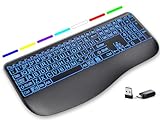
- Large Print Keys for Easy Reading: Oversized, high-contrast letters make each key easier to see, helping reduce eye strain and typing mistakes. The full-size 16.54 x 8.01 x 0.94 in layout offers a familiar typing feel for home or office use. (Keyboard only, mouse not included)
- 7 Colored Backlights with Smart Memory: First plug the USB receiver into your device, then choose from 7 backlight colors and 3 brightness levels for clearer typing in dim rooms or at night. The keyboard remembers your last light setting after power-off, so you do not need to readjust it every time.
- Scissor-Switch Keys & Quiet Typing: Low-profile scissor-switch keys provide a responsive, laptop-like typing feel while helping reduce tapping noise. Ideal for offices, libraries, shared workspaces, or anyone who prefers a quieter typing experience.
- Wide Curved Wrist Rest & Adjustable Stand: Designed with a wider, curved wrist rest, this keyboard provides better hand support and a more comfortable resting position during long typing sessions. The adjustable stand lets you raise the keyboard to a more natural typing angle to help reduce wrist and hand strain.
- Long-Lasting Rechargeable Keyboard: This large print keyboard is equipped with a type-c charging cable, standby time is up to 3 months, 25 days of continuous use with backlight off. With smart multi-stage power management, the keyboard conserves energy when idle but wakes instantly with a single keystroke. No more battery waste
Pairing checklist
- Charge the keyboard according to the manufacturer’s instructions before the first long session.
- On the target computer, open the system’s Bluetooth settings if you are using Bluetooth, or insert the supplied receiver if your version uses one.
- Put the keyboard into its pairing mode using the key combination documented for your exact model and revision.
- Select the keyboard name shown by the operating system and complete pairing.
- Type in a text field, then test every required key, the number pad and the lighting controls before discarding the packaging.
Key combinations and indicator behavior can vary by revision, so use the current manual rather than a shortcut printed for another version.
Battery expectations without misleading runtime claims
How to read the MX Keys S figures
Logitech advertises up to 10 days on a full charge with predefined settings and up to five months with backlighting off. “Up to” is a maximum under the manufacturer’s stated conditions, not a promise for every user. Logitech also notes that battery life can vary with the user and computing conditions. Heavy typing, brighter or more frequent illumination and a different connection pattern can shorten the interval between charges.
How to read the K5 Pro specification
The K5 Pro’s listed 2,000 mAh rechargeable lithium-polymer battery gives you a capacity figure. The supplied information does not provide a comparable runtime with a particular brightness or polling condition. Capacity alone cannot be converted into days without those variables, so do not compare “2,000 mAh” directly with the MX Keys S day figures.
Practical battery habits
- Turn illumination off during daylight or when the legends are already easy to read.
- Use a lower brightness or a static effect if your model offers those controls and you want fewer charging interruptions.
- Charge before travel rather than relying on a maximum-runtime claim.
- Keep the keyboard’s charging cable accessible at the desk, and check the connector and charging behavior in the return period.
Pick 1: Logitech MX Keys S for adaptive, full-size productivity
The MX Keys S is the focused choice when your priorities are a full-size productivity layout, scissor-style keys and lighting that reacts to your hands and room. Its Bluetooth Low Energy and Logi Bolt options also cover two common desk setups.
Free tools Windows power users keep installed
One-click scans. No signup required.
Why it belongs on the shortlist
- Adaptive illumination can reduce the need to reach for a brightness control as room light changes.
- A full-size format preserves the navigation and number-pad areas many office workflows require.
- Bluetooth and a receiver give you a choice of connection method.
- Published battery figures explicitly distinguish backlighting enabled from disabled.
Important qualifications
- The runtime figures are Logitech claims, not independent test results.
- Confirm the regional layout, color and included Logi Bolt receiver before ordering.
- Scissor-style keys are a different feel from the mechanical switches on the K5 Pro; neither construction is universally preferable.
- Availability and current pricing must be checked for your market.
Pick 2: Keychron K5 Pro for low-profile mechanical customization
The K5 Pro is the better starting point when you want a slim full-size mechanical board and the ability to choose among lighting and switch configurations. It keeps the number-pad-friendly footprint while offering a more configurable platform than a fixed productivity board.
Best Value

- ✅ INSTANT CONNECTIVITY. Plug in the USB receiver and you can use the KLIM Chroma wireless keyboard instantly, from up to 30 feet away. There is no need to install any drivers!
- ✅ LONG-LASTING BATTERY. There's no need to buy batteries anymore! The gaming keyboard comes with premium-quality built in rechargeable batteries. You will spend lesser money while helping the environment.
- ✅ RGB BACKLIGHTING. Bring your desk to life! Choose static or breathing mode, or turn off the lights completely if you prefer. Note: colors are not customizable.
- ✅ IMPROVE YOUR TYPING SPEED. The membrane keys have a short travel distance, allowing for quick and easy typing.
- ✅ SPILL-RESISTANT & DURABLE. Engineered to handle everyday accidents. One of the only spill-resistant keyboards available at this price point.
Why it belongs on the shortlist
- Its ultra-slim mechanical design targets people who do not want a conventional tall mechanical keyboard.
- RGB versions list 22 backlight options for more visual control.
- A 2,000 mAh rechargeable lithium-polymer battery is specified.
- The RGB hot-swappable version can be selected when switch replacement is a requirement.
Important qualifications
- RGB, white-backlight, switch and hot-swap choices are version-dependent.
- The listed battery capacity is not a runtime guarantee, and no comparable backlit runtime is established here.
- Confirm the exact wireless modes, operating-system support, regional layout and included accessories.
- Mechanical switch sound and feel depend on the selected switch; the model name alone is not enough to predict them.
Configuration checklist for the product page
Before adding either keyboard to your cart, capture the exact variant name or a screenshot of the configuration selectors. Check each item below rather than relying on a retailer’s shortened title.
- Layout: Confirm language, regional legends, full-size arrangement and number-pad presence.
- Key construction: Identify scissor-style keys on the MX Keys S or the exact low-profile mechanical switch on the K5 Pro.
- Backlight: Record RGB versus white and note whether the listing describes automatic sensing, selectable effects or both.
- Hot-swap: For the K5 Pro, verify that the words “RGB hot-swappable” apply to the selected variant.
- Connection: Confirm Bluetooth, receiver support and any required adapter; for the MX Keys S, check whether the Logi Bolt receiver is included.
- Battery: Note whether the listing gives a conditional runtime, only a capacity figure, or no number.
- Returns: Make sure the seller’s return window covers a real typing and nighttime-lighting trial.
Common buying mistakes and how to avoid them
Buying for the word “backlit” alone
A backlight can be a fixed white glow, an RGB effect system or an automatic proximity sensor. Decide which behavior you need, then verify it in the specifications. Do not treat all illuminated keyboards as interchangeable.
Comparing battery numbers that measure different things
A manufacturer’s “up to 10 days” with a stated lighting mode and a 2,000 mAh capacity are not equivalent measurements. Keep runtime, capacity and lighting conditions in separate columns when comparing products.
Recommended Free Tools
Assuming every variant has the headline feature
The K5 Pro family includes RGB and white-backlight versions, and hot-swapping is tied to the RGB hot-swappable version. A retailer may combine photos from several variants. Read the configuration selectors and ask the seller if the listing is ambiguous.
Ignoring the receiver in the box
The MX Keys S supports a Logi Bolt receiver, but the included accessories can vary by regional package. If you need a receiver, verify its inclusion rather than assuming the connection name guarantees one.
Expecting a universal best overall
The available evidence covers two manufacturer-described products and does not include independent testing, a complete market survey or verified live prices. A defensible choice comes from matching layout, key feel, lighting behavior and connection needs—not from an unsupported ranking.
Decision guide
- Choose the MX Keys S if adaptive illumination, scissor-style productivity typing and a choice between Bluetooth Low Energy and a receiver matter most.
- Choose the K5 Pro if you specifically want low-profile mechanical switches, a full-size layout and configurable RGB or variant-specific customization.
- Keep looking if you need a compact layout, a confirmed multi-device workflow, a specific regional key arrangement or a guaranteed backlit runtime that neither listing states for your conditions.
Whichever route you take, verify the exact market listing at purchase time. Price, stock, layout, accessories and variant labels can change independently of the model name.
What’s actually slowing this PC down?
Pick the symptom - the matching free tool is one click away.
Quick Recap
Product prices and availability are accurate as of the date/time indicated and are subject to change. Any price and availability information displayed on Amazon at the time of purchase will apply.

