
Recommended Free Tools
iTechGuides is reader-supported. When you buy through links on our site, we may earn an affiliate commission. As an Amazon Associate I earn from qualifying purchases. Learn more
There is no independently measured overall winner among the currently listed wired Xbox controllers. The right choice depends on the controls you use, the games you play, fit, cable needs, and current price. PowerA’s Advantage Wired Controller is the clearest feature match for players who want remappable buttons, adjustable trigger travel, a long included cable, and calibration software. PDP’s Victrix Gambit Prime is a tournament-oriented option to investigate if its current price and stock suit you. Razer lists a wired esports controller for Xbox and PC, while Xbox’s accessories directory also lists a GameSir Tarantula Pro Gaming Wired Controller; exact model specifications and availability should be checked before purchase.
A wired connection means you do not need to charge the controller during a match, but the available sources do not establish that any of these controllers has lower real-world latency than a wireless model. Treat response-time claims, stick-drift rates, and competitive performance as unverified unless a comparable independent test is available.
What matters in a wired Xbox controller for competitive play
Competitive gaming rewards a control layout that you can operate consistently under pressure. A wired controller can simplify power management, but the cable alone does not prove faster inputs. Compare the features that change how your hands interact with the game, then verify console, game, software, and price details for the exact model.
The Tool Desk
Outbyte PC Repair FREERepair Windows errors before they cause bigger problemsFix Now →Outbyte Driver Updater FREEFix the driver behind crashes, sound loss and screen glitchesFind Drivers →Extra buttons and remapping
Rear paddles or other mappable controls can let you perform a jump, crouch, reload, or ability action without removing your thumbs from the analog sticks. That is an ergonomic and control-layout benefit, not a guaranteed improvement in aim, movement, or win rate. The useful question is whether the button positions match your grip and whether the controller lets you assign the commands your games use.
#1 Best Overall

- Versatile compatibility: supports Xbox Series X/S, Xbox One X/S consoles and PC Win10 and above (including the game platform Steam).
- Precise control: features Hall joysticks and Hall triggers for a comfortable feeling, long service life and improved game accuracy.
- Plug and Play Convenience: Wired USB connection (removable) for easy setup and instant play without the need for additional drivers.
- Customizable experience: Includes 2 custom backbuttons that allow users to eliminate false triggers and improve their gaming experience.
- Impressive gameplay: Provides a pulsating vibration trigger and an asymmetric vibration grip motor for intense tactile feedback.
PowerA explicitly lists mappable Advanced Gaming Buttons on the Advantage Wired Controller. The manufacturer also notes that compatibility varies by title, so check the games you actually play rather than assuming every command can be assigned in every game.
Trigger travel
Trigger locks change how far a trigger moves before it activates. A shorter pull can suit shooters or other games in which you prefer a quick, switch-like trigger action; a full pull may be preferable for racing throttle control or games that use graduated pressure. PowerA describes the Advantage as having three-way trigger locks. The feature changes travel and feel, but the available product information does not provide a measured response-time advantage.
Fit, stick placement, and consistency
Hand size, stick height, face-button reach, and grip texture affect whether you can repeat an input accurately for a long session. No source in the available material reports standardized measurements for these controllers, so treat comfort as a personal fit decision. If possible, buy from a seller with a clear return policy and test the controller in the games you play before committing.
Platform and title support
“For Xbox” is not a blanket statement that covers every generation, accessory, or game. Confirm that the listing names your console—Xbox Series X|S in the case of the models described below—and check whether PC support is included. A controller can be recognized by the operating system yet have features that vary by title; PowerA specifically warns that compatibility varies by game.
Cable and power
Wired play removes battery charging from your routine and avoids pairing steps. It also places a physical cable between the controller and the console or PC. Check the connector, length, strain relief, and whether the cable is detachable on the exact listing. PowerA specifies an included 10-foot USB-C cable for the Advantage. The supplied information does not establish detachable-cable designs for the other candidates, so do not assume a replacement cable is possible.
Rank #2
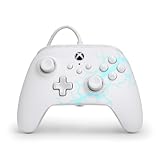
- Now Including Hall Effect Modules – Say goodbye to stick drift with contract-free magnetic sensors in the thumbsticks giving you smoother control, enhanced precision, and increased longevity
- Advanced Gaming Buttons – Get an edge over the competition with two mappable buttons you can program on-the-fly, mid-game—no system settings to configure
- 3-Way Trigger Locks – Set the travel distance of the triggers with three different positions to pull off quicker actions in your favorite FPS games or go full throttle in a high-end race car
- Dual Rumble Motors – Take your gaming experience to the next level, providing tactile feedback and sensations that bring your virtual worlds to life
- Immersive Impulse Triggers – Provides reactive rumble sensations using built-in motors so you can feel the action of the game*
Wired Xbox controller options supported by current listings
The following table separates confirmed manufacturer or directory descriptions from details that still require a current product-page check. Prices and stock can change, so a displayed price should never be treated as a permanent specification.
| Controller | What the listing establishes | Who should investigate it | What is not established |
|---|---|---|---|
| PowerA Advantage Wired Controller for Xbox Series X|S | Xbox-licensed; mappable Advanced Gaming Buttons; three-way trigger locks; included 10-foot USB-C cable; free PowerA Gamer HQ app for testing and calibration on Xbox or Windows 10/11 PC. | Players who want extra mapped controls, adjustable trigger travel, a long cable, and first-party calibration software. | No independent latency, durability, drift, or win-rate measurements; title compatibility varies. |
| PDP Victrix Gambit Prime Wired Tournament Controller | PDP’s Xbox collection lists it as a wired tournament controller for Xbox Series X|S and PC. A search result displayed $79.99, but that result was crawled about 1.3 years ago. | Players interested in a tournament-focused design who can verify the current model, price, stock, and included accessories. | Current price, availability, detailed control specifications, and comparative performance must be rechecked. |
| Razer wired esports controller | Razer’s Xbox category identifies a wired esports controller for Xbox and PC and describes its Xbox products as pro-grade controllers. | Players already considering that ecosystem and willing to identify the exact current model page. | The available listing does not provide a model name or detailed specifications, so no feature-level recommendation is justified yet. |
| GameSir Tarantula Pro Gaming Wired Controller for Xbox | The official Xbox accessories directory currently showed this product as an Xbox-listed wired controller. | Players who want to examine an additional Xbox-directory option after confirming the exact product page. | Specific controls, cable details, software, compatibility boundaries, price, and stock are not established by the directory entry alone. |
Best match by player priority
Choose PowerA Advantage for mapped controls and trigger adjustment
The Advantage is the most completely specified option in the available listings. Its Advanced Gaming Buttons address the common need to keep thumbs on the sticks while activating another command. Its three-way trigger locks provide selectable travel positions, allowing you to choose a shorter or longer pull according to the game and your preference. The included 10-foot USB-C cable is useful when the console is farther from your seat, and the Gamer HQ app can test and calibrate the controller on Xbox or Windows 10/11 PC.
Those features make it a logical starting point for a player who can describe a concrete control problem—such as needing a rear button for a movement action or wanting a shorter trigger pull. They do not establish that the controller is faster or more accurate than every alternative. Confirm that the games you play support the mappings you need, and use the calibration tools to check the controller before a serious session.
Investigate Victrix Gambit Prime when tournament positioning is the priority
PDP’s collection identifies the Victrix Gambit Prime as a wired tournament controller for Xbox Series X|S and PC. That description makes it relevant to players who want a competition-oriented design, but the available result does not provide enough current detail to rank it against the Advantage on buttons, trigger mechanisms, stick configuration, cable construction, or software.
A search result showed $79.99, yet the result was crawled roughly 1.3 years ago. Before buying, open the current official listing or an authorized retailer page, confirm that it is the same “Prime” model, verify stock and included cable, and compare the present price with other candidates. Do not use the old displayed figure as a current deal signal.
Rank #3

- No Stick Drift, More Accurate Every Match: Updated Hall Effect sticks deliver ultra-precise control with zero stick drift, zero deadzone, and exceptional recentering, helping you land accurate headshots, smoother movement, and more reliable inputs even after years of intense gaming sessions.
- Adjust Joystick Feel for Every Game in Seconds: Unlike ordinary XBOX controllers, Vader 5S lets you physically adjust joystick tension from 40gf to 100gf on the fly. Use lighter tension for fast FPS aiming and flick shots, or tighten the sticks for smoother steering and precision control in racing and sports games — all without opening software or replacing parts.
- Switch Trigger Response for FPS or Racing Games Instantly: Use micro-click triggers for rapid firing and faster reactions in shooting games, or switch to Hall Effect linear triggers for smoother throttle and braking control in racing games. One controller optimized for multiple genres without needing separate setups.
- Feel Recoil, Acceleration, and Impact More Realistically: 4-motor vibration across both triggers and grips makes shooting, driving, crashing, and combat feel more immersive. Experience stronger recoil feedback in shooters and more realistic acceleration and road feel in racing games.
- Quick In-Game Adjustments Without Interrupting Gameplay: Fine-tune vibration, switch profiles, remap buttons, or adjust volume directly on the controller while gaming. No need to pause the match or open software — perfect for players who constantly switch between FPS, RPG, racing, and multiplayer games.
Consider Razer only after identifying the exact model
Razer’s official Xbox category identifies a wired esports controller for Xbox and PC. Because the supplied listing does not name the model or provide detailed specifications, it is not possible to responsibly say whether it has rear controls, trigger stops, a particular cable, or calibration software. Treat “pro-grade” as the manufacturer’s category language rather than an independent performance finding.
Do these 3 things before closing this tab:
1Scan for outdated or missing drivers - takes under a minute2Clear out junk files and repair common Windows errors3Fix the driver behind crashes, sound loss and screen glitchesIf you are evaluating this option, start at the current Xbox product page and record the exact model name, supported Xbox generation, PC requirements, button configuration, trigger settings, cable design, warranty, and current price. Only then compare those details with the feature priorities in this guide.
Use the Xbox directory to discover, not to assume
The official Xbox accessories directory lists wired products including the PowerA Advantage and GameSir Tarantula Pro Gaming Wired Controller. A directory listing confirms that Xbox recognizes a product category entry; it does not provide every specification needed for a purchase decision. Follow the model link, check the manufacturer’s current documentation, and verify that the cable, software, and game support match your setup.
How to choose in a few minutes
- Write down your games and platform. Note whether you play on Xbox Series X, Xbox Series S, or Windows 10/11 PC, and list the titles for which you want remapping or trigger adjustment.
- Identify the control change you actually need. If you need an extra command while your thumbs stay on the sticks, prioritize a model with explicitly mappable controls. If you want a different trigger feel, prioritize documented trigger locks. If neither matters, do not pay for either feature merely because it appears in marketing.
- Verify the exact model name. Product families often contain standard and tournament variants. Match the full name, generation, color or edition, and included accessories on the seller page to the manufacturer’s page.
- Check cable information. Confirm that a cable is included, note its length and connector, and determine whether it is detachable. The Advantage listing specifies a 10-foot USB-C cable; treat other models as “not stated” until their current pages say otherwise.
- Confirm software and title compatibility. PowerA’s Gamer HQ app supports testing and calibration on Xbox or Windows 10/11 PC, while PowerA warns that compatibility varies by title. Do not generalize that app support to another brand.
- Recheck price and stock on purchase day. Prices are volatile. The $79.99 Gambit Prime figure came from a search result crawled about 1.3 years ago, so it requires a current check.
- Plan a return and testing window. Test every face button, stick direction, trigger position, vibration function available in your game, headset connection if relevant, and cable stability. Keep packaging until the controller passes your normal session.
Setup checklist for competitive sessions
Console setup
- Turn off the console or leave it at the dashboard before connecting a new wired controller.
- Plug the controller directly into the Xbox USB port using the supplied cable or the cable specified by the manufacturer. Avoid adding an unverified hub while troubleshooting.
- Wait for the Xbox button and profile prompt, then sign in to the intended account.
- Open the game’s controller settings and confirm that every mapped command appears once and performs the expected action.
PC setup
- Confirm that the product page names Windows 10/11 support if you intend to use a PC; Xbox compatibility alone is not enough.
- Connect the controller, allow Windows to finish device detection, and select it in the game’s input menu.
- If the manufacturer supplies calibration software, install the current version from the official product page and run its test before changing in-game sensitivity.
- Launch the game and check button, stick, trigger, and headset behavior again. A controller can pass an operating-system check while a particular title interprets an input differently.
Calibration and baseline recording
With the Advantage, PowerA says Gamer HQ can test and calibrate on Xbox or Windows 10/11 PC. Record the controller’s baseline behavior before a tournament: center the sticks, move each axis slowly to its edge, press every button once, and test both trigger-lock positions you intend to use. Calibration can correct an input setup issue, but it cannot prove long-term durability or eliminate future mechanical wear.
Troubleshooting common problems
The Xbox does not recognize the controller
- Disconnect and reconnect the cable at both ends, then try another console USB port.
- Remove hubs, extension adapters, and other USB devices temporarily.
- Check that the cable is the one supplied or one that carries data, not only power.
- Compare the exact model and console generation with the official compatibility statement.
A remapped button does nothing in one game
- Check the game’s own controller and accessibility settings; title compatibility can vary.
- Reset the mapping, save it again, and test in a training or offline area.
- Verify whether the controller stores mappings internally or requires its companion app; do not assume one brand’s workflow applies to another.
Triggers feel wrong after switching games
- Check the physical trigger-lock position and return to full travel for games that use analog throttle or pressure.
- Test both trigger positions in the game’s practice mode before changing sensitivity.
- Remember that a shorter pull changes feel and travel; it is not evidence of lower measured latency.
Intermittent disconnects or input drops
- Inspect the connector for looseness and route the cable so it is not pulled sideways from the console.
- Try a second known-good data cable only if the controller’s cable is detachable and the manufacturer permits replacement.
- Test another USB port and another game to separate a hardware connection issue from title-specific behavior.
- If the fault follows the controller, use the seller’s return or warranty process rather than relying on unsupported repairs.
Wired versus wireless for competition
Wired operation’s clear practical benefit is continuous power: there is no battery to charge and no wireless pairing step during play. The trade-off is cable management and a fixed distance from the console or PC. The available evidence does not include a controlled latency comparison between wired and wireless Xbox controllers, so choose wired for its power and setup characteristics, not for an unverified promise of faster response.
Rank #4

- Drift Free Hall Effect Sticks: GameSir T7 uses GameSir's non-contact magnetic Hall effect technology to ensure that the sticks do not wear out throughout their life and provide an ultra life of up to 5 million cycles. This prevents GameSir T7 from drifting the sticks and ensures reliable, long-lasting stick performance for games on Xbox, PC and Steam.
- PRECISION MATCHED ANOG HALL EFFECT TRIGGERS With precisely tuned Hall Effect Triggers for an even, smooth pull, you can race confidently and enjoy a seamless gaming experience like never before.
- REALISTIC & SUPPLY VIBRATION The controller features a total of four rumble motors, with a motor in each handle and trigger that provide immersive and realistic vibration feedback. In addition, the two asymmetric actuators in the handles improve the realism of the vibrations and ensure that you feel every small impact and shot in your hands as if it happened on the spot.
- COMFORTABLE ERGONOMIC DESIGN & TEXTURED SURFACE The ergonomic design combined with the fine laser textured surface of the handles, bumpers and triggers ensures a secure grip and provides a comfortable, stable grip, even during extended gaming sessions.
- 3.5mm Headphone Jack: The 3.5mm audio jack allows you to easily connect a headset for impressive sound and clear communication.
A long cable can reduce seating constraints, but excess length can snag on a chair or desk. The Advantage’s specified 10-foot cable may be convenient in a living-room layout; measure your route and secure slack away from feet and wheels. For a desk setup, a shorter cable may be easier to manage, but the correct length for another model is not stated in the available listings.
Price, availability, and buying safeguards
Controller prices change with stock, region, promotions, and model revisions. Use the manufacturer’s current page and a reputable retailer on the day you buy. Confirm the exact model, Xbox generation, PC support, cable inclusion, return period, and warranty. A search result is useful for discovery but not a durable price record; the Gambit Prime’s $79.99 display was already about 1.3 years old when recorded.
Do not let an attractive price substitute for a required feature. A lower-cost controller without the extra controls you use can be more expensive after a return, while a tournament label does not by itself establish better switches, lower latency, or longer life. Keep the receipt and packaging until the controller survives your normal competitive routine.
A practical decision framework
| Your priority | First option to investigate | Reason | Verification still required |
|---|---|---|---|
| Mapped controls and adjustable trigger travel | PowerA Advantage | Those features are explicitly listed, along with a 10-foot USB-C cable and Gamer HQ testing/calibration. | Confirm game support, fit, current price, and stock. |
| Tournament-oriented listing for Xbox Series X|S and PC | PDP Victrix Gambit Prime | PDP identifies it as a wired tournament controller. | Confirm current model status, specifications, cable, price, and availability. |
| Razer ecosystem | Razer’s current wired Xbox model | The Xbox category identifies a wired esports controller for Xbox and PC. | Find the exact model page before comparing features; detailed specifications are not established here. |
| Exploring another Xbox-directory product | GameSir Tarantula Pro Gaming Wired Controller | It appears in the official Xbox accessories directory. | Confirm exact controls, software, cable, platform support, price, and stock. |
| No need for remapping or trigger locks | Compare all currently available wired models by fit and verified compatibility | Paying for unused features adds cost and complexity without a documented competitive benefit. | Inspect ergonomics, return terms, cable design, and title support. |
What the available evidence cannot tell you
- There is no sourced, comparable latency figure for these candidates.
- There is no measured competitive win-rate advantage for a particular controller.
- There is no standardized stick-drift incidence or durability ranking.
- There is no current, guaranteed price or stock position for every model.
- There is no detailed specification set for the unnamed Razer wired esports controller in the available listing.
Those gaps matter because “competitive” is often used as a marketing label. A responsible purchase decision uses documented controls and compatibility, then validates comfort and reliability in your own hands. Manufacturer specifications describe what a product is designed to offer; they do not replace independent testing.
Free tools Windows power users keep installed
One-click scans. No signup required.
Bottom-line recommendations
Start with the PowerA Advantage if you specifically want mappable controls, three-way trigger locks, a long included USB-C cable, and an app that can test and calibrate on Xbox or Windows 10/11 PC. Choose it because those functions fit your games, not because wired operation has been proven faster.
Investigate the PDP Victrix Gambit Prime if its wired tournament positioning and current verified specification sheet match your preferences. Treat the historical $79.99 display as stale until you confirm today’s price. Keep Razer and GameSir in consideration only after opening their exact current model pages and checking the details that the directory or category listing does not provide.
Whichever controller you select, verify the console generation, PC support, title compatibility, cable arrangement, return policy, and current availability before paying. No available source establishes a universal best model, so the best choice is the one whose documented controls solve your specific problem and remain comfortable and reliable through your longest sessions.
Quick Recap
Product prices and availability are accurate as of the date/time indicated and are subject to change. Any price and availability information displayed on Amazon at the time of purchase will apply.

