
iTechGuides is reader-supported. When you buy through links on our site, we may earn an affiliate commission. As an Amazon Associate I earn from qualifying purchases. Learn more
For most people, WhatsApp’s built-in sticker creator is the best place to start: it turns a photo into a sticker, lets you add preset effects, emoji, text, or drawings, and keeps pack creation and sharing inside WhatsApp. If you need background removal, captions, animated stickers from video, or pack links, Sticker.ly is the strongest documented third-party option. No evidence supports naming one app universally best, so the right choice depends on how much editing and sharing control you need.
Check your current WhatsApp version first. Custom sticker tools are available on current Android and iOS releases, but WhatsApp rolls some features out gradually by country and account.
Quick comparison: which sticker maker fits your workflow?
The two options below cover different needs. WhatsApp is the simplest route when the source is a photo and you want to send the result immediately. Sticker.ly is a separate editor for people who want more control over cutouts, captions, animation, or pack distribution.
The Tool Desk
Outbyte PC Repair FREERepair Windows errors before they cause bigger problemsFix Now →Outbyte Driver Updater FREEFix the driver behind crashes, sound loss and screen glitchesFind Drivers →| Option | Where you create | Editing features documented by the publisher | Pack and sharing features |
|---|---|---|---|
| WhatsApp built-in creator | Inside a WhatsApp chat | Photo-based sticker creation, preset options, emoji, text, and drawing tools | Add a sticker to a new or existing pack, then share the pack in a chat |
| Sticker.ly | Dedicated Android or iOS app | Upload photos, erase backgrounds, add text, and create animated stickers from video | Export packs to WhatsApp and share packs with links or codes |
WhatsApp’s official instructions are in its Help Center guide to custom stickers and sticker packs. Sticker.ly describes its editor and pack workflow on the official Sticker.ly site, with current app listings for iOS and Android.
#1 Best Overall

- All-in-One Convenience - Print and Cut in One Step. Say goodbye to the hassle of using separate machines. The PixCut S1 seamlessly integrates high-resolution photo printing and precise die cutting into one streamlined device. With just a few clicks on the user-friendly app, you can edit, print, and cut directly from your smartphone via Bluetooth. Create stickers in just 2 minutes! This all-in-one solution saves you time and effort, making your creative projects more enjoyable and efficient.
- AI Image Extraction & Precision Cutting - Unleash your creativity with the AI image extraction feature that automatically recognizes and extracts subjects from your photos. Then watch as the high-precision cutting system, guided by the same AI technology, perfectly follows every edge with pinpoint accuracy. This seamless AI-to-cut workflow ensures flawless results every time. Turn any moment into custom stickers with professional edges in minutes - just masterpieces made simple.
- High-Resolution Prints - Vivid and True-to-Life Colors. Utilizing thermal dye-sublimation technology, the PixCut S1 delivers stunning 300 dpi high-resolution prints with 16.7 million colors. Whether you're printing photos, stickers, or labels, you can expect vibrant, true-to-life color effects that make your creations stand out. Every detail is captured with precision, providing professional-quality results every time.
- AI Lab - Bring Your Imagination to Life. Upload a photo, pick a style from the Liene Photo App, and watch AI bring your vision to life instantly. Turn selfies into an anime character, a fantasy hero, or a festive holiday illustration — all with stunning realism. One style, endless versions of you. Print your AI art as custom stickers, unique gifts, or social media posts — perfect for avatars and DIY projects. No design experience required. Your creativity is just one click away from magic.
- Durable Stickers - Create Long-Lasting Creations .Thanks to the four-layer thermal dye-sublimation technology, the photopaper is automatically laminated during printing. Stickers produced by PixCut S1 are durable, waterproof and scratch-resistant, ensuring they remain vibrant and intactover time. Perfect for creating custom stickers, labels, and more that last.
WhatsApp’s built-in sticker creator: the best starting point
Use the built-in creator when you want a quick photo sticker without handing the image to another app. The workflow remains in WhatsApp, so there is no separate export step and no additional editor to install. It is also the clearest choice for someone who only needs occasional stickers rather than a large, designed collection.
How to create a sticker from a photo
Names and button positions can vary slightly between Android and iPhone versions, but the process follows the same sequence described by WhatsApp:
- Open a one-to-one or group chat.
- Open the sticker picker beside the message field and choose the create or add-sticker control.
- Select a photo from your device when WhatsApp prompts you.
- Apply any available preset treatment. Add emoji or text, or draw over the image with the editing tools.
- Send the finished sticker, or add it to an existing pack or a new pack.
- To distribute the pack, open the pack’s options and choose the share action in a chat.
If you do not see the create control, update WhatsApp through your device’s app store and check again. Feature availability depends on the app version and staged rollout, so two accounts on the same phone model may not receive every tool at the same time.
WhatsApp AI stickers are a separate, limited feature
WhatsApp also documents AI sticker generation, but it is not a universal replacement for photo-based creation. Descriptions are currently supported in English, Indonesian, Portuguese, and Spanish, and WhatsApp limits availability by country. Treat AI generation as an optional feature: confirm that it appears in your own sticker picker before planning a pack around it.
When the built-in creator is enough
- You want to turn a personal photo into a reaction sticker in seconds.
- You prefer not to upload the image to a separate sticker service.
- You need a small pack for a family, club, or work chat.
- You only need WhatsApp’s preset editing, text, emoji, and drawing tools.
WhatsApp sticker-pack limits you need to meet
WhatsApp publishes separate limits for static and animated stickers. Keep the qualification with each number: these are the limits stated in the WhatsApp Help Center, accessed in 2026, rather than measurements from an independent test.
| Sticker type | Maximum file size | Canvas size | Animation limit | Maximum stickers in a pack |
|---|---|---|---|---|
| Static | 100 KB per sticker | 512 × 512 pixels | Not applicable | 30 |
| Animated | 500 KB per sticker | 512 × 512 pixels | 10 seconds total duration | 30 |
These limits affect exports from third-party editors as well as stickers you prepare yourself. A source image can be much larger than 512 × 512 pixels, but the final sticker must be resized and compressed to the applicable limit. Animated files have two independent constraints: the file-size ceiling and the maximum total animation duration.
Sticker.ly: the dedicated editor for deeper customization
Sticker.ly is a practical choice when WhatsApp’s quick editor leaves out an operation you need. Its publisher describes a workflow that starts with your own photos, memes, or illustrations, removes the background, adds text, and exports the result to WhatsApp. The service also supports animated stickers made from video and lets users share packs through links or codes.
Crashes, No Sound, or Screen Glitches?
Random freezes, missing sound and display glitches usually trace back to one bad driver. Find and replace yours safely.Free scan · under a minuteWindows Errors? Fix Them Before They Spread
Repair common Windows errors and clear accumulated junk for a smoother, more stable PC - no reinstall needed.Free scan · no reinstallRank #2

- All-in-One Convenience - Print and Cut in One Step. Say goodbye to the hassle of using separate machines. The PixCut S1 seamlessly integrates high-resolution photo printing and precise die cutting into one streamlined device. With just a few clicks on the user-friendly app, you can edit, print, and cut directly from your smartphone via Bluetooth. Create stickers in just 2 minutes! The Inspire Kit includes 36 photo papers and 144 sticker papers, so you can create endlessly without running out.
- AI Image Extraction & Precision Cutting - Unleash your creativity with the AI image extraction feature that automatically recognizes and extracts subjects from your photos. Then watch as the precision cutting system, guided by the same AI technology, perfectly follows every edge with pinpoint accuracy. This seamless workflow ensures flawless results every time. Turn countless moments into custom stickers with the generous paper bundle—professional edges made simple.
- High-Resolution Prints - Vivid and True-to-Life Colors. Utilizing thermal dye-sublimation technology, the PixCut S1 delivers stunning 300 dpi high-resolution prints with 16.7 million colors. Whether you're printing photos, stickers, or labels, you can expect vibrant, true-to-life color effects that make your creations stand out. With the Inspire Kit’s abundant paper supply, you’re ready to print vivid memories and labels whenever inspiration strikes.
- AI Lab - Bring Your Imagination to Life. Upload a photo, pick a style from the Liene Photo App, and watch AI bring your vision to life instantly. Turn selfies into an anime character, a fantasy hero, or a festive holiday illustration — all with stunning realism. One style, endless versions of you. Print your AI art as custom stickers, unique gifts, or social media posts — perfect for avatars and DIY projects. No design experience required. Your creativity is just one click away from magic.
- Durable Stickers - Create Long-Lasting Creations .Thanks to the four-layer thermal dye-sublimation technology, the photopaper is automatically laminated during printing. Stickers produced by PixCut S1 are durable, waterproof and scratch-resistant, ensuring they remain vibrant and intactover time. Perfect for creating custom stickers, labels, and more that last.
How the Sticker.ly workflow works
- Install the current app listing for your platform: Sticker.ly for iOS or Sticker.ly for Android.
- Start a new pack and add a photo, illustration, meme, or video, depending on whether you are making a static or animated sticker.
- Use the background-erasure tool to isolate a person, object, or other subject. Inspect edges around hair, fingers, and fine lines before continuing.
- Add a caption or other text if the sticker needs context. Keep important words away from the edge so they survive WhatsApp’s final display size.
- Save the sticker to the pack. Repeat until the pack is complete, staying within WhatsApp’s 30-sticker limit for the relevant type.
- Use the export-to-WhatsApp action to install the pack on your device. Sticker.ly also documents pack sharing by link or code, which is useful when another person needs the same collection.
The publisher’s feature description is not a guarantee that every editing control appears identically on every operating-system version. Check the current in-app interface before starting a large project.
When Sticker.ly is the better fit
- Your photos need automatic or assisted background removal.
- You want captions without switching between several editing apps.
- You are converting a short video into an animated sticker.
- You need to distribute a pack by a link or code rather than manually rebuilding it for each person.
What its store listings do—and do not—tell you
Apple lists Sticker.ly as free with in-app purchases. Store prices, feature descriptions, permissions, and privacy disclosures can change, so read the live listing before installing or paying. Ratings, download counts, and promotional claims are not proof of editing quality and should not be treated as an independent test.
How to choose between WhatsApp and a third-party app
Choose the simplest creation path
If your requirement is one photo, a few edits, and immediate sending, start in WhatsApp. You avoid exporting a file and can add the sticker directly to a pack. A separate app adds another permission request and another place where your media may be processed.
Choose editing depth when the source needs work
Use a dedicated editor when the subject must be cut out cleanly, when a caption is central to the joke, or when you need to assemble many stickers consistently. Background removal and text controls can save time compared with drawing around every object in WhatsApp.
What’s actually slowing this PC down?
Pick the symptom - the matching free tool is one click away.
Decide static versus animated before you edit
A still image and a video-derived sticker follow different technical rules. For a static reaction, plan for 100 KB and 512 × 512 pixels. For an animated result, plan for 500 KB, the same 512 × 512 canvas, and no more than 10 seconds of total animation. If an editor cannot export within those limits, the pack will need further compression or a shorter clip.
Consider how recipients will get the pack
WhatsApp can add a sticker to a new or existing pack and share the pack in a chat. Sticker.ly adds export to WhatsApp plus link- and code-based sharing. Pick the route that matches your audience: a family group may only need WhatsApp’s in-chat sharing, while a community with many recipients may benefit from a reusable pack link or code.
Check platform availability
WhatsApp says custom packs are available on current Android and iOS versions. Rollout-limited functions, including AI stickers, may not appear everywhere. Sticker.ly has current iOS and Android listings, but the exact controls and store disclosures can change with an update.
Rank #3
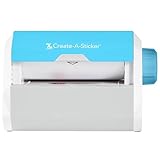
- QUICK - Get immediate results with a unique, non-electric process that doesn’t require warm-up, cool-down, or dry time. The Xyron 5" Create-A-Sticker is always ready for fast, clean fun.
- EASY - Add photos, ribbon, craft foam, fabric, paper, and much more into home, school, and professional projects. Simply feed, turn the knob, and tear to use your custom sticker on the spot.
- MESS-FREE - Ditch messy adhesives and keep work tables, hands, and projects clean with this odor-free alternative. Quickly apply an acid-free, non-toxic adhesive that’s safe for photos and projects.
- REFILLABLE - Drop-in refill cartridges in permanent and repositionable adhesive make it easy to swap cartridges or refill in seconds. Comes pre-loaded with a 5" x 10' permanent adhesive cartridge.
- PORTABLE - Whether making stickers, labels, or embellishments, this compact non-electric machine easily fits in any home, office, or classroom.
Make better custom stickers from your own photos
Prepare the source image
- Choose a sharp image with a clear subject and enough contrast against its background.
- Crop away empty space before the final resize so the subject remains recognizable in a 512 × 512 canvas.
- Keep faces, hands, and text away from the extreme edge; trimming and compression can remove small details.
- For a set, use a consistent visual style, outline treatment, and caption placement so the pack feels intentional.
Use transparency purposefully
A transparent background works well for reaction stickers because it blends with either light or dark chat themes. Background erasure can leave halos around hair or translucent objects, so zoom in and inspect the border before exporting. If a cutout looks worse than the original photo, a simple crop with a solid outline may be more legible.
Keep text readable
Sticker text is viewed at a small size. Use short words, strong contrast, and a type size that remains legible after the image is reduced. Do not rely on a caption to convey information that the image alone cannot communicate if recipients may see the sticker briefly in a fast-moving chat.
Creating animated WhatsApp stickers
Sticker.ly’s store descriptions and official site describe animated stickers made from video. WhatsApp’s published animated-sticker requirements are the controlling constraints for the exported pack: each sticker can be no larger than 500 KB, the canvas is 512 × 512 pixels, total animation duration is limited to 10 seconds, and a pack can contain up to 30 animated stickers.
A reliable animated workflow
- Choose a short source clip with one clear action. Remove unnecessary lead-in and end frames before importing.
- Crop the video to the subject and set a square 512 × 512 output canvas in the editor when that option is available.
- Reduce frame rate, color complexity, or duration as needed to stay below 500 KB.
- Preview the loop at the size used in a chat. Check that motion starts and ends cleanly and that text is readable during the brief display.
- Export to WhatsApp and test the sticker in a private chat before distributing the pack.
Do not assume that a video file accepted by an editor will automatically meet WhatsApp’s limits. If export fails, shorten the clip first, then reduce dimensions or compression overhead while preserving the subject.
Independent reader supportYour contribution helps us test, update, and keep practical guides available for everyone.Privacy and permissions before installing a sticker app
A third-party sticker app may need access to photos or videos so you can select source media. Grant only the access required for the workflow and review the permission prompt rather than accepting every option automatically.
Free tools Windows power users keep installed
One-click scans. No signup required.
The Google Play listing for Sticker.ly says the app may share app activity, app info and performance, and device or other IDs. It also says the app may collect personal and financial information among other categories. Google notes that these disclosures are supplied by the developer and may change. Read the current Google Play data-safety section and the Apple App Store privacy information before installing.
If a photo contains children, customers, confidential documents, or identifiable people, obtain the necessary permission before uploading it to any third-party editor. For sensitive images, WhatsApp’s in-app creator reduces the number of services involved, although normal device and messaging-account risks still apply.
Rank #4

- Compatible with Munbyn label series including shipping (4"x6"), circle (2"x2"/3"x2"), rectangle (1.57"x1.18"/2"x1"/2.25"x1.25") Supports specialty series: multicolor gradient/shell/aurora/glitter (2"x2"), rainbow (2"x2"/2.28"x2.28"/2.25"x1.25"), morandi (2"x2")
- Effortless Label Printing: Experience a simple 3-step setup—connect, design, and print. For iOS/Android, just download the 'MUNBYN Print' app to connect via Bluetooth. For PC, open Google Chrome and search the "Munbyn Editor" web, without any installation needed for Bluetooth wireless label design and printing. For Bluetooth-less desktops, connect via USB. Compatible with major online and shipping platforms, making your printing tasks effortlessly easy
- Customize labels for any occasion: With MUNBYN thermal label printer, access 3,500+ elements, 2,000+ templates, and 80+ fonts. Import PDFs/TXTs or use OCR for text recognition. Enjoy multi-language support across platforms.Download 'MUNBYN Print' for mobile and tablet, or visit the Google Chrome 'Munbyn editor' for laptop and desktop
- Reliable printing for every entrepreneur, every need: Trusted by 80,000+ entrepreneurs, the MUNBYN RealWriter 130B portable label printer offers 203dpi precision for all your needs: shipping, branding, QR barcodes, pricing, home organization, business or name stickers, and more. (To ensure optimal print performance, we recommend pairing your Munbyn label printer with genuine Munbyn thermal label paper for consistently crisp, long-lasting results)
- Wide Compatibility: Works with major shipping platforms and marketplaces. This shipping label printer supports labels ranging from 1.57" to 4.3" in width and is available in colors such as pink and Lavender Purple. Note: The 130B Bluetooth thermal printer may not be compatible with UPS thermal paper; MUNBYN thermal labels are recommended
Copyright, consent, and WhatsApp’s rules
Use photos, drawings, logos, and video that you own or are authorized to reuse. WhatsApp requires stickers to be legal, authorized, and acceptable under its rules. A meme found online is not automatically free to package and redistribute, and a recognizable person’s image can raise consent or privacy issues.
WhatsApp’s official developer repository for sticker sample apps and APIs explains that third-party apps can package sticker packs for Android and iOS. It also advises iOS developers to submit an app with more functionality than simply exporting stickers because of App Store review policy. That is developer guidance, not a promise that any particular app will be approved.
Quick wins for a faster PC:
Clear out junk files and repair common Windows errorsFree Scan →Fix the driver behind crashes, sound loss and screen glitchesFind Drivers →Adding, sharing, and removing a custom pack
Add a pack made in WhatsApp
When you create a sticker from a photo, choose the option to add it to an existing pack or create a new one. After the pack contains the stickers you want, use the pack’s share command in a chat. Recipients can add the shared pack from that conversation if their WhatsApp version supports the feature.
Add a pack made in Sticker.ly
Finish the pack in Sticker.ly, choose its export-to-WhatsApp action, and confirm the import prompt. If you are sending the collection to someone else, use the pack link or code documented by Sticker.ly. The recipient may still need the app installed, depending on the sharing method and current platform behavior.
Remove a pack you no longer want
Open WhatsApp’s sticker picker, enter the pack-management area, and use the delete or remove control for the unwanted pack. The exact label can differ by operating system and version. Removing a pack from your picker does not revoke copies that another person already imported.
Troubleshooting common sticker problems
The create-sticker button is missing
- Update WhatsApp from the official app store.
- Close and reopen WhatsApp after the update.
- Check another chat and the sticker picker; the control may be shown only in the expanded picker.
- Allow time for staged feature rollout. The built-in creator is tied to the current WhatsApp version and account availability.
The pack will not export or import
- Confirm that every sticker fits the applicable file-size and 512 × 512-pixel limits.
- Count the stickers; static and animated packs each allow up to 30 of their respective type.
- Update both WhatsApp and the third-party editor.
- Check that the device has enough free storage and that photo or media permission is enabled for the selected workflow.
The sticker looks blurry or has a white halo
- Start with a higher-resolution source and crop around the subject before compression.
- Inspect the edge after background removal; manually correct missed pixels or halos where the editor permits.
- Use a simple outline or solid background if transparency makes the subject disappear against the chat theme.
An animated sticker is rejected
- Trim the animation to 10 seconds or less.
- Reduce the exported file below 500 KB.
- Keep the canvas at 512 × 512 pixels and simplify motion or color detail if compression is still too large.
- Test one corrected sticker before rebuilding the entire pack.
Bottom line: start in WhatsApp, switch to Sticker.ly for extra control
WhatsApp’s built-in creator is the best first choice for fast, private-by-default photo stickers and simple packs. Choose Sticker.ly when background removal, captions, video-based animation, or link-and-code sharing justifies a separate app and its additional permissions. Whichever route you use, prepare images for WhatsApp’s published limits, use media you are authorized to share, and verify the current app interface before distributing a large pack.
Recommended Free Tools
Quick Recap
Product prices and availability are accurate as of the date/time indicated and are subject to change. Any price and availability information displayed on Amazon at the time of purchase will apply.

