
iTechGuides is reader-supported. When you buy through links on our site, we may earn an affiliate commission. As an Amazon Associate I earn from qualifying purchases. Learn more
For the best picture from original PS2 hardware, use a properly shielded component (YPbPr) cable and send it through a dedicated scaler. On an HDMI-only television, the RetroTINK-5X Pro is the strongest documented all-around option: it accepts the PS2’s major analog formats, applies motion-adaptive deinterlacing to common 480i games, and outputs HDMI-compatible video up to 1080p. A less expensive generic PS2-to-HDMI dongle is easier and usually costs under $30, but image quality, lag and deinterlacing vary widely. If you already have a CRT or an older display with analog inputs, connecting the console directly preserves the original presentation with no scaler required.
What you need to know before choosing a connection
The PlayStation 2 does not natively output HDMI. Its Multi-AV connector carries analog video, most commonly composite, S-Video or component video. A modern television must either accept one of those signals directly or receive a converted digital signal from an active adapter or scaler.
Component video, labeled YPbPr, is the practical quality baseline for an original PS2. It separates luminance and color into three video channels instead of combining them into composite, producing a cleaner image and fewer color artifacts. The cable does not upscale the console’s output; it only transports the signal. Any improvement in resolution, deinterlacing or timing comes from the display or the scaler after the cable.
What’s actually slowing this PC down?
Pick the symptom - the matching free tool is one click away.
Many PS2 games output 480i (interlaced standard definition), while some offer 480p and a small number support other modes. Interlaced games are the main reason a dedicated scaler can look substantially better than a basic converter. A scaler that simply bobs each field can make fine details flicker or appear to jump vertically. Motion-adaptive deinterlacing analyzes movement and combines fields more intelligently, reducing that jitter without requiring the game to render at a higher resolution.
#1 Best Overall

- Get the best analog video & audio out of your PS2 or PS3 using this high-quality fully shielded cable
- HD Retrovision cables are properly engineered and constructed; don't settle for cheap unshielded cables which result in poor video quality and audio interference issues
- Supports all available PS2 & PS3 YPbPr video resolutions up to and including 1080p (see product description below)
- Full coverage 360° shielding prevents audio and video crosstalk (click on photos for more details)
- Proper 75Ω (75 ohm) coaxial cable impedance for optimal video quality (click on photos for more details)
Check the television’s inputs and the game’s supported video modes before buying anything. A scaler may accept 480i but not every progressive mode, and a television may reject a particular resolution or refresh rate even when the scaler can generate it.
Connection options compared
| Setup | Inputs and output | 480i handling | Latency and complexity | Published price or availability |
|---|---|---|---|---|
| Direct connection to CRT or analog-input display | Composite, S-Video or component, depending on the display; no HDMI conversion | Original display processing; a CRT naturally presents the native scan format | No external scaler; simplest if the right display is available | Requires an older or analog-capable display; current availability varies |
| Generic PS2-to-HDMI adapter | PS2 Multi-AV input to HDMI output | Quality and deinterlacing differ by adapter; inexpensive models may leave interlaced games jittery | Fastest setup, but lag and processing are unpredictable | Commonly under $30, according to GamesRadar+ (2026) |
| Component cable plus RetroTINK-2X Pro | Component, S-Video and composite inputs; HDMI output | Line-doubles 240p, 480i, 288p and 576i; no 5X-style motion-adaptive deinterlacer | Manufacturer states zero added latency; simple cabling | $139.99 listed by RetroTINK in 2026; legacy product |
| Component cable plus RetroTINK-5X Pro | Component, RGB, SCART, S-Video and composite inputs; HDMI-compatible output up to 1080p | Motion-adaptive deinterlacing designed for 480i game content | About 0.25 frames in framelock mode; 0.25–1.25 frames with triple buffering, according to the manufacturer | $325 listed by RetroTINK in 2026 |
| PS2 HD15 Dongle with a compatible scaler or display | Passes PS2 YPbPr to HD15 RGB lines and carries stereo audio | Does not upscale, deinterlace or alter timing | Only useful when the receiving device accepts YPbPr with sync on Y/Green; requires separate scaler or compatible sink | $19.99 listed by RetroTINK in 2026 |
| OSSC or GBS-C with component input | Enthusiast scaler paths; capabilities depend on the specific unit and configuration | OSSC is a sharp line-doubling option; GBS-C can be useful for interlaced PS2 content when configured for motion-adaptive deinterlacing | More tuning and compatibility decisions than a basic adapter | Prices and availability vary; the cited evidence does not provide independent testing |
Best overall: component cable plus RetroTINK-5X Pro
The 5X Pro is the most complete documented choice when you want one scaler for an original PS2 and other retro consoles. It accepts component, RGB, SCART, S-Video and composite, so you are not locked to one analog format. Its motion-adaptive deinterlacer was developed specifically for 480i game content; RetroTINK describes the feature as providing flicker-free output without an additional lag penalty. The unit scales to HDMI-compatible 1080p, making it suitable for televisions that lack analog inputs.
RetroTINK lists latency at approximately 0.25 frames in framelock mode and 0.25 to 1.25 frames when triple buffering is used. Those are manufacturer figures rather than an independent laboratory measurement, and the actual experience can also depend on the television’s own game mode and processing. Enable the TV’s game mode when available to avoid adding avoidable display delay.
Free tools Windows power users keep installed
One-click scans. No signup required.
The 5X requires a 5V/2A USB power source. It is a separate powered device: the PS2 cable does not supply the scaler’s operating power. The complete path is PS2 Multi-AV connector to component cable, component plugs into the scaler, scaler HDMI output to the television, and the scaler’s USB power connected to a suitable 5V/2A source.
When the 5X is worth the cost
- You primarily play 480i titles and want steadier motion than a basic bob deinterlacer provides.
- You need HDMI output and may connect other composite, S-Video, RGB or SCART consoles later.
- You want a documented low-latency mode and 1080p output rather than a simple line doubler.
Lower-cost dedicated option: RetroTINK-2X Pro
The 2X Pro is a simpler path. It accepts component, S-Video and composite and line-doubles 240p, 480i, 288p and 576i to HDMI. RetroTINK states that it adds zero latency. The trade-off is processing: it does not provide the 5X’s advanced motion-adaptive deinterlacing, so 480i games can retain more of the flicker or softness associated with basic line doubling.
Rank #2
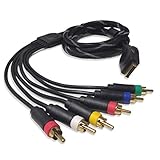
- Wide Console Compatibility: The component multi-out cable is compatible with PS2 & PS3 & PS3 Slim gaming console
- Enhanced Gaming Experience: The component audio video cable connects your PS2 / PS3 / PS3 Slim to TV, allowing you to enjoy high-quality graphics and audio during gaming
- Multiple Connection Ports: For TV connection side, there are 6 outputs multi out ports, they are: video, Component Y/Pr/Pb, audio L channel, audio R channel
- High Resolution Support: Owing to Y/Pr/Pb components, you can connect the Composite RCA Audio Video Cable to High Resolution TV and supports TV / LCD of 480p / 1080i / 720p resolution
- Cable Specifications: The length of the Component Audio Video Cable is 6 feet (180cm), weight is around 220 grams, and its main color is black
RetroTINK lists the 2X Pro at $139.99 in 2026 and labels it a legacy product. That status means availability may be less predictable than a current model; confirm stock and compatibility before planning a purchase. It makes sense when you want straightforward HDMI conversion, already understand the limitations of line doubling, or find one at a suitable price.
Fastest setup: a generic PS2-to-HDMI adapter
A direct HDMI dongle plugs into the PS2’s Multi-AV port and presents an HDMI output, usually with a separate 3.5 mm audio connection or audio carried through HDMI depending on the model. GamesRadar+ describes these adapters as commonly costing under $30. They are attractive for a secondary room or occasional play because they require fewer boxes and cables than a separate scaler.
Do not assume the low price means equivalent performance. Inexpensive adapters can soften the image, add noticeable lag, mishandle 480i, or leave moving scenes with bob-style jitter. Their behavior also differs between television models. If you choose this route, buy from a seller with a return policy, test several 480i games, and compare the result with the television’s game mode enabled. An adapter that displays a picture is not necessarily an adapter that handles the PS2’s interlaced signal well.
Best original presentation: direct connection to a CRT or analog-input display
If you own a CRT with compatible composite or component inputs, connect the PS2 directly. A CRT displays the console’s standard-definition signal in the way the games were designed around, with natural scanlines and no digital scaling stage. This avoids HDMI conversion latency and can make 240p and 480i titles look authentic.
The disadvantages are practical rather than purely visual: CRTs are bulky, older units can be difficult to find or repair, and their inputs vary. An older flat-panel television with component or S-Video can also accept a direct connection, but its internal deinterlacer and scaler may be mediocre. Preserve a 4:3 aspect ratio unless you have a specific reason to use another mode; stretching a 4:3 game to 16:9 distorts character and environment proportions.
Rank #3
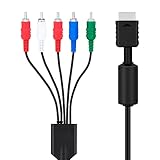
- SET CONSOLE OUTPUT TO COMPONENT FIRST: On PS2 go to System Configuration, then Component Video Out, and select Y Cb/Pb Cr/Pr mode manually - this cable gives no signal until the console video output is switched over.
- SHARPER 480P PICTURE THAN STANDARD AV: The 3 video YPbPr connection of this component cable supports 480p output on HDTV and EDTV screens, with better detail and more vibrant color for retro gaming sessions.
- BROAD SYSTEM SUPPORT: One cable works for PlayStation 2 , PS3, and PS3 Slim consoles through the AV multi out port; your TV must have component YPbPr inputs, and HDMI only TVs need a separate converter.
- COLOR CODED 5 PLUG DESIGN: Green, blue, and red video plugs plus red and white stereo audio match your TV ports for quick plug and play setup, with quality connectors for stable signal transmission.
- 6 FT CABLE WITH 5000 PLUS BEND LIFESPAN: The 1.8 m flexible jacket routes easily behind the TV stand, and the connectors are rated for a 5000 plus bend lifespan for long term daily use of the cable.
OSSC and GBS-C alternatives for enthusiasts
OSSC
An OSSC is a legitimate choice when you already own one or prefer a very sharp line-doubling workflow. It can produce a crisp result with low processing delay, but configuration and television compatibility matter more than with a plug-and-play HDMI dongle. Verify that the unit accepts the PS2’s component signal and that your television locks reliably to the selected output mode.
The Tool Desk
Outbyte PC Repair FREEClear out junk files and repair common Windows errorsFree Scan →Outbyte Driver Updater FREEFix the driver behind crashes, sound loss and screen glitchesFind Drivers →GBS-C
A GBS-C can be advantageous for PS2 libraries dominated by interlaced games when it is configured for motion-adaptive deinterlacing. Its appeal is flexibility: enthusiasts can tune timings and processing rather than accepting a fixed preset. That flexibility also makes setup more involved. The available evidence does not establish a universal ranking between GBS-C units, so treat construction quality, firmware and configuration knowledge as part of the purchase decision.
What the PS2 HD15 Dongle does—and does not do
The PS2 HD15 Dongle is an accessory, not a complete HDMI converter. RetroTINK lists it at $19.99 and describes it as passing YPbPr directly to HD15 RGB lines while carrying stereo audio. It does not upscale or change the timing. It works only when the PS2 or PS3 is configured for YPbPr and the receiving display or scaler accepts YPbPr with sync on Y/Green.
Use it when you already have a compatible scaler or monitor with the required HD15 input. It cannot replace a 5X, 2X Pro or another active HDMI scaler, and plugging it into an incompatible VGA input will not create a picture.
Step-by-step setup for an HDMI television
- Inspect the television. Note whether it has component (red, green and blue video sockets), S-Video, composite or HDMI only. HDMI-only sets require an active adapter or scaler.
- Choose a cable. For an original PS2, select a properly shielded component/YPbPr cable with the correct Multi-AV connector. Connect the green Y plug, blue Pb plug and red Pr plug to matching color-coded inputs; connect the red and white audio plugs to the scaler or television’s audio inputs if the design requires separate audio.
- Connect the scaler. Feed the component cable into the scaler’s component input, then run an HDMI cable from the scaler’s output to the television. Connect the scaler’s power separately. The 5X requires a 5V/2A USB source; the 2X Pro requires at least 5V/1A.
- Match the PS2 output setting. In the PS2 system menu, select the output type that matches the cable. Component cables require YPbPr/component mode, not RGB. A mismatch can produce a blank or badly colored screen.
- Set the television for low processing. Select the HDMI input used by the scaler and enable the TV’s game mode if it has one. Disable motion smoothing and other film-oriented processing that can add delay.
- Set the aspect ratio. Use 4:3 for normal PS2 gameplay. Check that the scaler and television are not independently stretching the image, which can result in double scaling or a distorted picture.
- Test representative games. Try at least one 480i title and, if relevant, one game that offers 480p. Confirm that the scaler accepts the progressive mode before relying on it; some devices handle 480i and 480p differently.
Fixing a blank screen, wrong colors or unstable image
Blank screen after changing cables or adapters
The most common cause is an RGB/YPbPr mismatch in the PS2 system menu. If you cannot see the menu, navigate blindly to the system configuration and change the component-video output setting. Return the console to the cable’s required mode, then power-cycle the PS2 and scaler.
Rank #4

- Wide Compatibility with PlayStation Consoles--Compatible with Sony PlayStation 1, PS2, PS2 Slim and PS3 game consoles, this 6ft RCA composite AV cable connects your PlayStation console directly to any TV or monitor with RCA composite inputs. It is a perfect replacement or backup cord for your original lost or damaged PlayStation AV cable.
- Plug-and-Play Audio Video Transmission--This 1.8M/6ft audio video cable transmits both stereo audio and composite video via 3 color-coded RCA connectors (yellow for video, red/white for left/right audio). No extra drivers or adapters are needed — simply plug and play for instant classic gaming.
- Stable & Clear Retro Gaming Performance--Delivers stable composite video signal and crisp stereo sound for PS1/PS2/PS3 classic games, restoring the original retro gaming experience. Tinned copper conductors and durable shielding minimize signal loss and interference for consistent, lag-free performance.
- Durable Replacement for Original Cords--Ideal for replacing lost, broken or damaged original PlayStation AV cables. The flexible PVC jacket and reinforced connector joints withstand frequent plugging and long-term use, making it a reliable spare for home or travel use.
- Compatibility Reminder--This is a 3-connector RCA composite AV cable for PS1/PS2/PS3. Please ensure your display has red/yellow/white RCA composite ports before purchase; it is not compatible with 5-port component video inputs. If your device only has an HDMI port, you’ll need an RCA to HDMI converter (not included)!!!
Picture appears in black and white or with incorrect colors
Check that each component plug is in the matching Y, Pb and Pr socket and that the PS2 is set to YPbPr. Composite and component plugs can share similar colors, but they are not interchangeable by position alone. Reseat every connection and test a known-good cable.
Image flickers, bobs or jitters during movement
The game is probably outputting 480i and the adapter is using basic bob deinterlacing or passing the signal to a poor television deinterlacer. A scaler with motion-adaptive processing, such as the documented 5X approach, is the appropriate upgrade. A CRT can also avoid digital deinterlacing artifacts by displaying the interlaced signal natively.
No signal from a PS2 HD15 Dongle
Confirm that the console is set to YPbPr and that the receiving device supports YPbPr with sync on Y/Green. A normal PC VGA input may expect RGBHV instead and reject the signal. The dongle does not upscale, convert timing or create HDMI output by itself.
Scaler powers off or behaves erratically
Use the required power specification: at least 5V/1A for the 2X Pro and 5V/2A for the 5X. Try a different USB power source and avoid an underpowered hub. Power the scaler before selecting its HDMI input so the television can complete its handshake.
Recommended Free Tools
Input lag remains noticeable
Check both stages of the chain. Select the scaler’s low-latency or framelock mode where appropriate, then enable the television’s game mode. Triple buffering on the 5X has a manufacturer-stated range of 0.25–1.25 frames, so mode selection can affect latency. A television that performs heavy post-processing can add more delay than the scaler.
How to choose by budget and priorities
- Under about $30: A generic PS2-to-HDMI adapter is the low-effort option. Accept uncertain deinterlacing and test it during the return period.
- Lowest hardware complexity: Use a direct connection to a CRT or an analog-input display if you already own one.
- Simple dedicated HDMI conversion: The 2X Pro is a legacy line doubler with stated zero added latency, but it lacks the 5X’s motion-adaptive processing.
- Best documented all-around setup: Component cable plus 5X Pro provides the broadest input support, motion-adaptive 480i processing and up to 1080p output. Its 2026 listed price is $325 before any cables, shipping or taxes.
- Existing enthusiast equipment: An OSSC or GBS-C can be sensible if you already own one and are comfortable tuning timings and deinterlacing. Buying one solely for the PS2 requires checking exact input and television compatibility.
Buying checklist
- Confirm the television’s inputs and whether it accepts 480p as well as 480i.
- Prefer component/YPbPr from the PS2 when the display or scaler supports it.
- Verify that the cable has the correct PS2 connector and adequate shielding.
- Check whether audio is carried through HDMI or needs separate red-and-white connections.
- Confirm scaler power requirements before ordering a USB supply.
- Look for a documented latency figure and deinterlacing method rather than assuming every HDMI adapter is equivalent.
- Keep the image at 4:3 unless your display setup specifically requires another aspect ratio.
- Recheck prices and availability: the $325 5X Pro, $139.99 2X Pro and $19.99 HD15 Dongle figures are listings cited for 2026, while generic adapters are described as under $30 by a 2026 guide.
Bottom line
Use a component cable as the starting point. For an HDMI-only modern TV, the RetroTINK-5X Pro is the most capable documented choice because its motion-adaptive 480i deinterlacing addresses the PS2’s biggest video problem while supporting multiple analog formats and 1080p HDMI output. Choose the 2X Pro for simpler line doubling, a generic dongle only when convenience and price outweigh consistency, and a direct CRT connection when authentic standard-definition presentation matters most.
Quick Recap
Product prices and availability are accurate as of the date/time indicated and are subject to change. Any price and availability information displayed on Amazon at the time of purchase will apply.

