
iTechGuides is reader-supported. When you buy through links on our site, we may earn an affiliate commission. As an Amazon Associate I earn from qualifying purchases. Learn more
The best Trello Power-Up depends on the work you need to move forward: Slack can connect conversations to cards, Google Drive and Confluence can bring documents into view, Jira can bridge issue handoffs, and built-in board features can handle recurring cards or crowded lists. Trello’s integration directory showed 234 entries when accessed in 2026, but that changing catalog is not a ranked list of the 100 best options. Use the picks below as a workflow-based shortlist, then check the current directory and provider details before enabling one.
What a Trello Power-Up does
Trello uses “Power-Up” and “integration” for features that extend a board or connect it with another service. Some bring information from an external tool into Trello; others add capabilities directly to a board. An integration listing is not, by itself, proof that a feature is currently supported or suitable for your setup.

Trello’s official integration directory showed 234 entries when accessed in 2026. Trello’s Enterprise guide separately describes more than 200 integrations. Those figures come from different pages and should not be treated as a combined count of distinct, active Power-Ups.
The Tool Desk
Outbyte Driver Updater FREEScan for outdated or missing drivers - takes under a minuteDriver Scan →Outbyte PC Repair FREEClear out junk files and repair common Windows errorsFree Scan →Trello says unlimited Power-Ups are available with every plan. That does not mean every connected service is free: third-party developers may charge, and their terms can change. Check both Trello’s current plan information and the provider’s pricing, permissions, availability, and support before committing.
#1 Best Overall
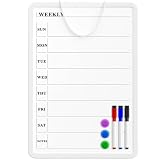
- Weekly Planner on One Side, Blank Whiteboard on the Other: This MaxGear dry erase calendar board features a double-sided design. One side is a weekly planner for scheduling and task tracking, while the other side is a blank whiteboard for notes, reminders, or drawings
- Double-Sided Magnetic Surface: Both sides of the board are magnetic, allowing you to attach notes, paper, or reminders on either the weekly planner side or the blank whiteboard side
- Works with Standard Dry Erase Markers: The smooth writing surface works with standard dry erase markers. The set includes 3 colorful dry erase markers, and you can also use other dry erase markers for clear writing and easy erasing
- Easy to Hang or Stick, Ready to Use: Includes a hanging rope and double-sided adhesive tapes, allowing you to hang the board on walls or doors or stick it to smooth surfaces like refrigerators—no other tools required
- AFTER-SALES SERVICE: 12-Month After-Sales Service. If you have any questions with our product, please feel free to contact us
Which Power-Ups fit common workflows?
These are practical options documented in Trello’s official guides, not a permanent popularity ranking or tested product score.
| Workflow need | Option | What it can do | Useful when |
|---|---|---|---|
| Team communication | Slack | Create Trello cards from Slack, attach Slack conversations to cards, and show key Trello details when a card link is shared in a Slack channel. | Decisions and requests begin in chat but need to be tracked on a board. |
| Files and folders | Google Drive | Find Drive files from Trello, bring files and folders onto cards, and view previews or details with a path back to Drive. | A card needs to point to working documents without making Trello the file-storage location. |
| Team documentation | Confluence Cloud | Attach existing pages to cards or create pages from a card; card views can show page details, content snippets, and comments. | Work items need a direct connection to project documentation. |
| Development handoffs | Jira | Link Jira issues and Trello cards, view issue details and status, create a Jira issue from a Trello card, and link back to the card from Jira. | People outside the engineering workflow need context on work tracked in Jira. |
| Recurring work | Card Repeater | Create copies of cards at a chosen frequency. | A board regularly needs the same checklist or task card again. |
| Board capacity | List Limits | Highlight a list when it exceeds a chosen card threshold. | A team wants a visible signal when too much work accumulates in one list. |
| Email capture | Email-to-Board | Send an email to a board’s unique address to create a card, or to a card’s address to add a comment. | Requests arrive by email and need to enter a board without manual copying. |
How to choose the right Power-Up
- Start with the handoff that is failing. Decide whether the problem is lost chat context, hard-to-find documents, unclear issue status, repeated tasks, overloaded lists, or email intake.
- Choose where the source of truth should live. If the file remains in Drive or an issue remains managed in Jira, use Trello to surface context and links rather than assuming the Power-Up replaces that service’s own workflow.
- Check access requirements before enabling it. For Google Drive, each user must authenticate and grant access; review the requested permissions during setup. Other providers may have their own account and access requirements.
- Confirm current availability and ongoing cost. Check the live Trello directory and the provider’s current details for support, plan eligibility, service charges, and geographic availability.
- Try it on a representative board. Verify that the information appears where the team expects, that links lead to the right records, and that the setup works for the people who need it.
How the documented integrations work
Connect Slack conversations and cards
Trello’s Slack workflow can turn a Slack message into a Trello card, attach a conversation to a card, and show key Trello details when a card link is pasted into a Slack channel. The directory also describes sharing cards and activity and pinning a Slack channel to a board. This is useful for carrying discussion into a trackable workflow; it does not make chat a substitute for maintaining the board.
Rank #2
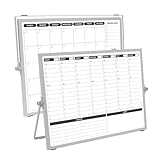
- 【Double Sided】Double-sided board features weekly calendar with time slots on one side and monthly planner with to-do list on the other side
- 【Installation】Compact 16"×12" size perfect for desk or wall use, includes stand for desktop placement and wall mounting capability
- 【For Family】1)For your kid’s nursing care so they can write down the time meds, daily activities, etc. 2)To transmit information to other family members 3)For the aged to remind them about appointments, pills, and idea's for food so that they are constantly reminded when they go in the kitchen to pay attention and check off items
- 【For Office】Perfect for the office schedule, it is a great way to stay on top of appointments and deadlines or as a huddle board to set expectations and goals at work
- 【Visual】This weekly calendar White Board is a solid option for those seeking a visual way to organize your schedule
Bring Google Drive files into card context
The Google Drive Power-Up lets users search Drive from Trello and associate files or folders with cards. Previews and details can help a board member identify the relevant document, while the file itself remains stored in Google. Each user needs to authenticate and grant access, so review the permission prompt rather than treating the connection as a simple public link.
Connect Confluence pages to work
Confluence Cloud can attach an existing page to a Trello card or create a page from a card. Trello can display page details such as the creator, date, a content snippet, and comments, giving a card a documentation trail without implying that the card replaces the page.
Rank #3

- Weekly Calendar Dry Erase Board: Weekly calendar layout, perfect for tracking events, to-do lists to help complete daily tasks, in addition to the to do list board, a hobby column is added for your convenience
- Premium Frame: The dry erase weekly calendar frame is made of high-quality aluminum material to ensure safety and long-term use. The weekly calendar whiteboard will add a touch of quality and luxury to your home and office
- Smooth Writing & Easy to Clean: The weekly wall calendar comes with a smooth and durable writing surface. It's easy to write on and easy to wipe clean without stains. You can ensure long lasting use
- Organizational Planning: This weekly calendar whiteboard(16" x 12") provide a clear and intuitive overview of your work tasks, class schedules, and to-do lists at a glance, helping you plan and prioritize better. Whether you use it for personal or professional use, it is a good choice
- Quality Service:If you have any questions or concerns about our products or services, please contact us and we will be happy to help within 24 hours
Link Jira issues without replacing Jira
The Jira Power-Up can connect a Jira issue with a Trello card, display issue details and status, create a Jira issue from a Trello card, and provide a link back to the card from Jira. It can help nontechnical collaborators understand the status of tracked work, while Jira remains the issue-management workflow for teams that use it.
Use email and board features for lightweight workflow needs
Email-to-Board routes incoming mail into a board: a message sent to the board’s unique address creates a card, while one sent to a card address adds a comment. Card Repeater makes copies of cards on a chosen schedule, and List Limits highlights a list that has passed a card-count threshold. These features address intake, repetition, and visible capacity without needing to move those tasks into a separate service.
Rank #4

- Dry Eraser Whiteboard Kit; The whiteboard kit includes 10 Markers of 8 colors, 6 Magnets, 1 Eraser, 1 Pen Clip. Both surfaces of the desktop dry erase board are made of smooth and durable materials, easily to write on and wipe off without stain. It also has a duty aluminum frame supplying a very good protection for the desktop whiteboard. This dry erase board is very durable and resistant to drops
- Portable Dry Erase Whiteboard with Stand; This magnetic desktop whiteboard is lightweight enough for you to take it anywhere. 360° adjustable knob makes it possible for you to adjust the the placement angle you want. The newly upgrade reinforced gear allows the dry erase board to stand stably at all angles. So you can make it place the way you like,convenient for you to write and hold. You can lay it down as a flat whiteboard, or make it stand on a desk
- The whiteboard is made of high-quality materials with a smooth and clean surface. The writing marks are clearly visible and the colors are bright and beautiful. The writing marks are easy to wipe off to make it white and clean again. It is equipped with a variety of color markers with diverse and bright colors. It is equipped with strong magnets, so you can stick documents and papers on the whiteboard
- Double-Sided Design Dry Erase Board; The desktop whiteboard is double-sided designed,one side is whiteboard and another is weekly planner board. You can do two projects meanwhile with this weekly calander whiteboard. Using weekly whiteboard calendar, you can make your week schedule, work, study, lessons or other to-do lists. The whiteboard is a desk buddy for distance learning, teaching, small group discussion, presentation. It is a good school supplies for Teen’s drawing,arithmetic, writing skills, showing their fantastic ideas
- Suitable for school & office; This whiteboard is suitable for classroom teaching, office meetings, planning presentations, writing drafts, home schedule planning, memo note recording boards. It can be school favors, teaching favor, it can also be given as a gift to teen as a drawing tool or writing practice tool. And you can also use it as a bulletin board to post photos
Other options visible in Trello’s directory
Trello’s directory also surfaced Microsoft Teams embedding, Trello for Gmail, Telegram, SupportBee ticket-to-card transfer, OneLogin access, Make app connections, and time-tracking or time-in-list tools including TimeDoctor, Tick, Timecamp, TMetric, Toggl, and Time in List. These examples establish that such listings appeared in the directory; they are not endorsements or guarantees of present-day functionality or third-party support.
What’s actually slowing this PC down?
Pick the symptom - the matching free tool is one click away.
Quick Recap
Best Value
What to verify before enabling one
- Whether the listing is available in your Trello workspace and plan.
- Which Trello and provider accounts must be connected, and what permissions each user grants.
- Whether data is linked, displayed, copied, or stored in the external service.
- Whether the provider charges separately and what support it currently offers.
- Whether the workflow works for all relevant board members, not only the person who configured it.
Product prices and availability are accurate as of the date/time indicated and are subject to change. Any price and availability information displayed on Amazon at the time of purchase will apply.

