
Recommended Free Tools
iTechGuides is reader-supported. When you buy through links on our site, we may earn an affiliate commission. As an Amazon Associate I earn from qualifying purchases. Learn more
There is no single best TradingView replacement. Choose thinkorswim if you trade US options and want broker-linked execution with paper trading; MetaTrader 5 for forex and algorithmic systems; StockCharts for independent classical stock charting and screening; GoCharting for browser-based footprint, volume-profile and futures analysis; and TrendSpider when automated trendlines, scanners, alerts and strategy testing are the priority. Experienced traders who want an integrated broker workstation should also consider Interactive Brokers Trader Workstation (TWS).
The right choice depends on your market, data needs, automation plans and willingness to open a brokerage account. The comparison below separates charting subscriptions from broker platforms, because a platform that looks inexpensive can still require exchange-data fees, commissions or a supported broker.
Quick comparison
| Platform | Best fit | Markets or coverage | Broker account | Standout tools | Access and cost model |
|---|---|---|---|---|---|
| thinkorswim | US options and active trading | Stocks, ETFs, options, futures and forex | Schwab account required | Hundreds of studies and drawing tools, paperMoney simulation, broker execution | Platform suite is free for Schwab clients; trading charges may apply |
| MetaTrader 5 | Forex and algorithmic trading | Forex, stocks and futures through supporting brokers | Required for live trading | Expert Advisors, MQL5 development, copy trading, multi-asset analysis | Software access varies by broker and jurisdiction |
| StockCharts | Classical stock charting and screening | US, Canadian, UK and Indian equities; indexes, commodities, currencies, bonds and cryptocurrencies | Not required | Many chart types, saved templates, watchlists and screeners | Monthly subscription; real-time exchange data can cost extra |
| GoCharting | Futures, order flow and browser analysis | US stocks and CME futures data options; other availability depends on feed | Optional for charting; needed for connected execution | Footprint and imbalance charts, market profile, volume profile, simulated trading | Free end-of-day US stock tier; paid real-time and advanced tiers |
| TrendSpider | Automated technical analysis | Coverage and feeds vary by plan and market | No broker account for analysis | Automated trendlines, scanners, alerts, strategy tester and bot workflow | Subscription; reported 2026 range is broad and should be checked before purchase |
| Interactive Brokers TWS | Experienced traders wanting a broker workstation | Product and market access depend on account and jurisdiction | IBKR account required | Advanced order entry, research and execution tools | Free software with an eligible account; normal brokerage and data charges can apply |
How to choose a TradingView alternative
Start with the market you actually trade
Options traders need an options chain, risk views, order routing and a reliable paper-trading environment. Forex traders usually need a broker ecosystem, symbols that match the broker’s pricing and automation support. Futures traders often care more about time-and-sales, footprint imbalance and market-profile displays than about social publishing. Stock investors may value broad screening, clean end-of-day data and long historical charts over one-click execution. Crypto users should verify that the exact coins, venues and real-time feeds they need are available; “crypto support” is not the same as coverage of every exchange.
Separate analysis from execution
A standalone charting service can be useful without moving money to its provider. A broker workstation can reduce symbol and order-routing mismatches because analysis and execution share the same account. The trade-off is account dependence: leaving the broker may also mean losing the platform. Decide whether you want one integrated workspace or the freedom to pair an independent charting subscription with any broker.
#1 Best Overall

- DO MORE ON ONE SCREEN: See every detail on the wider display featuring a 21:9 aspect ratio; Ultra WQHD provides the simplest way to maximize screen real estate and experience truly seamless multitasking on just one screen.Brightness (Typical) : 300 cd/㎡. Static Contrast Ratio 3000:1.
- ENJOY A BILLION COLORS W/ INCREDIBLE DEPTH: With HDR10 that displays over 1 billion colors compared to 16.7 million for typical SDR technology, dark colors are darker and the brightest are even brighter; Content is experienced as the creator intended
- CARE FOR YOUR EYES DAY and NIGHT: An ambient light sensor on the monitor detects lighting in your workstation and automatically adjusts brightness; Eye Saver Mode minimizes excessive blue light, and Flicker Free relieves eye strain
- SEE CONTENT SMOOTHER, EVEN GAMING: A faster than average refresh rate updates the image on screen more often every second; 100Hz refresh rate reduces lag and motion blur when playing games, watching videos, or working on design projects
- STAY IN SYNC WITH THE ACTION: AMD Radeon FreeSync keeps the refresh rate of your monitor and graphics card in sync to reduce image tearing for a superfluid entertainment experience; Watch movies and play games without interruptions
Calculate the complete data bill
“Free” may mean delayed or end-of-day quotes, while real-time exchange data may be an add-on. Check whether your exchange, asset class and professional-status classification change the fee. Add commissions, contract fees, market-data subscriptions and any minimums to the software price before comparing platforms.
thinkorswim: strongest for US options and active traders
What it offers
Charles Schwab describes thinkorswim as offering hundreds of technical indicators, studies and drawing tools. It supports stocks, exchange-traded funds, options, futures and forex in one broker-linked environment. The paperMoney feature provides live-market simulation, so you can rehearse orders and platform workflows without placing a live trade.
Account and trading costs
A Schwab account is required to log in. Schwab says clients receive the thinkorswim platform suite at no charge. Schwab’s 2026 listed pricing shows $0 online commission for listed equities and $0.65 per options contract. Those figures describe the stated online stock and options commissions; exchange, regulatory, futures, forex or other account charges may follow different schedules.
Who should choose it
- US options traders who want analysis, paper trading and execution together.
- Active stock or ETF traders who prefer a broker’s data and order entry in the same application.
- New users who want to practice with simulated money before sending orders.
Limitations to check
The required Schwab relationship makes thinkorswim less suitable if you want a completely broker-neutral workspace. Product availability, margin terms and data entitlements are account and jurisdiction dependent. The platform is a particularly clear substitute for US-focused trading, but thinkorswim’s product information does not state native spot-crypto coverage; verify the instruments you intend to trade rather than assuming every asset class is included.
MetaTrader 5: the forex and automation choice
Why forex traders use it
MetaQuotes describes MetaTrader 5 (MT5) as a multi-asset platform for trading forex, stocks and futures. Its most important distinction is the broker ecosystem: the desktop, web and mobile applications connect to a supporting broker, whose symbols, spreads, leverage, execution rules and jurisdiction determine what you can actually trade.
Analysis and development tools
MetaQuotes states that MT5 includes more than 80 technical indicators and analytical tools and 21 timeframes. It also includes an MQL5 development environment for Expert Advisors and custom indicators, a marketplace for trading applications and copy-trading functions. Web access and Android/iOS apps make the same broker account available across devices, although feature parity and execution conditions can vary.
Best use cases
- Forex traders who need automated strategies or broker-specific symbols.
- Developers building Expert Advisors, custom indicators or scripts in MQL5.
- Traders who want to test, deploy or copy algorithmic systems within a broker ecosystem.
What to verify before opening an account
- Confirm that the broker is regulated and accepts clients in your country.
- Check whether the symbols are spot, futures, CFDs or another instrument; the label alone does not describe the contract.
- Compare spreads, commissions, swaps, margin rules and execution policy.
- Confirm that the broker supports the MT5 desktop, web and mobile features you need.
MT5 is not a broker-independent live-trading service. You can inspect the software without funding an account, but live orders require a compatible broker and a jurisdiction in which that broker offers the product.
Rank #2

- Improved ComfortView Plus: Reduces harmful blue light emissions to ≤35%, for all-day comfort without sacrificing color accuracy.
- Refresh rate: A smooth, tear-free experience with AMD FreeSync Premium (refresh rate up to 120Hz) and an ultra-low 0.03ms response time create a captivating experience for work and play.
- Vivid colors: Enjoy vibrant, true-to-life colors with 99% sRGB and 95% DCI-P3 coverage. The VA panel with 3000:1 contrast ratio and HDR readiness delivers stunning depth, detail and realism.
- Re-engineered sound quality: Enjoy more detailed sound with spacious audio featuring greater output power, deeper frequency response and more decibel range than the previous generation.
- Easy connectivity: Keep your desk organized and clutter-free with a single USB-C cable (up to 65W power delivery).
StockCharts: independent classical charting and screening
Coverage and chart types
StockCharts is a broker-independent charting and screening service. It covers US, Canadian, UK and Indian equities as well as indexes, commodities, currencies, bonds and cryptocurrencies. Its chart engine supports intraday through yearly intervals and formats including bars, candlesticks, Renko, Kagi and Point & Figure. Saved templates and watchlists make it practical for maintaining repeatable technical-analysis routines.
Published 2026 subscription prices
| Plan | Monthly price | Typical reason to choose it |
|---|---|---|
| Basic | $19.95 per month | Core charting and screening for a single-user workflow |
| Extra | $29.95 per month | More capacity and features than Basic |
| PRO | $49.95 per month | Highest listed tier for intensive charting and analysis |
These are StockCharts’ published 2026 monthly prices. Official real-time exchange data can add separate fees, so the subscription is not necessarily the complete cost of live quotes.
Who should choose StockCharts
Choose it when you want an analysis workspace that does not depend on a particular broker, especially for end-of-day research, long-term trend work and classical chart patterns. It is also the clearest named option in this comparison for readers who need stated cryptocurrency coverage alongside stocks and other traditional markets. It does not provide the broker-integrated order workflow of thinkorswim or TWS.
GoCharting: order flow, footprint and futures analysis in a browser
Data tiers
GoCharting’s US offering lets users start free with end-of-day US stock data. Its paid data options add real-time NASDAQ, NYSE and CME futures feeds. Because real-time access is exchange-specific, select only the venues you actually trade and check whether your account classification changes the fee.
Crashes, No Sound, or Screen Glitches?
Random freezes, missing sound and display glitches usually trace back to one bad driver. Find and replace yours safely.Free scan · under a minutePC Slower Than It Used to Be?
A free scan shows the junk files, broken settings and background clutter dragging Windows down - then fixes them in one click.Free scan · Windows 10 & 11Order-flow features
The feature matrix lists footprint and imbalance charts, market profile, volume profile, simulated trading, broker connections, chart trading and alerts. Premium supports up to eight charts per tab. Those tools target traders who read executed volume and auction structure rather than relying only on time-based candles and indicator overlays.
When it beats a general charting platform
- You need footprint or imbalance visualization for futures or tape-reading work.
- You want browser access on modern operating systems instead of a broker-specific desktop application.
- You want to rehearse a strategy with simulated trading before connecting a broker.
GoCharting is not automatically a complete brokerage replacement. A broker connection is optional for analysis, but required for connected live execution, and the available instruments depend on the selected feed and broker.
TrendSpider: automation-first scanning and strategy work
What makes it different
TrendSpider presents an integrated workflow for charts, scanners, strategy testing, alerts and bot-oriented processes. Its automated technical-analysis approach is aimed at reducing repetitive work such as drawing trendlines, checking multiple symbols and monitoring conditions across a watchlist. That makes it a better fit for systematic discretionary traders than for someone who only needs a basic chart.
Rank #3
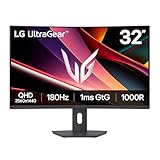
- Fast Response. Full Screen Immersion. - This UltraGear delivers fast, immersive gameplay on a 32" QHD curved display, with 180Hz refresh rate, and 1ms response. AMD FreeSync ensures smooth, tear-free action, while HDR10 and up to 99% sRGB coverage bring vivid color.
- 32" QHD Curved Display (1000R) - Dive into every detail with a 32" QHD (2560x1440) curved display. The 1000R curvature pulls you into the action, expanding your field of view for deeper immersion and giving you more screen space to game, multitask, or stream with ease.
- HDR10 & up to 99% sRGB Color - Experience vibrant, bold visuals with HDR10 support and up to 99% sRGB color gamut coverage. Whether you're gaming, streaming, or creating, colors stay rich and impactful—revealing more detail in every scene for a more dynamic and visually stunning experience.
- Experience Smooth Motion with 180Hz - With a fast 180Hz refresh rate, you’ll experience smoother frame transitions. Whether you're working or gaming, enjoy more fluid visuals with less screen stutter and motion blur.
- 1ms Response (GtG) for Crisp Gameplay - 1ms Response Time (GtG) keeps fast-paced gameplay sharp by minimizing blur and ghosting. Whether you're tracking enemies or racing to the finish, every frame stays crisp—giving you the edge when it matters most.
Price expectations
Finder’s 2026 comparison reports a monthly range of $52 to $321 for TrendSpider. Treat that as a dated comparison range, not a guaranteed price: plans, billing terms and promotions change. Verify the current tier, included markets, historical data depth, alert limits and automation permissions before subscribing.
Questions to answer during a trial
- Are your exchanges and symbols included at the required quote speed?
- Can the scanner express your exact conditions without hidden data limitations?
- Does the strategy tester model commissions, slippage, corporate actions and survivorship effects appropriately?
- Are alerts delivered through the channels and frequency your workflow requires?
- Does any bot or broker integration support your jurisdiction and account type?
TrendSpider is standalone for analysis, so a broker account is not needed simply to build charts or scans. Live execution, if available for your setup, remains a separate broker and integration decision.
Interactive Brokers Trader Workstation: a broker workstation for experienced users
Interactive Brokers Trader Workstation is relevant when you want advanced analysis and order entry tied to one brokerage account. Finder lists TWS as free with an Interactive Brokers account and positions it for experienced traders. The account requirement and the products available to you depend on jurisdiction, approvals and account permissions.
TWS makes sense when execution, order types and portfolio management matter more than a broker-neutral charting subscription. It is less appropriate if you want to compare brokers without opening one or if you prefer a minimal interface. Review commissions, market-data subscriptions, margin requirements and product permissions separately from the software cost.
Independent reader supportYour contribution helps us test, update, and keep practical guides available for everyone.Best choice by market and workflow
Best TradingView alternative for stocks
For independent stock research, StockCharts offers the broadest explicitly described set of classical chart formats, watchlists and screening without requiring a broker account. For active US stock execution, thinkorswim adds paperMoney and direct order entry through Schwab. Choose TWS instead when you already use Interactive Brokers and need a more execution-centered professional workstation.
Best alternative for forex
MetaTrader 5 is the strongest fit because its broker network, multi-timeframe analysis and MQL5 Expert Advisor environment are designed around forex workflows. Compare brokers rather than assuming that every MT5 installation offers the same spreads, symbols or leverage. A standalone charting subscription can complement MT5 if you want independent analysis, but it will not replace the broker’s execution feed.
Best alternative for crypto
StockCharts is the only option in this comparison with explicitly stated cryptocurrency coverage. Confirm the exact coins, exchange-derived feed, quote delay and chart history before relying on it. The other platforms may expose crypto-related instruments through particular brokers or feeds, but those platforms do not state universal spot-crypto coverage, so treat availability as a verification task rather than a feature assumption.
Rank #4

- 【Curved Ultrawide Monitor 49" & VA】 Premium VA Panel delivers double FHD 1080p resolution up to 144hz( DP1.4) monitor for content creation and gaming, 32:9 aspect ratio bring more wider visual than ordinary 16:9 monitor, capture game details more clearly for quick response. Tilt / Swivel / Height Adjustable meet different viewing visions
- 【USB Type C, DP and HDMI Ports】49C1G widescreen curved monitor delivers powerful USB C power delivery connectivity and have richful interfaces: 1 x DP 1.4, 1 x USB C 65W, 1 x HDMI 2.1, 2 x USB A, 1 x USB-B, 1 x RJ45, 1 x 3.5MM Audio Jack, you can directly connect your USB C devices such as Laptop, Mac, Phones, Tablets, Gaming Console( like Switch, PS5/4/3, XBOX Series etc) . It's much more convenient
- 【Adaptive-Sync & HDR 400 Technology】 INNOCN 49C1G ultrawide computer gaming monitor adopt high dynamic range (HDR) technology with professional color gamut (99% sRGB) delivers high contrast 3000:1 and color performance that meets the Display HDR 400 and Adaptive-Sync, bring smooth images and video viewing experience
- 【Enhanced Comfort & Double Your Experience】: 1800R curvature results in less eye fatigue; The curved screen allows content to be viewed at a glance while proven to limit eye strain compared to flat monitors. Dual FHD ensures enhanced depth in every detail, delivering incredibly realistic images; INNOCN 49C1G 32:9 super ultra wide display maximizes your screen real estate for seamless multitasking on just one computer screen
- 【Boost Productivity with Ultrawide Display】 Equipped PIP / PBP split screen technology which allowing you to configure your monitor to show content from two separate input sources. Play, watch, stream or work from multiple input sources at the same time, on one screen. You will not go wrong with any details, produce more fun and innovative things with INNOCN monitor. Just turn on and play
Best for futures and order flow
GoCharting is the most focused choice when footprint, imbalance, market-profile and volume-profile tools drive your decisions, especially with CME futures data. thinkorswim is more suitable when you also need options, equities and broker-integrated paper trading in one account.
Best for automated technical analysis
TrendSpider emphasizes automated trendlines, scanning, alerts and strategy testing. MT5 is the better choice when the automation must run through a forex broker using Expert Advisors and MQL5. The distinction is important: one automates analysis and monitoring, while the other is a broker-connected trading platform with a development environment.
The Tool Desk
Outbyte Driver Updater FREEFix the driver behind crashes, sound loss and screen glitchesFind Drivers →Outbyte PC Repair FREEClear out junk files and repair common Windows errorsFree Scan →Can you use an alternative without a broker account?
| Platform | Use for analysis without a broker? | What requires an account |
|---|---|---|
| thinkorswim | No login without Schwab relationship | All platform access requires a Schwab account |
| MetaTrader 5 | You can install and explore it | Live trading requires a supporting broker |
| StockCharts | Yes | Subscription and any real-time data entitlement are separate from brokerage |
| GoCharting | Yes, including the free end-of-day US stock tier | Broker connection is needed for connected live orders |
| TrendSpider | Yes | Any live execution integration depends on a supported broker |
| Interactive Brokers TWS | Limited; the software is tied to the broker relationship | IBKR account required |
Data, paper trading and backtesting pitfalls
Delayed versus real-time quotes
Do not compare a free end-of-day feed with a paid real-time feed as though they were equivalent. Record the exchange, delay, session hours and entitlement for every symbol you trade. Futures and equities can have separate exchange charges even inside the same application.
Paper trading is not live execution
Simulation is useful for learning layouts, order types and risk limits, but fills, slippage, liquidity and emotional pressure differ from live markets. thinkorswim’s paperMoney and GoCharting’s simulated trading let you rehearse; neither proves that a live strategy will perform identically.
Backtest assumptions
Automated scanners and strategy testers can produce attractive results if they ignore commissions, spread, slippage, delisted symbols, corporate actions or look-ahead bias. Use the tester to reject weak ideas and investigate robust ones, then validate with an out-of-sample period and small-size execution.
Broker and jurisdiction mismatch
A platform’s marketing list is not a promise that your account can trade every listed product. Confirm residence eligibility, account approval, margin rules, tax treatment and the legal form of the instrument before depositing funds.
Do these 3 things before closing this tab:
1Scan for outdated or missing drivers - takes under a minute2Clear out junk files and repair common Windows errors3Fix the driver behind crashes, sound loss and screen glitchesQuick Recap
A practical switching checklist
- Write down your primary market, trading session, time zone and required quote speed.
- List non-negotiable tools: options chains, Expert Advisors, footprint charts, screeners, alerts, paper trading or mobile access.
- Decide whether you need broker-neutral analysis or one account for charting and execution.
- Price the complete setup, including subscriptions, exchange data, commissions, contract fees and currency conversion.
- Open a demo or simulated environment where available and reproduce one real workflow from scan to order review.
- Check symbol definitions, historical depth and data quality for the exact instruments you trade.
- Test alerts, exports, mobile access and recovery procedures before depending on the platform during market hours.
- Only then connect or fund a live brokerage account, using position limits appropriate to your experience.
Product prices and availability are accurate as of the date/time indicated and are subject to change. Any price and availability information displayed on Amazon at the time of purchase will apply.

