
iTechGuides is reader-supported. When you buy through links on our site, we may earn an affiliate commission. As an Amazon Associate I earn from qualifying purchases. Learn more
For quick point-and-identify help, SkySafari 8 is the most natural fit; for offline simulation and advanced session or telescope planning, Stellarium Mobile Plus is the stronger choice; and Star Walk 2 is a broad, guide-like reference for searching objects and learning basic sky events. These are feature-based matches, not results from a hands-on accuracy test. App versions, platform support, prices and subscription tiers change, so verify the current listing for your phone before installing or paying.
Which stargazing app should you choose?
Start with the job you need the app to do rather than with a generic “best” label. A person standing outside and trying to identify a bright point needs fast sensor-assisted pointing. Someone deciding what to observe later tonight needs visibility forecasts, rise and set information, and an event calendar. An observer in a dark location without mobile data needs useful offline content. A telescope owner may care more about instrument views and mount control than about a beginner-friendly sky map.
| App | Best fit | Identification | Planning and observing tools | Offline or equipment distinction | Important qualification |
|---|---|---|---|---|---|
| SkySafari 8 | Fast identification plus a guided “what is visible tonight?” view | Its listing describes pointing a device at the sky to identify stars, constellations, planets, satellites and other objects. | The Tonight section presents visible objects and includes Moon and Sun information plus curated targets. | Useful as an all-round field guide; the cited description does not establish offline-data details or telescope-control support. | Confirm the current app tier, operating-system availability and included features in your platform’s listing. |
| Stellarium Mobile / Plus | Realistic simulation, offline field use and advanced observing sessions | The developer describes sensor-based identification by pointing the phone at the sky. | Plus adds observing-session preparation, predicted observability and transit times, an event and satellite-pass calendar, instrument views and telescope control. | The developer says the app works offline with a reduced data set. Telescope and advanced planning capabilities are described as Plus features. | Do not assume every feature is in the base app; check the current Plus requirements and telescope compatibility. |
| Star Walk 2 | Searching a large range of objects and reading an astronomy-guide style reference | The manual describes searches for planets, constellations, Messier objects, satellites and stars, and claims about 250,000 celestial bodies. | The manual lists Moon phases, meteor showers, sunrise and sunset times and planet information. | Good for broad reference and discovery; the cited manual does not establish current offline behavior. | The manual’s version and feature parity across platforms were not confirmed, so verify the current listing before relying on a specific function. |
NASA’s practical guidance is simple: use a skywatching app to determine whether an object can be seen from your location and when to look. You do not need a telescope merely to use a sky map. Naked-eye observing is a complete starting point, while binoculars or a telescope can be added later if you want more detail.
The Tool Desk
Outbyte PC Repair FREERepair Windows errors before they cause bigger problemsFix Now →Outbyte Driver Updater FREEScan for outdated or missing drivers - takes under a minuteDriver Scan →SkySafari 8: quickest route from a bright point to an answer
What identification is designed to do
SkySafari 8’s listing describes a point-the-phone experience. Hold the device toward the sky and the app can label stars, constellations, planets, satellites and other objects. That makes it a plausible choice when your immediate question is, “Is that bright object a planet?” rather than, “How do I construct a week-long observing program?”
#1 Best Overall

- EASY-TO-USE ASTRONOMY BINOCULARS FOR BEGINNERS: Cometron 7x50 binoculars are an easy, affordable way to learn the night sky and get started with astronomy.
- 7X MAGNIFICATION: With a wide field of view that reveals a larger portion of the night sky, Cometron is ideal for panning across the Milky Way, exploring constellations, and viewing large objects like comets.
- 50MM OBJECTIVES WITH MULTI-COATED OPTICS: Large objective lenses gather more light while multiple layers of anti-reflective coatings boost light transmission. Views are bright and detailed with increased contrast and resolution.
- GREAT FOR DAY AND NIGHT USE: Not just for astronomy—these binoculars are also great for birdwatching, hiking, and scenic viewing with a close focus of 26.2 feet.
- TRIPOD-ADAPTABLE FOR STABLE VIEWING: Designed with a built-in tripod adapter socket so you can mount the binoculars on a standard tripod (adapter not included) for shake-free, extended viewing sessions.
Sensor-based pointing is most useful when the phone’s orientation is correct. Give the app permission to use location and motion sensors, keep the phone away from magnetic cases or metal objects that can disturb the compass, and move slowly if labels appear to lag. A label is a guide to what should be in that part of the sky, not an independent confirmation that an object is visible through clouds or haze.
Why the Tonight view matters
The Tonight section is the app’s planning-oriented distinction. It shows what is visible and includes Moon and Sun information together with curated objects. A beginner can open one view, see the night’s practical targets and decide whether a short session is worthwhile without first learning every planetarium control.
Use the view as a shortlist, then check each target’s altitude, direction and timing before walking outside. “Visible tonight” can mean above the horizon for part of the night; it does not necessarily mean high, bright or easy to see from a city. Buildings, trees and light pollution can remove a theoretically visible target from your actual view.
Who should pick it
- Choose SkySafari 8 when rapid identification is your main need.
- Choose it when a curated Tonight screen is more useful to you than a deep observing-session planner.
- Check the current tier before purchase if you need advanced catalogs, equipment support or other capabilities not established in the cited listing.
Stellarium Mobile Plus: offline simulation and serious session planning
Pointing, simulation and reduced offline data
The developer describes sensor-based identification by pointing the phone at the sky. Stellarium’s simulation is intended to resemble what an observer sees with the naked eye, binoculars or a telescope, which helps you preview how a target’s position changes as time advances.
The developer also says the app works offline with a reduced data set. That qualification is important: offline does not mean every catalog, image or online service remains available. Download or open the content you expect to use before leaving coverage, and test airplane mode if a no-connection session matters.
Rank #2

- POWERFUL 15X MAGNIFICATION: Giant astronomy binoculars with massive 70mm objective lenses and 20x power. Pair them with any tripod for long-distance land-based viewing or astronomical observation.
- WORKS WITH YOUR TRIPOD: Due to their size & weight, most users mount SkyMaster binoculars on a traditional photo tripod (not included). The built-in ¼”-20 adapter attaches to most tripods in seconds.
- BRIGHT, SHARP VIEWS WITH BaK-4 PRISMS: The SkyMaster is a favorite among those who view in dim conditions near dawn and dusk or at night for astronomy. BaK-4 prisms maximize light throughput to your eye so you see brighter, more detailed images.
- DURABLE AND WATER-RESISTANT: A rubber-armored housing protects your binoculars from damage and provides a secure gripping surface. The water-resistant exterior stands up to tough conditions and unexpected rainy weather.
- UNBEATABLE WARRANTY & CUSTOMER SUPPORT: Buy with confidence from Celestron, a leading optics brand in California since 1960. Your purchase includes a Celestron Limited Lifetime US Warranty & US-based expert tech support.
Planning features in Plus
Plus is described as adding tools for preparing an observing session, predicted observability and transit times, an event and satellite-pass calendar, instrument views and telescope control. Predicted observability helps answer a more useful question than “Is it above the horizon?”—namely, when the target is likely to be in a favorable part of the sky during your available time.
Instrument views can help set expectations about how a target may look through different equipment. Telescope control is a separate practical step: compatibility depends on the app, control protocol, phone, mount and telescope. Treat the feature as a reason to investigate your own setup, not as a guarantee that a particular instrument will connect.
Who should pick it
- Choose Stellarium Mobile Plus if you regularly plan sessions in advance rather than only identifying objects after stepping outside.
- Choose it for field locations where a reduced offline data set is preferable to depending on cellular service.
- Choose it if you already own a compatible computerized telescope or mount and are prepared to verify the required protocol and Plus tier.
- Do not pay for Plus solely on the assumption that every advanced feature is included in the base app; the cited description specifically presents these capabilities as Plus additions.
Star Walk 2: broad object search and an astronomy-guide approach
Searching the sky
Star Walk 2’s manual describes searches for planets, constellations, Messier objects, satellites and stars. It says the app identifies about 250,000 celestial bodies. That number is a product claim from the manual, not an independently audited catalog count, so use it to understand the intended breadth rather than as a verified benchmark against the other apps.
A broad search catalog is useful when you encounter an unfamiliar object in a book, observing list or conversation and want to locate it in the sky. Search by the object’s name, open its information panel, then use the sky view to see its direction and altitude for your location and selected time.
Events and reference information
The same manual lists Moon phases, meteor showers, sunrise and sunset times and planet information. Those features make Star Walk 2 plausible as a general astronomy reference: you can learn what an event is and then use the sky view to understand where to look.
Rank #3

- POWERFUL 25X MAGNIFICATION: Giant astronomy binoculars with massive 70mm objective lenses and 25x power. Pair them with any tripod for long-distance land-based viewing or astronomical observation.
- WORKS WITH YOUR TRIPOD: Due to their size/weight and high magnification, most users mount SkyMaster binoculars on a traditional photo tripod (not included). The built-in ¼”-20 adapter attaches to most tripods in seconds.
- BRIGHT, SHARP VIEWS WITH BaK-4 PRISMS: The SkyMaster is a favorite among those who view in dim conditions near dawn and dusk or at night for astronomy. BaK-4 prisms maximize light throughput to your eye so you see brighter, more detailed images.
- DURABLE AND WATER-RESISTANT: A rubber-armored housing protects your binoculars from damage and provides a secure gripping surface. The water-resistant exterior stands up to tough conditions and unexpected rainy weather.
- UNBEATABLE WARRANTY & CUSTOMER SUPPORT: Buy with confidence from Celestron, a leading optics brand in California since 1960. Your purchase includes a Celestron Limited Lifetime US Warranty & US-based expert tech support.
The manual’s version and current feature parity across platforms were not confirmed. Before depending on a specific calendar, offline mode or information panel, compare the current iOS or Android listing with the function you need.
Recommended Free Tools
Who should pick it
- Choose Star Walk 2 when object search and explanatory reference content are more important than telescope control.
- Choose it if you want Moon, meteor-shower, sunrise/sunset and planet information in one guide-like app.
- Verify current features on your platform because a manual may describe an earlier release or a capability that differs by edition.
How to use a stargazing app to identify a planet
- Set the observing location. Allow location access or enter the nearest city manually. A wrong location changes the horizon, altitude and rise or set times.
- Set the date and time. Use the current time for an object you can see now, or move to a future evening when planning.
- Calibrate the phone. Follow the app’s compass or motion-sensor calibration prompt. Keep the phone away from magnets, vehicle bodies and metal tripod parts while calibrating.
- Hold the phone in the same direction as the object. Move slowly and use the horizon and cardinal directions as cross-checks. If the label jumps, recalibrate instead of assuming the object moved.
- Confirm the object’s practical visibility. Check whether it is above your local horizon, how high it is, whether twilight has ended and whether the Moon or city lights will wash out faint detail.
- Look up from the screen. Lower screen brightness or enable a red/dark observing mode if offered. Use the app as a finder, then spend most of the session looking at the sky.
Planets can appear star-like to the naked eye. Their apparent brightness and position change over time, while stars generally keep the same pattern relative to one another. An app can show those relationships, but clouds, haze and obstructions still determine what you can actually see.
How to plan tonight’s observations
Build a realistic shortlist
- Start with the available time. Enter the period you can genuinely spend outside, including setup and travel.
- Filter by visibility. Use SkySafari 8’s Tonight view, Stellarium’s observability and transit information, or the event and object information available in Star Walk 2.
- Prioritize high-altitude targets. An object near the horizon passes through more atmosphere and is easier to lose behind trees and buildings.
- Check the Moon and twilight. Bright moonlight and remaining twilight can hide faint targets even when an app marks them as above the horizon.
- Order the session. Place time-sensitive events, such as a satellite pass or a short transit window, first. Follow with targets that remain available for hours.
- Prepare an offline fallback. If you expect poor reception, open the required charts and information beforehand. Stellarium’s documented offline mode uses reduced data, so confirm that your chosen targets are included.
Use a simple observing record
For each target, note the name, planned time, direction, approximate altitude and what you expect to see without equipment. Afterward, record whether clouds, light pollution or an obstruction prevented the observation. This turns the app from a one-time identifier into a repeatable planning aid without requiring specialized software.
What features matter most in a comparison?
| Decision question | What to inspect in an app listing | Why it changes your choice |
|---|---|---|
| Can I identify an object immediately? | Sensor-based point-and-identify, compass calibration and search | These reduce the time between seeing an object and learning its name. |
| What can I see tonight? | Tonight or “visible now” view, rise/set data, altitude and curated targets | A catalog alone does not tell you whether a target is practical from your location. |
| Can I plan a session later? | Date/time controls, observability, transit times and event calendars | Planning tools help fit targets to a limited evening and avoid missed events. |
| Will it work without data? | Explicit offline support and the scope of offline content | Reduced offline data may omit images or catalog details you expected. |
| Can it work with my telescope? | Instrument views, mount protocols, supported devices and a required paid tier | “Telescope control” is conditional on hardware and software compatibility. |
| Is the feature included? | Base-app versus Plus or other edition labels | A desirable function may require an upgrade or subscription. |
Accuracy, calibration and real-world limitations
None of the cited descriptions establishes a controlled accuracy comparison between these apps, and no hands-on test supports declaring a universal winner. Treat their capabilities as documented product features. The phone’s sensors, your location settings and local conditions determine whether the guidance is useful at a particular moment.
- Compass interference: magnetic cases, cars, railings and other metal objects can distort heading. Recalibrate in the open.
- Sensor drift: accelerometer and gyroscope readings can become misaligned after the phone is rotated quickly. Recenter or repeat calibration when labels do not match obvious stars.
- Location errors: a city selected several hundred kilometers away can materially change the horizon and event times.
- Atmosphere and weather: an app cannot see through cloud, smoke, haze or severe light pollution.
- Obstructions: the app’s geometric horizon may not include your apartment, trees, hills or streetlights.
- Screen glare: a bright white display harms dark adaptation. Dim the screen and use a red or dark theme where available.
- Changing catalogs and editions: listings, prices, subscriptions and feature tiers can change. Recheck them before relying on a paid capability.
Do you need binoculars or a telescope?
No. NASA describes skywatching as ranging from casual naked-eye viewing to telescope imaging, and its guidance treats an app as a way to determine what is visible and when. Begin with your eyes, learn the major constellations and planets, and add equipment only when you know what additional detail you want.
Do these 3 things before closing this tab:
1Clear out junk files and repair common Windows errors2Scan for outdated or missing drivers - takes under a minute3Repair Windows errors before they cause bigger problemsRank #4
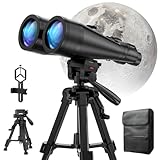
- POWERFUL ASTRONOMY BINOCULARS:20x80 Binocular for Adults High Powered With 20x magnification & 80mm objective lenses,deliver bright, detailed views of celestial objects like the Moon, star clusters, and deep-sky targets.
- WORKS WITH YOUR TRIPOD: Our astronomical binoculars weighs 4.66lb(2113g), and long-term hand-held will cause a burden on the arms and neck, so we equipped it with a 1/4 thread tripod, which can eliminate vibration and provide clear and stable observation.
- CRYSTAL-CLEAR VIEWS WITH BAK-4 PRISMS:The Stargazing Binoculars delivers exceptional brightness and clarity, making it ideal for low-light viewing at dusk, dawn, or under starry skies. The premium BaK-4 prisms enhance light transmission, revealing brighter images with sharper details—perfect for astronomical observation or twilight adventures.
- COMFORTABLE & NON-SLIP DESIGN:These binoculars for adults feature a rugged rubber-armored housing that absorbs shocks while providing a secure, non-slip grip. The waterproof construction ensures reliable performance in sudden rain, fog, or humid conditions.The O-ring sealing lens prevents dust and other debris from entering the inside of your binoculars, protecting your binoculars from damage
- UNMATCHED WARRANTY AND QUALITY SUPPORT:The high power binoculars inner leather bag for easy carrying and protection of the binoculars, perfect for bird watching, stargazing. Professional support team - always ready to provide you with expert help, feel free to contact us if you have any questions.
Binoculars as an optional next step
Binoculars can reveal more stars, lunar features and some deep-sky objects while remaining easier to aim than a telescope. They are optional equipment, not a requirement for any of the apps above. Use the app to preview the field of view, then sweep slowly from a known bright star toward the target.
Telescope owners
Stellarium Mobile Plus lists instrument views and telescope control, which may matter if you already own a computerized mount. Compatibility depends on the telescope, mount protocol, phone, connection method and app tier. Check the manufacturer’s and app’s current compatibility documentation before buying an accessory or assuming an automatic connection.
When NASA’s Spot the Station is the better tool
NASA’s Spot the Station is focused on finding when the International Space Station is visible overhead from a location. It is therefore a specialized satellite-pass tool, not a general planetarium alternative to SkySafari 8, Stellarium Mobile Plus or Star Walk 2. Use it when the ISS is your only target; use a general sky map when you want planets, constellations and other objects in the same session.
Recommended picks by observing situation
| Your situation | Most plausible match | Reason |
|---|---|---|
| “What is that bright object?” | SkySafari 8 | Its documented point-and-identify workflow is centered on immediate recognition. |
| “What should I observe during a short evening?” | SkySafari 8 | The Tonight view combines visible objects with Moon and Sun information and curated targets. |
| “I plan sessions and may be offline.” | Stellarium Mobile Plus | It documents session preparation, observability and transit information, plus reduced-data offline use. |
| “I want instrument views or mount control.” | Stellarium Mobile Plus | Those capabilities are specifically described for Plus, subject to hardware and protocol compatibility. |
| “I want to search many object types and read about them.” | Star Walk 2 | Its manual describes broad searches and reference information for objects and sky events. |
| “I only want ISS pass alerts.” | NASA’s Spot the Station | It is purpose-built for locating visible International Space Station passes. |
Bottom line
Pick SkySafari 8 for the shortest path from pointing your phone to identifying an object and seeing a curated list of tonight’s targets. Pick Stellarium Mobile Plus when offline operation, realistic simulation, session planning, transit times or telescope-related tools justify checking the Plus tier. Pick Star Walk 2 when broad object search and astronomy-reference content are your priorities. In every case, set the correct location and time, calibrate the sensors, verify practical visibility and remember that the app complements—not replaces—looking at the actual sky.
Outdated Drivers Are Slowing You Down
One free scan finds every outdated or missing driver and matches the right update for your exact hardware.Free scan · exact hardware matchWindows Errors? Fix Them Before They Spread
Repair common Windows errors and clear accumulated junk for a smoother, more stable PC - no reinstall needed.Free scan · no reinstallQuick Recap
Product prices and availability are accurate as of the date/time indicated and are subject to change. Any price and availability information displayed on Amazon at the time of purchase will apply.

