
Free tools Windows power users keep installed
One-click scans. No signup required.
iTechGuides is reader-supported. When you buy through links on our site, we may earn an affiliate commission. As an Amazon Associate I earn from qualifying purchases. Learn more
The best replacement depends on what you want to preserve. If you want the familiar hand motion and broad compatibility, choose a modern optical mouse with a connection your computer supports. If you want the cursor to move while the device stays planted, choose a trackball. Wired USB avoids batteries and pairing, while wireless models can use Bluetooth, a dedicated USB receiver, or both.
There is no single best model for every desk or vintage computer. Finger-operated trackballs are usually ambidextrous and move a larger ball with the fingers; thumb-operated models keep the palm on a fixed body and move a smaller ball with the thumb. Before buying for an older machine, identify the exact computer, operating system, available port, and any adapter requirement. A connector that physically fits does not prove that the computer can use the mouse.
Decide what kind of replacement you actually need
A vintage ball mouse can be replaced in two fundamentally different ways:
- Conventional optical mouse: You move the whole mouse across the desk, as with most current computers. This is the easiest transition for someone who wants familiar cursor control.
- Trackball: The body remains in one place while you rotate a ball. A trackball can reduce the amount of desk movement required, but its control style and hand posture feel different from a conventional mouse.
Both categories can be wired or wireless. The practical choice is determined by the host computer as much as by the pointing device. A recent desktop may offer USB, Bluetooth, or both; a vintage computer may have only a legacy serial or PS/2 interface, an early USB implementation, or an operating system that lacks drivers for a current device.
#1 Best Overall

- Less Movement, More Comfort: The sculpted shape of the ERGO M575S wireless trackball mouse keeps your hand relaxed for hours of smooth, precise tracking with thumb control - now with quiet clicks
- 25% less muscle strain in your forearm (1): This wireless ergonomic mouse has been developed with Logi Ergo Lab experts, user-tested and certified by ergonomists for all-day comfort
- Improved forearm posture (1): The ergonomic shape of the ERGO M575S supports your hand and realigns your forearm into a better posture throughout the day; a good fit for most hand sizes
- Work it your way: Experience enhanced control with 3 customizable buttons, time-saving shortcuts, and Smart Actions; adjust the cursor speed to your preference with the Logi Options plus App (2)
- Save space with thumb control: With the ERGO M575S, you can move your cursor without moving your hand, making it ideal for small or space-saving setups and for use on any surface
Manufacturer specifications establish connection types, dimensions, controls, and listed operating systems. They do not establish that a particular device will feel comfortable to every hand or remain reliable on an unlisted vintage host. Treat compatibility as a model-specific question, not as a property of every mouse with the same plug.
Recommended options at a glance
| Option | Control style | Connection documented by the manufacturer | Notable characteristics | Best fit |
|---|---|---|---|---|
| Kensington Orbit Trackball with Scroll Ring, K72337 | Finger-operated; ambidextrous | Wired USB | 40 mm ball, scroll ring, two-button customization, no batteries; PC and Mac compatibility listed | A simple wired trackball for either hand |
| Kensington Expert Mouse Wireless Trackball, K72359WW | Finger-operated; ambidextrous | Bluetooth LE or 2.4 GHz USB receiver | Four buttons, scroll ring, AA battery | Users who want a large finger-controlled ball without a cable |
| Logitech ERGO M575S | Thumb-operated | Wireless; verify the host connection required by the current specification | Quiet-click design, customizable controls, stationary body | Users who prefer a compact thumb trackball |
| Logitech MX ERGO | Thumb-operated | Bluetooth or Unifying USB receiver | Customizable controls and a larger, adjustable design than a basic mouse | Users who want an adjustable wireless thumb trackball |
| Conventional optical mouse | Whole-device movement | Wired USB or wireless, depending on model | Most familiar cursor motion; exact features vary by model | Anyone who does not want to learn trackball control |
The table is a decision aid, not a performance ranking. The available evidence does not include independent comparative testing, long-term reliability trials, comfort scores, current prices, or stock checks.
Trackball control styles: thumb versus fingers
Finger-operated trackballs
With a finger-operated design, you rotate a relatively large central ball with one or more fingers while your hand rests on the device. The Orbit and Expert Mouse are both ambidextrous, so they can be used on either side without buying a left- or right-handed version. Their scroll rings place scrolling around the ball rather than under a separate wheel.
Windows Errors? Fix Them Before They Spread
Repair common Windows errors and clear accumulated junk for a smoother, more stable PC - no reinstall needed.Free scan · no reinstallOutdated Drivers Are Slowing You Down
One free scan finds every outdated or missing driver and matches the right update for your exact hardware.Free scan · exact hardware matchThis layout is attractive when you want precise movement from the fingers, need to alternate hands, or have little room to move a mouse body. It also creates a different posture from a thumb model: the fingers perform the fine motion while the palm remains supported. The larger ball and ring increase the footprint compared with a small travel mouse, so measure the available desk space.
Thumb-operated trackballs
The ERGO M575S and MX ERGO place the ball under the thumb. The rest of the hand stays on a mouse-shaped shell, which can make the transition easier for someone accustomed to a conventional mouse. The trade-off is that cursor movement is concentrated in the thumb, and the fixed body is generally designed for one hand rather than true ambidextrous use.
Rank #2

- Less Movement, More Comfort: The sculpted shape of the ERGO M575S wireless trackball mouse keeps your hand relaxed for hours of smooth, precise tracking with thumb control - now with quiet clicks
- 25% less muscle strain in your forearm (1): This wireless ergonomic mouse has been developed with Logi Ergo Lab experts, user-tested and certified by ergonomists for all-day comfort
- Improved forearm posture (1): The ergonomic shape of the ERGO M575S supports your hand and realigns your forearm into a better posture throughout the day; a good fit for most hand sizes
- Work it your way: Experience enhanced control with 3 customizable buttons, time-saving shortcuts, and Smart Actions; adjust the cursor speed to your preference with the Logi Options plus App (2)
- Save space with thumb control: With the ERGO M575S, you can move your cursor without moving your hand, making it ideal for small or space-saving setups and for use on any surface
The M575S emphasizes a compact stationary design, quiet clicks, and customizable controls. The MX ERGO is the larger and more adjustable of the two and supports Bluetooth or a Unifying receiver. Neither description proves that one will be more comfortable for a particular user; hand size, thumb mobility, and preferred grip matter more than the product category alone.
Ergonomic claims need context
Logitech advertises a 25% forearm muscle-strain reduction for the ERGO M575S and a 20% muscular-strain reduction for the MX ERGO. Those figures are manufacturer claims, not independent comparative evidence, and they should not be treated as a guaranteed medical or ergonomic outcome.
Wired, Bluetooth, or a USB receiver?
Wired USB
A wired trackball such as the Orbit needs no batteries, charging, pairing, or radio receiver. It is usually the least complicated option when the host has a compatible USB port and operating-system support. The cable occupies a port and can add desk clutter, but it removes wireless troubleshooting.
Bluetooth
Bluetooth avoids a dedicated receiver and can leave a USB port free. The computer must have compatible Bluetooth hardware and operating-system support, and the pairing process must be available before the pointer is usable. A vintage machine may lack both the radio and the software stack needed for modern Bluetooth HID devices.
Dedicated USB receiver
A receiver-based model, such as the Expert Mouse Wireless Trackball or MX ERGO when used with its receiver, requires a free USB port and the correct receiver. The receiver is not interchangeable with every other wireless mouse adapter. If the computer has only a legacy port, an adapter may be needed, but physical conversion alone does not guarantee that the host will recognize the device.
Rank #3

- Work it your way: Experience enhanced control with 3 customizable buttons, time-saving shortcuts, and Smart Actions
- Save space with thumb control: With the ERGO M575S, you can move your cursor without moving your hand, making it ideal for small or space-saving setups and for use on any surface
- Easy to Connect, Long Battery Life: Connect your ergonomic wireless mouse using Bluetooth or the included Logi Bolt USB receiver. (AA battery included)
- Made with recycled plastic: The plastic parts in the ERGO M575S Bluetooth trackball mouse are made of certified post-consumer recycled plastic
- Ergonomic shape: The ERGO M575S supports your hand and realigns your forearm into a better posture throughout the day; a good fit for most hand sizes
Hybrid models
The Expert Mouse supports Bluetooth LE or a 2.4 GHz USB receiver, and the MX ERGO supports Bluetooth or a Unifying receiver. Having two connection methods is useful only when the computer supports at least one of them. Check which method is documented for the exact operating system and machine before assuming the choice provides a fallback.
The Tool Desk
Outbyte PC Repair FREERepair Windows errors before they cause bigger problemsFix Now →Outbyte Driver Updater FREEScan for outdated or missing drivers - takes under a minuteDriver Scan →Compatibility with a vintage computer
Compatibility is the most important caveat for an older system. Work through this checklist before ordering:
- Record the exact computer model and revision. A family name is not always enough; ports and operating systems can differ between revisions.
- Record the operating system and version. Note whether it is a classic Mac OS release, an older Windows release, a Linux distribution, or a proprietary system.
- Identify the physical port. Determine whether the machine exposes USB, PS/2, serial, ADB, or another interface, and whether the port is actually enabled for pointing devices.
- Check whether the computer can enumerate a USB HID device. Early USB implementations may require drivers, firmware support, or a particular boot-time behavior.
- Check the mouse and adapter as a pair. If an adapter is required, confirm that it supports the specific device and host combination rather than assuming that a plug converter translates the protocol.
- Confirm basic operation without customization software. A device may provide ordinary HID movement and buttons while its configuration utility is unavailable on the chosen operating system.
The distinction between connector and protocol is critical. A USB-to-PS/2 adapter can change the physical connector, but many modern mice do not speak the signaling expected by a PS/2 port. Conversely, a host may accept a USB keyboard yet fail to initialize a particular USB mouse during boot.
What the legacy Cordless Optical TrackMan specification shows
The Logitech Cordless Optical TrackMan specification is a useful example of why assumptions are unsafe. It documents a cordless USB mouse connection and a receiver connection available as USB or PS/2. It also lists operating systems supported at the time of release, which are older Windows and Mac OS versions. Those details apply to that product and its receiver; they do not prove that a current USB mouse or trackball works on a vintage computer, and they do not prove that adding a PS/2 adapter will make a modern device compatible.
Current compatibility caveats for the Kensington models
Kensington states that the Orbit provides HID functions on ChromeOS, but ChromeOS users cannot customize it through KensingtonWorks. Kensington also states that Windows ARM-based computers are not currently supported for that model. The Expert Mouse support information lists a broad range of Windows, macOS, and Chrome OS versions, but the exact machine and current support page should still be checked before purchase.
Rank #4

- Ergonomic Design with Smooth Thumb Control: Move your cursor by the smooth trackball instead of moving your wrist and arm. Let the easy and smooth thumb control help you reduce your muscle stress. The optimal angle of the trackball mouse allows you to keep your palm in a natural position for all-day comfort.
- Precise Tracking with Adjustable DPI: Nulea trackball mouse provides precise cursor movement for exceptional accuracy and control. With the smooth trackball, you can be more productive on the move on almost any surface, any workplace. Especially on the narrow space, such as the messy desktop, couch, bed, small writing board on a chair, etc.
- True Wireless Freedom: Connect up to 3 devices by either bluetooth or USB dongle. Switch easily between them by the button on the bottom to improve your efficiency. KINDLY REMINDER: The 2.4G USB receiver is stored at the bottom of the wireless trackball mouse.
- Rechargeable Battery: (For your best experience, please fully charge the bluetooth trackball mouse before your first use) The built-in rechargeable battery has a long battery life enables you to say goodbye to dry cell batteries. Please Note: 1. Please use our included charging cable to charge the wireless trackball mouse 2. Do not use a fast charger to charge the trackball mouse. (Directly use the computer USB port or a 5V charger to charge the bluetooth trackball mouse).
- 6 Button High Performance: Nulea trackball mouse bluetooth is designed with thoughtful ergonomic details and an elegant curved shape. Plus the back and forward button, you can operate easily with higher productivity as well as added comfort. Note: All buttons on this wireless trackball mouse are not programmable!
Model-by-model guidance
Kensington Orbit Trackball with Scroll Ring, K72337
Choose the Orbit when you want a wired, finger-operated trackball that works with either hand. Its 40 mm ball and scroll ring provide separate cursor and scrolling controls, while the two buttons can be customized where the operating system and Kensington software allow it. Because it has no batteries, there is no charging schedule or battery compartment to maintain.
The practical requirements are a compatible USB host and a supported operating system. ChromeOS users receive basic HID input but cannot use KensingtonWorks customization, and Windows ARM support is not currently listed. For a vintage computer, verify USB HID support and any required adapter before treating the Orbit as plug-and-play.
Kensington Expert Mouse Wireless Trackball, K72359WW
The Expert Mouse is the wireless finger-operated alternative. It is ambidextrous, adds four buttons and a scroll ring, and uses an AA battery. Its connection choices are Bluetooth LE or a 2.4 GHz USB receiver, so it can suit a newer computer that supports one of those interfaces without a cable across the desk.
Its larger control surface and four-button layout may appeal to users who want more hand-operated controls than the Orbit provides. They also make it important to check desk space and button reach. Confirm the operating-system version and the selected wireless method for the exact host; the presence of both connection options does not make either one universal.
Recommended Free Tools
Logitech ERGO M575S
The ERGO M575S is a thumb-operated wireless trackball with quiet clicks and customizable controls. The body stays still while the thumb moves the cursor ball, making it a natural candidate for someone who wants a mouse-shaped shell but less desk travel. Consult the current Logitech specification for the host connection and operating-system requirements before buying, especially for an older computer.
Best Value
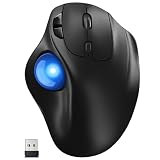
- [Ergonomic Design] - Relaxed Hand and Arm, Precision-engineered, it reduces hand fatigue with thumb controls instead of wrist/arm movements.Let the easy and smooth thumb control help you reduce your muscle stress. The optimal angle of the trackball mouse allows you to keep your palm in a natural position for all-day comfort.
- [3 Devices Connection - BT1+BT2+2.4G] - 33 feet / 10 meter wireless connection range.This wireless mouse connects via Bluetooth or the included 2.4G USB receiver, Supported by an Easy-Switch button.No need to re-pair for a seamless workflow. Compatible with PC, Mac, laptops, tablets and so on.
- [2*AAA Triple A Battery Required] - Two AAA batteries are required and are not included.There is no built-in battery, allowing for longer product lifespan and eliminating concerns about built-in battery failure. New batteries can be replaced at any time.Utilizing AI-based design concepts, resulting in less damage and longer battery life.No charging required, convenient and portable.Please note: You will need to purchase 2*AAA batteries yourself.
- [Silent Mouse with 5 Adjustable DPI] - Easy and quick with just one click to suit different tasks and ensure instant switching between precise or fast tracking modes, the mouse is equipped with 5 adjustable DPI levels. The DPI buttons can be easily switched between 100-200-400-800-1200 DPI to allow the cursor to move faster or slower.Our computer mouse reduces 90% noise, so you don't worry about disturbing others when you focus on work.
- [Saves Space Used on any Flat Surface] - Move your thumb to move the cursor and operate, it’s perfect for tight workspaces and busy desks. Not only work on flat surfaces but also your leg, sofa, bed, carpet and other surfaces as well.Smooth & Precise Tracking on Various Surfaces -- Its advanced sensors detect even the smallest movements of the trackball, translating them into accurate cursor movements on your screen.
Logitech MX ERGO
The MX ERGO is another thumb-operated model, with Bluetooth or a Unifying USB receiver, customizable controls, and a larger adjustable design than a simple mouse. It is better suited to a user who wants an adjustable full-size body than to someone seeking a minimal travel device. Receiver availability, Bluetooth support, and operating-system requirements must be checked for the target computer.
Another wired finger-operated category
Kensington also documents the SlimBlade Trackball as a wired, finger-operated model. It is worth considering when you specifically want a wired finger trackball, but compare its current controls, dimensions, operating-system support, and connection details on the manufacturer’s support page rather than assuming they match the Orbit.
Conventional optical mouse
A conventional optical mouse remains the safest category when the reader wants ordinary mouse movement. Select a wired USB or wireless model whose interface is documented for the computer. This option avoids learning a trackball, but it does not solve a host-compatibility problem: a modern optical mouse still needs a port, protocol, and operating-system support that the vintage machine can use.
How to choose in a few minutes
- Start with the host. Write down the computer model, operating system, port type, and whether the machine must work before its graphical interface loads.
- Eliminate unsupported interfaces. Remove Bluetooth models if the host lacks compatible Bluetooth, receiver models if no suitable USB port is available, and USB models if the host cannot use USB HID devices.
- Choose the movement style. Select a conventional optical mouse for familiar desk movement, a finger trackball for a larger central ball and ambidextrous use, or a thumb trackball for a mouse-shaped stationary body.
- Check hand and desk fit. Confirm handedness, available footprint, reach to buttons and scrolling controls, and whether the ball can be operated without striking nearby objects.
- Choose power behavior. Wired models avoid batteries; wireless models require either an AA battery, charging, or a receiver and pairing process, depending on the product.
- Separate basic input from customization. Verify that movement and primary buttons work on the host even if optional configuration software is unavailable.
- Buy only after checking the exact documentation. Use the manufacturer’s current specification and support page for the model number, operating-system version, and adapter combination.
Setup procedure for a supported modern computer
- Install any required batteries or charge the device. The Expert Mouse uses an AA battery; other wireless models may have different power requirements.
- Connect the chosen interface. Plug in a wired USB cable, insert the model’s dedicated receiver, or open the operating system’s Bluetooth pairing screen.
- Allow the operating system to finish device detection. Test pointer movement and primary clicks before installing optional utilities.
- Configure buttons and scrolling only if supported. The Orbit’s customization depends on compatible Kensington software; ChromeOS provides basic HID operation but not KensingtonWorks customization for that device.
- Test both normal and recovery use. Restart the computer, test the device at the login screen if relevant, and confirm that the receiver or Bluetooth connection returns after sleep.
Troubleshooting and failure modes
The computer does not detect the mouse
- Try a different port that is known to support pointing devices.
- Remove hubs and connect directly to the computer.
- For a receiver model, verify that the receiver belongs to that device and is fully inserted.
- For Bluetooth, confirm that the host has compatible Bluetooth hardware and that pairing is supported by its operating system.
- On a vintage computer, stop and verify protocol support rather than repeatedly changing adapters.
The pointer works but customization does not
Basic HID movement and buttons can work even when the manufacturer’s utility is unavailable. Check the operating-system limitation for the exact model. For example, Kensington identifies basic HID operation for the Orbit on ChromeOS but does not provide KensingtonWorks customization there.
The adapter fits but the device still fails
This usually indicates a protocol or driver mismatch rather than a bad physical connection. Confirm that the adapter explicitly supports the host port and the mouse technology. A passive plug converter cannot be assumed to translate USB, PS/2, serial, or other signaling.
Wireless operation is intermittent
- Replace or recharge the battery as appropriate.
- Move the receiver closer to the device and away from dense cable bundles or metal obstructions.
- Re-pair Bluetooth if the operating system lost the device.
- Test the mouse directly on a known-compatible computer to distinguish a device fault from a host limitation.
Which replacement is the most sensible?
For the simplest modern replacement, choose a conventional optical mouse with a confirmed wired USB or wireless connection. For a wired trackball, the Kensington Orbit offers a 40 mm finger-operated ball, a scroll ring, ambidextrous use, and no batteries. For a wireless finger trackball, the Kensington Expert Mouse combines ambidextrous operation with Bluetooth LE or a 2.4 GHz receiver, four buttons, a scroll ring, and an AA battery. For a thumb-operated design, compare the Logitech ERGO M575S and MX ERGO according to body size, adjustability, and the connection your host supports.
For a vintage computer, the most responsible choice is not a particular brand or control style until the machine’s exact interface and operating system are known. Confirm the device-and-adapter combination first; then choose the hand posture, footprint, controls, and power method that fit the person who will use it.
What’s actually slowing this PC down?
Pick the symptom - the matching free tool is one click away.
Quick Recap
Product prices and availability are accurate as of the date/time indicated and are subject to change. Any price and availability information displayed on Amazon at the time of purchase will apply.

