
Do these 3 things before closing this tab:
1Fix the driver behind crashes, sound loss and screen glitches2Repair Windows errors before they cause bigger problems3Scan for outdated or missing drivers - takes under a minuteiTechGuides is reader-supported. When you buy through links on our site, we may earn an affiliate commission. As an Amazon Associate I earn from qualifying purchases. Learn more
For the least maintenance, choose NextDNS. It is hosted, works at home and on mobile networks, and provides profiles, blocklists, parental controls and SafeSearch without a server in your house. Its free plan has a strict monthly query allowance, so a busy household can lose filtering unless it upgrades to unlimited queries.
If you want to keep DNS on your own hardware, AdGuard Home is the closest Pi-hole replacement. It combines a local dashboard with encrypted upstream DNS, malware and phishing blocking, parental controls and SafeSearch. Technitium DNS Server is the power-user choice for authoritative and recursive DNS, clustering and client-specific policies, but it is not the simplest option.
Which Pi-hole alternative should you use?
Use this short decision rule:
- Choose NextDNS when avoiding a local server, operating-system updates and hardware failures matters more than owning the resolver.
- Choose AdGuard Home when you want a Pi-hole-like local dashboard with more of the encrypted-DNS and family-safety features built in.
- Choose Technitium DNS Server when you need a complete DNS platform, client-specific regex policies, advanced forwarding, authoritative zones or clustering.
- Buy a Raspberry Pi only as a host for self-hosted software. The board enables AdGuard Home, Pi-hole or Technitium; it does not remove maintenance.
| Option | Where it runs | Maintenance burden | Encrypted DNS | Per-device controls | Best fit |
|---|---|---|---|---|---|
| NextDNS | Hosted service | Low; provider maintains the service | Handled by the service and supported client methods | Profiles for different devices or people | Households wanting filtering everywhere without a local server |
| AdGuard Home | Your computer, server or single-board device | Moderate; you maintain host, software and backups | DNS-over-HTTPS, DNS-over-TLS and DNSCrypt upstreams | Local policies, parental controls and SafeSearch | Pi-hole users seeking a fuller all-in-one local package |
| Technitium DNS Server | Your server, virtual machine or container | Moderate to high; many DNS functions are available to configure | DNS-over-TLS, DNS-over-HTTPS and DNS-over-QUIC | Regex lists can vary by client IP or subnet | Technical households, homelabs and multi-network designs |
| Raspberry Pi | Hardware for self-hosting | Depends on the software; hardware still needs power, storage, updates and recovery planning | Depends on the DNS application | Depends on the DNS application | A small, low-power host when local ownership is more important than zero maintenance |
No option is universally “best.” Hosted DNS removes local failure points but places availability, policy and query handling with a provider. Self-hosted DNS gives you local control and can continue working when the internet link is down, but your resolver is unavailable if its host, storage, power or network configuration fails.
Why replacing Pi-hole can reduce work
Pi-hole is a network-wide DNS sinkhole that normally runs on Linux hardware you own. Devices send DNS requests to it; domains on its lists are answered with a blocked result instead of an advertising or tracking address. That design is effective because one resolver can cover an entire home, but it also makes the resolver part of your infrastructure.
#1 Best Overall

- USB Blocker NO LOOPHOLES: Safety should be your first choice.You don't have to choose how to operate it, just plug in the data blocker of USKYT to physically block data transfer / syncing,Only provide charging function for mobile devices, 100% so as to prevent any hacker from invading.
- USB PERFECT COMPATIBILITY:3rd Gen design chip automatically switches between Apple, Universal and Samsung LG standards to ensure compatibility with your device and charge at up to 2.4A
- SAFE AND LOVELY:Advanced 3rd Gen design with multiple security features . MINI Version The appearance material is Aluminum alloy metal , Beautiful, fashionable and generous,rugged design and durability
- Data Blocker USB PROTECTIVE SHIELD: USB Data Blocker are used by the governments of the USA, Canada, UK and New Zealand as well as 100s of corporations around the world to secure their devices,100% guarantee against hacker attack. It's a simple and easy method to keep your phone away from data breach.
- METAL QUALITY, PLEASE REST ASSURED:We make the best quality.if you have any questions, we will resolve your issue within 24 hours.Own it, be your data protector.(This link is only available for USB A interface)
You are responsible for keeping the operating system and Pi-hole software updated, protecting the administration interface, preserving its configuration and deciding what happens if the machine is offline. A Raspberry Pi may use little electricity, yet it still needs a reliable power supply, storage that will not corrupt easily, a network connection and a recovery plan. Replacing the board with another small computer does not change those responsibilities.
A hosted service changes the failure model. There is no local DNS machine to patch or replace, and the same policy can follow a phone or laptop when it leaves home. The trade-off is that filtering depends on the provider and on your account’s allowance. A self-hosted replacement keeps queries inside your network up to the point where your chosen upstream resolver receives them, but you retain the operational burden.
NextDNS: the simplest no-server option
What it provides
NextDNS is a hosted resolver with configurable profiles, blocklists, parental controls and SafeSearch. You can apply different rules to different groups of devices rather than forcing one policy on the whole household. Because the service is reached through device or network configuration rather than a box in your home, it can protect devices on cellular, hotel or school Wi-Fi as well as devices on your home router.
NextDNS describes its service as “The new firewall for the modern Internet.” Its 2026 product page displays service-wide figures of 100,000,000,000 queries handled each month, 15,000,000,000 queries blocked each month and 132 server locations. Those are vendor-reported totals and locations for the service as a whole, not a performance or capacity guarantee for an individual account.
The free-tier limit you must understand
The NextDNS Help Center documents 300,000 queries per month for the free tier. After an account reaches that allowance, NextDNS continues as a standard DNS resolver but stops applying filtering and logging until the allowance resets or the account pays for unlimited queries. That behavior is materially different from a small local sinkhole, which does not stop filtering because a hosted quota was reached.
For a single light user, the allowance may be adequate. For a household with many phones, televisions, game consoles, smart speakers and computers, measure usage during a normal month before treating the free tier as a permanent whole-home solution. If uninterrupted blocking is important, plan for an unlimited account or use a self-hosted resolver.
Basic setup sequence
- In the NextDNS dashboard, create a profile for the household or for a specific group of devices.
- Select the blocklists, parental controls and SafeSearch behavior required for that profile.
- Associate each device or network with the intended profile using the configuration method NextDNS provides for that platform or router.
- Open a few known advertising, tracking and family-safety test pages from each device category. Confirm that the device is using the intended profile rather than a browser or operating-system resolver that bypasses it.
- Check the account’s query usage during the first month. A rapid approach toward the allowance is a signal to reduce unnecessary clients, change the profile arrangement or move to unlimited queries before filtering stops.
The exact labels and client instructions can change as NextDNS updates its dashboard, so follow the current instructions shown for the device or router you are configuring. The important design choice is profile assignment: a child’s devices may need stronger family controls than an adult’s work computer, and a guest network may need a separate policy.
When NextDNS is the right trade-off
- You do not want a Raspberry Pi, virtual machine or always-on computer.
- You need one policy to travel with a phone or laptop away from home.
- You prefer automatic provider-side service maintenance over managing updates yourself.
- You can accept hosted DNS and either stay within the allowance or pay for unlimited queries.
NextDNS is not the best match if local operation during an internet outage is a hard requirement, if you need authoritative DNS zones, or if you want complete control over the resolver software and its logs.
AdGuard Home: the closest local Pi-hole replacement
Why it stands out
AdGuard Home is self-hosted DNS filtering software designed to cover a network from one local resolver. Its official comparison lists built-in HTTPS administration, DNS-over-HTTPS, DNS-over-TLS and DNSCrypt upstreams, cross-platform support, malware and phishing blocking, parental controls and SafeSearch. These functions are included in the project’s documented feature set rather than requiring a collection of unrelated add-ons.
“We want it to be simple to the point when even casual users can set it up with minimal effort.” — AdGuard Team, Comparison wiki
The same documentation notes that running your own AdGuard Home server allows you to do more than using a public DNS server. In practical terms, that means you choose the host, the upstream resolvers, the local policy and the point at which DNS requests leave your network.
Recommended Free Tools
Rank #2
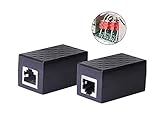
- PROTECTION EQUIPMENT - The Network Surge Protector Suppressors protects against network surges.Insert a Network Surge Protector in your network cables, to prevent network surging.This is a good insurance policy for your expensive router and outdoor POE antenna.
- EXTENSION - Use this RJ45 Coupler to connect two network cables into one longer network cable. When your network cable is too short and needs to be extended, using this dual-pass is a very good solution.Data transmission rate:100Mbps
- SURGE PROTECTION - Built-in 8 TVS anti-detonator, prevent lightning and other abnormal current through the network cable damage to your computer equipment.
- HIGH QUALITY - Fixed interface shielding external EML,RFL and other electromagnetic interference.Effectively prevent network signal damage.Using PC flame retardant raw materials, fire rating 100V0.
- EASY TO USE - Plug and play.There is no ""In"" or ""Out"" cable side of this device, both sides are identical RJ-45 Interface.Regardless of whether your protected device is behind any particular side, it can work properly by connecting the correct cables.
Deployment pattern
- Choose an always-on host that the household can reach reliably. A Raspberry Pi is one possibility, but a spare computer, server or other supported platform can fill the same role.
- Install AdGuard Home on that host and complete its initial web administration setup over your local network.
- Choose encrypted upstream DNS when you want the connection from AdGuard Home to its upstream resolver protected by DNS-over-HTTPS, DNS-over-TLS or DNSCrypt.
- Point the router’s DHCP or LAN DNS setting at the AdGuard Home address so new clients receive it automatically. If the router cannot advertise a custom DNS server, configure important devices individually.
- Enable malware or phishing protection, parental controls and SafeSearch according to the people and devices using the network. Keep a separate policy for guests when their access should not inherit household restrictions.
- Test both normal browsing and a deliberately blocked domain. Then test what happens when the AdGuard Home host is powered off so you know the fallback behavior before an actual failure.
Maintenance and failure points
AdGuard Home removes much of the manual assembly that can surround a basic sinkhole, but it remains your service. You must apply application and operating-system updates, protect the administration interface, keep the host’s clock and storage healthy, and retain a copy of the configuration. A second resolver or a documented temporary router fallback can prevent one failed device from taking DNS away from the entire home.
Local operation is an advantage during an upstream internet outage: clients can still resolve entries that are available locally or from cached data, although they cannot reach websites that are themselves offline. If the host loses power or its address changes, every client relying on it can lose name resolution. Reserve a stable address and record the recovery steps before you need them.
When AdGuard Home is the better choice than NextDNS
Choose AdGuard Home when ownership, local visibility and operation without a hosted query allowance matter more than hands-off updates. It is also the natural choice when you already have a small server or Raspberry Pi and want a dashboard that combines encrypted upstream choices, family controls and filtering. Choose NextDNS instead when maintaining that host is the part you are trying to eliminate.
Technitium DNS Server: the advanced platform
Capabilities beyond basic blocking
Technitium DNS Server is a full authoritative and recursive DNS server, not merely a list-based sinkhole. Its official repository documents block-list URLs, encrypted DNS-over-TLS, DNS-over-HTTPS and DNS-over-QUIC, Docker support and clustering. Its regex lists can vary by client IP address or subnet, allowing different networks or device groups to receive different answers.
Outdated Drivers Are Slowing You Down
One free scan finds every outdated or missing driver and matches the right update for your exact hardware.Free scan · exact hardware matchWindows Errors? Fix Them Before They Spread
Repair common Windows errors and clear accumulated junk for a smoother, more stable PC - no reinstall needed.Free scan · no reinstallThat breadth matters when DNS is part of a homelab or a multi-network design. You can combine recursive resolution, forwarding and authoritative zones with filtering in one platform, rather than placing a separate service in front of a separate DNS server. The same breadth creates more decisions: zone behavior, forwarding, encryption endpoints, list maintenance, client matching and cluster operations all need to be understood before exposing the resolver to a larger network.
Performance claim and its limits
Technitium’s current repository documentation reports more than 100,000,000,000 requests per second on Gigabit Ethernet in a vendor load test. That is a vendor-reported test result, not an independent benchmark and not a promise that a home installation will achieve it. Home performance will depend on hardware, enabled features, list size, cache state, network path and query mix.
Who should run it
- Administrators who need authoritative DNS as well as recursive resolution.
- Homelabs that use Docker, clustering or several network segments.
- Households that need regex policies selected by client IP or subnet.
- Users comfortable troubleshooting a complete DNS server rather than only a filtering dashboard.
If your only goal is to block advertising domains with minimal attention, Technitium is likely more platform than you need. Its value is control and consolidation, not simplicity.
A cautious deployment sequence
- Install Technitium on a server or container that has a stable address and a recovery path.
- Decide whether it will answer recursively, forward to selected upstreams, host authoritative zones, or combine those roles.
- Configure encrypted DNS protocols only for listeners and upstreams you intend to use, and restrict administrative access to trusted networks.
- Add block-list URLs and begin with policies that apply to a test client or subnet.
- Validate ordinary lookups, blocked lookups, internal zones and client-specific regex behavior before changing the whole router or DHCP scope.
- If clustering is required, test failure of one member and document how clients discover the remaining resolver.
Can a Raspberry Pi still be part of the solution?
Yes. A Raspberry Pi is a valid low-power host for self-hosted DNS software, but it is hardware rather than an alternative service. The board, storage, power supply and operating system remain your responsibility. The DNS application determines whether you get a Pi-hole-style sinkhole, AdGuard Home’s integrated controls or Technitium’s full server feature set.
Free tools Windows power users keep installed
One-click scans. No signup required.
| Question | What the Raspberry Pi changes | What it does not change |
|---|---|---|
| Up-front setup | Provides a small dedicated machine for the DNS service | You still install software and configure the network |
| Power use | Usually suits an always-on, low-power role | It still needs dependable power and a healthy storage device |
| Availability | Can stay on your LAN during an internet outage | A failed board, card, cable or switch can still interrupt DNS |
| Maintenance | Keeps the service separate from your daily computer | Operating-system updates, application updates and backups remain necessary |
Use a Raspberry Pi when local ownership is worth those tasks. Do not buy one expecting “maintenance-free” DNS; a hosted service is the option that actually removes the local machine.
Independent reader supportYour contribution helps us test, update, and keep practical guides available for everyone.Hosted versus self-hosted: the decisions that matter
Setup and updates
NextDNS has the smallest operational footprint because the provider runs the resolver. AdGuard Home asks you to maintain one application and its host. Technitium exposes the largest configuration surface and therefore benefits from an administrator who is comfortable with DNS concepts, containers or server operations.
Encrypted DNS
AdGuard Home documents DNS-over-HTTPS, DNS-over-TLS and DNSCrypt upstreams. Technitium documents DNS-over-TLS, DNS-over-HTTPS and DNS-over-QUIC. NextDNS is a hosted service that supplies its own client and network configuration methods. In every case, verify which devices actually use the intended resolver; browsers and operating systems can have independent secure-DNS settings that bypass router DNS.
Rank #3

- LIFETIME PRIVATE BROWSING INCLUDED: Built-in decentralized VPN service delivers always-on privacy without subscriptions, masking your IP and encrypting traffic as you roam with this portable wifi and vpn router, ideal for privacy-conscious travelers and remote workers.
- LIGHT DAILY CONNECTIVITY TIER: Designed as a low-overhead portable router mode for light browsing and messaging, this setting trims background chatter and quietly blocks intrusive ads to stretch limited hotel or café bandwidth, helping privacy-minded users keep everyday email, social feeds, and cloud notes responsive without burning through data or battery on the go.
- OPTIMIZED POCKET ROUTER CAPACITY: Tuned as a compact portable wifi router for 1–3 small devices, this pocket router balances speed and stability so your phone, tablet, or laptop stay reliably connected without slowdowns, ideal for focused solo work sessions or minimalist travel setups.
- SMART CONTENT FILTERING CONTROL: Intelligent traffic management automatically prioritizes video and music streams while enabling smart ad blocking and simple parental controls, helping this portable wifi router keep casual entertainment smooth and family browsing more focused without extra apps or complex setup, ideal for relaxed evenings or kid-friendly screen time.
- ENTERPRISE-GRADE THREAT DEFENSE: Enterprise-grade firewall hardening, tracker blocking, and DNS-layer malware shielding work together on this portable wifi router to quietly stop suspicious sites and risky connections before they load, reducing phishing and data-theft exposure for privacy-first users who treat every network like a hostile one.
Per-device policy
NextDNS uses profiles, making separate rules practical for people who travel with their devices. AdGuard Home provides local policy features together with parental controls and SafeSearch. Technitium’s documented regex behavior can vary by client IP or subnet, which is particularly useful when your network is already segmented.
Privacy and logging
Self-hosting lets you decide which local logs to retain and who can access the administration interface, but it also makes you responsible for securing and deleting those logs. With NextDNS, query handling occurs in a hosted service. Its free-tier behavior is explicit: after the monthly allowance, filtering and logging stop until reset or an unlimited account is used. Decide whether provider operation or local custody better matches your privacy requirements; neither model removes the need to read the applicable service documentation.
Resilience
A hosted resolver avoids a dead Raspberry Pi, failed storage card or local power interruption, but it depends on the provider and your internet connection. A local resolver can continue serving cached or local data when the upstream connection is down, yet it fails for every client if the host or LAN configuration fails. Two local resolvers, a tested fallback and a written recovery procedure improve self-hosted resilience.
A practical migration plan from Pi-hole
Run the replacement beside Pi-hole until you have tested real clients. Changing every device at once makes it difficult to tell whether a failure comes from the new resolver, DHCP, a blocklist or an application’s own DNS-over-HTTPS setting.
- Inventory dependencies. Record the router’s DNS and DHCP settings, static leases, custom local names, allowlists, blocklists and any devices with manually configured DNS.
- Choose the policy model. Decide whether everyone receives one policy, whether children and guests need separate profiles, and whether internal names must resolve locally.
- Deploy the candidate. For NextDNS, create and assign profiles. For AdGuard Home or Technitium, install on a stable host and give it a predictable address.
- Test a small group. Point one computer and one phone at the new resolver. Check ordinary sites, blocked domains, streaming or work services that previously required allowlisting, and family controls.
- Switch DHCP or router DNS. Advertise the new resolver to the LAN, then renew leases or reconnect clients so they receive the change. Keep Pi-hole available during the observation period.
- Watch for bypasses. Check browser secure-DNS settings, VPN clients, hard-coded DNS on appliances and applications that use their own resolver.
- Document rollback. Keep the old resolver’s address and the previous router setting until the new arrangement has survived a normal day of use and at least one restart.
- Retire deliberately. Export the final configuration, remove obsolete DHCP entries and power down the old host only after you can restore DNS from the new design.
Maintenance checklists
If you choose NextDNS
- Review profile membership when a device changes owner or leaves the household.
- Check query usage before the free allowance is exhausted.
- Re-test parental controls and SafeSearch after changing profiles.
- Keep a backup DNS plan for a provider outage or an expired allowance.
If you choose AdGuard Home
- Apply host and application updates on a schedule.
- Back up configuration and record the resolver’s address.
- Restrict administration to trusted LAN or management networks.
- Test the router’s behavior when the resolver is unavailable.
- Review blocklists and allowlists when a legitimate service breaks.
If you choose Technitium
- Document authoritative zones, recursive or forwarding choices and encrypted listeners.
- Stage block-list and regex changes on a test client or subnet.
- Back up configuration for each cluster member or container.
- Test client-specific policy matching after address or subnet changes.
- Measure your own installation rather than relying on vendor load-test figures.
Common failure symptoms and fixes
Nothing is being blocked
First confirm that the device is using the intended resolver. Check router DHCP, manually configured DNS, VPN software and browser secure-DNS settings. In NextDNS, verify the device is attached to the intended profile. In a local deployment, verify that the router advertises the server’s current address and that the service is listening on the LAN interface.
What’s actually slowing this PC down?
Pick the symptom - the matching free tool is one click away.
Only some devices fail
Different clients may have different DNS settings or may be receiving stale DHCP information. Renew the affected lease, compare its resolver addresses with a working device and inspect per-device policy assignments. A Technitium client-IP or subnet rule can also explain why two devices receive different answers.
A legitimate site is broken
Identify the exact domain that failed, then add the narrowest possible allow rule in the profile or local policy responsible. Re-test the site and remove the exception if it was caused by a temporary list update. Avoid disabling all filtering to solve one domain.
DNS stops when the local host reboots
That is an availability problem, not a blocklist problem. Check power, storage, the host address, service startup and the router’s fallback behavior. A second resolver or a temporary router fallback can keep essential name resolution available while you repair the primary host.
Filtering disappears unexpectedly on NextDNS
Check the account’s monthly query usage. Once the free allowance is reached, the service operates as a standard resolver without filtering or logging until the allowance resets or an unlimited account is used.
The Tool Desk
Outbyte Driver Updater FREEFix the driver behind crashes, sound loss and screen glitchesFind Drivers →Outbyte PC Repair FREERepair Windows errors before they cause bigger problemsFix Now →Bottom line
NextDNS is the best Pi-hole alternative when “maintenance-free” means no local DNS machine at all, provided you account for its free-tier query allowance. AdGuard Home is the best local replacement for most Pi-hole households because it keeps ownership while bringing encrypted upstream choices, family controls and SafeSearch into one package. Technitium DNS Server earns its place when you need a full DNS platform and are willing to manage its complexity. A Raspberry Pi remains useful, but only as the host that makes a self-managed design possible.
Quick Recap
Product prices and availability are accurate as of the date/time indicated and are subject to change. Any price and availability information displayed on Amazon at the time of purchase will apply.

