
iTechGuides is reader-supported. When you buy through links on our site, we may earn an affiliate commission. As an Amazon Associate I earn from qualifying purchases. Learn more
Use manual brightness at the lowest comfortable level, turn on Airplane Mode for sessions that do not need wireless features, and set handheld Auto-Sleep to 5 or 10 minutes. These changes reduce avoidable display, radio, and idle power use while you play monster-taming games. They may make a charge last longer, but they do not guarantee a higher frame rate or fix a game’s engine-level performance limit.
The best starting profile
The following profile is a practical baseline for handheld play. It favors battery life without making the console inconvenient to use.
| Setting | Recommended value | Use this when | What it can and cannot do |
|---|---|---|---|
| Brightness | Manual brightness at the lowest level that remains comfortable | Every session, especially indoors or in dim surroundings | Can reduce display power use. Nintendo documents the control but does not publish a universal battery-saving percentage. |
| Airplane Mode | On | Playing without internet, local wireless, Bluetooth audio, or NFC | Disables wireless communication. It does not alter a game’s graphics engine or guarantee smoother frame delivery. |
| Handheld Auto-Sleep | 5 or 10 minutes | You often pause to put the console down | Reduces drain during inactivity. A shorter timeout is safer for battery life; a longer timeout is more convenient. |
| Quick Settings | Use the HOME-button shortcut for changes | You need to adjust brightness, volume, Airplane Mode, or sleep while a game is open | Avoids leaving the game just to change a system setting. |
Start with this profile, then adjust only the setting that conflicts with how you play. Keep wireless features available when the game requires online services, local communication, Bluetooth audio, or NFC.
How to lower brightness without making the screen hard to see
The display is often the easiest power-saving control to adjust. Set brightness manually rather than relying on a level that is brighter than your surroundings require.
#1 Best Overall
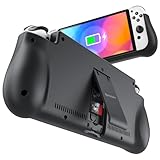
- 【Compatible for Nintendo Switch 6.2" LCD and 7.0" OLED Model 】This battery charging pack is compatible with Nintendo Switch - 7.0" OLED Model And for Nintendo Switch - 6.2" LCD Model. Please confirm the size of your Switch before purchasing this battery case.
- 【Portable Battery Charger】 Battery case for Nintendo Switch built-in 10000 mAh rechargeable Li-polymer battery pack, Effectively provide 160% extra battery life. Charge the case at night, enjoy a ultra long game time on next day!
- 【High-Speed Charging】Support PD & QC 3.0 Fast Charging. 18W/ 3.0A Faster USB Charging for Nintendo Switch only takes about 1.75 hours (Faster than the 3 hours required for the original charge).
- 【Dual-Port Charging Convenience】Switch battery pack features a USB-C input port for recharging the battery case. USB-A output port to charge other devices like phones, tablets, or other devices. The Switch and external devices can charge simultaneously.
- 【Foldable Bracket & Card Slot】Stand for Nintendo Switch adapt to a variety of angles, and provides you with ultra Comfortable Grip. Conveniently store 2 game cards with the extra game card slots.
Set a comfortable manual level
- Open System Settings from the HOME Menu.
- Select System.
- Open Screen Brightness.
- Turn off or bypass Automatic Brightness, then move the manual slider down.
- Check a dark battle scene, a bright outdoor scene, and text-heavy menus before deciding that the level is usable.
There is no evidence-based percentage that applies to every Switch, game, screen condition, or console model. Treat brightness reduction as a practical adjustment, not a measured guarantee. If you cannot read menus comfortably, raise brightness one step; eye strain is not a useful trade for a small, unquantified saving.
When automatic brightness is preferable
Automatic brightness can be useful when you move between rooms or play outdoors and indoors. It may raise the screen when ambient light changes, so it is not the most predictable choice for maximum endurance. A fixed, comfortable manual level gives you a more consistent power target.
When Airplane Mode helps
Nintendo describes Airplane Mode as disabling all wireless communication functionality, including internet communication, local communication, Bluetooth, and the NFC Reader/Writer. That makes it useful when a monster-taming session is entirely self-contained.
Do these 3 things before closing this tab:
1Fix the driver behind crashes, sound loss and screen glitches2Repair Windows errors before they cause bigger problems3Scan for outdated or missing drivers - takes under a minuteTurn it on before an offline session
- From the HOME Menu, open System Settings.
- Select Airplane Mode.
- Set the switch to On.
- Start or resume the game and confirm that you do not need an online service, local wireless feature, Bluetooth audio, or NFC accessory.
You can also use Quick Settings without closing the game: hold the HOME button for at least one second, then select Airplane Mode.
Rank #2

- Designed for Nintendo Switch 2 Accessories: This 10000mAh magnetic power bank with 20W PD fast charging includes a thin magnetic plate. Simply attach the magnetic plate to your Switch 2 console or Switch 2 case, and the battery pack securely locks into place. No more tangled cables or mid-game power loss-it stays on even with vigorous shaking. Enjoy longer, untethered gaming
- Extended Gaming Sessions: With a capacity of 10000mAh, this power bank provides an extra 2.8 times playtime for your Nintendo Switch 2, ensuring you never worry about power outages in the middle of your game
- Fast Charging Technology: Features 20W PD fast charging capability to quickly recharge for your Nintendo Switch 2, Switch OLED, iPhone, and other smartphones, keeping your devices powered up efficiently
- Lightweight and Portable Design: Weighing only 186g (6ounces) and measuring just 4.7 x 3 x 0.5 inches, this slim power bank won't interfere with your gaming experience and is easy to carry for travel, gaming parties, or long commutes
- Complete Package Contents: Includes 1 PD 20W battery pack for Nintendo Switch 2, 1 USB charging cable, 2 accessory kits with paper stickers, cleaning wipes, cleaning cloth, and 1 user manual for convenient setup and maintenance
When not to use it
- Online battles, trades, cloud-related functions, downloads, or other features that require an internet connection.
- Local wireless play with another console.
- Bluetooth headphones or another Bluetooth audio device.
- NFC-based functions or compatible accessories that need the NFC Reader/Writer.
Nintendo allows individual wireless radios to be re-enabled while Airplane Mode is active. If you need one feature, turn on only the required radio and leave the others disabled. The exact option shown can depend on the function and system software available on your console.
Choose an Auto-Sleep timeout that matches your pauses
In handheld or tabletop mode, the console enters sleep mode after a set period of inactivity. Sleep protection matters when you stop to answer a message, look up a map, eat, or leave the console on a table.
Set 5 or 10 minutes
- Open System Settings from the HOME Menu.
- Select Sleep Mode.
- Choose the setting for Auto-Sleep (Playing on Console Screen) or the equivalent handheld/tabletop option.
- Select 5 Minutes or 10 Minutes.
Nintendo provides timeout choices of 1, 3, 5, 10, and 30 minutes, plus Never. Five minutes is the better battery-first choice if your pauses are brief. Ten minutes is less disruptive when you regularly stop for longer planning or menu work. Use Never only when you have a specific reason and are actively watching the console; it removes the automatic safeguard against forgetting an idle system.
Use Quick Settings during a game
Quick Settings lets you make the most useful changes without leaving the current game.
Rank #3
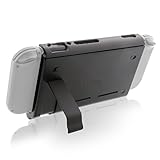
- Keep playing after the internal battery runs out
- 5000 mAh battery provides up to double the battery life
- Rapidly recharge the Power Pak through the included Type-C cable
- Does not block any ports or vents
- Sturdy kickstand built into the Power Pak
- Hold the HOME button for at least one second.
- Adjust brightness or volume, switch Airplane Mode, or change the sleep-related control shown by the system.
- Press the appropriate button to return to the game.
This is particularly useful when moving from a bright room to a dark one, boarding a flight, or pausing for a short break. It also avoids the temptation to leave a game running while you navigate several system menus.
Offline and online settings profiles
Airplane Mode is the main difference between an offline and an online profile. Brightness and sleep settings can remain the same in both.
| Situation | Brightness | Airplane Mode | Auto-Sleep | Reasoning |
|---|---|---|---|---|
| Offline story, exploration, or battle session | Lowest comfortable manual level | On | 5 or 10 minutes | No radios are needed, so wireless activity can be disabled while the display and idle protection are optimized. |
| Online play or trading | Lowest comfortable manual level | Off, or re-enable only the required wireless function | 5 or 10 minutes | Connectivity is part of the session; disabling it would interrupt required features. |
| Local wireless session | Lowest comfortable manual level | Off | 5 or 10 minutes | Local communication must remain available. |
| Bluetooth audio session | Lowest comfortable manual level | Off, or Bluetooth re-enabled if supported by the current Airplane Mode configuration | 5 or 10 minutes | Bluetooth audio requires the Bluetooth radio. |
| Frequent long pauses | Lowest comfortable manual level | Use the connection required by the game | 5 minutes | A shorter timeout limits drain when the console is forgotten during a break. |
| Frequent short pauses while planning | Lowest comfortable manual level | Use the connection required by the game | 10 minutes | Gives more time before sleep while still protecting against a long idle period. |
What these settings can do for performance
Lowering brightness, disabling unused radios, and preventing long idle periods can reduce avoidable power consumption. They do not constitute a performance mode. Nintendo does not document a universal frame-rate increase, graphics upgrade, or engine fix for monster-taming games from any of these controls.
Recommended Free Tools
Why smoother play is not guaranteed
Frame pacing, loading behavior, resolution changes, animation limits, and area-specific slowdowns are determined by the game and its software workload. A system setting that saves battery cannot force a title to render beyond its programmed or hardware-limited behavior.
Rank #4
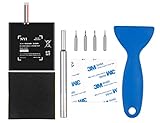
- Higher Battery Capacity : 4550mAh HAC-003 Battery Li-ion replacement battery; Upgraded hac-003 Battery voltage: 3.7V/16.8Wh, 25% higher than most batteries on the market.
- Compatible with Models : This NYI high-capacity battery replacement Compatible for Nintendo Switch is very easy to install and the same size as your original HAC-003 battery. It is a better replacement battery for your Nintendo Switch 2017 Game Console HAC-001.
- Excellent Installation Tool : There is a set of precision screwdriver in the package, which is of great quality and can also be used in other places; A solid scraper tool can facilitate you to remove the battery; There are also replacement double stick adhesive tape and shockproof sponge pad, which can firmly fix the battery and effectively prevent noise.
- High Quality& Safety : High quality, no memory effect, over-charge, over-discharge, over-heat, over-current and short-circuit protection. You can use NYI Nintendo Switch Replacement Battery with confidence.
- Satisfactory After-sales Service : We provide an 18 month warranty for the upgraded HAC-003 battery. If you have any questions, please contact us by email! PS: The package includes 1 HAC-003 replacement battery, 1 magnetic screwdriver handle, 1 plastic travel, 1 sponge shock proof pad, 1 fixing sticker, 1 installation manual, 4 S2 screwdriver bits (2 Y1.5 , 1 PH00, 1 PH000)
If a game offers its own graphics, camera, effects, or performance options, evaluate those controls separately using the game’s documentation. Do not assume that Airplane Mode or a darker screen changes those options.
Use settings as a diagnostic, not a promise
If the console feels more responsive after reducing brightness or disabling radios, the change may reflect less background power use or a different workload at that moment. It is not proof of a repeatable frame-rate increase. Compare the same area, activity, and session conditions before drawing a conclusion.
Battery and charging facts
Nintendo lists approximately 2.5 to 6.5 hours of battery life for the original HAC-001 model. That is a range, not a guarantee for every game or session: actual endurance varies with the software and how the console is used.
What’s actually slowing this PC down?
Pick the symptom - the matching free tool is one click away.
Nintendo also lists approximately 3 hours to fully charge when the console is powered off or in sleep mode. Charging while playing can take longer because the console is simultaneously consuming power. The three-hour figure should therefore not be treated as a promise for an active gaming session.
Best Value
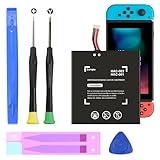
- (COMPATIBLE MODELS) - This Battery Only Compatible with Nintendo Switch 2017 HAC-003, HAC-001, HAC-A-BPHAT-C0, HAC-S-JP Game Console, Please check your device model before placing your order.
- (HIGHER CAPACITY) -5180mAh higher capacity battery for HAC-003, HAC-001, HAC-A-BPHAT-C0, HAC-S-JP Game Controller, power more than Original or Other Battery .Brand new 0 cycle, last over 1000 cycles . Store more power, Enjoy your game to the fullest.
- (HIGH QUALITY) - Each battery for HAC-003 has update IC chip technology. The high-quality batteries can effectively prevent power protection, current protection, recovery protection, temperature protection, short circuit protection, cell protection, output/input over-voltage protection.
- (EASY INSTALLATION) - Provide all tools for HAC-003 batteries replace. Before disassembly, please carefully watch some relevant video on YouTube guide for HAC-003 battery replacement.
- (GREAT CUSTOMER SERVICE) - If you are not satisfied with our HAC-003 battery, we have a perfect after-sale team to help you, So you don’t need to worry about anything about after-sale.
Plan around the range rather than a single number
- Use the lower end of the published range as the conservative planning point for demanding or screen-bright sessions.
- Keep brightness and wireless use as low as the activity allows.
- Use Auto-Sleep so a break does not silently consume the remaining charge.
- For a long trip, carry a genuine Nintendo Switch AC adapter or another power solution explicitly verified for your exact console model and required output.
A USB-C power bank can be a secondary option, but compatibility, charging behavior, cable quality, and wattage must be checked against the listing and your model. Do not assume that every USB-C battery will charge the console reliably while you play.
Independent reader supportYour contribution helps us test, update, and keep practical guides available for everyone.Exact setup sequence before a long session
Use this sequence when preparing for travel, a tournament day, or any session where an outlet may not be available.
- Charge the console while it is powered off or in sleep mode if you want to use Nintendo’s approximately three-hour full-charge reference.
- Open System Settings > System > Screen Brightness and select the lowest level that remains comfortable.
- Open System Settings > Airplane Mode. Turn it on if the session is offline; otherwise leave the required connection available.
- Open System Settings > Sleep Mode and choose 5 or 10 minutes for the handheld/tabletop Auto-Sleep setting.
- Start the game and verify that any feature you need, such as online communication, local wireless, Bluetooth audio, or NFC, still works.
- During play, hold HOME for at least one second whenever you need a quick brightness, volume, wireless, or sleep adjustment.
Troubleshooting by symptom
The battery still falls quickly
- Check whether brightness has returned to a higher automatic level.
- Confirm that Airplane Mode is on for an offline session and that no individual radio was re-enabled.
- Check the Auto-Sleep timeout and avoid Never unless necessary.
- Compare your result with Nintendo’s original HAC-001 reference range of approximately 2.5–6.5 hours, remembering that software and use conditions change endurance.
- If the result is outside what you can reasonably explain through settings and workload, consult Nintendo’s support channels for model-specific battery guidance rather than assuming a game setting is responsible.
The game still stutters or feels uneven
- Do not treat Airplane Mode or brightness as a guaranteed frame-rate fix.
- Test the same location or activity with identical brightness and connection conditions so you are not comparing different workloads.
- Check whether the game itself documents a performance or graphics option; system settings cannot substitute for a title-specific control.
- Use Quick Settings to confirm that a long pause has not left the console active at full brightness.
A required feature stopped working
- Turn Airplane Mode off if the feature needs internet or local wireless.
- Re-enable Bluetooth if you use Bluetooth audio.
- Restore NFC functionality when an NFC Reader/Writer feature or accessory is required.
- After changing the radio setting, return to the game and retry the feature rather than assuming the game is malfunctioning.
The screen is too dim
Raise manual brightness until text and battle information are easy to read. Battery conservation is useful only when the display remains practical for the environment. If lighting changes frequently, automatic brightness may be more convenient, although its power use will vary with the brightness it selects.
Crashes, No Sound, or Screen Glitches?
Random freezes, missing sound and display glitches usually trace back to one bad driver. Find and replace yours safely.Free scan · under a minutePC Slower Than It Used to Be?
A free scan shows the junk files, broken settings and background clutter dragging Windows down - then fixes them in one click.Free scan · Windows 10 & 11How console model and software workload affect expectations
The published 2.5–6.5-hour figure specifically describes the original HAC-001 model. Do not transfer that range automatically to another Switch model, a different battery condition, or a different software workload. A game with frequent loading, complex scenes, or sustained wireless activity can produce a different result from a menu-heavy or lightly used session.
For a meaningful comparison, record the console model, starting charge, brightness approach, wireless state, sleep behavior, game activity, and elapsed play time. Without those details, “the battery lasted longer” is only an anecdote and cannot establish how much any one setting contributed.
Quick Recap
A compact pre-play checklist
- Brightness is manual and comfortable, not unnecessarily high.
- Airplane Mode is on for a genuinely offline session.
- Any required internet, local wireless, Bluetooth, or NFC function has been tested and left available.
- Handheld/tabletop Auto-Sleep is set to 5 or 10 minutes.
- The console is charged, and the charger or a verified compatible power source is available if the session will exceed the expected battery range.
- You are treating system settings as power-management controls, not as a guaranteed cure for game-specific frame-rate limits.
Product prices and availability are accurate as of the date/time indicated and are subject to change. Any price and availability information displayed on Amazon at the time of purchase will apply.

