
Free tools Windows power users keep installed
One-click scans. No signup required.
iTechGuides is reader-supported. When you buy through links on our site, we may earn an affiliate commission. As an Amazon Associate I earn from qualifying purchases. Learn more
The best monochrome laser multifunction printer depends on how much you print and how you handle originals—not just the advertised pages-per-minute figure. For a home office, print, scan and copy may be enough; a busy small office may need fax, an automatic document feeder (ADF), duplex scanning, Ethernet and more paper capacity. Check the exact model’s current local availability and supply costs before choosing.
Choose the functions and document handling you actually need
“All-in-one” is not a fixed feature set. A 3-in-1 typically prints, scans and copies; a 4-in-1 adds fax. Fax is useful only if your office still sends or receives documents that way, but an ADF can save time whenever you scan or copy multi-page originals.
Check duplex printing and duplex scanning separately. Automatic two-sided printing handles output; duplex scanning handles both sides of an original. A printer can offer one without the other. If staff routinely process two-sided paperwork, confirm that the scanner can capture both sides automatically and whether it does so in a single pass.
Also verify ADF capacity and supported paper sizes against the documents you process. Tray capacity, connectivity options and device dimensions matter when several people share the printer or it must fit in a small workspace.
#1 Best Overall

- BEST FOR SMALL BUSINESSES – Engineered for extraordinary productivity, the Brother DCP-L2640DW Monochrome (Black & White) 3-in-1 combines laser printer, scanner, copier in one compact footprint and delivers high-quality black & white prints
- FAST PRINTER WITH EFFICIENT SCANNING – Produces documents quickly with print speeds up to 36 ppm(2) and scan speeds up to 23.6/7.9 ipm(3) (black/color). A 50-page auto document feeder(4) allows for convenient, time saving multi-page scanning and copying
- FLEXIBLE CONNECTION OPTIONS – Easily navigate the changing demands of your business with secure multi-device connectivity via built-in dual-band wireless (2.4GHz / 5GHz) and Ethernet. Or connect locally to a single computer via USB interface
- BROTHER MOBILE CONNECT APP – Print, scan, and manage your wireless printer anytime, from almost anywhere from your mobile device. Order Brother Genuine Supplies, track toner usage, and complete more work on-the-go(5)
- CHOOSE BROTHER GENUINE TONER – When it’s time to replace your toner, be sure to choose Brother Genuine TN830 or TN830XL replacement toner. And with Refresh EZ Print Subscription Service, you’ll never worry about running out of toner again and you’ll enjoy savings of up to 50%(6) on Brother Genuine Toner. Get started with Refresh today with a Free Trial(1)
Match capacity to your workload
Estimate monthly pages and the number of people who will use the device. A manufacturer’s stated speed or recommended workgroup size is a specification, not a guarantee of real-world throughput. Jobs involving scanning, copying, complex layouts or frequent interruptions may not resemble a simple continuous-print speed claim.
For one manufacturer example, Xerox lists the B305 as a black-and-white laser all-in-one for print, copy and scan, with speeds of up to 40 pages per minute, a stated fit for workgroups of 1–10 users and average monthly use of 6,000 pages. Those are Xerox listing claims, not independent test results. Its listing confirms automatic two-sided printing and built-in Wi-Fi; confirm ADF details and the configuration sold in your region before deciding whether it suits your document flow. Xerox B Series shop listing
Rank #2

- BEST FOR SMALL OFFICES – Combining space-saving efficiency and premium monochrome (black & white) print quality with affordability, the Brother MFC-L2820DW delivers dynamic laser print, copy, scan, and fax multi-functionality in a compact footprint
- EFFICIENT PRINTING & SCANNING – Produces black & white documents quickly with print speeds up to 36 ppm(2) and scan speeds up to 23.6/7.9 ipm(3) (bk/cl). A 50-page auto document feeder(4) allows for convenient, time saving multi-page copy, scan, and fax
- FLEXIBLE CONNECTION OPTIONS – Securely connect to multiple devices with built-in dual-band wireless (2.4GHz / 5GHz), Ethernet, or connect locally to a single computer via USB interface
- 2.7" TOUCHSCREEN – The intuitive 2.7” touchscreen enables effortless navigation with the added ability to print-from and scan-to popular Cloud-based apps such as Google Drive, Dropbox, Evernote, OneNote, and more(5)
- BROTHER MOBILE CONNECT APP – Print, scan, and manage your wireless printer anytime, from almost anywhere from your mobile device. Order Brother Genuine Supplies, track toner usage, and complete more work on-the-go(6)
These figures do not establish how the B305 compares with other current models in print quality, durability or long-term failure rates. Treat them as screening specifications, then check local support, warranty terms and user-serviceable consumables.
Do these 3 things before closing this tab:
1Clear out junk files and repair common Windows errors2Scan for outdated or missing drivers - takes under a minute3Repair Windows errors before they cause bigger problemsCompare models only within the market where you can buy them
Availability and model configurations vary by country, so a shortlist from one market may not translate to another. Digit’s September 18, 2026 India-market guide names the Canon imageCLASS MF275dw for home-office use, the Brother DCP-B7640DWB as a small-office multifunction printer and the Brother MFC-B7810DWB as a mono MFP with fax. These are the guide’s editorial selections, not independent test findings here; verify official regional specifications and current stock before considering them elsewhere. Digit’s India-market guide
Rank #3
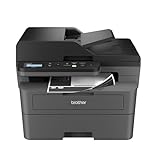
- BEST FOR SMALL BUSINESSES – Engineered for extraordinary productivity, the Brother DCP-L2640DW Monochrome (Black & White) 3-in-1 combines laser printer, scanner, copier in one compact footprint and delivers high-quality black & white prints
- FAST PRINTER WITH EFFICIENT SCANNING – Produces documents quickly with print speeds up to 36 ppm(2) and scan speeds up to 23.6/7.9 ipm(3) (black/color). A 50-page auto document feeder(4) allows for convenient, time saving multi-page scanning and copying
- FLEXIBLE CONNECTION OPTIONS – Easily navigate the changing demands of your business with secure multi-device connectivity via built-in dual-band wireless (2.4GHz / 5GHz) and Ethernet. Or connect locally to a single computer via USB interface
- BROTHER MOBILE CONNECT APP – Print, scan, and manage your wireless printer anytime, from almost anywhere from your mobile device. Order Brother Genuine Supplies, track toner usage, and complete more work on-the-go(5)
- CHOOSE BROTHER GENUINE TONER – When it’s time to replace your toner, be sure to choose Brother Genuine TN830 or TN830XL replacement toner. And with Refresh EZ Print Subscription Service, you’ll never worry about running out of toner again and you’ll enjoy savings of up to 50%(6) on Brother Genuine Toner. Get started with Refresh today with a Free Trial(1)
The Brother MFC-L2750DW is a useful example of why checking status matters: Brother’s US product page labels it discontinued. The page documents print, scan, copy and fax; speeds up to 36 ppm; a 50-sheet ADF; a 250-sheet paper tray; automatic duplex printing; and single-pass duplex copying and scanning. Those specifications describe a legacy model, not a current recommendation. Do not treat historical or remaining stock as evidence of ongoing regional availability or support. Brother USA product page
Work out ongoing supply and ownership costs
Compare the cost of replacement toner and any separate drum with the purchase price. Check cartridge yield, the conditions used to state that yield, whether a drum is a separate consumable and whether compatible supplies are readily available in your market. The reviewed model information does not establish a current cost-per-page comparison across these printers, so a precise cost ranking would be unsupported.
Rank #4

- FROM AMERICA'S MOST TRUSTED PRINTER BRAND – Perfect for offices printing, scanning and copying black & white brochures, business documents and presentations. Perfect for 1-5 people
- FASTEST TWO-SIDED PRINTING IN ITS CLASS – Up to 28 black-and-white pages per minute single-sided. Quickly finish multipage print projects with the fastest in-class two-sided printing speed
- DUAL-BAND WI-FI WITH SELF-RESET – Automatically detects and resolves connectivity issues
- STRONG SECURITY – Built-in security features help protect your printer from potential attacks
- PRINT FROM ANY DEVICE – Wireless printing from any mobile device, PC or tablet. Ethernet included. Works with Microsoft, Mac, AirPrint, Android, Chromebook and more.
For shared office use, include paper replenishment and the time required to load or clear documents in your decision. A larger tray or ADF may reduce interruptions, but only if its capacity and supported media match your actual jobs. Confirm the device’s dimensions and operating noise where it will sit near desks or calls.
The Tool Desk
Outbyte PC Repair FREERepair Windows errors before they cause bigger problemsFix Now →Outbyte Driver Updater FREEScan for outdated or missing drivers - takes under a minuteDriver Scan →Assess quality and reliability with evidence, not slogans
Print quality is model-specific. If crisp text or readable small print is essential, look for independent evaluations of the exact model and examples relevant to your documents; do not assume a category-wide ranking from the product type alone. Likewise, no source here establishes comparative long-term failure rates for the named monochrome MFPs.
Best Value

- Monochrome, Wireless, Duplex 4-in-1: Print, scan, copy, fax.
- Fast Print Speeds: Print up to 37 pages per minute and spend less time waiting with a quick first print time of approximately 5 seconds.
- Easy Wireless Setup: Setup your wireless connection and get up and running in just a few steps2
- 5-inch Color Touchscreen: Get the job done quickly with Application Library - an intuitive and easy to use customizable access to the features you use most.
- Mobile Device Printing: Print from your compatible mobile devices using the free Canon PRINT app, Apple AirPrint and Mopria Print Service.
Xerox describes its black-and-white wireless printers as providing performance and reliability users can count on day after day. That is the manufacturer’s promotional statement, not independent comparative evidence. To assess reliability for your situation, check the local warranty and service arrangements, supply availability and independent long-term evidence for the exact model. Xerox B Series shop listing
A practical shortlist checklist
- Confirm whether you need print/scan/copy only or fax as well.
- Match expected monthly volume and users to the manufacturer’s stated workload guidance, treating it as a specification rather than a performance guarantee.
- Verify automatic duplex printing and, separately, duplex scanning.
- Check ADF capacity, paper-tray capacity and supported paper sizes against your documents.
- Confirm Wi-Fi, Wi-Fi Direct, Ethernet and mobile printing requirements for your workspace.
- Compare toner yield, replacement price, any separate drum cost and local supply availability.
- Confirm current regional stock, warranty and service support for the exact model number.
For broader all-in-one selection, TechRadar describes its own printer testing criteria as including print detail, scan performance, duplex features, build and ownership costs. Its general 2026 shortlist is not a monochrome-laser ranking, so it should not be read as proof of how these models compare. TechRadar’s all-in-one printer guide
Quick Recap
Product prices and availability are accurate as of the date/time indicated and are subject to change. Any price and availability information displayed on Amazon at the time of purchase will apply.

