
Windows Errors? Fix Them Before They Spread
Repair common Windows errors and clear accumulated junk for a smoother, more stable PC - no reinstall needed.Free scan · no reinstallCrashes, No Sound, or Screen Glitches?
Random freezes, missing sound and display glitches usually trace back to one bad driver. Find and replace yours safely.Free scan · under a minuteiTechGuides is reader-supported. When you buy through links on our site, we may earn an affiliate commission. As an Amazon Associate I earn from qualifying purchases. Learn more
For most groups, Mario Kart 8 Deluxe is the easiest four-player couch racer on one Nintendo Switch. Sonic Racing: CrossWorlds is the newer multi-platform kart option, with clearly separated one-console, local-wireless and online modes. If your group wants circuit racing rather than items and drifting shortcuts, Gran Turismo 7 offers four-player local split-screen on PlayStation. Crash Team Racing: Nitro-Fueled is a more demanding kart alternative.
Choose by the hardware you own, the number of people sharing one screen, and whether you want party-style kart racing or a more simulation-oriented driving experience. “Local” is not always synonymous with split-screen: some games support several players on one console, while others use local wireless connections between multiple devices.
What “local split-screen” means for a racing night
Before buying a game, identify the exact multiplayer mode you need:
- One-console split-screen: multiple people use one console and television, with the display divided into player views.
- Local wireless: players connect separate consoles nearby. This is local multiplayer, but it is not one-console split-screen.
- Online multiplayer: players connect over the internet, usually from separate locations or devices.
Store pages often list all three modes together. A headline number such as “up to eight players” can therefore describe local wireless or online play rather than eight people sharing one screen. The recommendations below label each mode explicitly.
#1 Best Overall
![Mario Kart 8 Deluxe - Nintendo Switch [Digital Code]](https://m.media-amazon.com/images/I/517O3bI45YL._SL160_.jpg)
- Hit the road with the definitive version of Mario Kart 8 and play anytime, anywhere! Race your friends or battle them in a revised battle mode on new and returning battle courses
- Play locally in up to 4-player multiplayer in 1080p while playing in TV Mode. Every track from the Wii U version, including DLC, makes a glorious return
- Plus, the Inklings appear as all-new guest characters, along with returning favorites, such as King Boo, Dry Bones, and Bowser Jr.
- Players can choose a new Smart Steering feature which makes driving and staying on the track easy for novice players and kids even at 200cc
Best games at a glance
| Game | Racing style | Confirmed local mode | What the official listing establishes |
|---|---|---|---|
| Mario Kart 8 Deluxe | Accessible kart racing | One-console offline split-screen | Up to four players in TV or tabletop mode on one Nintendo Switch; one compatible controller per player. Nintendo product page |
| Sonic Racing: CrossWorlds | Newer kart racing | One-console, local wireless and online modes | One-console local play: one to four; local wireless: two to eight; online: two to twelve on the Nintendo listing. PlayStation and Steam listings also identify local/shared split-screen features. Nintendo Australia · PlayStation Store · Steam |
| Gran Turismo 7 | Circuit racing with a simulation-oriented presentation | One-console local split-screen | The official product page specifies local four-player split-screen. Gran Turismo 7 products |
| Crash Team Racing: Nitro-Fueled | Competitive kart racing | Local split-screen | A PlayStation developer interview confirms local split-screen; verify the current edition and platform before purchasing. PlayStation Blog interview |
The best choices, explained
Mario Kart 8 Deluxe: the safest four-player Switch choice
Mario Kart 8 Deluxe is the straightforward pick when four people want to start racing quickly. Nintendo states that up to four players can play offline split-screen in TV or tabletop mode on one Switch. The format is immediately readable for mixed-skill groups: steering, drifting, items and short races let new players join without learning a full car setup system.
Every player still needs a compatible controller. The game’s online capacity is listed separately as up to twelve racers; that figure does not increase the number of people who can share one Switch locally. Count the controllers you already have before planning a four-person session.
- Choose it for: a familiar party format, short races and minimal setup.
- Check first: that the Switch is in TV or tabletop mode and that four compatible controllers are available.
- Do not infer: the online twelve-player figure is not a local split-screen count.
Sonic Racing: CrossWorlds: the flexible newer kart option
Sonic Racing: CrossWorlds is useful when your group may switch between one-screen play, nearby consoles and online sessions. The Nintendo Australia listing separates the modes precisely:
- One-console local: one to four players.
- Local wireless: two to eight players across nearby systems.
- Online: two to twelve players.
Those numbers describe different connection methods. Four people can share one console in the one-console mode, while the eight-player local-wireless limit requires multiple devices. Nintendo also notes that each local multiplayer participant needs a compatible controller.
The PlayStation Store describes local split-screen in Grand Prix and Race Park, and the Steam listing identifies shared/split-screen play. If you are buying on another platform, open that platform’s current product page and confirm the edition’s local mode before purchase.
- Choose it for: a current kart racer that can support both couch sessions and separate nearby systems.
- Best planning question: are all players sharing one console, or will each person bring a system?
- Controller check: one compatible controller is required for each local player.
Gran Turismo 7: the PlayStation circuit-racing pick
Gran Turismo 7 is the recommendation for friends who want closed-circuit racing and a more simulation-oriented presentation instead of item-based kart competition. Its official product page specifies local four-player split-screen, making it the clearest choice in this list for a serious four-person race on one PlayStation setup.
Expect a different kind of session from a kart game. The appeal is choosing and driving road or race cars around circuits, managing braking points and learning track layouts. That makes it a better fit when the group enjoys tuning driving lines and comparing lap performance, but less ideal when everyone wants instant catch-up items and chaotic shortcuts.
Free tools Windows power users keep installed
One-click scans. No signup required.
- Choose it for: circuit layouts, car-focused driving and four-player local competition.
- Use it when: your group prefers skillful braking and cornering over power-ups.
- Verify before buying: the exact PlayStation edition and current local-mode availability for your region.
Crash Team Racing: Nitro-Fueled: a tougher kart alternative
Crash Team Racing: Nitro-Fueled broadens the kart choices for groups that want a more demanding competitive feel. A PlayStation developer interview confirms local split-screen. Its drift timing, track hazards and racecraft can reward practice, so it suits friends who enjoy improving and rematching rather than only playing one casual race.
Platform editions and retail availability can change. Check the current store listing for your console and confirm that the copy you are considering includes the local split-screen mode described by the publisher.
- Choose it for: competitive kart racing with a steeper learning curve than a purely casual party racer.
- Check first: platform, edition and current availability.
- Plan for: a few practice races if some players are unfamiliar with its drift mechanics.
Specialist possibilities that need an edition check
F1 25
F1 25 is a specialist option for groups interested in licensed Formula 1-style circuit racing. A current 2026 split-screen roundup includes it, and EA publishes a compatibility list for controllers and steering wheels on PlayStation 5, Xbox Series X|S and PC. A wheel is optional equipment, not a requirement for a local session.
The available official material does not establish a complete platform-by-platform local player-count and mode matrix. Do not promise a specific split-screen count or versus/co-op format until you open the official store or support page for the exact edition and platform. For supported input devices, use EA’s F1 25 controllers, wheels and VR support page.
What’s actually slowing this PC down?
Pick the symptom - the matching free tool is one click away.
Rocket League
Rocket League frequently appears in split-screen recommendations, including a current 2026 roundup, but the official platform-specific evidence needed to state an exact local configuration was not established here. Treat it as a possible extra choice only after checking Epic’s current support documentation and the store page for your platform. Do not assume that a player count shown for online play applies to one-console split-screen.
For context on how it is being discussed in contemporary lists, see Traxion’s 2026 split-screen racing roundup; use the official platform documentation for the final purchasing decision.
How to choose the right game for your group
1. Start with the hardware
Write down the console or PC everyone will use, then check the game’s listing for that exact platform. A title can support split-screen on one system while offering a different mode or player count on another. For Sonic Racing: CrossWorlds in particular, keep Nintendo’s one-console, local-wireless and online figures separate.
Rank #2

- Nuevos personajes: Inkling, Rey Boo, Huesitos y Bowsy
- Inclusi n de circuitos in ditos en el modo batalla
- Los pilotos cuentan con el volante inteligente, que ayuda a no salirse de la pista
- Hasta 8 pilotos en partidas de multijugador local
2. Count people sharing one screen
For a four-person couch session, the confirmed one-console choices in this shortlist are Mario Kart 8 Deluxe, Sonic Racing: CrossWorlds and Gran Turismo 7. Their four-player limits refer to one device and one display, not a networked room. If you have more than four people, move to local wireless or online only where the official listing explicitly supports it.
3. Pick the driving style
- Fast party racing: Mario Kart 8 Deluxe.
- Newer kart racing with multiple local connection options: Sonic Racing: CrossWorlds.
- Competitive kart racing with more demanding technique: Crash Team Racing: Nitro-Fueled.
- Circuit and simulation-leaning driving: Gran Turismo 7.
- Formula 1-focused play: investigate F1 25 only after confirming the edition’s local mode.
4. Check input equipment
Controllers are the practical bottleneck in most couch sessions. Nintendo requires one compatible controller per local player for Mario Kart 8 Deluxe and Sonic Racing: CrossWorlds. For a four-player plan, verify the number and type of controllers before buying the game.
Steering wheels are an optional specialist purchase for F1 25. EA’s compatibility page covers supported controllers and wheels for PS5, Xbox Series X|S and PC; confirm your exact model rather than assuming any USB wheel will work.
Step-by-step setup for a one-screen race
- Confirm the platform and edition. Open the current store page for your console or PC and check that local or split-screen play is listed for that edition.
- Decide whether everyone is sharing one device. Select the one-console mode when using one television. Do not choose local wireless unless each participating player has a separate compatible system.
- Connect and test every controller. Pair or plug in one compatible controller per player. On Nintendo Switch, make sure the console is in TV or tabletop mode for Mario Kart 8 Deluxe’s four-player offline split-screen.
- Launch the local multiplayer menu. Select the game’s local, split-screen or multiplayer option rather than online matchmaking. In Sonic Racing: CrossWorlds, choose the one-console local path when all players are on one system.
- Set the race format. For a mixed-skill group, begin with short races and default assists. For Gran Turismo 7, agree on track, car and driving-assist settings before starting so the first race is not spent in menus.
- Run a one-lap or short test. Confirm that every view is active, each controller steers the intended player and the display remains readable from the couch.
- Adjust the room setup. Increase text or HUD readability where the game allows it, seat players close enough to read their divided screen and keep spare charging cables available.
Common mistakes and how to avoid them
Confusing online capacity with local capacity
Mario Kart 8 Deluxe’s up-to-twelve online figure and Sonic Racing: CrossWorlds’ two-to-twelve online range are not local split-screen limits. Use the one-console figures when planning a shared television.
Calling local wireless “split-screen”
Sonic Racing: CrossWorlds supports two to eight players through local wireless on Nintendo’s listing, but that means nearby systems rather than eight views on one display. Label the mode accurately when inviting friends.
Do these 3 things before closing this tab:
1Scan for outdated or missing drivers - takes under a minute2Repair Windows errors before they cause bigger problems3Fix the driver behind crashes, sound loss and screen glitchesBuying before checking controllers
A game can support four local players while your room has only two usable controllers. Inventory compatible pads first, and remember that Sonic Racing: CrossWorlds requires one compatible controller for each local participant.
Assuming every platform has identical features
Store descriptions can differ by platform and edition. This is especially important for F1 25 and Rocket League, where a complete official local-mode and player-count matrix was not established. Check the current platform listing instead of transferring a number from another system.
Expecting a circuit simulator to feel like a kart racer
Gran Turismo 7 emphasizes circuit driving and a simulation-oriented presentation. If your group wants items, shortcuts and very short party races, choose one of the kart-focused games instead.
Relying on an old physical listing
Crash Team Racing: Nitro-Fueled editions and retail availability can vary. Confirm the platform, edition and included local mode on the current store page before purchasing a particular copy.
A practical decision guide
- One Switch, up to four friends, quickest start: Mario Kart 8 Deluxe.
- One console but you may later use nearby systems: Sonic Racing: CrossWorlds, while keeping its one-console and local-wireless modes distinct.
- PlayStation group that wants four-way circuit racing: Gran Turismo 7.
- Players who want a challenging kart rematch: Crash Team Racing: Nitro-Fueled, after checking the current edition.
- F1 enthusiasts with optional wheel hardware: F1 25 only after verifying the exact platform’s local player count and mode.
- Considering Rocket League: verify Epic’s current platform documentation before treating it as a split-screen recommendation.
The best purchase is the one whose confirmed local mode matches your room: one device and one screen, separate systems connected nearby, or online play. Once that distinction is settled, the choice between party kart racing and circuit-focused driving becomes straightforward.
Buying and planning checklist
Make the hardware decision before comparing prices or editions. Write down the exact console model or PC storefront, then open that platform’s current product page. Check that the listing names local, split-screen or shared-screen play rather than only online multiplayer. For a physical copy, confirm that the box and included content match the edition shown online; older listings for Crash Team Racing: Nitro-Fueled may not reflect current retail availability.
Next, budget for the complete session rather than the game alone. A four-player plan requires four compatible controllers for Mario Kart 8 Deluxe and Sonic Racing: CrossWorlds. If you already own enough pads, there may be no additional hardware purchase; if not, compare compatible controller options before committing to the game. Do not count a controller that cannot pair with the chosen platform.
Finally, decide whether you need one screen or several. One-console split-screen is the right choice for a single television. Sonic Racing: CrossWorlds’ two-to-eight local-wireless figure assumes nearby systems, so each participant needs access to a compatible device as well as a controller. Online numbers should be treated as a separate plan altogether.
Quick wins for a faster PC:
Repair Windows errors before they cause bigger problemsFix Now →Fix the driver behind crashes, sound loss and screen glitchesFind Drivers →Clear out junk files and repair common Windows errorsFree Scan →Choosing by group size
Two players
Two people can use the confirmed local modes in every core recommendation, provided the specific platform and edition list that mode. Mario Kart 8 Deluxe is the simplest if both players are on one Switch. Sonic Racing: CrossWorlds gives you the option to stay on one console or move to local wireless later. Gran Turismo 7 is the better match when both players want circuit driving rather than kart items.
Rank #3
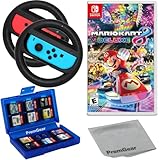
- Included is the following: Mario Kart 8 Deluxe - Nintendo Switch Game, 2x PremGear Steering Driving Wheels to use with your Joy-Con Controllers (NOT COMPATIBLE WITH SWITCH 2), PremGear 24 Slot Game card Case/Holder with 2 Slot MicroSD Memory Card Adapter and PremGear Quality Cleaning Cloth
- RACE ANYTIME, ANYWHERE! Hit the road with the definitive version of Mario Kart 8. Race your friends or battle them in a revised battle mode on new and returning battle courses
- Play locally in up to 4-player multiplayer in 1080p while playing in TV Mode. Every track from the Wii U version, including DLC, makes a glorious return
- Plus, the Inklings appear as all-new guest characters, along with returning favorites, such as King Boo, Dry Bones, and Bowser Jr.!
- Players can choose a new Smart Steering feature which makes driving and staying on the track easy for novice players and kids even at 200cc
Three or four players
For three or four people on one display, use the confirmed four-player options: Mario Kart 8 Deluxe, Sonic Racing: CrossWorlds and Gran Turismo 7. Verify the controller inventory before the session. With Gran Turismo 7, agree on assists and track choice before launching the race so a larger group spends less time waiting through menus.
More than four players
Do not assume that adding controllers creates extra split-screen views. The confirmed one-console limits above stop at four. If your group is larger, Sonic Racing: CrossWorlds lists local wireless for two to eight players on Nintendo systems, but that requires multiple nearby devices. Online play is also a separate option, listed there as two to twelve players.
Making a split-screen session comfortable
Split-screen divides the available display, so seating distance matters. Put the television where every player can read their own portion, and run a short test before starting a tournament. Check that each controller is assigned to the intended player and that no one is looking at the wrong quadrant. If the game offers HUD or text-size settings, adjust them before the first serious race.
Recommended Free Tools
Use short opening races to expose problems with pairing, charging or visibility. In a kart game, a quick race also lets newcomers learn steering and drifting without a long wait. In Gran Turismo 7, settle on a track and car combination in advance; the more simulation-oriented format rewards preparation and can make menu delays more noticeable to a group.
For F1 25, treat a steering wheel as an optional enthusiast upgrade. EA’s compatibility information covers controllers and wheels for PS5, Xbox Series X|S and PC, but support is model-specific. Confirm the exact wheel and platform before buying one, and keep standard controllers available so the session does not depend on an unverified accessory.
What to verify on the store page
- Platform: confirm PlayStation, Nintendo Switch or PC edition rather than relying on a generic game description.
- Connection type: identify one-console split-screen, local wireless or online play.
- Player count: use the number attached to the chosen mode, not the largest number anywhere on the page.
- Controller requirement: check whether every local participant needs a compatible controller.
- Edition and region: make sure the physical or digital copy is current and sold for your region.
- Optional equipment: for F1 25, verify wheel-model support before treating a wheel as part of the setup.
This checklist is particularly important for F1 25 and Rocket League. They are often mentioned in split-screen roundups, but the exact local player count and mode can vary by platform and edition. Until the official store or support page confirms the details, present them as possibilities rather than guaranteed recommendations.
Frequently Asked Questions
Which game is the easiest four-player split-screen racing choice?
Mario Kart 8 Deluxe is the clearest accessible option on one Nintendo Switch. Nintendo lists up to four players offline in TV or tabletop mode. Each player needs a compatible controller.
Does Mario Kart 8 Deluxe support twelve players on one Switch?
No. Nintendo’s up-to-twelve figure refers to online racers. Offline split-screen on one Switch supports up to four players.
Is Sonic Racing: CrossWorlds local wireless the same as split-screen?
No. One-console local play is listed as one to four players. Local wireless is listed as two to eight across nearby systems, so it does not mean eight views on one television.
Which recommendation is best for realistic or simulation-leaning racing?
Gran Turismo 7 is the strongest fit in this list. Its official product page specifies four-player local split-screen and its circuit-focused presentation suits drivers who prefer braking, cornering and lap performance over items.
How many controllers do I need for a four-player couch race?
Plan on one compatible controller per player. Nintendo explicitly states this requirement for Mario Kart 8 Deluxe and Sonic Racing: CrossWorlds, so verify that four usable controllers are available before buying extra hardware.
The Tool Desk
Outbyte PC Repair FREEClear out junk files and repair common Windows errorsFree Scan →Outbyte Driver Updater FREEFix the driver behind crashes, sound loss and screen glitchesFind Drivers →Can I safely recommend F1 25 for local split-screen?
Only after checking the official store or support page for the exact platform and edition. EA documents compatible controllers and wheels, but the available listing does not establish one complete local player-count and mode matrix.
Is Rocket League confirmed as a split-screen recommendation here?
It appears in contemporary recommendations, but verify Epic’s current platform-specific documentation first. Do not transfer an online player count to one-console split-screen.
What should I check when buying Crash Team Racing: Nitro-Fueled?
Confirm the current platform edition, retail or digital availability and the listed local split-screen feature. A PlayStation developer interview confirms local split-screen, but individual listings can change.
The Bottom Line
Pick Mario Kart 8 Deluxe for the simplest four-player Switch session, Sonic Racing: CrossWorlds for flexible one-console or local-wireless kart play, Gran Turismo 7 for four-player circuit racing, and Crash Team Racing: Nitro-Fueled for a tougher kart challenge. Count controllers, separate split-screen from local wireless and online modes, and verify the exact edition before you buy.
Quick Recap
Product prices and availability are accurate as of the date/time indicated and are subject to change. Any price and availability information displayed on Amazon at the time of purchase will apply.

