
Crashes, No Sound, or Screen Glitches?
Random freezes, missing sound and display glitches usually trace back to one bad driver. Find and replace yours safely.Free scan · under a minutePC Slower Than It Used to Be?
A free scan shows the junk files, broken settings and background clutter dragging Windows down - then fixes them in one click.Free scan · Windows 10 & 11iTechGuides is reader-supported. When you buy through links on our site, we may earn an affiliate commission. As an Amazon Associate I earn from qualifying purchases. Learn more
Zoho Books is the best-documented cloud-first choice in this comparison. Its India GST workflow covers GSTIN and HSN/SAC mapping, GSTN-authenticated B2B e-invoices, IRN and QR retrieval, e-way bills, pre-validation, approvals, audit trails, reports and multiple GSTINs. TallyPrime is the stronger alternative for organisations that prefer established accounting ledgers and desktop-oriented operations, with GSTR-1 and GSTR-3B reporting, IRN/QR e-invoices and a stated prevention-detection-correction mechanism.
Neither application can guarantee that an invoice is genuine or that a return is correct. The software can validate data, check duplicates and preserve a government-registered trail, but your controls, master data, tax interpretation and review process determine the final result. Confirm current plan limits, connected services, pricing, mandate applicability and filing responsibility before production use.
What GST e-invoicing actually does
GSTN defines e-invoicing as reporting details of specified GST documents to a Government-notified portal and obtaining a reference number. You still create the invoice in your accounting, billing or enterprise resource planning system. The system sends the required data to an Invoice Registration Portal (IRP); the IRP validates it and returns a signed invoice containing a unique Invoice Reference Number (IRN) and QR code.
Quick wins for a faster PC:
Fix the driver behind crashes, sound loss and screen glitchesFind Drivers →Repair Windows errors before they cause bigger problemsFix Now →Scan for outdated or missing drivers - takes under a minuteDriver Scan →The registered document is not a replacement for your accounting invoice. It is an authenticated transaction record that can be used to verify the invoice and populate downstream compliance work. GSTN identifies standardisation, interoperability, automatic population into GST returns and e-way bills, lower processing costs, fewer disputes and improved payment cycles as benefits. The National Informatics Centre also highlights cross-software readability, fewer manual data-entry errors and backward integration into returns and e-way bills.
#1 Best Overall

- AN EASY & EFFICIENT WAY TO CONTROL YOUR FINANCES: Created for both small business and personal use, this horizontal accounting ledger book has spacious pages to log payments and deposits, so that you can monitor your finances and spot errors easily.
- LARGE FORMAT LEDGER WITH PLENTY OF WRITING SPACE: This accounting book ledger comes in a large format, measures 10 by 7 inches, and has 129 pages with 3,100 entry lines total.
- TRACK ACTIVITY IN MULTIPLE ACCOUNTS WITH JUST ONE BOOK: This accounting log book will be perfect if you want to track activity in multiple accounts. To do so, use the dedicated column to add the bank account number every time you make a record.
- PREMIUM DESIGN FOR COMFORTABLE DAILY USE: This accounting journal book has a durable eco-leather hardcover, thick 120gsm paper, sturdy elastic closure, pen loop, ribbon bookmark, and back pocket for extra notes, checks, and receipts.
- 60-DAY MONEY-BACK GUARANTEE: We will exchange or refund your small business log book if you aren’t satisfied with your business bookkeeping ledger for any reason. Reach out to us via message to refund your monthly accounting ledger book.
For a buyer, the practical test is whether the product can send the right document fields to an authorised IRP, retrieve the IRN and QR code, stop or flag invalid data before submission, and carry the accepted transaction into GSTR-1, GSTR-3B and reconciliation reports.
Best options at a glance
| Product | E-invoicing and IRN/QR | GSTR-1 and GSTR-3B | Validation and fraud-related controls | Deployment and scale | Best fit |
|---|---|---|---|---|---|
| Zoho Books | GSTN-authenticated B2B e-invoices, direct IRP upload, IRN and QR retrieval, recurring e-invoices and e-way bills | Online filing for existing and new users; automatically compiles taxable transactions and reports | Pre-validates missing or incorrect data; approval workflows, reports and audit trail | Cloud-first; multiple GSTINs; REST APIs | Businesses wanting cloud access, guided GST workflows and central visibility across registrations |
| TallyPrime | E-invoices with IRN and QR code; connected-service details depend on the edition and configuration | GSTR-1 and GSTR-3B reports; export to the GST portal or file directly from TallyPrime | Product literature describes a prevention-detection-correction mechanism and visibility into tax liabilities and credits | Established accounting workflow with desktop-oriented use; verify current connected services and licensing | Organisations with experienced accountants, established ledgers and a preference for Tally-style operations |
| Other IRP or API integrations | Capabilities vary by provider; confirm IRP authorisation, duplicate checks, IRN/QR retrieval and outage handling | May provide data feeds rather than complete return filing | IRP-level validation and duplicate checks are available, but accounting controls differ by product | Often API-led; integration effort and support vary | Teams with an existing ERP or a developer-maintained integration |
The table describes documented capabilities, not a laboratory ranking. Current plan limits, prices, filing permissions and supported transaction types must be checked for your entity and subscription.
Zoho Books: strongest cloud-first fit
GST and e-invoice workflow
Zoho’s India GST documentation says both existing and new users can file GST returns online. The application automatically compiles taxable transactions, maps GSTINs and tax components, classifies HSN/SAC codes, generates e-way bills and creates GSTN-authenticated B2B e-invoices. Its e-invoicing workflow uploads directly to the IRP and brings the returned IRN and QR information back to the invoice.
Pre-validation checks for missing or incorrect data before transmission. That matters when a supplier GSTIN, place of supply, tax component, document number or item classification would otherwise cause a rejection or an incorrect return entry. You should still review the underlying master data; a pre-validation check cannot know whether the commercial facts you entered are true.
Rank #2

- Refined Financial Management: Our ledger books for bookkeeping can be used to track personal bills and budgets and serve as book keeping log for small business.Helps you keep track of your expenses and income for effective financial planning.
- Adequate Ledger Entries: Dimensions are 8.4 x 6.1 inches, making it easy for you to take anywhere. This accounting ledger comes with 3304 entry spaces (120 pages) so you can record all your financial information in one place, with easier access to track transaction types and dates.
- Elegant & Exquisite Design: Our ledger notebook adopts a classic waterproof material cover, which is not easy to wear. Gold double spiral binding makes flipping through easy. This bookkeeping book is also designed with practical inner pockets and bookmark elastic bands.
- Flexible & Thick Paper: Our accounting book is made of 100gsm non-bleeding paper, perfect for fountain pens, ballpoint pens and other pen types. Convenient to write on, so you no longer have to worry about bleeding ink.
- Perfect For Gift Giving: As you would expect, the cover of the book keeping book is beautifully designed with gold foil lettering and floral patterns. Perfect as a gift for parents and friends, or as a business ledger for small business.
Controls for teams
- Approval workflows can require a review before an invoice is submitted or a return is filed.
- Reports provide a reviewable view of taxable transactions, tax components and filing data.
- An audit trail records activity for investigation and accountability.
- Multiple GSTINs can be managed in one cloud environment, subject to the limits of the selected plan.
- REST APIs support connections to other systems when the standard workflow is not enough.
- Recurring e-invoices are supported for repeat billing scenarios, but each recurring transaction still needs the correct tax facts and document details.
Zoho states that paid plans from Standard include e-invoicing. Plan names, limits and inclusions can change, so verify the current India pricing and feature page before subscribing. The documentation describes a recognized GST Suvidha Provider role and direct IRP connectivity; confirm the currently available connection and any authentication prerequisites during setup.
TallyPrime: strongest established-accounting fit
Returns and ledgers
Tally’s GST accounting material says TallyPrime can prepare accurate GST returns, show tax liabilities and credits, and generate e-invoices containing an IRN and QR code. Its GST billing documentation lists GSTR-1 and GSTR-3B reports and says users can export returns to the GST portal or file directly from TallyPrime.
Prevention-detection-correction mechanism
Tally describes a prevention-detection-correction mechanism rather than a single fraud score. In practice, that means configuring ledgers and tax classifications to prevent avoidable errors, using reports and validations to detect exceptions, and correcting transactions before filing. This is useful for organisations whose accounting team already works in Tally-style ledgers and vouchers.
Confirm the exact edition, connected services, user count, online filing arrangement and current licensing terms. The available product description does not establish one universal price or one feature set for every edition, so do not assume that an older installation has the same IRP connection or direct-filing capability as a current subscription.
Rank #3

- Easy To Track Your Finances: HAUTOCO accounting ledger book keeps you on top of your expenses and income! Help you keep your money organized, spend well, and set and achieve financial goals
- Premium Material: The A5 accounting ledger book has a total of 120 pages and 2040 lines of entries. It is made of 100gsm thick paper to reduce ink leakage; it is equipped with a waterproof and sturdy PP cover to protect the inner pages
- Practical Design: Compact 8.3 x 6.2'' expense tracker notebook is easy to carry and features information pages, 2025 calendar, yearly financial goals page, and PVC pocket for storing important tickets and loose items
- Manage Your Finances Effectively: Undated accounting books with number, date, description, account, payment or deposit amount, and total balance. You will be able to easily analyze your financial activities and quickly prepare accurate financial statements
- Ideal For Small Business or Personal Use: An accounting log journal can track your business or personal financial status. With a clear record of transactions, you can find unnecessary expenses or fraudulent charges
How e-invoicing helps prevent duplicates and questionable invoices
Government-registered identity
Once an IRP accepts a document, the IRN and signed QR code provide an identifier that can be checked against the registered invoice. A recipient can compare the supplier’s invoice details with the QR data instead of relying only on a PDF or printed copy. The registration trail also makes it harder to submit the same document repeatedly under different local records.
Duplicate checks
IRP systems perform duplication checks using the document identity elements supplied in the request. Cygnet IRP describes IRN and QR generation after duplication checks, while IRIS describes duplicate checking and API integration. Your accounting application may perform additional checks before transmission, such as matching invoice number, supplier GSTIN, financial year, date and value. The exact key fields and error messages depend on the connected IRP and software.
What the controls cannot prove
- A valid IRN does not prove that goods were delivered, that the price is commercially correct or that the supplier is trustworthy.
- A QR code does not correct a wrong GSTIN, tax rate, HSN/SAC code, place of supply or reverse-charge treatment entered by your staff.
- Duplicate detection cannot find a transaction that was entered once with incorrect identity data and again with a different incorrect identity.
- Permission settings cannot stop a person with excessive access from approving their own work.
- No authoritative product-specific percentage for fraud reduction is established here; the documented benefits are mechanisms and qualitative risk reduction, not a comparable causal statistic.
Use e-invoicing as one layer in a control system that also includes segregation of duties, approval thresholds, supplier verification, bank and sales reconciliation, exception reports and periodic audit-log review.
Do these 3 things before closing this tab:
1Clear out junk files and repair common Windows errors2Fix the driver behind crashes, sound loss and screen glitches3Repair Windows errors before they cause bigger problemsPreparing and filing GSTR-1 and GSTR-3B
GSTR-1 data path
GSTR-1 contains outward-supply information. A suitable application should classify sales by document type, customer GSTIN, place of supply, tax rate and applicable HSN/SAC details, then show how those records will appear in the return. E-invoice data should flow from the accepted IRP record rather than being retyped from a PDF. Review amendments, credit notes, debit notes, exports and cancelled documents before generating the return.
Rank #4

- PU Leather Cover with Gold Foil: Ledger book features a finely textured black pebbled PU leather cover with exquisite gold foil stamping. This not only provides a non-slip, wear-resistant feel but also exudes a luxurious and sophisticated look. The durable material protects the inner pages from damage and is suitable for various scenarios, including business office work and personal finance.
- Portable Size: Columnar book 7 x 9.25 inches, is compact and space-saving, easily fitting into a briefcase, tote bag, or backpack. Whether for business trips, field reconciliation, or everyday carry, it allows for recording income and expenses anytime.
- Large Capacity: Record per book contains 50 sheets of 80g double-sided offset paper. Each page features 30 clear lines of writing and a 3-column categorization layout. Double-sided color printing ensures clear and smudge-proof text. The notebook includes a marker bar for quickly marking important items or reconciliation points. With a total of 1500 writing positions, it meets daily, monthly, and even annual accounting needs, eliminating the need for frequent notebook replacements.
- Eye-friendly Inner Pages: Budget book's inner pages feature a soft, eye-friendly green background with double-sided color printing, effectively reducing visual stimulation from strong light reflection. This minimizes eye fatigue even during extended writing sessions, reflecting a healthy and thoughtful design consideration, making it suitable for those who frequently keep track of their expenses.
- Comfortable Writing Experience: Logs book's spacious line spacing provides ample space for writing, allowing for clear categorization of income, expenses, and balances, resulting in more organized budgeting. It also ensures clear and neat handwriting, enhancing writing fluency and overall page neatness.
GSTR-3B data path
GSTR-3B is a summary return used to declare liabilities and claim eligible input tax credit. Software can aggregate the relevant values and expose mismatches, but it cannot decide whether a credit is legally eligible in your circumstances. Reconcile purchase records, supplier filings, reverse-charge transactions and payment records before submission.
A controlled monthly routine
- Lock the period for data entry. Set a cut-off for invoices, credit notes and adjustments so late entries are visible rather than silently changing a return.
- Check IRN status. Identify invoices that are accepted, rejected, cancelled, pending or created outside the applicable e-invoice process.
- Review exception reports. Resolve missing GSTINs, invalid HSN/SAC codes, tax-rate conflicts, place-of-supply errors and duplicate document numbers.
- Reconcile outward supplies. Compare the sales register with e-invoice and e-way-bill data, then investigate differences.
- Reconcile input tax credit. Compare purchase records with available supplier data and document any reversals or ineligible claims.
- Approve the return. A reviewer who did not prepare the data should sign off the final GSTR-1 and GSTR-3B values.
- File and archive. Preserve acknowledgements, filed return data, IRNs, QR information, rejected-document reasons and the audit trail according to your retention policy.
Selection framework: what to compare before buying
Use the following questions in a product demonstration and in a test organisation, not just in a feature checklist.
IRP connectivity
- Which authorised IRP or GST Suvidha Provider connection is used?
- Can the system submit, retrieve IRNs and QR codes, cancel documents where permitted and retry after an outage?
- Are rejected requests stored with the exact error returned by the IRP?
- Can an administrator see which user submitted or cancelled a document?
Tax and master-data controls
- Can each GSTIN have its own state, registration type, invoice series and place-of-supply rules?
- Are HSN/SAC codes, units, tax rates, exemptions and reverse-charge flags centrally maintained?
- Does the system block an invoice when mandatory data is absent, or merely display a warning?
- Can you prevent users from editing a posted invoice without a traceable amendment?
Returns, reconciliation and branches
- Are GSTR-1 and GSTR-3B reports generated from the same ledger that produced the invoice?
- Can branch users work with restricted GSTIN access while head office sees consolidated exceptions?
- Can you import supplier data and match it to purchase invoices?
- Are credit notes, advances, exports, reverse-charge cases and amended documents represented correctly?
Security and operations
- Are roles separated for invoice creation, approval, filing and administration?
- Is the audit trail exportable and retained when a user leaves?
- What happens when the IRP, GST portal or internet connection is unavailable?
- What support channel handles a rejected invoice close to the reporting deadline?
Implementation plan
- Establish applicability. List every legal entity, GSTIN, state registration, business activity and document type. Ask a qualified GST professional to confirm whether the entity is covered and which exemptions apply.
- Choose the operating model. Select a cloud-first workflow when remote access, multi-GSTIN visibility and API connections are priorities. Select an established ledger workflow when accountants already depend on desktop vouchers, existing reports and controlled local processes.
- Configure each GSTIN. Enter the legal name, registration number, state, invoice series, place-of-supply rules, tax registrations and authorised users. Do not copy one state’s configuration to another without review.
- Clean the masters. Deduplicate customers and suppliers, validate GSTINs, assign HSN/SAC codes, define units and tax rates, and identify reverse-charge or exempt supplies. Record who approved each master-data change.
- Connect the IRP. Complete the provider’s authentication and API or portal connection. Send a controlled test invoice and verify the returned IRN, QR code, signed payload, status and accounting entry.
- Design approvals. Set amount and risk thresholds. For example, require a second user for new customers, manual tax overrides, credit notes above a chosen amount and any invoice that fails pre-validation.
- Run parallel checks. For at least one reporting cycle, compare system-generated GSTR-1 and GSTR-3B values with the existing process. Investigate every difference before switching the filing responsibility.
- Document recovery. Write down how staff handle rejected invoices, duplicate-IRN messages, cancelled documents, portal outages, user lockouts and corrections after filing.
Test cases before production filing
Use representative, anonymised transactions and record the expected result for each test.
The Tool Desk
Outbyte PC Repair FREERepair Windows errors before they cause bigger problemsFix Now →Outbyte Driver Updater FREEFix the driver behind crashes, sound loss and screen glitchesFind Drivers →| Test | What to verify | Failure response |
|---|---|---|
| Domestic B2B sale | Customer GSTIN, tax rate, place of supply, IRN, QR code and GSTR-1 mapping | Correct the master or transaction; do not repeatedly resubmit unchanged data |
| Credit note against an e-invoice | Reference to the original document, permitted cancellation or amendment path and return treatment | Follow the IRP and GST rules for the document type and retain the linkage |
| Invalid GSTIN or missing HSN/SAC | Pre-validation blocks or clearly flags the request and records the reason | Fix the source data and rerun validation |
| Duplicate invoice number | Local duplicate warning and IRP duplicate response are visible to the reviewer | Determine whether the document is a true duplicate, an intended series correction or a new legal document |
| Reverse-charge transaction | Correct liability presentation, ledger posting and GSTR-3B treatment | Obtain tax advice before filing; do not rely on a generic tax-rate rule |
| Multi-GSTIN branch sale | The correct registration, invoice series, place of supply and user permission are selected | Restrict cross-GSTIN access and correct the configuration |
| IRP or internet outage | Clear pending status, retry behaviour, duplicate protection and an auditable manual process | Follow the documented contingency process and reconcile once service returns |
Turnover thresholds and deadlines to verify
Compliance thresholds change and may include exemptions. A Zoho Books compliance page states a ₹5 crore turnover mandate for B2B and B2G e-invoicing from 1 August 2023; treat that as historical page content, not as the current universal threshold.
Best Value
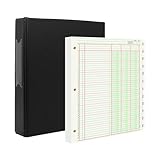
- [A Value Set]: Our Accounting Ledger Paper notebook comes with 100 sheets/200 pages ledger papers and a PU leather 3 ring binder. Extra Movable Monthly Tabs
- Thick Paper: These 3 column ledger paper are 100 gsm, Can be written smoothly to prevent ink bleeding. Both sides can be used
- [Size]: The size of the columnar pad paper is 8.5" X 11". The black 3-ring binder can be used for 8.5X11 refill paper
- [3-Ring Binder & Movable Monthly Tabs]: Binder accounting ledger notebook can be added, deleted, and re-arranged pages easily. The month tabs make it easy to organize the same months from different years
- Application: The ledger paper notebook is perfect for bookkeeping, accounting or other numeric data. it can be used by accountants, teachers, student
IRIS states that taxpayers with aggregate annual turnover (AATO) of ₹10 crore or more must report e-invoices within 30 days from the invoice date, effective 1 April 2025. Because this is a time-sensitive rule, verify the latest GSTN or IRP notification, the relevant financial year and all exemptions for the taxpayer before relying on the date or threshold. Your software should be configured only after that determination.
The filing obligation remains with the taxpayer even when a provider, accountant or software service performs the technical submission. Define who reviews the document, who authorises filing and who retains evidence.
Common failure modes and fixes
Invoice rejected for missing or invalid data
Read the exact IRP error, correct the customer or item master, rerun pre-validation and resubmit only after confirming that the document identity has not already been registered. Keep the rejection response with the corrected record.
Free tools Windows power users keep installed
One-click scans. No signup required.
IRN exists but the accounting record is incomplete
Do not create a second invoice to compensate. Match the IRN to the original transaction, complete the missing accounting fields, and use the permitted amendment or cancellation procedure where necessary.
GSTR-1 does not match the sales register
Compare document status, credit notes, exports, cancelled invoices, branch GSTIN and reporting period. Separate timing differences from classification errors, then rerun the report after corrections.
GSTR-3B input credit appears too high
Pause filing and reconcile purchase records, supplier data, reverse-charge entries and ineligible credits. A software total is not evidence that every credit is claimable.
Users bypass approval
Remove unnecessary permissions, require a different approver for high-risk actions, review the audit trail and test the controls with a sample user account. Approvals are effective only when the system technically prevents self-approval or records an exception.
Quick Recap
Which option fits your organisation?
Choose Zoho Books when
- Your team needs browser-based access and central visibility across multiple GSTINs.
- Pre-validation, approval workflows, audit trails and API access are more important than preserving a desktop-only routine.
- You want one documented workflow for invoices, e-way bills, returns and recurring billing.
- You are prepared to verify current plan limits and configure the GST masters carefully.
Choose TallyPrime when
- Your accountants already rely on its ledger, voucher and reporting conventions.
- You want GSTR-1 and GSTR-3B reports alongside established accounting controls.
- A desktop-oriented process and the documented prevention-detection-correction approach fit your governance model.
- You will confirm the exact edition, connected services and direct-filing capability before deployment.
Use an IRP/API integration alongside an existing ERP when
- Your organisation already has a reliable accounting or ERP system and only needs a compliant submission layer.
- Internal developers can monitor API errors, authentication, retries, duplicate responses and reconciliation.
- You can assign clear ownership for return preparation and filing instead of assuming the API makes the process automatic.
Product prices and availability are accurate as of the date/time indicated and are subject to change. Any price and availability information displayed on Amazon at the time of purchase will apply.

