
Free tools Windows power users keep installed
One-click scans. No signup required.
iTechGuides is reader-supported. When you buy through links on our site, we may earn an affiliate commission. As an Amazon Associate I earn from qualifying purchases. Learn more
For most PCSX2 players, the best choice is a modern PC gamepad that works through SDL. PCSX2 identifies SDL as its preferred input source and supports automatic mapping for SDL and XInput devices. If you already own an original PS2 controller, the MAYFLASH AD001 is a documented adapter option that presents it to Windows as a standard HID gamepad, but you should map and test it yourself because the manufacturer does not claim PCSX2-specific testing. Do not buy an adapter expecting DualShock 2 pressure-sensitive buttons to work: PCSX2 currently documents pressure sensitivity only for original DualShock 3 controllers.
Quick answer: which type should you choose?
Your best option depends more on the hardware you already own and the input protocol it exposes than on a particular brand name. PCSX2 can read several controller paths, but they do not offer the same setup experience.
| Choice | Best for | PCSX2 input path | Mapping effort | Important limitation |
|---|---|---|---|---|
| Modern PC gamepad | Most players who want the simplest setup | SDL preferred; XInput fallback on Windows | Usually automatic with SDL or XInput | Compatibility depends on the controller and its operating-system mode; no specific model is guaranteed by the documentation |
| MAYFLASH AD001 with an original PS2 controller | Players who already own a PS2 pad and want to reuse it | PC Gamepad mode exposes standard HID axes, buttons and POV input | Map and test in PCSX2 | PCSX2-specific testing is not claimed, and DualShock 2 pressure data is not established |
| SDL Raw Input | Third-party devices that SDL identifies incorrectly | SDL Raw Input | Manual mapping | More setup work than normal SDL |
| DirectInput | Older devices that fail with SDL and XInput | DirectInput | Manual mapping | PCSX2 describes it as the least reliable source and provides no automatic mapping |
PCSX2’s official guide says, “SDL is cross-platform and should work for most controllers and operating systems.” That makes SDL the sensible starting point on Windows, Linux and macOS. On Windows, use XInput when a compliant controller does not work correctly through SDL. Treat DirectInput as a last resort rather than a feature to seek out.
How PCSX2 sees your controller
SDL: the preferred source
SDL is PCSX2’s recommended input source because it is cross-platform and supports automatic mapping for many controllers. Select SDL in the controller settings, connect the gamepad, and use PCSX2’s automatic mapping when it is offered. SDL is the most practical default if you move between Windows, Linux and macOS or want one configuration approach across operating systems.
#1 Best Overall

- Type: PS2 To PS3/PC Controller Converter, connect to your PS3 or PC USB Ports.
- Function: Adapter to use your PS2 controller on PS3 console or PC/Laptop, fully compatible with the console and control.
- Use: Converts PS2 or PS1 vibration controller to play with PS3 games on PS3 system, without requiring any external power or driver to operate. Easy to set up and use.
- Compatible With: All original and third party for PS2 Controller (wired and wireless), supports most of for P3 games and for P2 or P1 vibration controllers, can be directly used with PC computer.
- Application: Support wired For PS1/For PS2 hand lever and wireless For PS1/For PS2 hand lever. Applied on PC/For PS3.
SDL support does not mean every controller will have identical labels or button order. A controller can expose unusual axis names, a nonstandard layout or a mode that SDL does not identify as expected. If the automatic map is wrong, remap the controls manually before trying a different protocol.
XInput: the Windows fallback
XInput is the documented fallback for XInput-compliant controllers on Windows. A contemporary Xbox Wireless Controller is a reasonable shopping search because it is commonly associated with XInput-oriented PC use, but the available PCSX2 documentation is protocol guidance, not a guarantee for every hardware revision, connection mode or driver.
If your controller is recognized by Windows but SDL gives incorrect controls, select XInput in PCSX2 and test again. XInput is not a universal solution for every USB or Bluetooth device; the controller must actually provide an XInput-compatible interface.
DirectInput: only when newer paths fail
DirectInput can make an older or third-party device usable when it is neither SDL-compatible nor XInput-compliant. PCSX2 describes DirectInput as generally the least reliable source and notes that automatic mapping is unavailable. Expect to assign every control manually and to correct differences in stick axes, triggers, the D-pad and button labels.
SDL Raw Input: a repair path for misidentified devices
Some third-party controllers work through SDL but are identified in a way that produces unusable mappings. In that case, try SDL Raw Input. It can expose the underlying inputs differently, but the trade-off is manual configuration: you will need to bind each control yourself and verify the result in a game or a pad-testing utility.
Rank #2

- Product Compatibility : Compatibility with Sony Playstation 1,PSX and Playstation 2 controllers to PS3/PC Controller. support Win98, Win98SE, Win Me, Win2000 & the newly announced Win XP, Win 7 together with the direct X 7.0a or above
- Easy to Use: Connect your original PS2 controller to the converter, then plug the USB into a PS3 or PC. Works perfectly with PS2 Guitar Hero devices. Windows 10 auto-installs the adapter—no drivers are needed. Compatible only with original PS2 controllers, PS3 consoles, and USB-enabled PCs/laptops. Ensure the controller is securely connected and the USB port functions properly. If issues occur, try another port or restart the system
- Enhance Game Experience : Supports Double shock real vibration function on supported games and digital/analog mode. Supports most of PC games,can be directly used with PC computer
- Perfect Design : USB Controller adapter Converter Cable for Saved you lots of cash being able to use a PS2 controller instead of buying a new PS3 controller or Wireless controller
- After Sales Support : Our product 100% extremely strictly before selling, You can give it as a gift to your family, friends, classmates and anyone, especially your children. If you have any issues for this product, please contact us by Amazon message, we will provide you satisfied solution at first time
Best choice for most people: a modern PC gamepad
Choose a current PC controller that offers an SDL-compatible mode. This avoids the extra hardware and troubleshooting involved in translating a PS2 controller’s connector and protocol. If SDL does not behave correctly on Windows, try the controller’s XInput path when it supports one.
When comparing modern controllers, focus on these practical questions rather than unverified latency or reliability claims:
- Does the controller appear to the operating system as an SDL-supported gamepad?
- If you use Windows, does it provide an XInput-compatible mode?
- Will you connect by USB, or do you need Bluetooth?
- Can the controller remain in a stable mode after reconnecting or waking from sleep?
- Are its stick, trigger and D-pad controls exposed in a way you can map clearly?
USB is the simplest way to remove wireless pairing and battery variables during initial setup. Bluetooth can be convenient for a living-room PC, but you should complete the first mapping and test with the controller connected reliably; otherwise a pairing or mode change can look like a PCSX2 configuration error.
No controlled measurements establish a winning controller for latency, connection reliability or durability here, so those claims should not be used to rank one model above another. Select the model whose supported input mode and physical layout fit your use.
Best adapter path when you already own a PS2 controller
MAYFLASH AD001
The MAYFLASH AD001 is a relevant option for reusing an original PS2 controller. Its manufacturer listing says it connects PS2 controllers wirelessly to a PC and offers a PC Gamepad mode that uses standard HID axes, buttons and POV input. In practical terms, that mode is intended to make the connected PS2 pad look like a conventional PC gamepad.
Rank #3
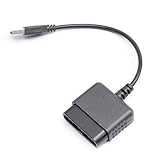
- ★Controller adapter allows PlayStation 2 controllers to be used with the PlayStation 3 consoles or PC | Vibration function supported in compatible games
- ★Easy to use, just connect PS2 controller to the adapter then plug the USB cable into an available port on your PS3 or PC | For best results plug directly in device and not in to USB hub
- ★Does not provide the motion sensing capability featured on PS3's wireless controller | Games requiring motion sensing abilities will not be compatible with adapter
- ★ Compatible with only original PS2 Controllers, PS3 console, and desktops/laptops with an USB Port
- ★Package Contents: 1x Controller Adapter
The listing does not say that PCSX2 tested the AD001. Treat it as a hardware candidate, not as a guaranteed plug-and-play PCSX2 solution. After pairing, select SDL or another appropriate source in PCSX2, assign the controls, and verify every input. If the adapter presents an XInput-compatible mode on your system, you can test that path as well, but the documented AD001 description supplied here establishes standard HID PC Gamepad behavior rather than a PCSX2 certification.
The Tool Desk
Outbyte Driver Updater FREEFix the driver behind crashes, sound loss and screen glitchesFind Drivers →Outbyte PC Repair FREEClear out junk files and repair common Windows errorsFree Scan →Why an adapter may be worth it
- You already own a comfortable, functional PS2 controller.
- You want the original button spacing and stick feel for PS2 games.
- You would rather add one adapter than buy a new gamepad.
What an adapter cannot be assumed to preserve
A USB or Bluetooth adapter translating a PS2 controller into a standard PC gamepad does not automatically preserve every console-era feature. In particular, do not assume that DualShock 2 pressure-sensitive face buttons will reach PCSX2 as pressure values. The official PCSX2 guide currently documents pressure sensitivity only when using original DualShock 3 controllers.
Why the Brook Wingman PS2 is not a confirmed PC adapter choice
The official Wingman PS2 material describes switching a controller connection to XInput while the Wingman PS2 is connected to a PC. That description does not establish the specific use case of plugging an original PS2 controller into a PC for PCSX2. Its FAQ also directs users to a tested controller-compatibility list and warns that unlisted controllers may be incompatible or untested.
Because the documented information does not confirm the PS2-controller-to-PC arrangement, it should not be recommended as a PS2-to-PC adapter on the basis of this evidence. If you investigate it independently, verify the exact hardware direction, operating mode and compatibility list before buying.
Pressure-sensitive buttons: the limitation you need to know
Some PS2 games use analog pressure values from the face buttons for throttle, braking, attack strength or other graduated actions. PCSX2’s controller documentation states: “Pressure sensitivity is currently only available when using original DualShock 3 controllers.” That is a narrower claim than saying all PlayStation controllers with pressure-sensitive buttons will work.
Rank #4

- 【Product Compatibility】: Compatibility with Sony Playstation 1,PSX and Playstation 2 controllers to PS3/PC Controller. support Win98, Win98SE, Win Me, Win2000 & the newly announced Win XP, Win 7 together with the direct X 7.0a or above.
- 【Easy to Use】: Just connect PS2 controller Converter, then plug the USB cable into an available port on your PS3 or PC, Uses this with a guitar hero device for the PS2 and it works flawlessly. Windows 10 recognizes the adapter and will automatically set it up, Didn’t need to install any drivers , Compatible with only original PS2 Controllers, PS3 console, and desktops/laptops with an USB Port.
- 【Enhance Game Experience】:Supports Double shock real vibration function on supported games and digital/analog mode.Supports most of PC games,can be directly used with PC computer.
- 【Perfect Design】:USB Controller adapter Converter Cable for Saved you lots of cash being able to use a PS2 controller instead of buying a new PS3 controller or Wireless controller
- 【After Sales Support】:Our product 100% extremely strictly before selling, You can give it as a gift to your family, friends, classmates and anyone, especially your children.If you have any issues for this product, please contact us by Amazon message, we will provide you satisfied solution at first time.
The documented Windows setup for an original DualShock 3 involves DsHidMini in SXS mode and SDL. On Linux and macOS, the guide describes using SDL. Those instructions do not prove that a DualShock 2 connected through a USB adapter will deliver pressure data to PCSX2. Therefore:
- Expect ordinary digital button presses from a generic PS2-to-PC adapter unless you have verified otherwise.
- Do not purchase an adapter solely on the promise that it preserves DualShock 2 pressure sensitivity.
- If a specific game requires pressure input, use the officially documented DualShock 3 route or confirm the adapter’s behavior with an actual pressure test before relying on it.
PCXS2 setup: connect, select a source and map controls
PCSX2’s labels can change between releases, but the documented path is Settings > Controllers. Perform the initial setup with only the controller you intend to use connected when possible; this makes device selection less ambiguous.
- Connect the hardware. Plug in the modern gamepad by USB, pair it over Bluetooth, or put the PS2 adapter into its PC Gamepad mode and connect the original controller.
- Open the controller settings. In PCSX2, go to Settings > Controllers.
- Select an input source. Start with SDL. On Windows, try XInput if the device is XInput-compliant and SDL does not identify it correctly.
- Run automatic mapping when available. SDL and XInput can provide automatic mapping. Review the result instead of assuming every label is correct.
- Map controls manually where needed. Assign the two sticks, D-pad, face buttons, shoulder buttons, Start, Select and any analog or pressure-related controls your game uses. For DirectInput and SDL Raw Input, manual mapping is expected.
- Check axis direction and dead zones. Move each stick through its full range and confirm that up, down, left and right are not reversed. Press triggers gradually if the device exposes them as axes.
- Save the configuration and test in PCSX2. Confirm that the intended controller remains selected after reconnecting or restarting the emulator.
Verify a questionable mapping with PS2 Pad Test
When a game behaves as though a button is stuck, an axis is reversed or an analog input is missing, separate the emulator configuration from the game itself. PCSX2’s guide points to the PS2 Pad Test homebrew application, which can display the inputs received by the emulated console.
- Load the PS2 Pad Test homebrew in PCSX2.
- Press every button once and watch for the corresponding indicator.
- Move both sticks slowly to each edge and confirm the displayed direction.
- If the application shows no response, revisit the selected input source and device.
- If the application shows the wrong response, remap the affected control or try SDL Raw Input, XInput or another supported source.
This test is especially useful for an adapter because it shows whether the translation from the physical PS2 pad is reaching the emulated PS2 correctly, without relying on one game’s own control menu.
Fixes for common failures
The controller is visible to Windows but not to PCSX2
- Reconnect it before opening the controller settings.
- Confirm that the adapter is in PC Gamepad mode rather than a console- or mobile-oriented mode.
- Try SDL first, then XInput on Windows if the device supports it.
- Close other software that may have captured the controller and reopen PCSX2.
Automatic mapping produces the wrong buttons
- Check whether the controller has a switchable mode that changes its protocol.
- Try another supported input source.
- Use SDL Raw Input for a third-party device that SDL identifies incorrectly, then map every control manually.
- Use the PS2 Pad Test homebrew to identify the exact incorrect axis or button.
The sticks or triggers act like buttons, or move in the wrong direction
Delete the incorrect binding and assign the physical axis again while moving it through its full range. Verify that the positive and negative directions are not swapped. If the device exposes several similar axes, test each one rather than guessing from its label.
Best Value

- Package Include: 1 Pcs DHSKZRMJ Blue USB 2 in 1 Dual Controller Converter Adapter, Total Length 46 cm/18.11 "
- Wanna Use Your PSX Controller to Play PC Games On Your PC/Laptop ? USB Dual Controller Converter Adapter Support Real Vibration PS And PS2 USB Adaptor for The PC Is Available Now, It supports Dual Player Games (Win98/ME/2000/XP) And Real Vibration, Even The Most Popular DDR Dancing Controller
- Convert All The PSX Controller to Be Used On PC/Laptop, Support All The Vibration Types, Real Vibration Feedback Function, Both Digial And Analog Modes Are Available, DDR Dancing Controller Is Compatible, Support 2 Wired Controllers, Not Support Real Vibration Function for Dual Shock And Dual Shock 2
- Easy And Convenient to Use, Simply Hot-Plug The PC/Laptop USB (Compatible With USB 1.0/1.1/2.0) Socket And Install The Driver, Buttons Mapping Must Be Set Up Before Playing The Games, Then It Works Perfectly
- Compatible with Win98, Wing8se, WinME, Win 2000,Vista, Win 7, Win 8, Win 10, And The Newly Announced Winxp, Together With The Direct X 7. Oa Or Above, Not Compatible With Linux, Mac OS System. Not Compatible with PS Controller (SCPH-1010, SCPH-1080) for PS 1, Not Compatible with Dance Pad, Guitar, Gun, Wheel for PS 1, PS 2, PS One, PSX
Steam sends keyboard commands while you play
PCSX2’s guide warns that Steam Input can send unwanted desktop keyboard inputs by default. Its documented workarounds are to fully exit Steam, disable Steam’s controller support, or change Steam’s desktop and hotkey mappings. Apply one of those changes before diagnosing PCSX2 as the source of stray keystrokes.
The adapter works for buttons but not pressure-sensitive actions
That result is consistent with the documented limitation. Standard HID buttons can arrive as on/off inputs while DualShock 2 pressure values are not exposed to PCSX2. Do not keep changing mappings in the expectation that a missing pressure channel will appear; use a controller path that PCSX2 documents for pressure sensitivity if the game truly requires it.
Choosing between wired, Bluetooth and an adapter
| Priority | Most practical route | Reason |
|---|---|---|
| Fastest setup on a new PCSX2 installation | Modern SDL-compatible gamepad over USB | Fewer translation layers and a straightforward mapping path |
| Reuse an existing PS2 pad | MAYFLASH AD001 in PC Gamepad mode | Manufacturer documents standard HID gamepad output |
| Wireless seating distance | Bluetooth-capable modern gamepad or wireless adapter | Avoids a long cable; pairing and mode stability must still be checked |
| Pressure-sensitive PS2-era controls | Original DualShock 3 using PCSX2’s documented setup | PCSX2 currently documents pressure sensitivity for this controller only |
| Old or unusual USB controller | SDL, then SDL Raw Input, then XInput or DirectInput as applicable | Moves from preferred automatic mapping toward manual troubleshooting |
There is no evidence here for a universal winner in latency, reliability or battery life. Make the decision from protocol support, existing hardware and the features your games actually use.
Windows Errors? Fix Them Before They Spread
Repair common Windows errors and clear accumulated junk for a smoother, more stable PC - no reinstall needed.Free scan · no reinstallCrashes, No Sound, or Screen Glitches?
Random freezes, missing sound and display glitches usually trace back to one bad driver. Find and replace yours safely.Free scan · under a minuteBuying checklist
- Identify the platform. SDL is the starting point on all three major desktop operating systems; XInput is a Windows fallback.
- Confirm the operating mode. A controller or adapter can expose different protocols depending on a switch, button combination or driver.
- Decide whether you need original hardware. If you do not already own a PS2 pad, a modern PC gamepad usually avoids adapter-specific mapping work.
- Do not pay for unverified pressure support. PCSX2’s current documentation limits pressure sensitivity to original DualShock 3 controllers.
- Plan a test. Leave time to map controls and run PS2 Pad Test before a long play session.
- Check compatibility claims carefully. A manufacturer saying “works on PC” does not necessarily mean PCSX2 has tested the device.
Bottom-line recommendation
Buy a modern PC gamepad with SDL support if you want the least complicated PCSX2 experience. On Windows, use XInput when it is the controller’s supported path and SDL is not behaving correctly. If you already have an original PS2 controller, the MAYFLASH AD001 is a documented candidate in PC Gamepad mode, but treat it as a standard HID adapter that requires mapping and verification. For pressure-sensitive PS2 controls, do not assume a generic adapter is sufficient; PCSX2 currently documents that feature only for original DualShock 3 controllers.
Frequently Asked Questions
Can I use an original PS2 controller with PCSX2?
Yes, an adapter such as the MAYFLASH AD001 can present a PS2 controller to a PC as a standard HID gamepad in PC Gamepad mode. PCSX2-specific testing is not claimed, so map and verify the controls after connecting it.
Will a PS2 USB adapter preserve DualShock 2 pressure-sensitive buttons?
Do not assume so. PCSX2 currently documents pressure sensitivity only for original DualShock 3 controllers; pressure support through a generic DualShock 2 adapter is not established.
Should I select SDL, XInput or DirectInput in PCSX2?
Start with SDL. On Windows, try XInput for a compliant controller if SDL fails. Use DirectInput only as a last resort because PCSX2 describes it as less reliable and without automatic mapping.
Recommended Free Tools
Why does Steam cause keyboard input while I play?
PCSX2’s guide warns that Steam Input can send desktop keyboard commands. Fully exit Steam, disable its controller support, or change Steam’s desktop and hotkey mappings.
Quick Recap
Product prices and availability are accurate as of the date/time indicated and are subject to change. Any price and availability information displayed on Amazon at the time of purchase will apply.

