
What’s actually slowing this PC down?
Pick the symptom - the matching free tool is one click away.
iTechGuides is reader-supported. When you buy through links on our site, we may earn an affiliate commission. As an Amazon Associate I earn from qualifying purchases. Learn more
For the closest Tor Browser-style privacy without connecting to the Tor network, choose Mullvad Browser. It keeps Tor Project’s anti-fingerprinting design, blocks third-party trackers and cookies by default, and starts in private mode. It does not provide Tor circuits, onion-site access, or Tor’s integrated censorship circumvention.
For normal everyday browsing, Firefox is the strongest non-Chromium choice, while Brave is the practical option when Chromium compatibility matters. Neither browser provides Tor’s network-level anonymity. If hiding your IP address from sites and local observers, using onion services, or bypassing censorship is the priority, Tor Browser remains the appropriate tool.
What “private browsing” actually protects
Private or incognito windows mainly provide local session privacy. When the private session closes, the browser normally removes its history, cookies, form entries, and other session data from that device. That is useful on a shared computer, but it is not anonymity.
Quick wins for a faster PC:
Repair Windows errors before they cause bigger problemsFix Now →Scan for outdated or missing drivers - takes under a minuteDriver Scan →Clear out junk files and repair common Windows errorsFree Scan →The Tor Project explicitly warns that incognito mode and private tabs do not make you anonymous. Websites, advertising networks, internet providers, employers, schools, and other observers can still see activity or infer identity through network information, account logins, and browser characteristics. A private window also does not automatically defeat browser fingerprinting—a collection of details such as screen size, fonts, operating-system settings, graphics capabilities, and APIs that can make one browser look distinctive.
#1 Best Overall

- 𝐅𝐮𝐭𝐮𝐫𝐞-𝐑𝐞𝐚𝐝𝐲 𝐖𝐢-𝐅𝐢 𝟕 - Designed with the latest Wi-Fi 7 technology, featuring Multi-Link Operation (MLO), Multi-RUs, and 4K-QAM. Achieve optimized performance on latest WiFi 7 laptops and devices, like the iPhone 16 Pro, and Samsung Galaxy S24 Ultra.
- 𝟔-𝐒𝐭𝐫𝐞𝐚𝐦, 𝐃𝐮𝐚𝐥-𝐁𝐚𝐧𝐝 𝐖𝐢-𝐅𝐢 𝐰𝐢𝐭𝐡 𝟔.𝟓 𝐆𝐛𝐩𝐬 𝐓𝐨𝐭𝐚𝐥 𝐁𝐚𝐧𝐝𝐰𝐢𝐝𝐭𝐡 - Achieve full speeds of up to 5764 Mbps on the 5GHz band and 688 Mbps on the 2.4 GHz band with 6 streams. Enjoy seamless 4K/8K streaming, AR/VR gaming, and incredibly fast downloads/uploads.
- 𝐖𝐢𝐝𝐞 𝐂𝐨𝐯𝐞𝐫𝐚𝐠𝐞 𝐰𝐢𝐭𝐡 𝐒𝐭𝐫𝐨𝐧𝐠 𝐂𝐨𝐧𝐧𝐞𝐜𝐭𝐢𝐨𝐧 - Get up to 2,400 sq. ft. max coverage for up to 90 devices at a time. 6x high performance antennas and Beamforming technology, ensures reliable connections for remote workers, gamers, students, and more.
- 𝐔𝐥𝐭𝐫𝐚-𝐅𝐚𝐬𝐭 𝟐.𝟓 𝐆𝐛𝐩𝐬 𝐖𝐢𝐫𝐞𝐝 𝐏𝐞𝐫𝐟𝐨𝐫𝐦𝐚𝐧𝐜𝐞 - 1x 2.5 Gbps WAN/LAN port, 1x 2.5 Gbps LAN port and 3x 1 Gbps LAN ports offer high-speed data transmissions.³ Integrate with a multi-gig modem for gigplus internet.
- 𝐎𝐮𝐫 𝐂𝐲𝐛𝐞𝐫𝐬𝐞𝐜𝐮𝐫𝐢𝐭𝐲 𝐂𝐨𝐦𝐦𝐢𝐭𝐦𝐞𝐧𝐭 - TP-Link is a signatory of the U.S. Cybersecurity and Infrastructure Security Agency’s (CISA) Secure-by-Design pledge. This device is designed, built, and maintained, with advanced security as a core requirement.
That distinction determines which alternative is appropriate:
- Local privacy: use a private window in a mainstream browser.
- Lower tracking and stronger fingerprint resistance without Tor: use Mullvad Browser.
- Everyday privacy with flexibility: use Firefox.
- Everyday privacy with Chromium compatibility: use Brave.
- Network anonymity, onion services, or censorship circumvention: use Tor Browser.
Why Tor Browser is different from ordinary privacy browsers
Tor Browser’s defining feature is not simply tracker blocking or automatic history deletion. It routes traffic through the Tor network. A website receives a Tor network address rather than your real IP address, and a local network observer does not normally see the names of the sites you visit. Tor Browser also standardizes many browser characteristics so users are harder to single out.
Tor Browser integrates those protections with Tor-specific functions:
Do these 3 things before closing this tab:
1Repair Windows errors before they cause bigger problems2Scan for outdated or missing drivers - takes under a minute3Clear out junk files and repair common Windows errors- Circuit-based routing: traffic travels through Tor relays rather than directly from your connection to each site.
- Circuit isolation: different sites can be separated into different Tor circuits, reducing the chance that activity across sites is trivially linked.
- New identity controls: the browser can start a fresh Tor identity and discard the current session when needed.
- Onion-service support: sites with
.onionaddresses are reachable through Tor. - Integrated censorship circumvention: Tor Browser includes controls intended to help connect where direct Tor access is blocked.
These functions create trade-offs. Tor Browser can be slower than a direct connection, some sites challenge or restrict Tor traffic, and its privacy model works best when you keep the browser’s defaults and avoid signing into identifying accounts. An alternative that only blocks trackers cannot provide the same network properties.
Best alternatives at a glance
| Browser | Best fit | Traffic route | Fingerprinting posture | Chromium compatibility | Main trade-off |
|---|---|---|---|---|---|
| Mullvad Browser | Tor-style anti-fingerprinting without Tor routing | Direct connection by default; Tor is not integrated | Strong protections enabled by default and a standardized design | Not Chromium-based | No Tor circuits, onion services, or integrated censorship circumvention; private mode reduces session convenience |
| Firefox | Flexible everyday browsing and a non-Chromium engine | Direct connection unless separately configured | Configurable privacy controls; greater customization can increase distinctiveness | Some Chromium-only sites or extensions may differ | Requires informed settings choices for stronger privacy and is not an anonymity network |
| Brave | Users who need Chromium compatibility with built-in privacy features | Direct connection in ordinary windows | Tracker and ad protections are built in; private windows still do not stop sites from tracking visits | High, because it uses Chromium | Does not hide your IP address or provide Tor’s anonymity merely by using a private window |
| DuckDuckGo Browser | Privacy-conscious mobile-oriented browsing | Direct connection unless another network tool is used | Privacy features are emphasized, but Tor-level anonymity is not established | Depends on the platform and site | Not a substitute for Tor’s network routing |
| Tor Browser | Network anonymity, onion services, or censorship circumvention | Tor network | Integrated anti-fingerprinting and Tor-specific protections | Some sites and services may behave differently | Less convenience and potentially slower or more frequently challenged browsing |
Privacy Guides recommends Firefox as a casual Chrome alternative, Brave when Chromium compatibility is important, and Mullvad Browser for stronger anti-fingerprinting out of the box. It recommends Tor Browser when anonymous browsing is the actual goal. Those are organization-specific recommendations, not a universal performance ranking; no controlled speed or compatibility benchmark establishes one browser as best for every user.
Rank #2

- SIGNAL UP TO 16K SQ FT:Equipped with four high-performance external antennas and cutting-edge signal boosting technology, it ensures optimal signal strength and penetration in every room. With this innovative design, you can extend your WiFi coverage to up to 16K square feet, guaranteeing a strong and reliable connection throughout your home—whether it's in the basement or the attic. Say goodbye to weak signals and enjoy fast, uninterrupted WiFi in every room.
- STABILITY AND ULTRA-FAST SPEED: Our latest WiFi extender is powered by a high-performance CPU for fast, stable speeds, and its Intelligent biochip core processor reduces latency and buffering for a seamless online experience. Whether you're streaming HD content, gaming, browsing, or video chatting, you’ll enjoy smooth, uninterrupted connectivity. With the advanced Bionic Chip and four high-gain external antennas, this device ensures fast internet over long distances and reliable wireless access for your whole family.
- WIDE COMPATIBILITY AND MULTI-DEVICE SUPPORT: Designed to meet the needs of the modern home, this internet extender uses smart IC chip technology to easily handle up to 99+ or more devices of all types in your home online at the same time. It is compatible with a wide range of devices, including cameras, game consoles, smartphones, laptops, tablets, and even smart home devices. The product also boasts up to 99% router compatibility, ensuring seamless integration with a wide range of brands, providing users with a high-quality network service.
- 1-TAP SETUP IS FAST, EASY, AND HASSLE-FREE:We know that not every user is a tech expert, so we designed the one-click WPS button to make it easy to configure the connection between your WiFi booster and your router without any specialist skills. The whole process takes only a few seconds, and the easy-to-understand interface allows anyone to get started quickly. Our WiFi extender offers five different smart modes to meet the diverse needs of different scenarios.
- UPGRADED BANK-LEVEL ENCRYPTION MEETS MILITARY SECURITY FEATURES:We have added a complete WPA/WPA2 encryption protocol and implemented real-time risk monitoring function to ensure the network security of users. This prevents unauthorised access and detects and defends potential threats from external networks in a timely manner, ensuring that your WiFi environment remains secure and reliable at all times. Additionally, its military-grade encryption create an impenetrable defense against hackers, suitable for various intdoor conditions.
Mullvad Browser: the closest Tor Browser alternative
What it keeps
Mullvad Browser was developed by the Tor Project with Mullvad. Its design carries over Tor Browser’s privacy-oriented approach while removing Tor network integration. Private mode is enabled, and third-party trackers and cookies are blocked by default. The browser aims to make users look more alike rather than allowing every installation to become a unique configuration.
That makes it the best fit when your concern is cross-site tracking or fingerprinting but you need a direct connection for ordinary websites. It is also useful when Tor’s network latency or site restrictions are inconvenient.
What it does not keep
- It does not route traffic through Tor.
- It does not hide your real IP address from websites or your network provider by itself.
- It does not provide Tor Browser’s circuit isolation or new-identity integration.
- It does not open onion services as a built-in Tor client.
- It does not include Tor’s integrated censorship-circumvention workflow.
A trusted VPN can be used separately, and official documentation describes VPN use as optional. A VPN changes which party sees your connection address; it does not turn Mullvad Browser into Tor Browser, and it does not automatically provide Tor’s anonymity properties.
Important customization warning
Anti-fingerprinting depends partly on being part of a large, similar-looking population. Privacy Guides cautions that modifying Mullvad Browser beyond its security levels can make your fingerprint more distinctive. Installing unusual extensions, changing window dimensions repeatedly, enabling uncommon fonts, or overriding standard privacy settings may make tracking easier. Add a customization only when its benefit is clear, and understand that convenience can reduce anonymity within the browser’s user population.
Firefox: the flexible everyday alternative
Firefox is the sensible choice if you want a mature, non-Chromium browser that can be adapted to your workflow. Privacy Guides positions it as a casual alternative for people who do not want Chrome’s engine. It supports ordinary saved sessions, password managers, extensions, multiple profiles, and detailed settings, so it is generally more convenient than an aggressively standardized private browser.
Rank #3
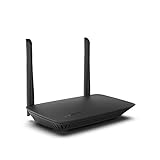
- WORK UNITERRUPTED: Stay connected with a home WiFi that can handle the load. The router eliminates possible dead zones for stable signals up to 1.2 Gbps from room to room.
- LOADS BETTER: With ultra-low latency for lag-free gaming, streaming and binging TV shows. Connect game consoles, smartphones, computers & smart home devices with fast WiFi.
- KID-SAFE INTERNET: Enable Parental Control feature to set time limits, schedule time-specific WiFi access, and restrict websites on kids' devices so they can browse safely online.
- SIMPLE SETUP: The browser-based setup provides clear visual instructions of the entire process so you can get online in minutes. Set separate guest access to keep the network safe.
- SECURE PRIVACY: Blocks internet safety threats with WPA2 wireless encryption & SPI firewall systems. With 4 Gigabit Ethernet ports for fast data transfer & high network throughput.
Where Firefox fits
- Choose it for routine work, school, media, and shopping where you need normal logins and broad customization.
- Choose it when supporting a second browser engine matters to you.
- Use its privacy settings and carefully selected content-blocking tools to reduce tracking.
Firefox is not an anonymity network. A direct Firefox connection exposes your IP address to sites unless you separately use a network privacy service, and ordinary privacy settings do not provide Tor circuits or onion-service access. Because Firefox is highly configurable, an unusual combination of settings and extensions can also make the browser easier to distinguish.
Brave: the Chromium-compatible choice
Brave is aimed at users who need Chromium’s compatibility with websites and extensions while wanting built-in blocking of many ads and trackers. Its vendor documentation describes tracking protections, but those features should not be confused with anonymity. A Brave private window removes local session data when it closes; it does not stop visited sites from observing the connection or tracking an account you sign into.
When Brave makes sense
- You depend on a site or extension that expects Chromium behavior.
- You want blocking enabled without assembling a large extension stack.
- You accept direct network connections and manage anonymity separately when needed.
Use Tor Browser instead when the goal is to conceal your network address or reach onion services. Use Mullvad Browser instead when anti-fingerprinting is more important than Chromium compatibility and you can live without Tor routing.
DuckDuckGo Browser: a limited alternative for mobile privacy
DuckDuckGo Browser is a mobile-oriented option for readers who want privacy features in a simple interface. The material available for this comparison does not establish it as a substitute for Tor’s network-level anonymity. Treat it as a convenience and tracking-reduction choice, not as a way to hide your IP address, access onion services, or obtain Tor’s circuit isolation.
If your threat model includes a network operator or website learning your real address, select Tor Browser or use a separately evaluated network-privacy setup rather than relying on a mobile private tab.
PC Slower Than It Used to Be?
A free scan shows the junk files, broken settings and background clutter dragging Windows down - then fixes them in one click.Free scan · Windows 10 & 11Crashes, No Sound, or Screen Glitches?
Random freezes, missing sound and display glitches usually trace back to one bad driver. Find and replace yours safely.Free scan · under a minuteRank #4

- 1. True VPN Router - Network Protection for Every Device: This VPN router secures your entire homenetwork at the router level. Unlike app-based VPN software, this hardware VPN protects smart TVs, gaming consoles, laptops, and loT devices simultaneously-no individual installation required.
- 2. Residential IP Support for Smarter Connectivity: Built to support residential IP routing, reducing common IP blocking issues associated with shared data-center VPN servers. Ideal for remote workers and privacy-focused users who need stable, real-world IP behavior.
- 3. Router-Level Ad Blocking - Beyond Browser Extensions: This ad blocking router filters advertising domains and tracking requests atthe network layer. Independent of browser plugins and unaffected by changes like Manifest V3 limitations.
- 4. Built-In Home Firewall & Traffic Monitoring: Functions as a light weight home firewall, helping monitor and control network traffic. Adds anadditional layer of protection against malicious domains and unwanted outbound connections.
- 5. Hardware VPN vs Software VPN: A dedicated hardware VPN privacy router offers centralized protection without slowing individual devices. One device. One network policy. Full-home coverage
How to choose by threat model
You share a computer and only need local privacy
Use a private window in Firefox, Brave, or another mainstream browser. Close every private window at the end of the session, and remember that downloads and bookmarks may remain on the device. Private mode does not erase files you saved or prevent monitoring software, network administrators, or websites from observing activity.
You want less tracking but normal direct browsing
Start with Mullvad Browser if fingerprint resistance is your main concern. Select Firefox or Brave when saved sessions, extensions, and site compatibility matter more. Keep privacy settings consistent and avoid logging into an identifying account when you need separation between activities.
You need Chromium-only compatibility
Use Brave for ordinary browsing, accepting that it is not anonymous. If a sensitive task requires network anonymity, switch to Tor Browser for that task rather than trying to recreate Tor with private mode and tracker blocking.
You need anonymity from websites or local observers
Use Tor Browser and leave its privacy-relevant defaults intact. Do not assume that a direct browser plus a private window offers the same protection. Signing into a personal account, revealing identifying details, or opening downloaded documents in an application that connects outside Tor can still link activity to you.
You need onion services or censorship circumvention
Use Tor Browser. Mullvad Browser, Firefox, Brave, and DuckDuckGo Browser do not replace those Tor-specific functions.
Best Value

- Seamless WiFi Everywhere: The Micro 6 Dual-Band Mesh WiFi syste
Practical setup checklist
Setting up Mullvad Browser safely
- Download the current build from the project’s official distribution page and verify that it supports your operating system.
- Install it without importing a heavily customized profile if your goal is a standardized fingerprint.
- Keep the default privacy and security level initially; change a setting only when you understand its effect.
- Use separate browser profiles or separate browsers for activities that should not be linked by logins, cookies, or saved data.
- Review extensions before installing them. Each extension can change your browser’s observable characteristics.
- Close the browser when finished so its private session data is cleared.
Setting up Firefox for everyday privacy
- Install the current release from Mozilla’s official download channel.
- Open Settings → Privacy & Security and review tracking protection, cookie behavior, permissions, and data retention.
- Use a small, reputable extension set rather than collecting many overlapping blockers.
- Keep a normal profile for convenience and a separate profile for tasks that need stricter separation.
- Update promptly because browser security fixes and compatibility changes are release-dependent.
Using Brave without misunderstanding private windows
- Open Settings → Shields and review the blocking level for the sites you use.
- Use a private window when you need local session cleanup, not as an anonymity feature.
- Keep Chromium extensions to a minimum for sensitive browsing; extensions can add identifying signals.
- Use Tor Browser separately when hiding your network address or accessing onion services is required.
Common mistakes and how to correct them
- Mistake: calling any tracker-blocking browser anonymous. Correction: check whether traffic is routed through Tor. If it is not, the browser alone does not hide your IP address.
- Mistake: treating private mode as protection from an employer, school, or internet provider. Correction: private mode mainly cleans local session data; network observers may still see connections.
- Mistake: heavily customizing Mullvad Browser. Correction: return to its default security level and remove unnecessary extensions or unusual settings.
- Mistake: assuming a VPN and Mullvad Browser equal Tor Browser. Correction: a VPN is optional and changes the network trust arrangement, but it does not add Tor circuits, onion services, or Tor’s identity controls.
- Mistake: signing into a personal account during supposedly anonymous browsing. Correction: use an account only when you accept that the service can associate the session with that identity.
- Mistake: expecting every website to work identically. Correction: test essential services before relying on a browser, and keep a separate mainstream browser for sites that require Chromium or unusual scripts.
- Mistake: relying on old feature lists. Correction: browser capabilities, supported operating systems, and security controls change; verify the current official release and download documentation before installation.
Speed, compatibility, and convenience trade-offs
No current controlled benchmark establishes comparative speed, tracker-blocking rates, or a complete platform matrix for these browsers. Performance depends on the device, network, extensions, site, and release. Tor’s extra routing can add latency, while direct browsers generally provide the smoothest compatibility. That does not make a direct browser more anonymous; it is simply a different design objective.
Convenience also has a privacy cost. Persistent cookies, saved logins, extensive extensions, and highly individualized settings make daily work easier but create more data and more fingerprinting surface. Mullvad Browser deliberately favors a clean private session, while Firefox and Brave make it easier to preserve a personalized workflow.
Bottom line: which browser should you install?
Install Mullvad Browser when you want the closest browser-level substitute for Tor Browser’s anti-fingerprinting approach without Tor routing. Choose Firefox for a flexible, non-Chromium daily browser, or Brave when Chromium compatibility is essential. Consider DuckDuckGo Browser for straightforward mobile privacy features, but do not treat it as a Tor replacement.
Keep Tor Browser for the tasks that actually require network anonymity, onion services, or censorship circumvention. The decisive question is not which browser blocks the most trackers; it is whether your threat model requires Tor’s network route.
Quick Recap
Product prices and availability are accurate as of the date/time indicated and are subject to change. Any price and availability information displayed on Amazon at the time of purchase will apply.

