
Recommended Free Tools
iTechGuides is reader-supported. When you buy through links on our site, we may earn an affiliate commission. As an Amazon Associate I earn from qualifying purchases. Learn more
For most iPhone-automation projects, the best ESP32 alternative is not another identical microcontroller. Choose an RP2040 development board when your project can use Wi‑Fi through a suitable board or an external hub, an ESP8266 development board for inexpensive Wi‑Fi-only control, or a Home Assistant hub when the iPhone is the user-facing automation interface and accessories supply Bluetooth, HomeKit, or Matter connectivity.
The right choice depends on four questions: which radio the trigger needs, where the automation logic should run, how the iPhone communicates with the hardware, and whether the device is mains-powered or battery-powered. ESP32 remains distinctive because it combines Wi‑Fi and Bluetooth in one family. Most alternatives match only one part of that combination.
Start with the iPhone trigger, not the board
An iPhone does not generally “run” a microcontroller program. The phone starts an action in Shortcuts, sends an event through a home-automation hub, or reacts to an accessory exposed through a supported protocol. Your board then performs the physical task: switching a relay, moving a servo, reading a sensor, or calling another service.
Apple documents two especially useful personal-automation triggers:
#1 Best Overall

- The Raspberry Pi Pico is a beginner-friendly microcontroller board that uses MicroPython to give you a taste of the Internet of Things and microcontrollers. The RP2040 is a well-designed microprocessor that can be utilized in almost any Internet of Things project. It has enough power to complete the task quickly.
- 【Raspberry Pi RP2040 Microcontroller】Raspberry Pi Pico features Dual-core ARM Cortex M0+ processor, flexible clock running up to 133 MHz. With 264KB of SRAM, and 2MB of on-board Flash memory.Supports up to 16 MB of off chip flash memory via a dedicated QSPI bus
- 【Multiple Software Support】Pico has rich and complete software support, it comes with a complete Rasberry Pi official C/C++ SDK, Micropython SDK.The programming and burning of Pico need to be carried out on the computer. Supported operating systems and computers include:Raspberry Pie with Raspberry Pi OS,Other platforms equipped with Debian based Linux system Computer with MacOS, Computers with Windows, etc.
- 【Rich Hardware Interface】Raspberry Pi Pico has 30 GPIO pins, 4 pins for analog signal input and 26 × multi-function GPIO pins, 2 × SPI, 2 × I2C, 2 × UART, 3 × 12-bit ADC, 16 × controllable PWM channels.USB 1.1 supported by host and device, The installation mode can be flexibly selected by users to facilitate welding with other development boards.
- 【Build Project in Tiny Size】Only 2.1cm*5.1cm ( as small as your thumb). Pico has been designed to use either soldered 0.1" pin-headers or can be used as a surface-mountable 'module'.
- Wi‑Fi connection: “When you connect to a selected Wi‑Fi network, your automation triggers.”
- Bluetooth connection: “When you connect to a selected Bluetooth device, your automation triggers.”
Shortcuts also includes triggers related to Focus modes and opening an app. Those triggers can start a network request or a Home Assistant action even when the hardware itself has no Bluetooth radio.
That leads to three practical architectures:
- Phone-to-board: the iPhone Shortcut sends a network request to a Wi‑Fi-capable controller.
- Phone-to-hub-to-device: the iPhone invokes Home Assistant, which then controls Bluetooth, HomeKit, Matter, or IP devices.
- Accessory-triggered: the iPhone connects to or detects a Bluetooth, HomeKit, or Matter accessory, while the hub or accessory handles the device action.
If you need a Bluetooth-triggered Shortcut, a Wi‑Fi-only board cannot replace an ESP32 by itself. If you only need a webhook or local API call, adding Bluetooth may be unnecessary.
Alternatives at a glance
| Alternative | Radio situation | Where logic runs | Best fit | Main limitation |
|---|---|---|---|---|
| RP2040 development board | Varies by board; verify Wi‑Fi and Bluetooth hardware | Firmware, Home Assistant, or both | Programmable controller using Wi‑Fi or a separate hub | “RP2040” does not guarantee any radio |
| ESP8266 development board | Wi‑Fi | Firmware or Home Assistant | Low-cost Wi‑Fi-only projects | No ESP32-equivalent Bluetooth capability |
| Home Assistant hub with accessories | Can bridge Bluetooth, HomeKit, Matter, Wi‑Fi, Ethernet, and Thread through supported hardware | Home Assistant automations and iPhone Shortcuts | iPhone-centered homes and multi-device workflows | Requires an always-on hub and more configuration |
| Bluetooth proxy or remote adapter | Bluetooth supplied by a proxy or adapter rather than the controller | Home Assistant | Extending Bluetooth reach without putting a radio in every board | Depends on network coverage and supported proxy hardware |
Home Assistant’s ESPHome documentation lists ESP32, ESP8266, BK72xx, RP2040, and RTL87xx microcontroller families. Family-level support does not mean that every board in a family has identical peripherals or wireless hardware.
RP2040: the strongest programmable alternative when radio details are acceptable
Why choose an RP2040 board
RP2040 is a credible ESP32 replacement for projects that need a small programmable controller and can communicate through Wi‑Fi supplied by the board or through a separate hub. ESPHome lists RP2040 as a supported family, so it can fit into a Home Assistant installation that already uses ESPHome.
The important qualification is at the board level. Some RP2040 boards are wired-only; others add Wi‑Fi, and radio combinations differ. Do not buy from the processor name alone. Check the exact board specification for:
- 2.4 GHz Wi‑Fi support, if the board must receive a Shortcut-triggered network request;
- Bluetooth Low Energy support, if the iPhone must see the board as a Bluetooth device;
- USB power and deep-sleep behavior for a battery project;
- available pins, voltage levels, and the peripherals your sensor or actuator requires.
When an RP2040 can replace ESP32
An RP2040 works well when the iPhone trigger is Wi‑Fi-based and the selected board includes suitable Wi‑Fi, or when Home Assistant supplies the network and Bluetooth bridge. It is also useful when you want a different microcontroller platform but are comfortable validating the board’s firmware support and wireless implementation.
Rank #2

- DUAL-CORE PERFORMANCE & MEMORY: Features the RP2040 microcontroller chip with a dual-core ARM Cortex M0+ processor running at a flexible clock speed up to 133 MHz. Equipped with 264KB of on-chip SRAM and 2MB of on-board Flash memory, providing ample space for complex code and data storage. Includes an on-chip accelerated floating point library for demanding calculations.
- VERSATILE I/O & PERIPHERALS: Provides access to 29 GPIO pins from the RP2040 chip (20 accessible via pin headers, others via soldering). Features a rich set of peripherals including 2x SPI, 2x I2C, 2x UART, 4x 12-bit ADC, and 16 controlled PWM channels. Supports USB1.1 host and device modes for flexible connectivity and communication.
- CUSTOM PERIPHERALS & POWER MODES: Includes 8 programmable I/O (PIO) state machines, allowing for the creation of custom peripheral support beyond standard hardware. Supports low-power sleep and hibernation modes, making it suitable for battery-powered applications. Programming is simplified with drag-and-drop file transfer via USB mass storage recognition.
- COMPACT FORM & EASY INTEGRATION: Features a stamp hole design allowing the board to be directly soldered onto a user-designed backplane for compact and robust integration into custom projects. Includes an accurate on-chip clock, timer, and a temperature sensor. The pins arrive unsoldered, offering flexibility for either direct mounting or use with the included pin headers.
- COMPLETE 6-PACK SET & SUPPORT: Includes 6 x RP2040-Zero Microcontroller Boards and 6 x Pin Header Sets. Digital documentation and technical support for setup, programming, and troubleshooting are available through our store customer service.
It is not a drop-in replacement when your design assumes ESP32 Bluetooth APIs, Bluetooth advertisements, or a specific ESP32 peripheral. Those details must be redesigned for the selected RP2040 board and its supported firmware.
RP2040 setup pattern with Home Assistant
- Select the exact board: record its wireless hardware, operating voltage, pin map, and supported ESPHome configuration.
- Install the board in ESPHome: create a device configuration for the precise RP2040 model rather than choosing a generic name and assuming radios are present.
- Expose a controllable entity: define the output as a switch, light, fan, or another Home Assistant entity that matches the physical action.
- Connect the board: use Wi‑Fi on a Wi‑Fi-capable variant, or connect the board by another supported path to a Home Assistant installation.
- Create the iPhone action: make an iPhone Shortcut call the Home Assistant action or webhook that changes the entity.
- Assign the trigger: use a Wi‑Fi, Bluetooth, Focus, or app-opened personal automation according to the event you want.
- Test failure behavior: disconnect the board and hub in turn. The Shortcut should report or safely tolerate an unavailable device instead of leaving an actuator in an unsafe state.
ESP8266: the practical Wi‑Fi-only budget path
ESP8266 is the simplest alternative when your iPhone workflow needs Wi‑Fi and does not need Bluetooth. ESPHome supports the family and describes it as Wi‑Fi capable. A Shortcut can therefore reach a service on the local network, or Home Assistant can use the ESP8266 as an IP-connected entity.
Choose ESP8266 for straightforward tasks such as a relay, indicator, environmental sensor, or small HTTP-controlled appliance. It is a legacy or budget choice rather than a feature-equivalent replacement for ESP32.
What you give up
- Bluetooth: the board cannot serve as the Bluetooth device selected in an iPhone Bluetooth automation.
- Radio flexibility: adding Bluetooth later requires another adapter, a different controller, or a hub.
- Architecture simplicity: if the project eventually needs Bluetooth and Wi‑Fi together, starting with ESP8266 can create a migration.
ESP8266 workflow
- Flash an ESPHome configuration for the exact ESP8266 board.
- Join it to the same network used by the iPhone or Home Assistant, subject to your router’s isolation rules.
- Expose the output or sensor as a Home Assistant entity, or provide a secured local API if your design does not use a hub.
- Create a Shortcut that invokes the chosen action.
- Use Apple’s Wi‑Fi trigger if connecting to a selected network should start the workflow.
A Wi‑Fi-only design is often easier to troubleshoot than a mixed-radio design, but it must remain reachable. Battery operation, sleep modes, changing IP addresses, and guest-network isolation can all interrupt a direct Shortcut-to-device request.
Home Assistant hub: often the better replacement for iPhone automation
When the iPhone is the control surface, moving orchestration into Home Assistant can be more reliable than trying to make one microcontroller imitate every ESP32 feature. The hub can receive a Shortcut action, run conditions and schedules, and then control devices using the protocol each device supports.
The Tool Desk
Outbyte Driver Updater FREEScan for outdated or missing drivers - takes under a minuteDriver Scan →Outbyte PC Repair FREEClear out junk files and repair common Windows errorsFree Scan →Home Assistant’s Siri Shortcuts documentation describes two-way patterns: Siri can launch Shortcuts you create, and a Home Assistant notification can trigger a Shortcut. This lets the phone remain the user interface while the hub handles device discovery, state, and multi-step automation.
Rank #3

- DUAL-CORE PERFORMANCE & MEMORY: Features the RP2040 microcontroller chip with a dual-core ARM Cortex M0+ processor running at a flexible clock speed up to 133 MHz. Equipped with 264KB of on-chip SRAM and 2MB of on-board Flash memory, providing ample space for complex code and data storage. Includes an on-chip accelerated floating point library for demanding calculations.
- VERSATILE I/O & PERIPHERALS: Provides access to 29 GPIO pins from the RP2040 chip (20 accessible via pin headers, others via soldering). Features a rich set of peripherals including 2x SPI, 2x I2C, 2x UART, 4x 12-bit ADC, and 16 controlled PWM channels. Supports USB1.1 host and device modes for flexible connectivity and communication.
- CUSTOM PERIPHERALS & POWER MODES: Includes 8 programmable I/O (PIO) state machines, allowing for the creation of custom peripheral support beyond standard hardware. Supports low-power sleep and hibernation modes, making it suitable for battery-powered applications. Programming is simplified with drag-and-drop file transfer via USB mass storage recognition.
- COMPACT FORM & EASY INTEGRATION: Features a stamp hole design allowing the board to be directly soldered onto a user-designed backplane for compact and robust integration into custom projects. Includes an accurate on-chip clock, timer, and a temperature sensor. The pins arrive unsoldered, offering flexibility for either direct mounting or use with the included pin headers.
- COMPLETE 3-PACK SET & SUPPORT: Includes 3 x RP2040-Zero Microcontroller Boards and 3 x Pin Header Sets. Digital documentation and technical support for setup, programming, and troubleshooting are available through our store customer service.
Bluetooth through a proxy or adapter
Home Assistant supports remote Bluetooth adapters and proxies. Its documentation identifies ESPHome, Shelly Gen2+, and SMLIGHT SLZB-U options for extending Bluetooth coverage. The key idea is that the Bluetooth radio can be placed near the accessory, while Home Assistant remains elsewhere on the network.
This architecture is useful when your iPhone trigger is Bluetooth-related but the main controller is Wi‑Fi-only. Instead of making an ESP8266 pretend to be a Bluetooth accessory, let a supported proxy handle Bluetooth and let Home Assistant expose the resulting event or service to Shortcuts.
HomeKit accessories
Home Assistant’s HomeKit integration can add HomeKit devices over Bluetooth. This is appropriate when the accessory already speaks HomeKit and you want Home Assistant to combine it with non-HomeKit devices or automations.
Check whether the specific accessory is intended to be paired directly with Apple Home, Home Assistant, or both. Pairing modes, ownership, and feature exposure can vary by device.
Matter over Wi‑Fi, Ethernet, or Thread
Matter is an application-layer control protocol. Home Assistant describes it as running over existing IP networking such as Wi‑Fi or Ethernet, or over Thread. Matter therefore changes the integration layer rather than replacing your network.
Choose Matter when the accessory and controller support it and you want a standards-based path across ecosystems. Thread support still requires compatible Thread infrastructure; a generic Wi‑Fi board is not automatically a Thread border router.
Rank #4

- DUAL-CORE PERFORMANCE & MEMORY: Features the RP2040 microcontroller chip with a dual-core ARM Cortex M0+ processor running at a flexible clock speed up to 133 MHz. Equipped with 264KB of on-chip SRAM and 2MB of on-board Flash memory, providing ample space for complex code and data storage. Includes an on-chip accelerated floating point library for demanding calculations.
- VERSATILE I/O & PERIPHERALS: Provides access to 29 GPIO pins from the RP2040 chip (20 accessible via pin headers, others via soldering). Features a rich set of peripherals including 2x SPI, 2x I2C, 2x UART, 4x 12-bit ADC, and 16 controlled PWM channels. Supports USB1.1 host and device modes for flexible connectivity and communication.
- CUSTOM PERIPHERALS & POWER MODES: Includes 8 programmable I/O (PIO) state machines, allowing for the creation of custom peripheral support beyond standard hardware. Supports low-power sleep and hibernation modes, making it suitable for battery-powered applications. Programming is simplified with drag-and-drop file transfer via USB mass storage recognition.
- COMPACT FORM & EASY INTEGRATION: Features a stamp hole design allowing the board to be directly soldered onto a user-designed backplane for compact and robust integration into custom projects. Includes an accurate on-chip clock, timer, and a temperature sensor. The pins arrive unsoldered, offering flexibility for either direct mounting or use with the included pin headers.
- COMPLETE 12-PACK SET & SUPPORT: Includes 12 x RP2040-Zero Microcontroller Boards and 12 x Pin Header Sets. Digital documentation and technical support for setup, programming, and troubleshooting are available through our store customer service.
How to connect an iPhone Shortcut to hardware
Pattern 1: Wi‑Fi trigger to a Home Assistant action
- Open the Shortcuts app and create a personal automation.
- Choose the Wi‑Fi trigger and select the network that should cause the event.
- Add the action that invokes your Home Assistant Shortcut, webhook, or exposed service.
- In Home Assistant, map that action to the RP2040, ESP8266, Bluetooth proxy, HomeKit device, or Matter device.
- Run the automation manually once, then test by leaving and rejoining the selected network.
Apple’s wording for this trigger is explicit: “When you connect to a selected Wi‑Fi network, your automation triggers.” The exact screen layout and confirmation options can vary with the iOS release.
Free tools Windows power users keep installed
One-click scans. No signup required.
Pattern 2: Bluetooth trigger to a hub workflow
- Pair or otherwise configure the Bluetooth accessory that the iPhone can select.
- In Shortcuts, create a personal automation using the Bluetooth trigger and select that device.
- Have the Shortcut call Home Assistant or perform the desired app action.
- Let Home Assistant control the final device, including a Wi‑Fi-only microcontroller if necessary.
- Test with Bluetooth disabled, the accessory out of range, and Home Assistant unavailable so you know how failures present.
Apple documents the trigger as: “When you connect to a selected Bluetooth device, your automation triggers.” A Bluetooth trigger identifies the accessory connection; it does not automatically provide a general-purpose Bluetooth command channel to an arbitrary microcontroller.
Pattern 3: Home Assistant notification starts a Shortcut
Use this pattern when the hub knows the event but the iPhone must perform the final action, such as showing a prompt, using a phone-only service, or changing a personal setting. Home Assistant sends the documented notification event, and the iPhone runs the Shortcut you created. Keep safety-critical control on the hub or device rather than depending on a phone that may be asleep, offline, or out of range.
Which alternative fits common projects?
| Project requirement | Recommended path | Reason |
|---|---|---|
| Wi‑Fi command to a relay, no Bluetooth | ESP8266 or Wi‑Fi-capable RP2040 | Both can use an IP-based path; ESP8266 is the simpler Wi‑Fi-only choice. |
| Programmable controller with Home Assistant integration | RP2040 development board | RP2040 is listed among ESPHome-supported families, subject to board-specific validation. |
| iPhone Bluetooth connection should trigger a broader scene | Home Assistant plus Bluetooth proxy or supported adapter | The hub separates the phone trigger from the final device protocol. |
| Several brands and protocols in one automation | Home Assistant hub | Shortcuts invoke one hub action while Home Assistant coordinates the devices. |
| Accessory already supports HomeKit | Home Assistant HomeKit integration | HomeKit Bluetooth devices can be added and combined with other entities. |
| New accessory supports Matter | Home Assistant Matter path | Matter can use Wi‑Fi/Ethernet or Thread, provided the required infrastructure exists. |
| Battery-powered sensor with no network requirement | Neither ESP8266 nor a generic RP2040 is automatically ideal | Choose a board and protocol after confirming sleep, radio, and gateway requirements. |
Common failure points and fixes
The Shortcut runs, but nothing changes
- Confirm that the iPhone and hub or board can reach each other on the same routed network.
- Check whether the board received a new address after reconnecting.
- Verify that the Shortcut calls the correct Home Assistant action or entity.
- Look at the entity state in Home Assistant before blaming the radio.
The iPhone cannot select the board as a Bluetooth trigger
A Wi‑Fi-only ESP8266 cannot appear as a Bluetooth device. An RP2040 board may also lack Bluetooth even though the RP2040 family is supported by ESPHome. Use a board with confirmed Bluetooth hardware or place a supported Bluetooth proxy between the iPhone-facing event and the final controller.
An RP2040 configuration compiles, but wireless control is missing
Recheck the exact board variant. ESPHome family support does not assert that every RP2040 board includes Wi‑Fi or Bluetooth. A wired RP2040 may need a networked Home Assistant hub or an external radio module.
Do these 3 things before closing this tab:
1Clear out junk files and repair common Windows errors2Fix the driver behind crashes, sound loss and screen glitches3Repair Windows errors before they cause bigger problemsBluetooth works near the hub but not in another room
Move a supported proxy or adapter closer to the accessory, then verify that Home Assistant sees the remote Bluetooth path. Thick walls, metal enclosures, and interference can reduce usable range. Do not solve a coverage problem by changing microcontroller families without measuring where the radio must operate.
Best Value
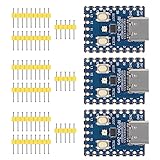
- Support C/C++, MicroPython, complete SDK, open source materials tutorial, easy to use, can be quickly embedded in applications
- Dual-core Arm Cortex M0+ processor, flexible clock running up to 133 MHz
- 264KB of SRAM, and 2MB of on-board Flash memory;USB-C connector, keeps it up to date, easier to use
- Castellated module allows soldering direct to carrier boards; USB 1.1 with device and host support
- Low-power sleep and dormant modes; Drag-and-drop programming using mass storage over USB
Matter pairing fails
- Confirm that the accessory is actually Matter-capable, not merely Wi‑Fi or HomeKit-capable.
- Check whether the installation has the required Wi‑Fi/Ethernet or Thread infrastructure.
- Keep the Matter controller and accessory on networks that permit the required local discovery and control.
The automation is unsafe when the phone is offline
Put essential conditions, timers, and fail-safe states in Home Assistant or on the controller. Treat the iPhone as a convenient trigger, not as the only place where a heater, lock, pump, or motor safety rule exists.
Decision checklist
- Need both Wi‑Fi and Bluetooth in one small board? ESP32’s combined radio capability remains difficult to match; consider a hub architecture rather than forcing a one-board substitute.
- Need Wi‑Fi only and the lowest complexity? Choose ESP8266 for a basic legacy or budget build.
- Need a programmable alternative that can fit ESPHome? Evaluate an RP2040 board, but verify its exact wireless variant first.
- Need one iPhone command to coordinate many accessories? Use Home Assistant as the automation layer.
- Need Bluetooth coverage away from the hub? Use a supported remote Bluetooth adapter or proxy.
- Need HomeKit or Matter interoperability? Select the integration according to the accessory’s actual protocol and the infrastructure available.
Final recommendation
For a new iPhone-automation installation, start by defining the trigger. If it is a Wi‑Fi Shortcut and you want a compact programmable controller, a Wi‑Fi-capable RP2040 board is the most flexible alternative identified here, provided its exact radio hardware and ESPHome support check out. If the project is strictly Wi‑Fi and cost or simplicity dominates, ESP8266 is sufficient. If the iPhone must coordinate Bluetooth, HomeKit, Matter, and multiple devices, use Home Assistant as the bridge and select the accessory or proxy that supplies the required radio. This approach avoids treating a processor family name as a guarantee of wireless capability.
Frequently Asked Questions
Can a Raspberry Pi Pico replace an ESP32 for iPhone Shortcuts?
Only if the specific Pico-family board and architecture provide the communication path your Shortcut needs. RP2040 is supported by ESPHome, but many RP2040 boards do not include Wi‑Fi or Bluetooth. A Wi‑Fi-capable variant or Home Assistant gateway is required for network-based control.
Do I need Bluetooth to automate an iPhone?
No. Use the iPhone’s Wi‑Fi trigger, a Home Assistant action, or another supported Shortcut trigger when the board is reachable over the network. Bluetooth is necessary only when the selected trigger or accessory workflow depends on Bluetooth.
Can an ESP8266 trigger an iPhone Shortcut?
It can participate in a Wi‑Fi-based workflow through Home Assistant or a network service, but it cannot provide the ESP32-style Bluetooth path. The exact direction of the event—iPhone to board or board to phone—must be designed explicitly.
Is Matter a replacement for Wi‑Fi or Bluetooth hardware?
No. Matter is an application-layer protocol that uses existing IP networking such as Wi‑Fi/Ethernet or Thread. The accessory and controller still need compatible network and radio infrastructure.
Quick Recap
Product prices and availability are accurate as of the date/time indicated and are subject to change. Any price and availability information displayed on Amazon at the time of purchase will apply.
What’s actually slowing this PC down?
Pick the symptom - the matching free tool is one click away.

