
Crashes, No Sound, or Screen Glitches?
Random freezes, missing sound and display glitches usually trace back to one bad driver. Find and replace yours safely.Free scan · under a minutePC Slower Than It Used to Be?
A free scan shows the junk files, broken settings and background clutter dragging Windows down - then fixes them in one click.Free scan · Windows 10 & 11iTechGuides is reader-supported. When you buy through links on our site, we may earn an affiliate commission. As an Amazon Associate I earn from qualifying purchases. Learn more
The best first accessories for the Lenovo Legion Go S are a model-specific screen protector, a USB-C dock, a 65W USB-C Power Delivery charger and a reliable microSDXC card. Each addresses a documented characteristic of the handheld: its 8-inch touch display, two USB4 ports, 65W charging specification and expandable storage.
Lenovo announced the Go S in 2025 as an 8-inch, 1920×1200, 120Hz handheld weighing about 730g (1.63lb). Depending on configuration, it ships with Windows 11 Home or SteamOS, 512GB or 1TB PCIe 4.0 storage, and up to 32GB of LPDDR5X memory. The recommendations below are compatibility and buying guidance rather than results from controlled third-party testing.
What the Legion Go S supports
Accessory compatibility starts with the ports and limits Lenovo documents for the Go S. The two USB-C connectors support USB4, DisplayPort 1.4 and USB Power Delivery 3.0. That combination enables a dock for external displays and peripherals, while also allowing charging through either compatible USB-C port. A built-in microSD reader accepts cards up to 2TB.
| Go S feature | Documented specification | Accessory implication |
|---|---|---|
| Display | 8-inch, 1920×1200 (WUXGA), 16:10 touch panel, 120Hz, 500 nits | Buy a protector sized for the Legion Go S rather than a generic 8-inch tablet film. |
| USB-C connectivity | Two ports with USB4, DisplayPort 1.4 and Power Delivery 3.0 | A USB-C dock can provide video, USB peripherals, networking and charging, subject to the dock’s own limits. |
| Power adapter | USB-C, 65W; 20V DC at 3.25A | Use a USB-C PD charger rated for at least 65W as the compatibility baseline. |
| Storage | 512GB or 1TB PCIe 4.0 internal drive | A microSDXC card is useful for larger game and media libraries. |
| Card reader | Supports microSD cards up to 2TB | Capacity can be selected according to your library; sustained performance and authenticity matter as much as the headline size. |
| Battery | Three-cell, 55.5Wh | A charger or dock should provide stable USB-C PD output; a larger wattage rating does not by itself make the Go S charge faster than its documented limit. |
| Operating systems | Windows 11 Home or SteamOS, depending on model | Check the operating system and available drivers when a dock or card-management utility requires them. |
Lenovo’s 2025 PSREF states that “Various docking solutions supported via USB-C.” It does not identify one universal dock design, so physical clearance, video support and power headroom still need to be checked for the particular model you buy.
#1 Best Overall
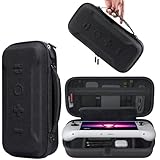
- Universal Compatibility: This case is fully compatible with Legion Go / Go S / Go 2, ensuring a secure and precise fit for all three models. Your device stays well-protected and stable during travel.
- Substantial Capacity: With a roomy interior and smart layout, this case keeps all your items organized and protected—handheld console, charging cables, wired earphones, and more, all in one secure place.
- Comprehensive Protection: The outer shell is made of durable Oxford fabric, offering water resistance and scratch protection. Inside, the EVA material provides excellent shock absorption and guards your device against drops, bumps, and pressure. A built-in screen protector layer shields the display from scratches—delivering full-body protection for your gear.
- Portable Design: Equipped with a comfortable handle and adjustable shoulder strap, this case adapts to various carrying styles—handheld, over-the-shoulder, or hung on other gear—making transport effortless in any situation.
- Secure Storage: The interior features a Velcro strap that keeps your device firmly in place without shifting during travel. Dual zipper design allows for quick and easy access to your accessories whenever you need them.
The short list: which accessory solves which problem?
| Accessory | Best for | What to verify before buying |
|---|---|---|
| Legion Go S screen protector | Protecting the touch panel from scratches, fingerprints and everyday handling | Exact model fit, full-panel coverage, touch response, installation method, glare treatment and case clearance |
| USB-C dock for Legion Go S | Connecting a television or monitor, keyboard, mouse, Ethernet and extra USB devices | Display output, USB ports, Ethernet, PD input rating, cable length and clearance around the top-mounted ports |
| 65W USB-C PD charger | Replacing the included adapter or creating a travel/spare charging setup | At least 65W USB-C PD output, regional plug, number of outputs, cable inclusion, heat behavior and warranty |
| microSDXC card | Expanding game and media storage beyond the internal SSD | Capacity up to 2TB, sustained read/write performance, warranty and seller authenticity |
1. A screen protector made for the Legion Go S
The screen protector is the least complicated recommendation and the easiest way to protect the part you constantly touch. Lenovo maintains a dedicated “Lenovo Legion Go S Screen Protector – Overview and Service Parts” page, published January 17, 2025. That model-specific reference is more useful than choosing a film solely because it is advertised as fitting an 8-inch screen.
Check the fit, not just the diagonal measurement
The Go S panel is 8 inches, 16:10 and touch-sensitive. A protector intended for a different 8-inch device can have the wrong aspect ratio, cutouts or edge radius. Look for explicit Legion Go S model targeting and coverage of the active display area. If you use a case or grip, confirm that the protector’s edges do not sit where the case lip presses against them.
Rank #2

- Next-Level Protection: Designed for the Legion Go S, this case offers ultimate protection from drops, bumps, and spills, ensuring your gaming device stays safe in any environment
- Spill-Resistant Material: Wrapped in spill-resistant PU fabric, this case keeps your Legion Go S protected from rain, coffee spills, and other accidental disasters while on the move
- Streamlined Storage: Spacious compartments for FPS controller, dock, and other accessories. Stay organized and ready for your next gaming session, whether at home or on the go
- Custom Fit: Perfectly designed for the Legion Go S, this case offers a snug fit that cradles your device securely, ensuring it won’t shift or get damaged during travel
- Sleek, Professional Look: Premium black finish with embossed Legion branding offers a modern, stylish appearance that matches the high-quality design of your gaming hardware
Choose the surface treatment for your environment
- Clear or glossy: preserves the panel’s original appearance and is usually the straightforward choice when maximum clarity matters.
- Matte or anti-glare: can reduce reflections under bright lights, but may introduce a slight texture or soften the image.
- Oleophobic treatment: helps fingerprints wipe away more easily; it does not prevent all smudges or replace cleaning.
Lenovo’s specifications list 500 nits for the display. A heavily diffusing matte layer can change perceived contrast and brightness, so select the finish based on whether you play mostly indoors, near windows or outdoors.
What’s actually slowing this PC down?
Pick the symptom - the matching free tool is one click away.
Installation checklist
- Power down the handheld and remove the charger and any case that could press on the screen.
- Clean the panel with the supplied dust-removal materials or a lint-free cloth. Work in a low-dust room.
- Align the protector with the display edges before exposing the adhesive. Check that openings, if any, line up.
- Apply from one edge, lowering the protector slowly while pushing bubbles toward the opposite edge with a soft card.
- Inspect touch response across the corners and center. If a case lifts an edge, stop using that combination rather than forcing the protector down.
No controlled comparative durability testing is established for third-party protectors. Treat claims such as a particular hardness rating as a manufacturer’s specification, not proof that one product will survive every impact.
Rank #3

- For Lenovo legion go S Carrying Case: Designed to make your Lenovo legion go S even more portable & travel friendly. Comfortable handle strap is ideal for carrying. Enough storage is suitable for taking all the Asus Rog Alley accessories on a trip.
- Multiple Storage: Interior grooves securely hold the Lenovo legion go S, built-in storage space can accommodate more accessories like Gaming Charger Dock, Earphones or Small Power Bank, etc. The interior detachable pocket holds 8 MicroSD and 2 Credit Sized Cards. Make going on vacation easy, fit for outdoor activities and enjoy your Game.
- Hard Protective Case: Our Lenovo legion go S Carry Case uses a thickened EVA shell to resist external extrusion. The strap keeps your controller securely in place within the groove, preventing any damage that may be caused by shaking or movement. The textile compartment makes accessories separate so that avoid scratching each other.
- Convenient to Use: Easy to carry with the comfortable handle strap. Double zipper is easy to open and Closing. Everything is easy to put in and take out and fits securely.
- Package Includes: 1x iVoler Case for Lenovo legion go SLenovo legion go S. The Lenovo legion go S, other accessories shown in the images are for usage demonstration purposes only and are not included with this case.
2. A USB-C dock for desktop and TV play
A dock is the most versatile accessory because the Go S can send video through DisplayPort 1.4 over either USB-C port while accepting USB Power Delivery. It is the practical choice if you want one cable to connect a display, keyboard, mouse, Ethernet and storage or other USB devices.
Ports that matter
- Video: Choose the output your monitor or television actually uses, such as HDMI or DisplayPort. A dock may advertise a high maximum resolution, but the final mode depends on the dock, cable, display and operating system working together.
- USB: Count the devices you will attach. A mix of USB-A and USB-C ports is more useful than a large port count in only one connector type.
- Networking: Add Ethernet if you want a wired connection for downloads or online play. Verify the operating system has the required support.
- Power input: The dock should accept USB-C PD and leave enough capacity for the handheld after the dock’s own consumption.
- Cable and placement: A short captive cable can reduce desk clutter, but it must reach the Go S’s top-mounted ports without bending sharply. Check whether the dock’s plug or housing physically clears the handheld.
How to choose dock power headroom
The Go S’s specified adapter is 65W. A dock with a 65W input may pass less than that to the handheld after powering its own electronics, USB devices and display. If you plan to play demanding games while connected, compare the dock’s stated pass-through output rather than its input headline. Do not assume that buying a dock with a larger input rating automatically increases the Go S’s charging rate; the handheld still follows its own USB PD negotiation and documented limits.
Rank #4

- 3-in-1 Protection Kit for Legion Go S 2025 - This accessory bundle includes a carrying case, TPU silicone protective cover, and 2 tempered glass screen protectors, specially designed for Lenovo Legion Go S 2025. It provides complete daily protection against drops, scratches, dust, and bumps.
- High-Capacity All-in-One Storage Case - The carrying case keeps your Legion Go S, original charger, earphones, cards, cables, and small accessories neatly organized in one place. The spacious interior helps protect your device while making travel and daily storage easier.
- Premium Carrying Case Protection - Crafted with a durable PU exterior and soft interior lining, the case offers reliable protection against shocks, scratches, and everyday splashes. Lightweight yet sturdy, it is ideal for home storage, commuting, and travel.
- Upgraded TPU Silicone Cover with Kickstand - The included silicone cover is made from soft, lightweight, skin-friendly TPU material that fits snugly around your Legion Go S. The built-in hidden kickstand makes tabletop gaming, controller connection, or screen casting more convenient.
- Ergonomic Grip & Heat Dissipation Design - Designed for longer gaming sessions, the TPU protective cover improves grip comfort and helps reduce hand pressure. Precise cutouts and built-in cooling holes support smooth heat dispersion while allowing easy access to buttons, ports, and controls.
Dock setup procedure
- Connect the dock’s PD input to a compatible USB-C charger.
- Connect the display cable from the dock to the monitor or television, then select the correct input on the display.
- Attach keyboard, mouse, Ethernet and other peripherals to the dock.
- Plug the dock’s host cable into a Go S USB-C port. If video or charging is absent, try the other USB-C port.
- In Windows or SteamOS, select the desired display mode and audio output. Start with the display’s native resolution and refresh rate, then adjust for the game and cable combination.
- If the screen flickers or disconnects, remove nonessential USB devices, reseat both ends of the video cable and test with the handheld’s power connected directly before changing more variables.
Common dock problems
- No picture: Confirm the dock is receiving PD power, the display input is correct and the cable supports the selected mode. Test one display at a time.
- Charging is slow or stops under load: The dock may be reserving power for itself or connected peripherals. Compare its pass-through specification with the Go S’s 65W baseline and test a direct charger connection.
- Peripheral dropouts: Excessive bus power or a marginal cable can affect USB devices. Disconnect high-draw accessories and reconnect them individually.
- Physical interference: A top-mounted port can be blocked by a bulky dock plug or a protective case. Choose a dock with a flexible cable and enough clearance.
3. A 65W USB-C Power Delivery charger
Lenovo specifies a 65W USB-C AC adapter rated at 20V and 3.25A. That is the sensible minimum for a replacement or travel charger: look for USB-C PD output of at least 65W and a plug configuration suitable for your region.
What to compare
| Buying factor | Why it matters |
|---|---|
| PD profile and output | The charger should explicitly support USB-C PD and provide a 65W-or-higher output mode compatible with the handheld’s negotiation. |
| Number of ports | One port dedicates the full rating to the Go S; multi-port models may reduce output when another device is connected. |
| Cable | A bundled cable simplifies travel, but verify it is rated for the charger’s intended power. A detachable cable is easier to replace. |
| Size and heat | Smaller chargers pack more easily. During use, keep the charger ventilated and treat unusually high heat, noise or repeated disconnects as a reason to stop using it. |
| Warranty and regional plug | Warranty support and the correct mains plug matter more for a travel spare than a marginally smaller enclosure. |
Do not confuse wattage with charging speed
A charger rated above 65W can power other equipment, but it does not force the Go S to accept more than the handheld’s negotiated rate. The 65W Lenovo specification is the compatibility baseline; higher-rated hardware is useful mainly when you also charge another device or want extra headroom for a dock.
Best Value
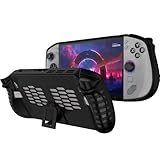
- 〖Compatibility〗-Silicone Protective Case Compatible with Lenovo Legion GO S 8inch Only [ 2025 Release].Every port and button well fits and connects with the device. (Note: Only Legion GO S Handheld 2025 Bumper Case with Kickstand,Not Include Device)
- 〖Superior Silicone Skin for Lenovo Legion GO S〗-Special designed with COMFORTABLE ultra Soft lightweight TPU silicone material for reducing hand pressure,environmental & skin friendly,durable and flexible.There is no deformation and smell,easy to install and well fit your Legion GO S controller,which is a great companion for Lenovo Legion GO S 2025.
- 〖Anti-Drop & Shockproof〗-With premium TPU silicone,the bumper for Lenovo Legion GO S cover can provide complete protection,reusable,extending the time of playing games and bring enjoyable gameplay feeling. It ensures your Legion GO S is breathable with continuous heat dispersion to enhance gaming experience.Defense your device against bumps,scratches,shock,scratches to avoid damage.
- 〖Built-in Kickstand & Ergonomics Design〗-The bumper for Legion GO S protector has a hidden stand that is convenient for you to connect the controller or cast the screen to the monitor to play games,providing support and convenience.And the ergonomic design for Lenovo Legion GO S grip case makes it more comfortable and easy to grip for extended gameplay, bringing a better grip feeling and allowing for longer gaming sessions without worrying about slippage or discomfort.
- 〖Non-Slip Protector Accessories 〗-The wrap protector for Lenovo Legion GO S protective cover 2025 accessories is designed with a non-slip texture which locks the controller firmly in your hands.What you get:1* Shockproof Kickstand Case for Lenovo Legion GO S 2025 Cover.If there is any problem or question after receiving our product, please let us know to solve.
Safe replacement steps
- Check the label for USB-C Power Delivery and an available 65W-or-higher output mode.
- Use a suitable USB-C cable and the correct regional mains connection.
- Connect the charger directly to the Go S and verify that charging begins before adding a dock or other accessory.
- If charging repeatedly starts and stops, try a different cable, remove other devices from a multi-port charger and check for heat or connector damage.
4. A microSDXC card for game and media storage
The Go S’s card reader supports microSD cards up to 2TB. Because Lenovo lists internal SSD options of 512GB and 1TB, removable storage is particularly useful for a large game library, recordings or media that you do not need on the fastest internal drive.
Capacity and performance choices
- Capacity: Select a size based on the games you expect to keep installed. The reader’s documented ceiling is 2TB; a larger card is not a supported assumption.
- Sustained performance: Compare sustained read and write figures, not only a peak sequential number on the packaging. Faster cards reduce transfer and installation waits, but game loading also depends on the title and operating system.
- Authenticity: Buy through a reputable seller, keep the receipt and test the card soon after purchase. Counterfeit cards can report a false capacity and corrupt data when filled.
- Warranty: A clear replacement policy is valuable because a card failure can take an entire library offline.
Install and prepare the card
- Shut down the Go S completely rather than inserting the card while a game or file transfer is active.
- Insert the microSDXC card in the reader with the contacts oriented as marked on the handheld.
- Start the system and confirm that the card appears in the operating system’s storage view.
- Format it only when the system asks or when you have backed up any existing data. Formatting erases the card, so verify the selected drive before confirming.
- Set the card as the install or media location using the storage controls in your operating system or game launcher. Keep irreplaceable saves and personal files backed up separately.
When a card is not detected
- Power down, remove and reseat the card, then check whether it appears after restarting.
- Test the card in another compatible reader. If it fails elsewhere, suspect the card or its formatting rather than the Go S.
- If the card works on another device but not the handheld, check for an operating-system update and inspect the slot for debris without forcing anything into it.
- Do not continue using a card that reports a changing capacity, produces repeated read errors or corrupts files; replace it under warranty.
Build an accessory setup by use case
Mostly handheld gaming
Start with the screen protector. Add a microSDXC card when the internal 512GB or 1TB drive no longer holds the games and media you want installed. A second 65W charger is useful only if you regularly play away from the included adapter.
Desk setup with monitor and peripherals
Choose a USB-C dock with the video connector, USB mix and Ethernet capability you need, then pair it with a charger that can meet the Go S’s 65W baseline after dock power is accounted for. Verify clearance around the Go S’s top-mounted USB-C ports before buying.
Free tools Windows power users keep installed
One-click scans. No signup required.
Travel
A compact 65W USB-C PD charger and a model-specific screen protector provide the highest practical benefit per item. Add a microSDXC card if you want to avoid carrying an external drive. A dock is worthwhile only when you know you will use a television, monitor or wired network at your destination.
Compatibility checks before you order
- Confirm that the listing names the Lenovo Legion Go S, not merely an 8-inch handheld or an earlier model.
- For a dock, verify DisplayPort-capable USB-C host support, the outputs you need, PD pass-through behavior and physical clearance.
- For a charger, verify USB-C PD and at least 65W output; do not rely on a USB-C connector alone.
- For a microSDXC card, stay within the documented 2TB reader limit and retain proof of purchase.
- Check current price, stock, regional plug compatibility and the seller’s return policy immediately before ordering. These details change independently of the Go S hardware specifications.
What is not established about third-party accessories
Lenovo’s specifications establish the Go S’s ports, power requirement, display and card-reader limit, but they do not establish that one third-party dock, charger, protector or memory card is universally superior. There is no controlled comparative testing for drop resistance, dock stability, charging thermals, card endurance or long-term case compatibility. Use the documented requirements and the selection criteria above, then verify the individual product’s current specifications and warranty.
Quick Recap
Product prices and availability are accurate as of the date/time indicated and are subject to change. Any price and availability information displayed on Amazon at the time of purchase will apply.

