
Outdated Drivers Are Slowing You Down
One free scan finds every outdated or missing driver and matches the right update for your exact hardware.Free scan · exact hardware matchPC Slower Than It Used to Be?
A free scan shows the junk files, broken settings and background clutter dragging Windows down - then fixes them in one click.Free scan · Windows 10 & 11iTechGuides is reader-supported. When you buy through links on our site, we may earn an affiliate commission. As an Amazon Associate I earn from qualifying purchases. Learn more
BenQ’s Mac-oriented monitor range is designed to do more than connect to a Mac: the company says its software can identify the computer and apply a device-related color profile, with workflow features intended for Mac users. That distinction—and the limits of what the available specifications establish—emerges from a 27 April 2026 91mobiles conversation with Jeffrey Liang, identified as BenQ Asia-Pacific president, and Rajeev Singh, identified as managing director of BenQ India & South Asia.
What the “Mac divide” means in the interview
The 91mobiles article frames “Mac compatible” as two different things. At the basic level, a monitor can physically connect to a Mac. The more demanding question is whether color handling and everyday controls fit a Mac user’s workflow. The article presents BenQ’s Mac-oriented software and monitors as its response to that second concern; this is the interview’s framing, not the result of an independent display test.
According to the article, BenQ software identifies the connected Mac and selects a color profile based on the device’s year and processor. It reports support for more than 20 Mac devices, spanning Intel models through M1–M5. That is a reported compatibility claim, not a guarantee for every Mac, macOS version, cable or connection method, or future device. Check BenQ’s current compatibility information for the exact setup before buying.
How the three MA monitors differ
The models discussed occupy three distinct size-and-resolution combinations. The figures below are specifications reported by the 91mobiles interview; they do not establish comparative image quality or independent performance.
#1 Best Overall

- [Show Mac Colors] Calibrated for MacBook with BenQ’s exclusive color tuning, offering a vibrant P3 wide color gamut for MacBook Pro and MacBook Air.
- [Expand MacBook with USB-C] Connect and expand your MacBook display with a single USB-C cable.
- [Integrated MacBook Controls] Adjust brightness and volume directly from your MacBook keyboard.
- [Versatile Connectivity] 2 HDMI and 2 USB-C ports—The dual USB-C ports deliver 90W for your MacBook, and 15W to charge your iPad or iPhone.
- [Adjustable Stand] Adjust height, tilt, swivel, and pivot for maximum comfort.
| Model | Size and resolution | Color coverage / refresh rate | Connectivity and power | Mac-related features |
|---|---|---|---|---|
| MA270U | 27 inches; 4K (3840 × 2160) | 99% Display P3 coverage; refresh rate not stated in the 91mobiles interview | USB-C with up to 90W power delivery, HDMI, and DisplayPort | Part of the Mac-oriented MA lineup; the interview does not state model-specific software behavior |
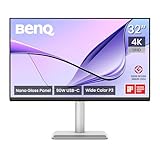
| MA320U | 32 inches; 4K (3840 × 2160) | Color coverage and refresh rate not stated in the 91mobiles interview | USB-C hub with 90W power delivery | Mac keyboard synchronization for brightness and volume; the interview does not state model-specific profile behavior |
| MA270S | 27 inches; 5K (5120 × 2880); 218 PPI | 99% P3 coverage; 70Hz; 2000:1 contrast | USB-C with 90W power delivery | Display Pilot 2 support; the interview describes Mac-oriented profile software for the lineup |
BenQ’s newsroom published a launch announcement for the MA270S on 3 March 2026. That company announcement establishes the dated launch communication, not current availability in a particular country. Confirm the local model name and specifications on the regional product page before purchase.
Which resolution and size fit your setup?
Choose between 27-inch 4K and 32-inch 4K
The MA270U and MA320U share 4K resolution but differ in stated size and workflow details. The 32-inch MA320U offers a larger workspace and the interview specifically notes synchronized Mac keyboard controls for brightness and volume. The 27-inch MA270U has stated 99% Display P3 coverage and lists HDMI and DisplayPort as well as USB-C. The interview does not supply enough comparable information to declare one the better display.
Rank #2

- [Show Mac Colors] Calibrated for MacBook with BenQ’s exclusive color tuning, offering a vibrant P3 wide color gamut for MacBook Pro and MacBook Air.
- [Expand MacBook with USB-C] Connect and expand your MacBook display with a single USB-C cable.
- [Integrated MacBook Controls] Adjust brightness and volume directly from your MacBook keyboard.
- [Versatile Connectivity] 2 HDMI and 2 USB-C ports—The dual USB-C ports deliver 90W for your MacBook, and 15W to charge your iPad or iPhone.
- [Adjustable Stand] Adjust height, tilt, swivel, and pivot for maximum comfort.
Consider the 27-inch 5K MA270S
The MA270S is the 5K option in this group: the interview reports 5120 × 2880 resolution at 218 pixels per inch, a 70Hz refresh rate, 99% P3 coverage, 2000:1 contrast, Display Pilot 2 support, and 90W USB-C power delivery. Those specifications make it the clearest 5K example in the conversation, but they do not by themselves prove that it is superior to an Apple display or another monitor. No comparative independent test is established by the cited material.
The Tool Desk
Outbyte PC Repair FREERepair Windows errors before they cause bigger problemsFix Now →Outbyte Driver Updater FREEScan for outdated or missing drivers - takes under a minuteDriver Scan →What to verify before choosing one
- Your exact Mac and macOS version: confirm they appear on BenQ’s current compatibility list, including the behavior of the profile software.
- Your connection and charging needs: verify which ports you will use and whether the stated USB-C power delivery meets your laptop’s needs. A stated maximum is not a promise of the same charging result in every setup.
- The features that matter to your workflow: check whether you need the MA320U’s reported keyboard synchronization, Display Pilot 2 support on the MA270S, or the MA270U’s listed HDMI and DisplayPort connections.
- Local SKU and availability: check the regional BenQ listing for the exact model and current specifications; a US newsroom announcement does not confirm stock or configuration in another market.
How to read the market claims
The 91mobiles conversation also includes figures about Mac-user share, PC and notebook costs, BenQ India monitor growth, and the expected lifespan of a premium monitor. The article does not identify the original statistical publishers or years behind those numbers. They should therefore be understood as figures reported in that interview, not independently validated market statistics. The article also does not provide a verified verbatim quotation from either interviewee in the reviewed text, so its summaries should not be presented as direct quotes.
Quick Recap
Best Value
- [Show Mac Colors] Calibrated for MacBook with BenQ’s exclusive color tuning, offering a vibrant P3 wide color gamut for MacBook Pro and MacBook Air.
- [Expand MacBook with USB-C] Connect and expand your MacBook display with a single USB-C cable.
- [Integrated MacBook Controls] Adjust brightness and volume directly from your MacBook keyboard.
- [Versatile Connectivity] 2 HDMI and 2 USB-C ports—The dual USB-C ports deliver 90W for your MacBook, and 15W to charge your iPad or iPhone.
- [Adjustable Stand] Adjust height, tilt, swivel, and pivot for maximum comfort.
Rank #4

- MAC COLORS IN FLUID MOTION: Experience 4K at 120Hz for smoother motion and faster on-screen response making everything feel more precise.
- SEAMLESS SETUP: Connect via Thunderbolt 4 daisy chain to extend your Mac workspace, and switch between two computers instantly with Smart KVM for a smoother creative flow.
- VERSATILE CONNECTIVITY: Two Thunderbolt 4 ports deliver a 4K 120Hz signal, fast data, and 96W/15W power delivery, with HDMI and USB-C ports offering added flexibility.
- NANO GLOSS PANEL CLARITY: Delivers crystal-clear detail with deep blacks, bright highlights, and vibrant contrast, showing your Mac exactly as it was meant to be seen.
- ADJUSTABLE STAND: Height, tilt, swivel, and pivot adjustments let the screen follow your posture, delivering comfort and flexibility beyond a fixed stand.
Rank #3

- [Show Mac Colors] Calibrated for MacBook with BenQ’s exclusive color tuning, offering a vibrant P3 wide color gamut for MacBook Pro and MacBook Air.
- [Expand MacBook with USB-C] Connect and expand your MacBook display with a single USB-C cable.
- [Integrated MacBook Controls] Adjust brightness and volume directly from your MacBook keyboard.
- [Versatile Connectivity] 2 HDMI and 2 USB-C ports—The dual USB-C ports deliver 90W for your MacBook, and 15W to charge your iPad or iPhone.
- [Adjustable Stand] Adjust height, tilt, swivel, and pivot for maximum comfort.
Sources
- 91mobiles conversation with Jeffrey Liang and Rajeev Singh, 27 April 2026
- BenQ newsroom: MA270S launch announcement, 3 March 2026
Product prices and availability are accurate as of the date/time indicated and are subject to change. Any price and availability information displayed on Amazon at the time of purchase will apply.

