

Recommended Free Tools
iTechGuides is reader-supported. When you buy through links on our site, we may earn an affiliate commission. As an Amazon Associate I earn from qualifying purchases. Learn more
ASUS C302: At First Glance
Since releasing its first Chromebook in 2014, ASUS has gone on to be one of the most prolific Chromebook manufacturers of all time. To add to its Chromebook collection, ASUS started releasing compact convertible Chromebooks.
An example of an ASUS convertible Chromebook is the ASUS Chromebook Flip C302. The ASUS Chromebook Flip C302 is a compact 2-in-1 Chromebook that offers adequate performance for regular computing tasks.
Furthermore, this laptop is one of the few Chromebooks that offers 128 GB of local storage and multiple processor options. However, Chromebooks with such uncommon features are a bit more pricey than the standard Chromebook.
What’s actually slowing this PC down?
Pick the symptom - the matching free tool is one click away.
Specifically, as of the time I published this article in December 2021, the ASUS Chromebook Flip C302 had a price tag of $399.99. With a good understanding of how much this ASUS Chromebook costs, let us now see if it is worth the price.
#1 Best Overall
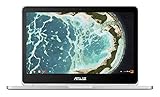
- The flexible 360 degree hinge and 12.5" Full-hd touchscreen lets you use the C302 in tablet or laptop mode
- Intel Core Processor with 64GB storage and 4GB RAM for fast and efficient performance With a bright backlit illuminated keyboard
- Extremely lightweight at 2.65 pounds with the protection of a sleek aluminum metal body. Starts up in seconds and lasts all day, thanks to a long battery life rated up to 10 hours*
- Unlock the power of Chromebooks with access to your favorite Chrome Web Store apps like Google Docs and it is Google play store/Android app ready
- Work anywhere online or offline regardless of your internet connection. Enjoy your favorite games, entertainment, and keep up with work, wherever you go
ASUS C302: Design, Dimension, and Weight
Chromebooks are better known for featuring boring designs due to their affordability. However, since the ASUS Chromebook Flip C302 costs a bit more than the regular Chromebook, one would expect a bit of elegance in its design.
Thankfully, that is exactly what this Chromebook delivers. To give more details, the laptop features a sleek design that will make you almost mistake it for an Apple MacBook.
Just a glance at the exterior of this laptop, and you will be convinced it is worth considering. In fact, if you’ve been looking for a laptop you can flaunt, the ASUS Chromebook Flip C302 will make you proud.
The Tool Desk
Outbyte Driver Updater FREEFix the driver behind crashes, sound loss and screen glitchesFind Drivers →Outbyte PC Repair FREEClear out junk files and repair common Windows errorsFree Scan →With all that being said, let us quickly discuss the design specifications of the laptop. The ASUS Chromebook Flip C302 features an aluminum chassis with a matte finish.
Moreover, this aluminum chassis is colored white and has a few silver accents around it. Following that, the laptop’s lid features an ASUS logo printed in stainless steel in the middle.
Also, you will find a Chrome logo in a colorful cyclic form at the top right corner of the laptop’s lid. All these little design specs are what add up to make this ASUS Chromebook look elegant.
Moving on, the ASUS Chromebook Flip C302 features a glossy 12.5-inch display in the interior. This display comes with an FHD (1920 x 1080) resolution that allows it to deliver vivid and colorful picture quality.
Impressively, this 12.5-inch display is also made with an IPS panel. Hence, the contents of the display will stay vivid and accurate when viewed from different angles.
However, this laptop’s display is surrounded by somewhat thick bezels. On a positive note, an ASUS logo is finely printed at the center of the bottom bezel – adding to its elegance.
Also, at the top bezel, you will find an HD webcam. This webcam isn’t particularly good for taking pictures, but it is ideal for video calls.
Lest if forget, the ASUS Chromebook Flip C302’s 12.5-inch FHD display is a touchscreen display, as expected. I said “as expected” because all convertible laptops feature a touchscreen display.
PC Slower Than It Used to Be?
A free scan shows the junk files, broken settings and background clutter dragging Windows down - then fixes them in one click.Free scan · Windows 10 & 11Outdated Drivers Are Slowing You Down
One free scan finds every outdated or missing driver and matches the right update for your exact hardware.Free scan · exact hardware matchBesides, the laptop’s display responds accurately and swiftly to touch input. Therefore, I can assure you that you won’t have issues with this laptop’s display.
Moving on, as a convertible laptop, the ASUS Chromebook Flip C302 features a 360-degree hinge. Hence, you can use the laptop in four modes – laptop, stand, tablet, and tent modes.
On the downside, due to its compact size, this laptop features a minimal number of ports. On the left side of the laptop, you will only find two USB 3.2 Type-C ports.
Also, on the right side of the laptop, you will see only 2 USB 3.1 Type-C ports. Thus, the laptop lacks ports like an Ethernet port, Thunderbolt, and HDMI port.
Rank #2

- The flexible 360 Degree hinge and 12.5 inches full HD touchscreen lets you use the C302 in tablet or laptop mode
- Intel Core Processor with 64GB storage and 4GB RAM for fast and efficient performance with a bright backlit illuminated keyboard
- Extremely lightweight at 2.65 pounds with the protection of a sleek aluminum metal body
- Starts up in seconds and lasts all day, thanks to a long battery life rated upto 10 hours
- Make sure latest chrome version is upto date and is using the device in stable channel
That said, now let us take a look at the keyboard. The ASUS Chromebook Flip C302 features a backlit, chiclet-style keyboard.
This keyboard features black keys with white lettering on top. Furthermore, the keyboard offers an excellent typing experience thanks to its decent key travel of 1.4mm.
To be clear, key travel refers to the distance between a key’s resting position and the depth to which it dips when pressed.
That said, below the laptop’s keyboard, you will find a spacious touchpad in the center. This touchpad has a smooth surface, and it is very responsive.
Interestingly, the touchpad also supports multitouch gestures.
Weighing 1202.02 g and measuring 304.8 x 210.8 x 12.7 mm, the ASUS Chromebook Flip C302 is definitely lighter and more portable than most of its competitors. For example, this laptop is lighter than the Dell Chromebook 13, which weighs 1465 g and measures 328.4 x 229.3 x 17.78 mm.
Another example is the Lenovo ThinkPad 13 Chromebook, which weighs 1500 g and measures 307.5 x 212.1 x 15.5 mm.
In conclusion, the ASUS Chromebook Flip C302 offers a design that is beautiful to the eye. Also, this laptop is more compact and lighter than most laptops in its category.
Therefore, I will be rating the ASUS Chromebook Flip C302 a nine out of ten in this section of this review.
ASUS C302: Processor (CPU) Performance
For processor, ASUS offers two processor configurations for the ASUS Chromebook Flip C302. The first option is the 2-core Intel Pentium 4405Y processor.
This processor offers a base frequency of 1.50 GHz and 2 MB cache memory.
The second option is the Intel Core m7-6Y75 processor. This processor is also a 2-core processor, but it features more cache memory.
Specifically, the Intel Core m7-6Y75 processor features a 4 MB cache memory. If you’re wondering, more cache memory contributes to the overall improved performance of the Chromebook.
Moving on, the Intel Core m7-6Y75 processor comes with a base frequency of 1.20 GHz and a maximum frequency of 3.10 GHz. To be honest, the Intel Core m7-6Y75 is the best processor option for the ASUS Chromebook Flip C302.
This is because the processor features a maximum frequency and a higher cache memory. Thankfully, this review is based on the ASUS Chromebook Flip C302 with the Intel Core m7-6Y75 processor.
Rank #3

- FREE GOOGLE ONE AI PREMIUM PLAN — Get Gemini Advanced, 2TB of cloud storage, and more for 3 months at no cost*
- SMOOTH MULTITASKING — Powered by the Intel Celeron N4500 Processor, enabling decent multitasking experience
- TOUCHSCREEN VERSATILITY — 14-inch FHD 1920x1080 NanoEdge 360-degree flippable touchscreen display
- WORK AND PLAY FROM ANY ANGLE — Convertible 2-in-1 design with four different work modes: traditional clamshell, tent, stand, tablet mode
- LIGHTWEIGHT YET DURABLE — Durable and built to US Military Grade standard MIL- STD 810H weighing just 3.59 lbs
With this processor, the ASUS Chromebook Flip C302 will be able to handle day-to-day computing tasks speedily and effectively. To give more details, the laptop will do well when handling tasks like word processing, web browsing, and video streaming.
Quick wins for a faster PC:
Clear out junk files and repair common Windows errorsFree Scan →Scan for outdated or missing drivers - takes under a minuteDriver Scan →Repair Windows errors before they cause bigger problemsFix Now →Unfortunately, I was unable to get benchmark test results based on the performance of the ASUS Chromebook C302 with this processor. This is due to the fact that most benchmark test tools are incompatible with Chrome OS, which runs on Chromebooks.
In conclusion, the ASUS Chromebook Flip C302 offers multiple processor options. Also, with one of these processor options, the laptop is sure to deliver decent performance for daily computing tasks.
Therefore, I will rate the ASUS Chromebook Flip C302 an eight in this processor review section.
ASUS C302: Memory (RAM) Performance
The ASUS Chromebook Flip C302 comes with 4 GB LPDDR3 RAM in its single RAM slot. Unfortunately, this single RAM slot is onboard, which means you won’t be able to upgrade the laptop’s 4 GB standard RAM.
Do these 3 things before closing this tab:
1Repair Windows errors before they cause bigger problems2Scan for outdated or missing drivers - takes under a minute3Clear out junk files and repair common Windows errorsOn a positive note, you can purchase the ASUS Chromebook Flip C302 with 8 GB or 16 GB RAM. The choice is all yours!
However, I don’t think you will need to get this laptop with higher RAM. This is because the standard 4 GB RAM is sufficient for daily computing tasks and even multitasking.
To give more details, with 4 GB RAM, the ASUS Chromebook Flip C302 will be able to juggle between 15 chrome tabs conveniently without lagging. Also, multiple applications will be able to perform smoothly on the laptop without slowing down.
I was supposed to include benchmark test results based on the ASUS Chromebook Flip C302’s memory performance in this section. Sadly, I was unable to get the benchmark test results because Chromebooks don’t support most benchmark tools.
Free tools Windows power users keep installed
One-click scans. No signup required.
Notwithstanding, the laptop with 4 GB RAM offers adequate performance for multitasking. Hence, I will rate the ASUS Chromebook Flip C302 an eight out of ten in this memory review section.
ASUS C302: Storage Options and Performance
In terms of storage, the ASUS Chromebook Flip C302 features an eMMC storage type, as expected. Interestingly, this laptop offers a maximum storage capacity of 128 GB.
Having a Chromebook with up to 128 GB of local storage is something unusual. This is because Chromebooks aren’t particularly meant to save their files on their local storage.
So, most Chromebooks feature limited local storage space. If Chromebooks aren’t meant to save files on their local storage, so where are they supposed to save files?
What’s actually slowing this PC down?
Pick the symptom - the matching free tool is one click away.
The answer to that is Google Drive cloud storage. To be more specific, Chromebooks run on ChromeOS, which offers free 100 GB of Google Drive cloud storage.
Moreover, despite featuring up to 128 GB eMMC storage, the ASUS Chromebook Flip C302 still comes with this free 100 GB cloud storage. Additionally, Cloud-based storage is an efficient and reliable storage option.
Rank #4
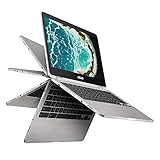
- The flexible 360 Degree hinge and 12. 5 inches full HD touchscreen lets you use the C302 in tablet or laptop mode
- Intel Core Processor with 64GB storage and 8GB RAM for fast and efficient performance with a bright backlit illuminated keyboard
- Extremely lightweight at 2. 65 pounds with the protection of a sleek aluminum metal body
- Starts up in seconds and lasts all day, thanks to a long battery life rated up to 10 hours
- With the Google Play Store, you can access a rich library of apps, games, music, movies, TV, books, magazines, and more, all from your Chromebook.
Also, as long as you are connected to the internet, there is no risk of losing saved files on cloud storage. To know how to activate the free Google Drive cloud storage on your Chromebook, you can follow the detailed guide in this link.
Impressively, despite featuring 100 GB cloud storage and up to 128 GB local eMMC storage, this ASUS Chromebook comes with a microSD card reader. Thus, you have about three storage options on the ASUS Chromebook Flip C302.
Do these 3 things before closing this tab:
1Repair Windows errors before they cause bigger problems2Scan for outdated or missing drivers - takes under a minute3Clear out junk files and repair common Windows errorsAs we normally do at www.itechguides.com, I am supposed to include a CrystalDiskMark test result based on the laptop’s local storage performance. Unfortunately, because Chromebooks do not support the majority of benchmark test tools, I was unable to obtain the CrystalDiskMark test results.
Therefore, I will be rating the laptop based on its storage options. Hence, I will rate the ASUS Chromebook Flip C302 a nine out of ten in this storage review section.
This rating is based on the Chromebook’s multiple and robust storage options.
ASUS C302: Graphics Card Performance
For the GPU, the ASUS Chromebook Flip C302 comes with an Intel HD Graphics 515. This GPU offers a base frequency of 300 MHz and a maximum frequency of 1000 MHz.
However, the graphics card is an integrated GPU. Hence, it shares memory with the processor to perform graphics-related tasks.
As a result, don’t expect the ASUS Chromebook Flip C302 to run graphics-intensive games or apps smoothly. Notwithstanding, the laptop will be able to smoothly play basic games like Candy Crush and Subway Surfer.
To further prove the graphics performance of this laptop, I will now share its results on a WebGL Aquarium graphic test. WebGL Aquarium graphic test is a web-based benchmark test that uses javascript to measure the graphics-rendering capabilities of a computer.
So, on this test, the ASUS Chromebook Flip C302 was able to display 2000 fish at 50 frames per second (fps). Comparatively, the ASUS Chromebook Flip C302 outperformed the Acer Chromebook R13, which was only able to deliver 2000 fish at 30 fps.
Before concluding this section, it is important to note that a high “fps” on the WebGL Aquarium graphic test indicated greater GPU performance.
In conclusion, despite featuring an integrated GPU, the ASUS Chromebook Flip C302 still performed decently on a graphics-rendering test. Hence, I believe the laptop deserves nothing less than an eight out of ten in this section.
Independent reader supportYour contribution helps us test, update, and keep practical guides available for everyone.ASUS C302: Battery Life and Performance
One of the biggest advantages of a Chromebook is its battery life. Specifically, Chromebooks offer impressive battery life because they run on ChromeOS, which is a less demanding and power-efficient operating system.
That said, the ASUS Chromebook Flip C302 comes with a 2-cell, 39 WHrs Li-Ion battery. According to ASUS, with this battery, this Chromebook should last 10 hours.
Outdated Drivers Are Slowing You Down
One free scan finds every outdated or missing driver and matches the right update for your exact hardware.Free scan · exact hardware matchPC Slower Than It Used to Be?
A free scan shows the junk files, broken settings and background clutter dragging Windows down - then fixes them in one click.Free scan · Windows 10 & 11To verify if the ASUS claim is true, I will now discuss the laptop’s performance on a video playback test. This video playback test involves looping an HD video until the laptop dies.
Best Value

- 【Replacement Battery Type】Li-ion; Voltage:7.7V Capacity:39Wh/5085MAH
- 【Compatible P/N】C21N1613 C21PQC5 0B200-02280000 0B200-02280000M
- 【Compatible Models】 For Asus Chromebook Flip C302C, Chromebook Flip C302CA-GU003, C302CA, Chromebook Flip C302CA, Chromebook Flip C302CA-GU006, Chromebook Flip C302, Chromebook Flip C302CA-DHM4, Chromebook Flip C302CA-1A, Chromebook Flip C302CA-GU017
- 【DG Quality】Grade A cells mitigate the risk of battery leakage and maximize output stability. Built-in circuit protection, enhances safety of usage and extends battery life
- 【DG Quality】Grade A cells mitigate the risk of battery leakage and maximize output stability. Built-in circuit protection, enhances safety of usage and extends battery life
So, on the video playback test, the ASUS Chromebook Flip C302 lasted 8 hours and 52 minutes. Although this battery life isn’t on par with ASUS’ 10 hours claim, it is still impressive.
In fact, the battery life beats the category average of 8 hours and 3 minutes. Also, when compared to the Lenovo ThinkPad 13, the ASUS Chromebook Flip C302 has longer battery life.
Specifically, on the video playback test, the Lenovo ThinkPad 13 lasted only 6 hours and 34 minutes.
All things considered, I will rate the ASUS Chromebook Flip C302 a nine out of ten in this battery review section.
Frequently Asked Questions
Unfortunately, it doesn’t. The ASUS Chromebook Flip C302 only offers a single color which is white.
No, it doesn’t.
Yes, it does. The ASUS Chromebook Flip C302 features an HD webcam at the top bezel of its display.
Yes, the ASUS Chromebook Flip C302 is a convertible laptop.
Quick wins for a faster PC:
Repair Windows errors before they cause bigger problemsFix Now →Fix the driver behind crashes, sound loss and screen glitchesFind Drivers →Clear out junk files and repair common Windows errorsFree Scan →In December 2021, when I wrote this review, the ASUS Chromebook Flip C302 had a starting price of $399.99.
Conclusion
The ASUS Chromebook Flip C302 is a compact convertible laptop with an impressive design. Furthermore, this Chromebook features a sharp FHD touchscreen display that I believe everyone would love.
Also, the laptop comes with unusual but outstanding 128 GB local storage. Also, the laptop has outstanding battery life.
However, due to its compact size, the laptop comes with a minimal amount of ports. Aside from that, there is basically nothing to hate about this laptop.
Hence, if you are looking for a convertible Chromebook that offers compatibility and efficiency, I strongly advise you to purchase the ASUS Chromebook Flip C302.
I hope you found this ASUS Chromebook Flip C302 review helpful. If you found the review helpful, share your thoughts with our community using the comments form below.
Alternatively, simply respond to the “Was this page helpful” question below and provide us with your feedback.
Finally, for more laptop reviews, visit our Laptop Reviews page. You may also find our Laptop Specs page very helpful.
The Tool Desk
Outbyte Driver Updater FREEScan for outdated or missing drivers - takes under a minuteDriver Scan →Outbyte PC Repair FREERepair Windows errors before they cause bigger problemsFix Now →Quick Recap
Product prices and availability are accurate as of the date/time indicated and are subject to change. Any price and availability information displayed on Amazon at the time of purchase will apply.


